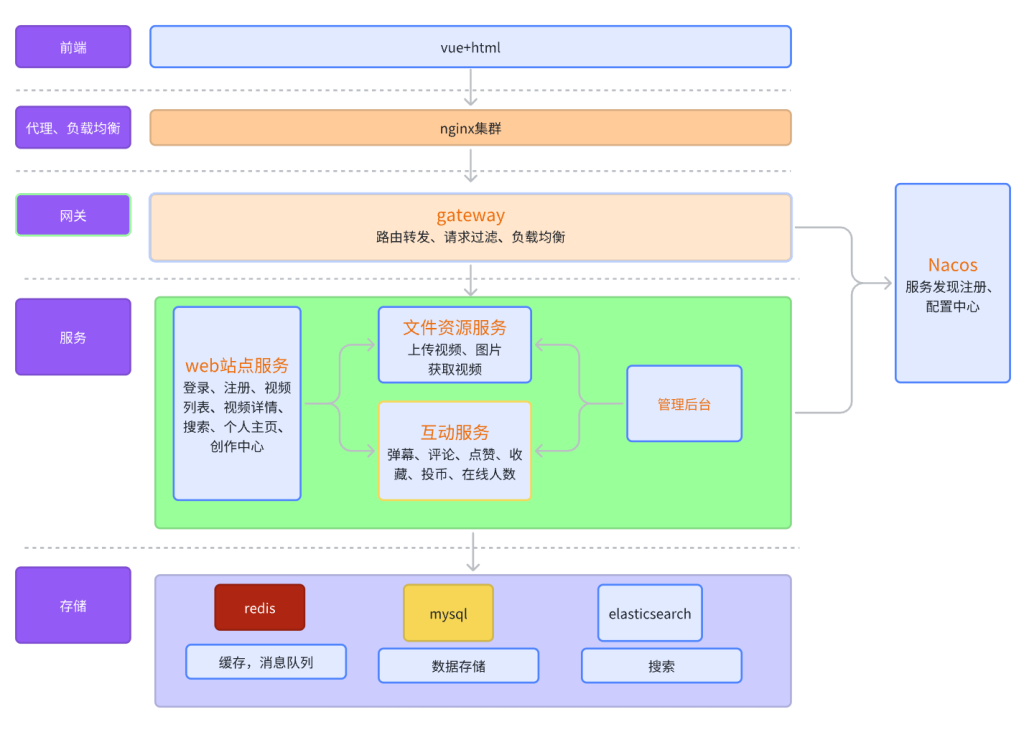
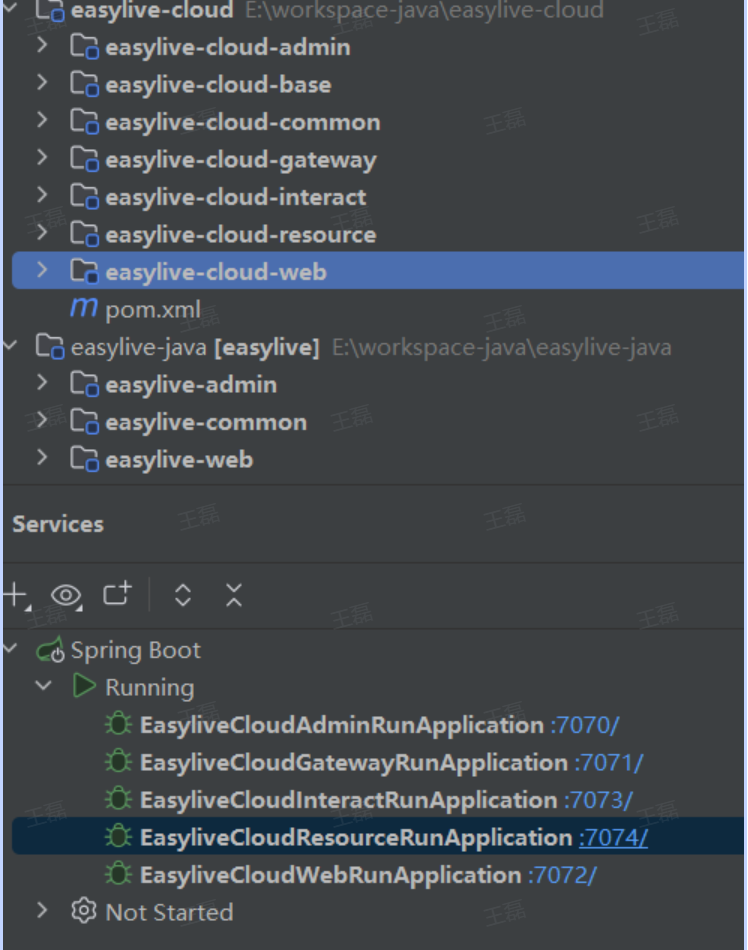
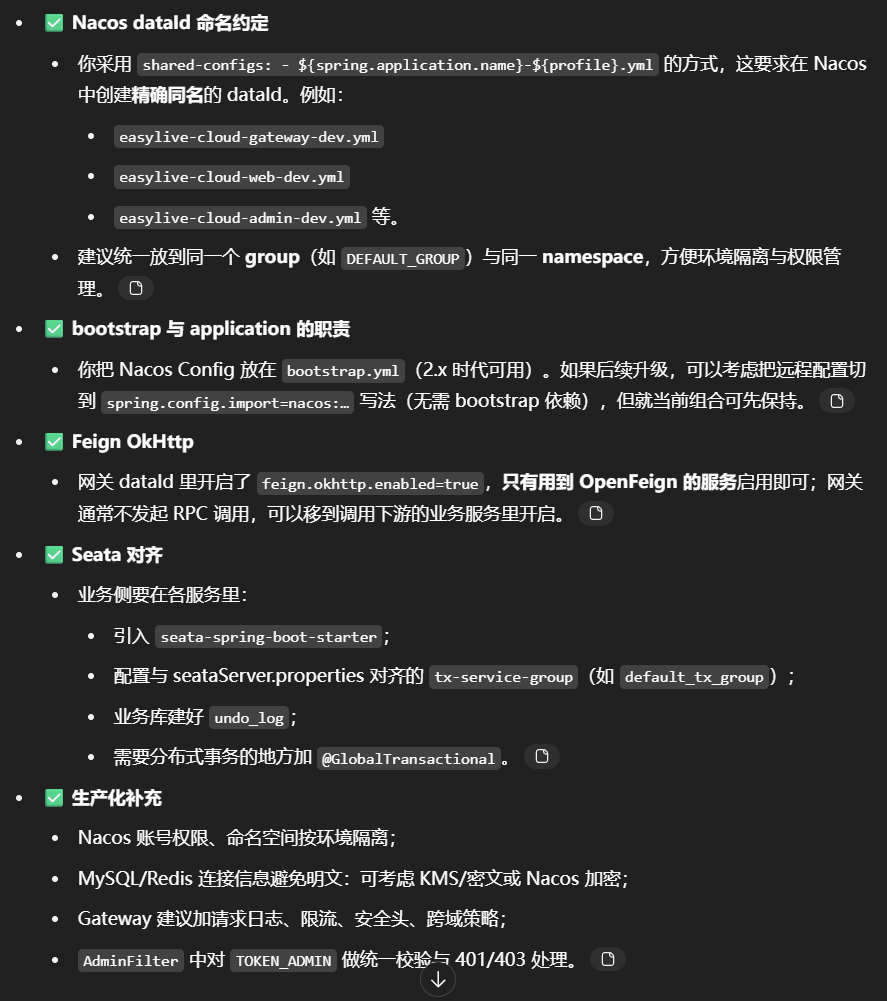
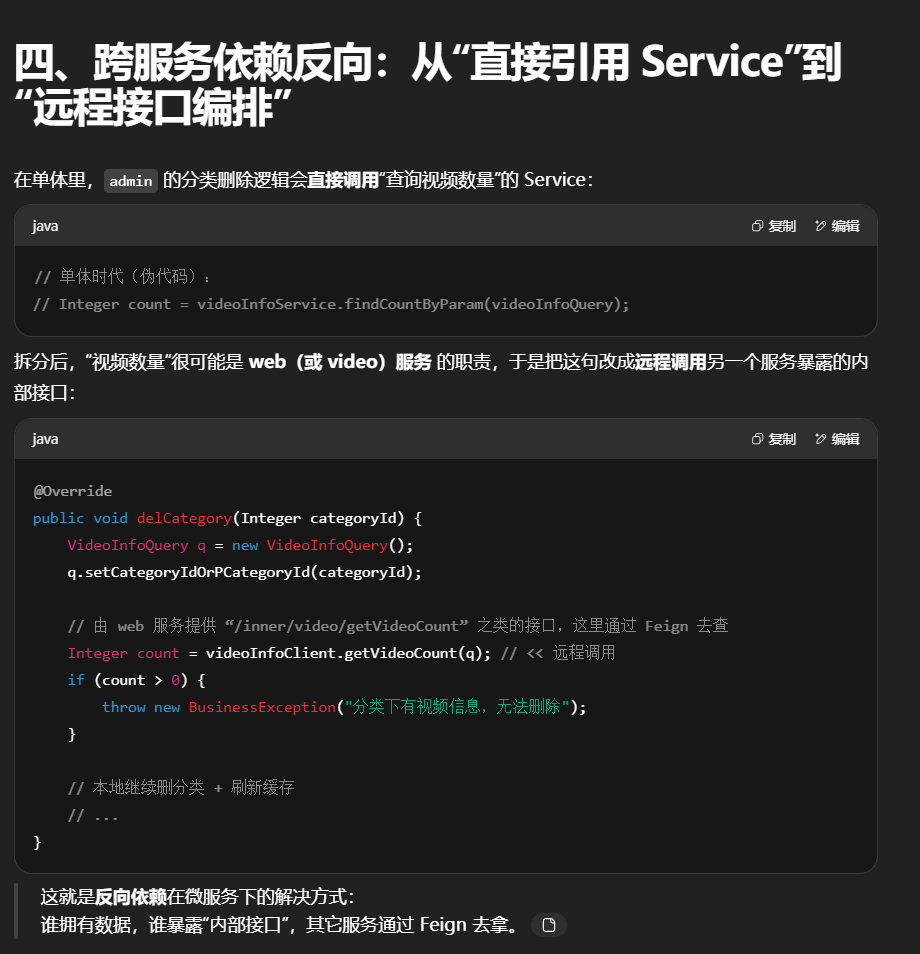
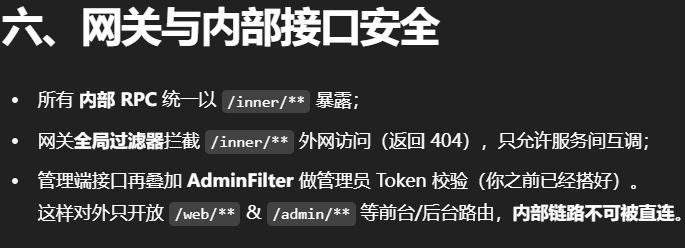
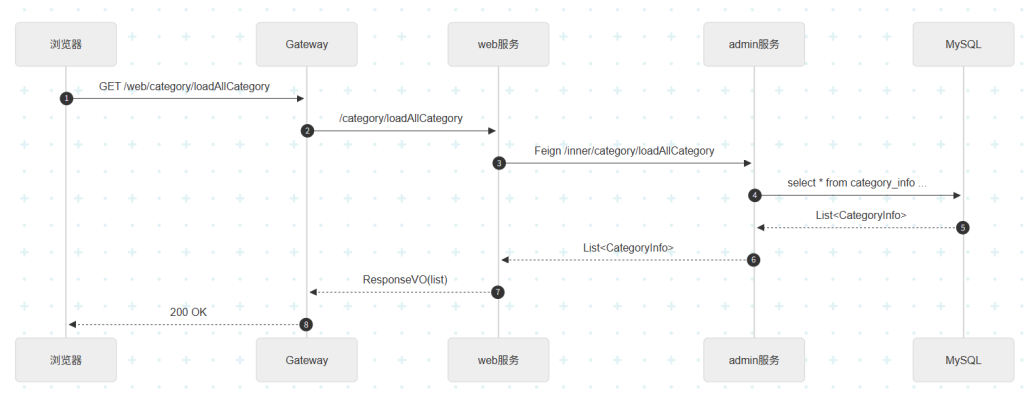
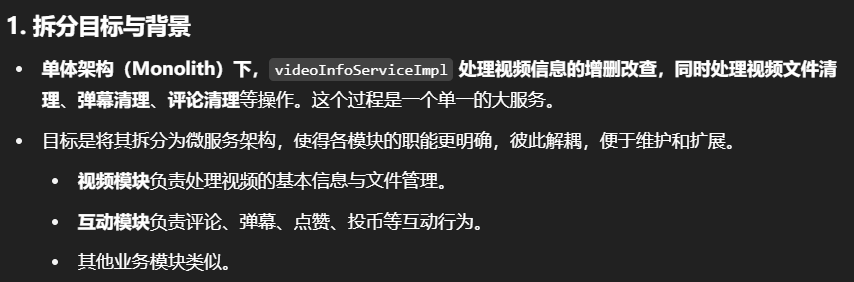
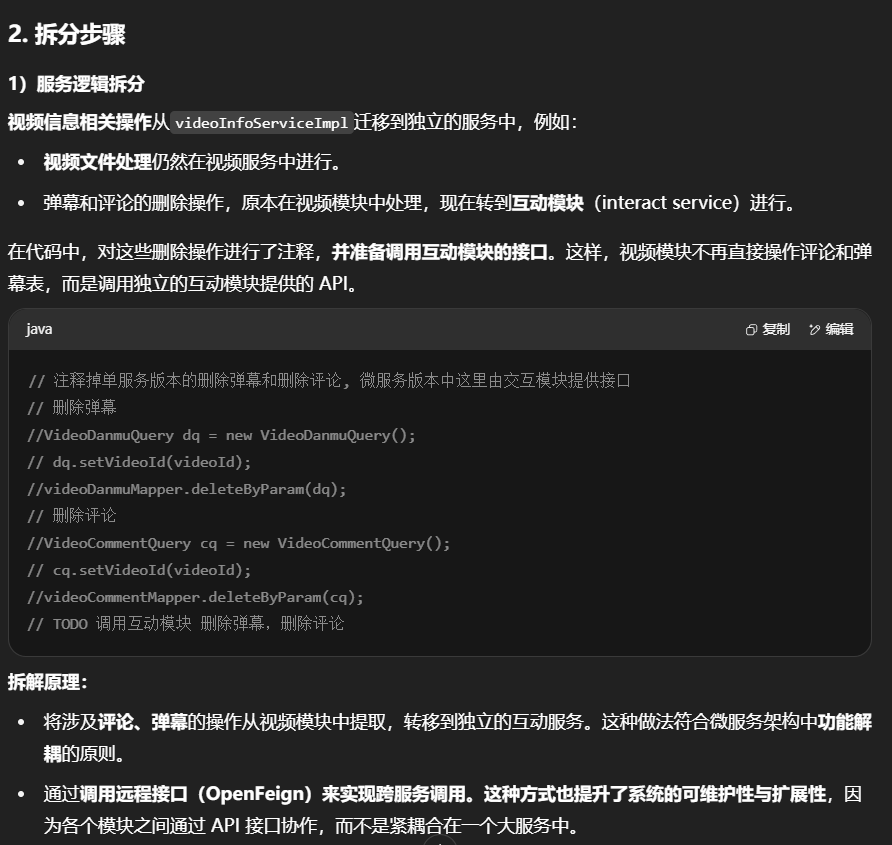
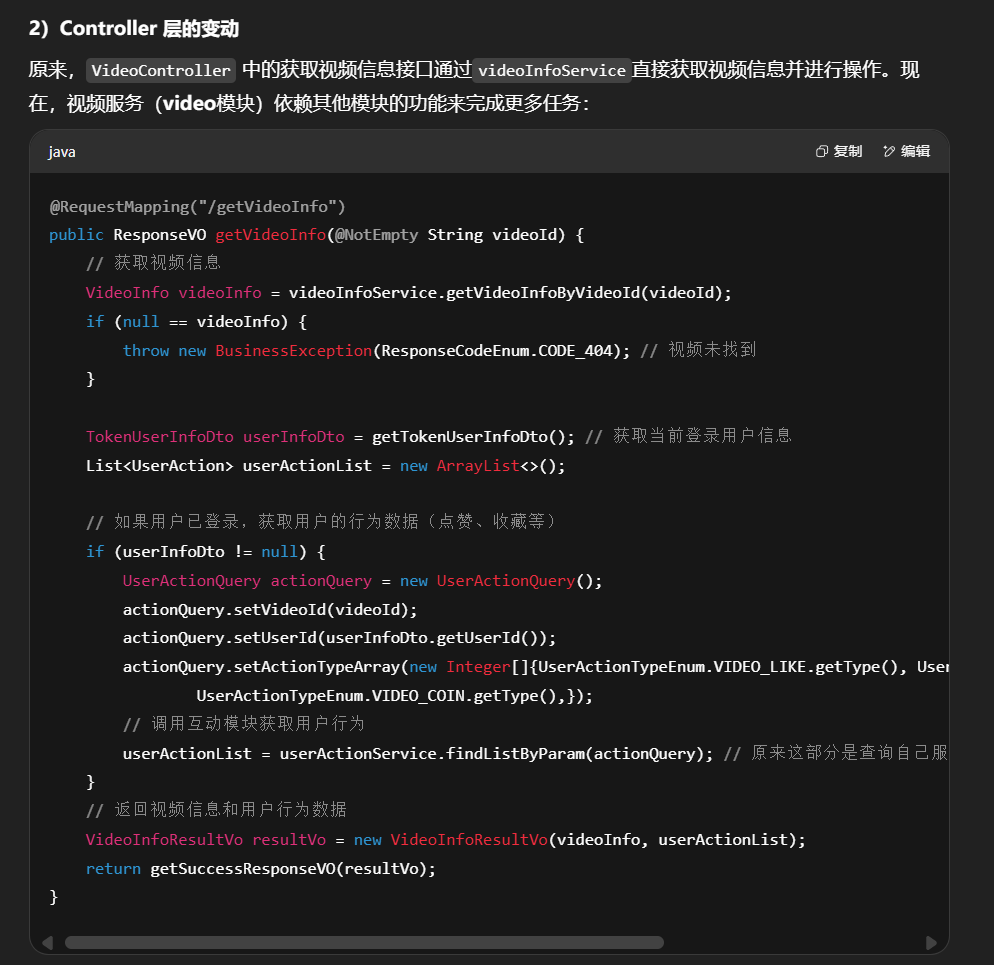
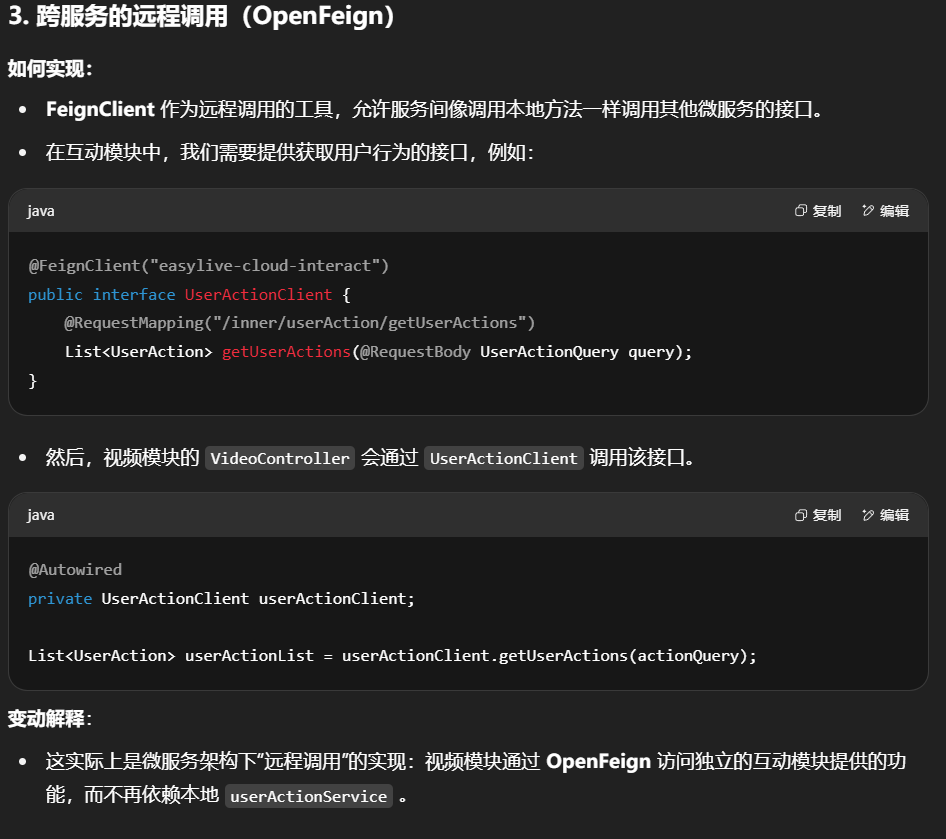
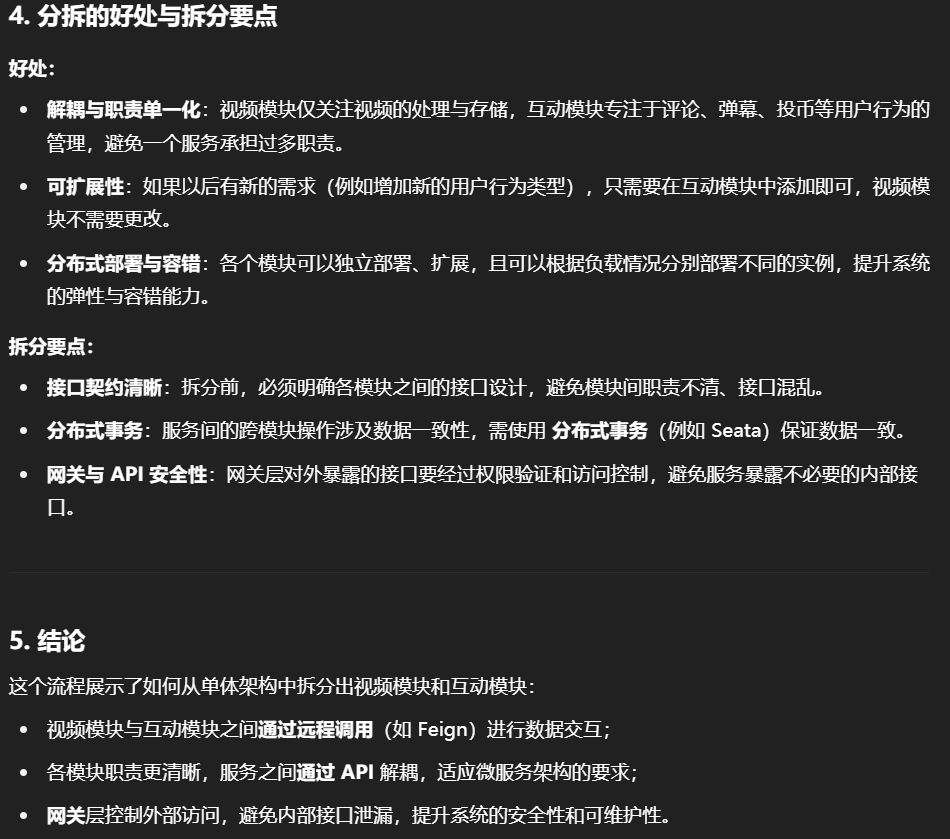
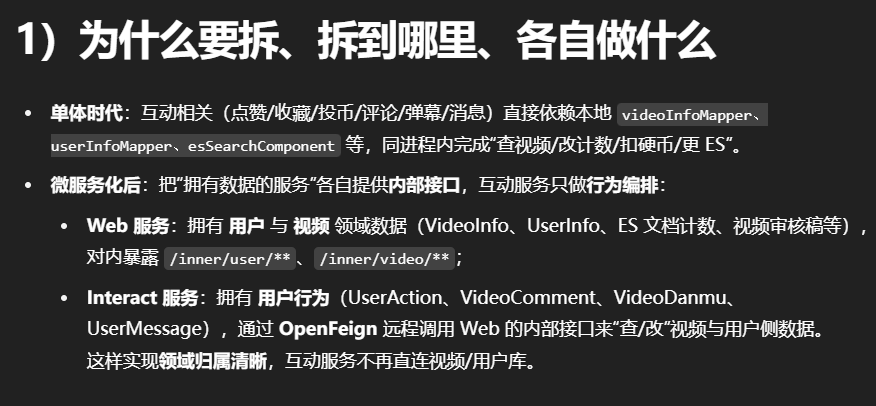
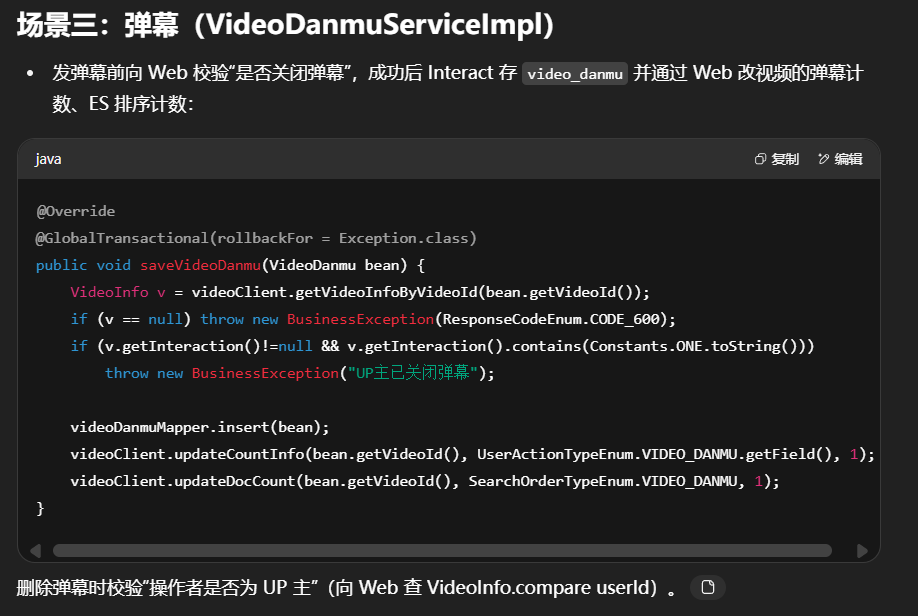
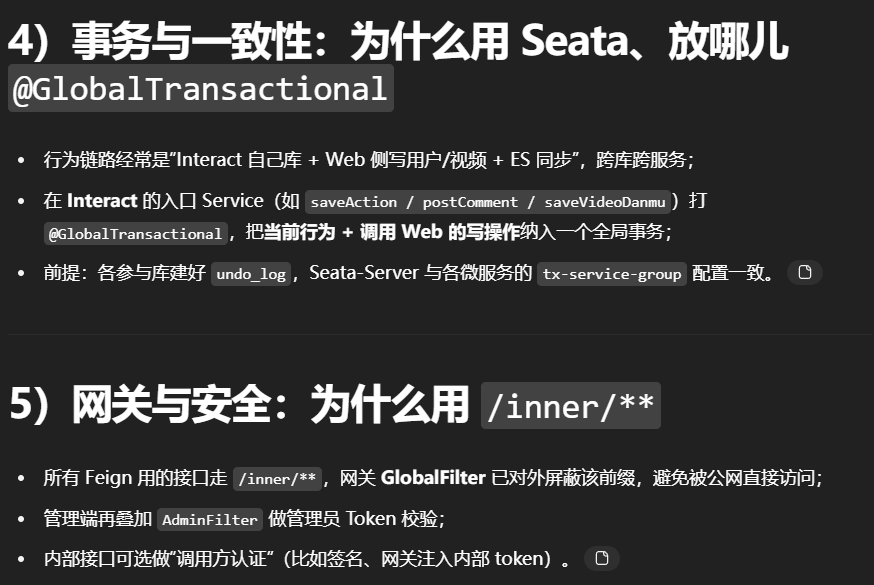
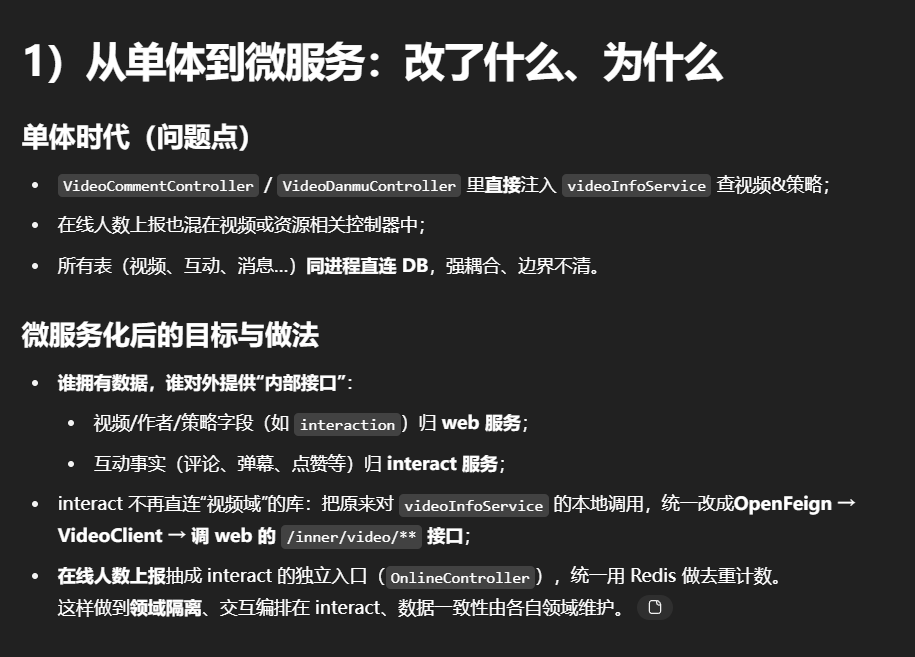
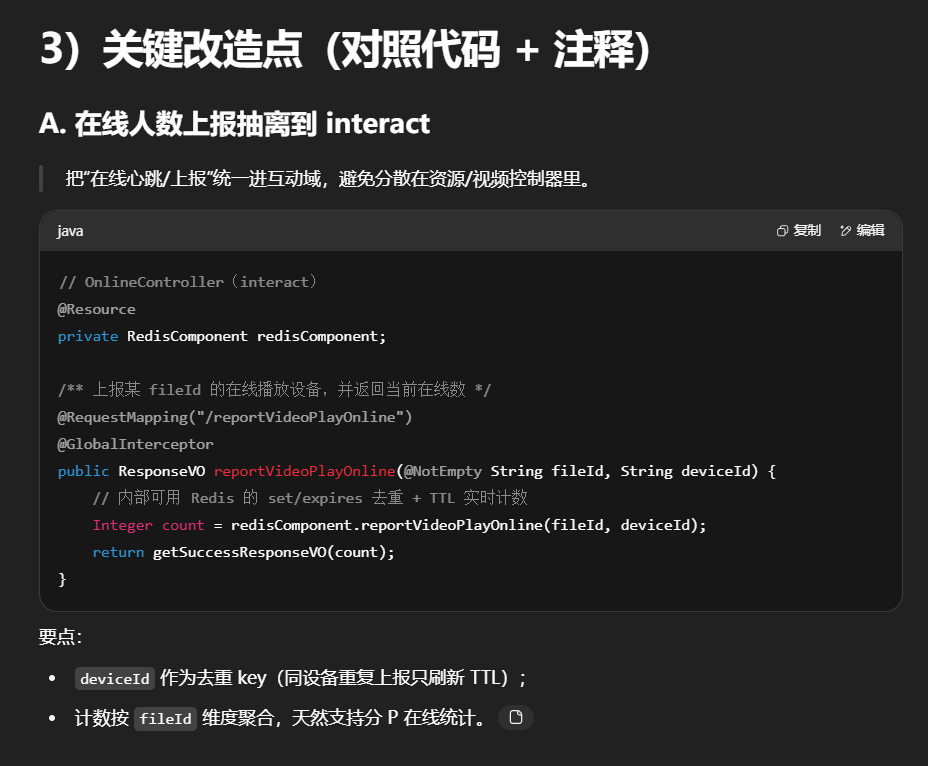
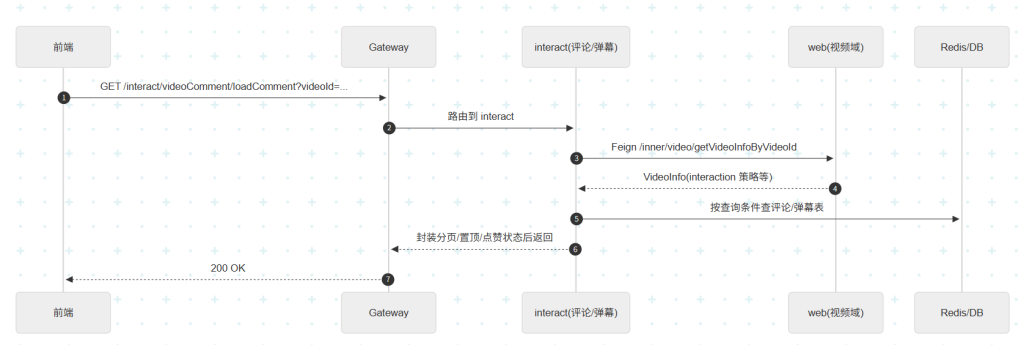
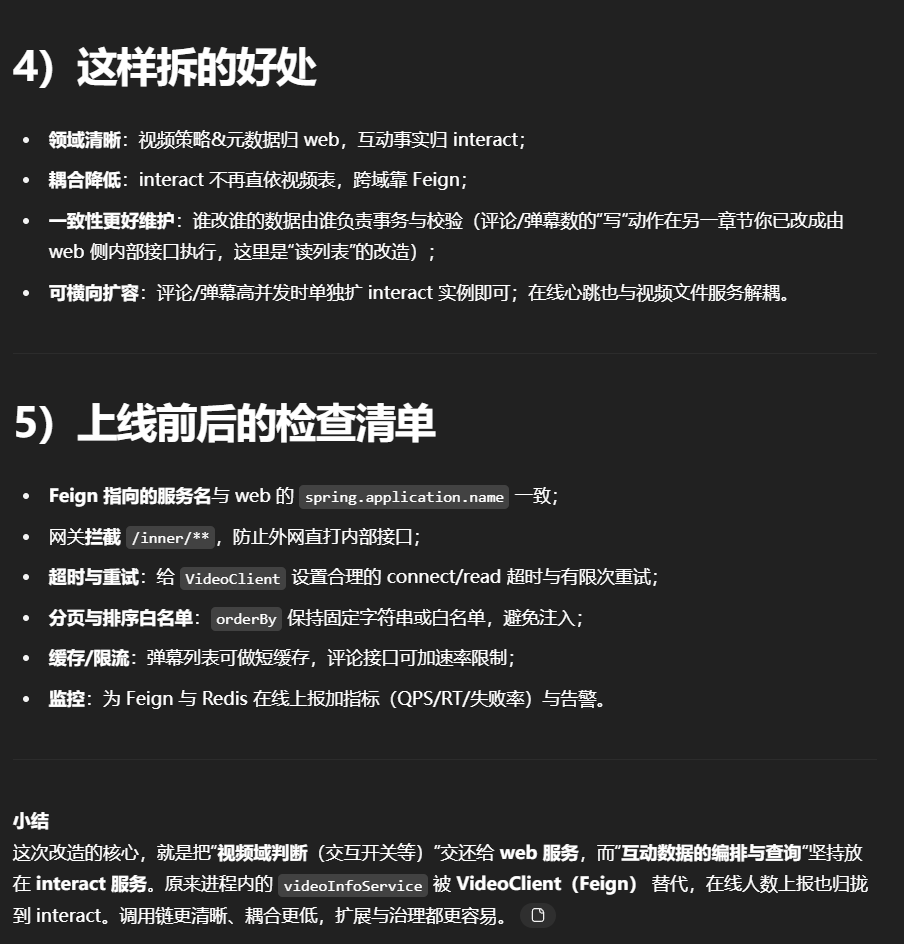
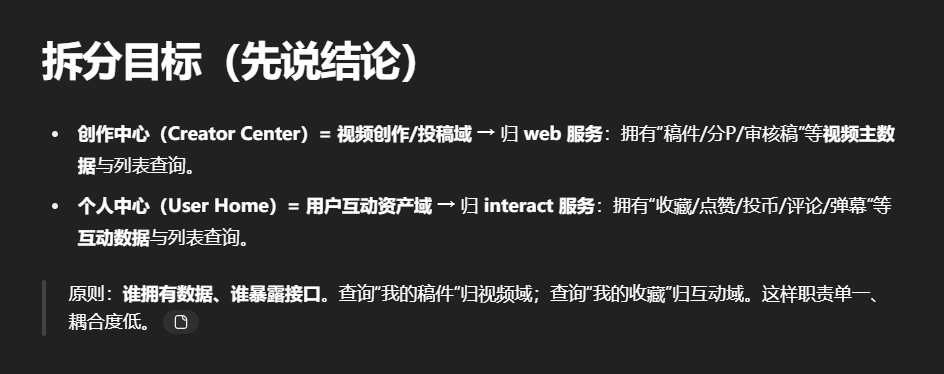
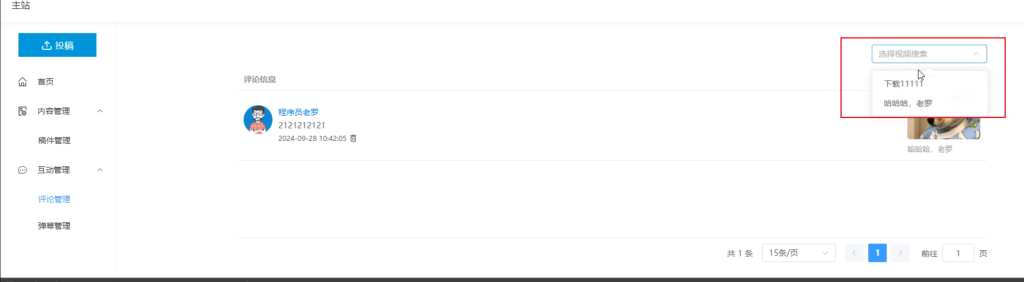
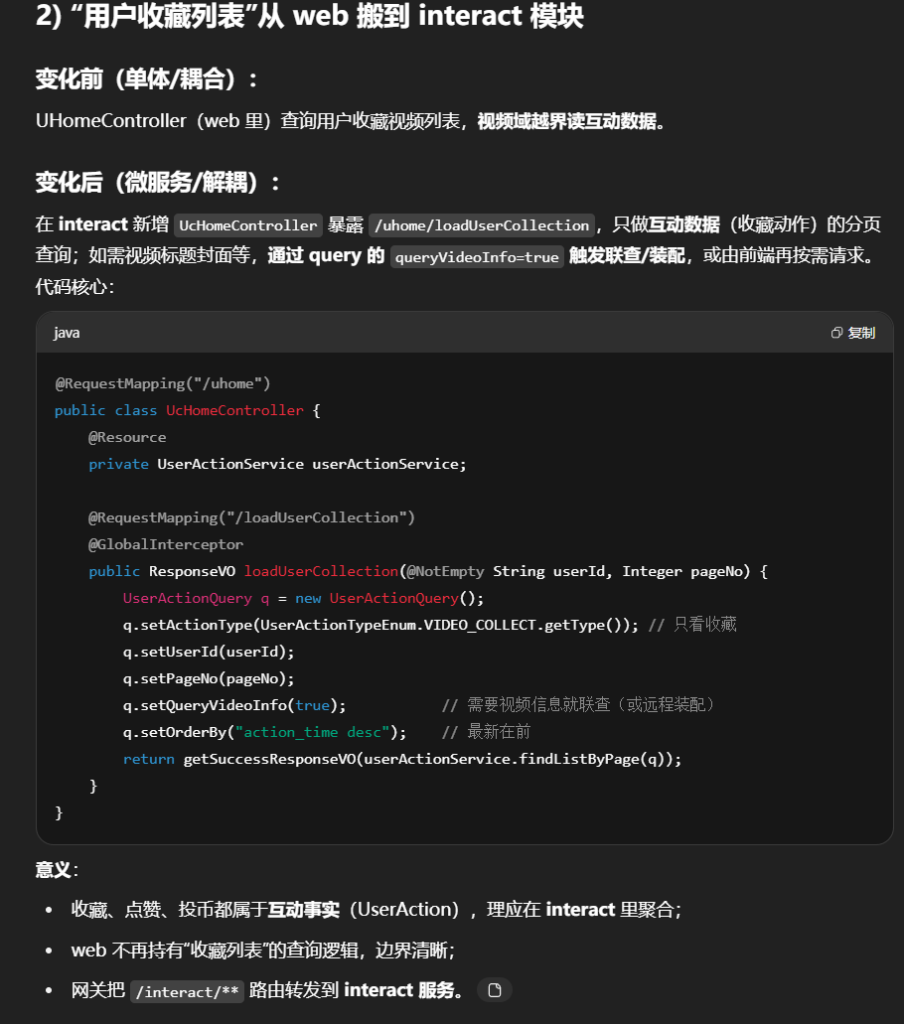
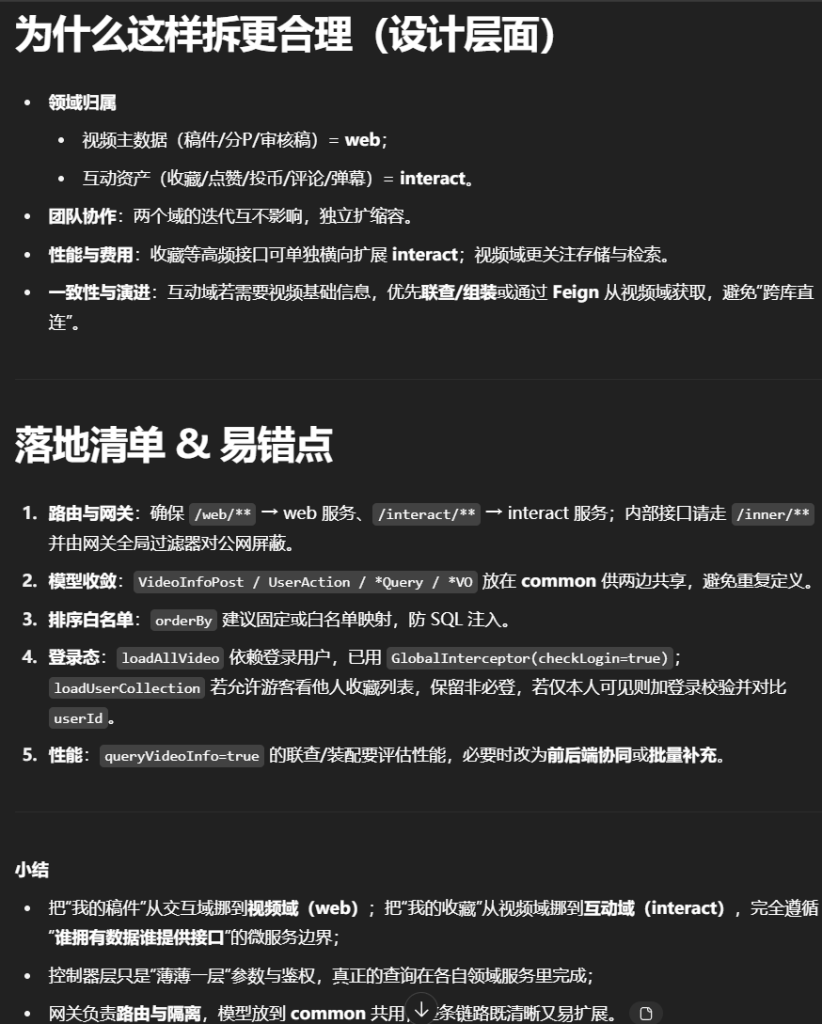
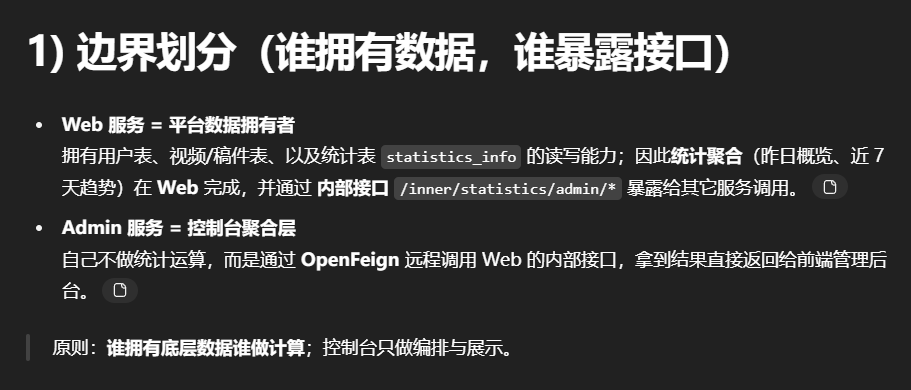
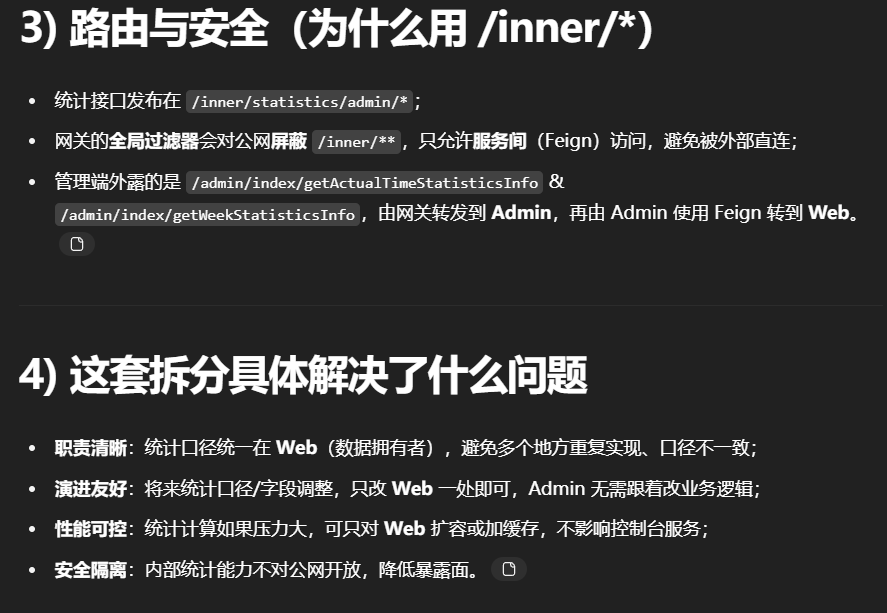
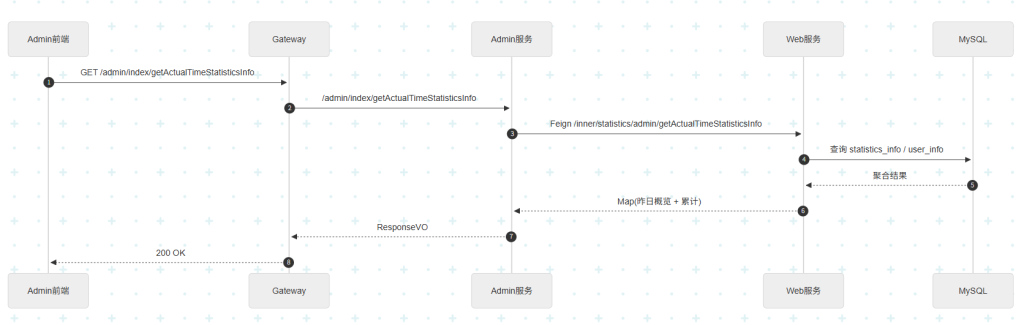
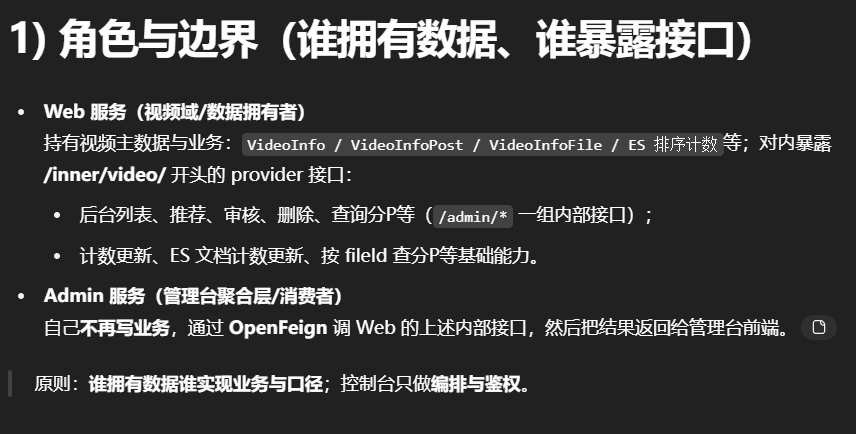
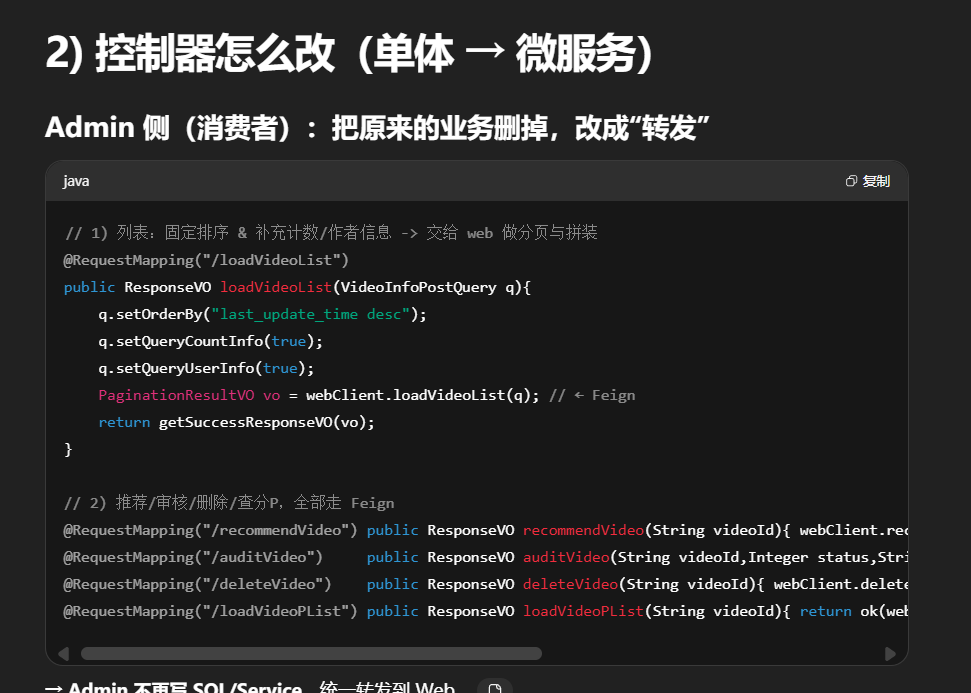
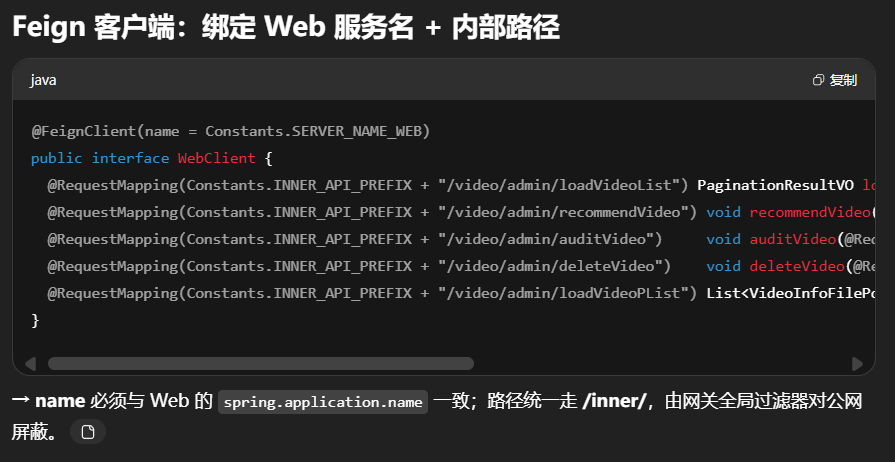
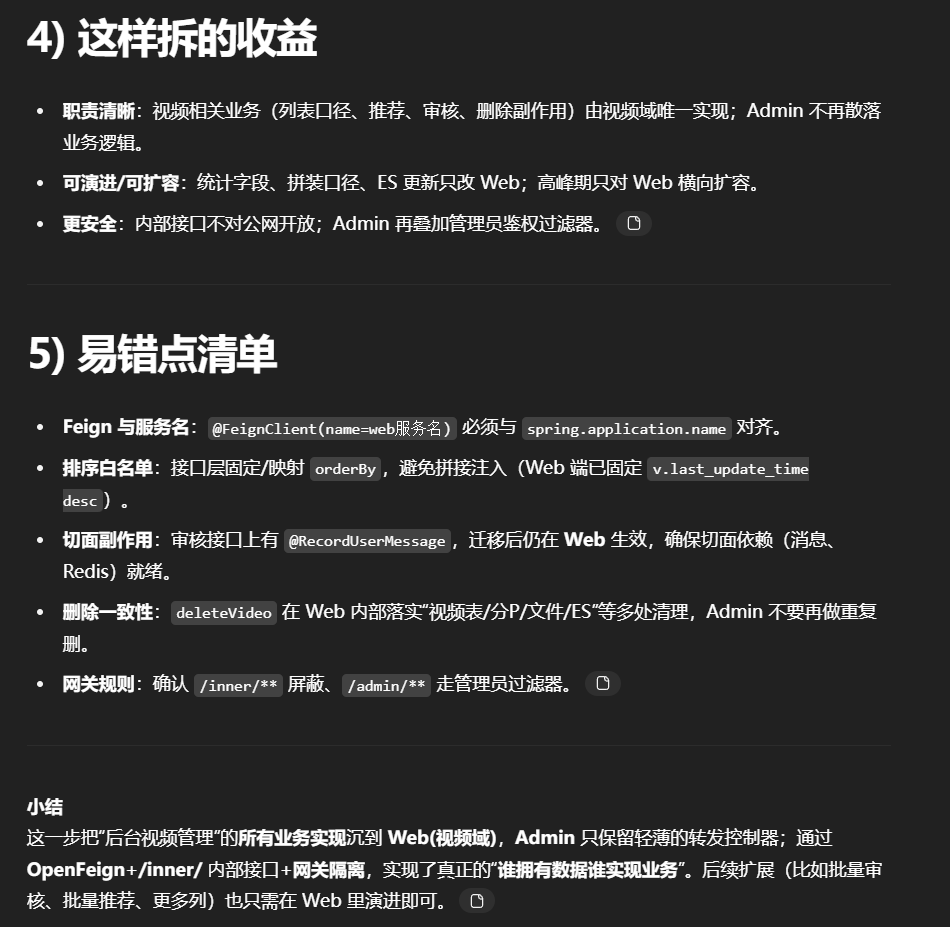
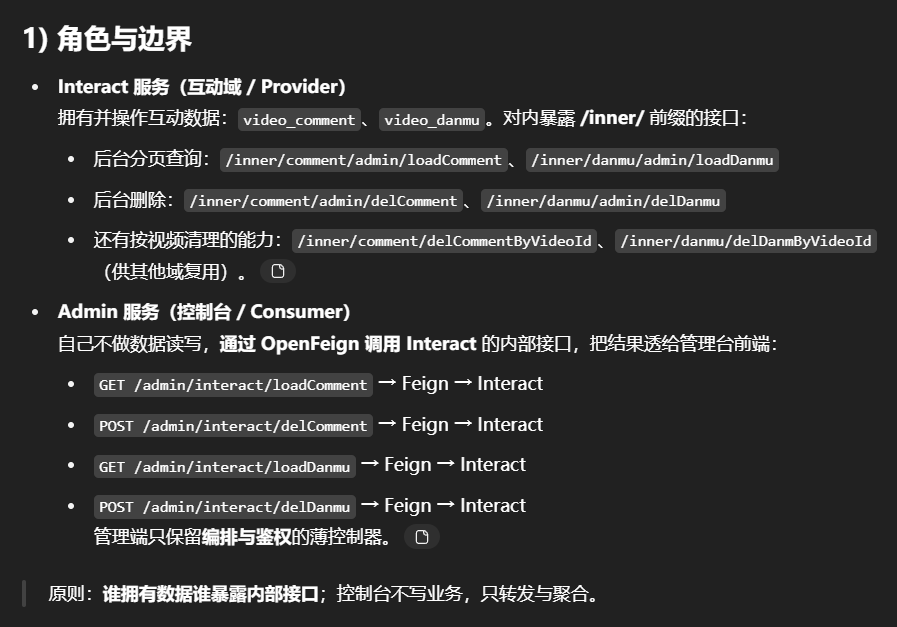
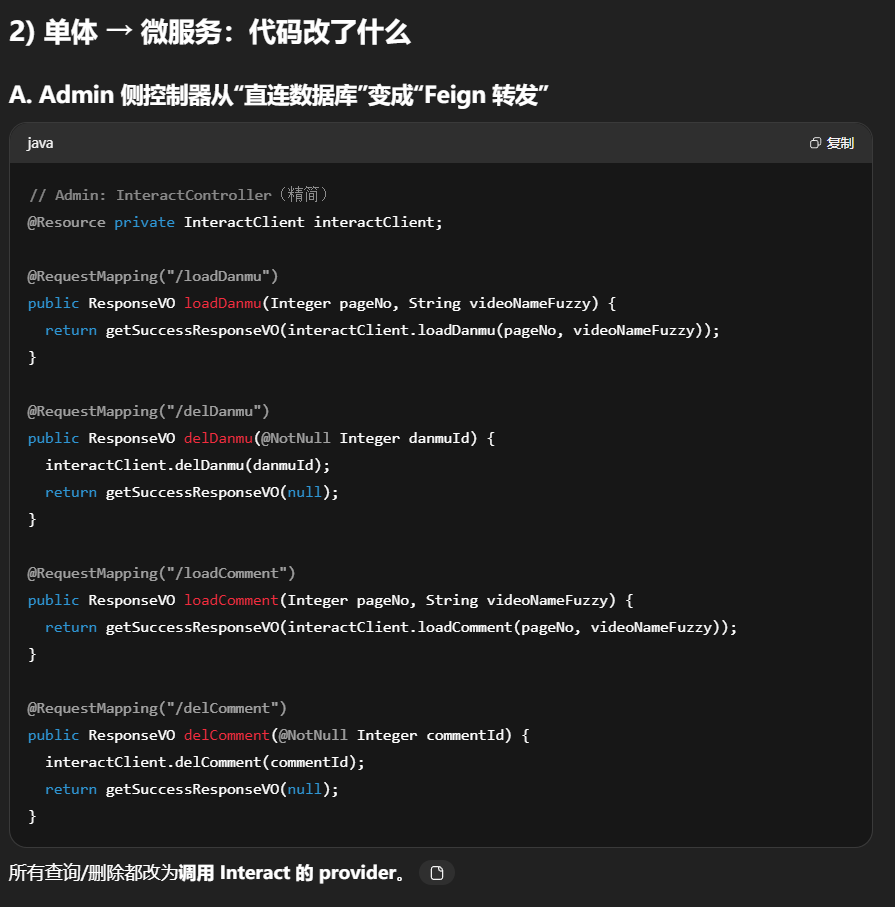
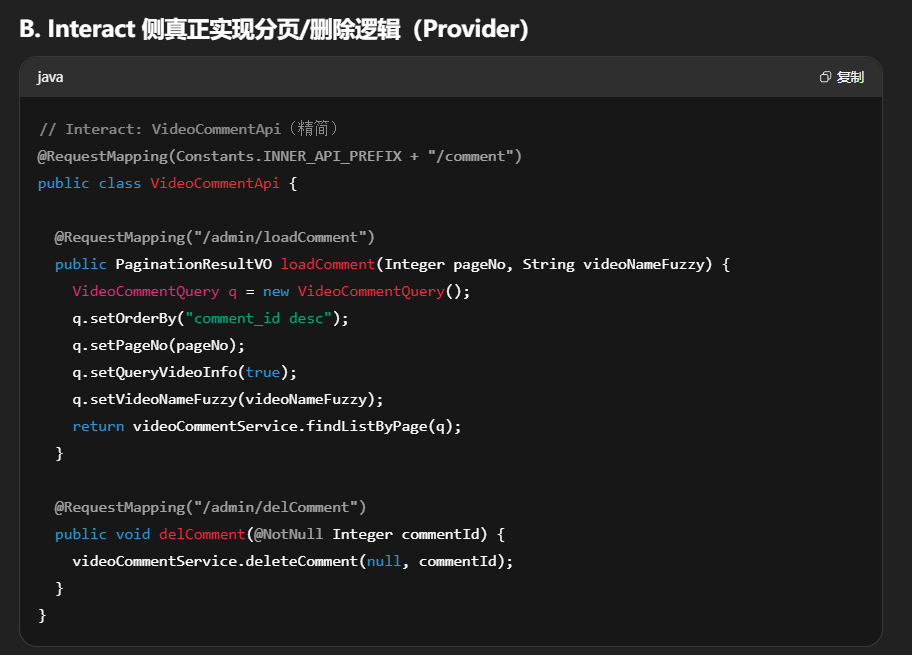
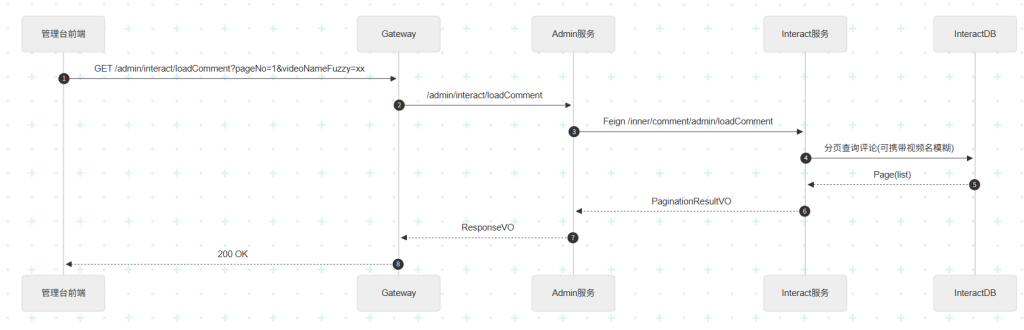
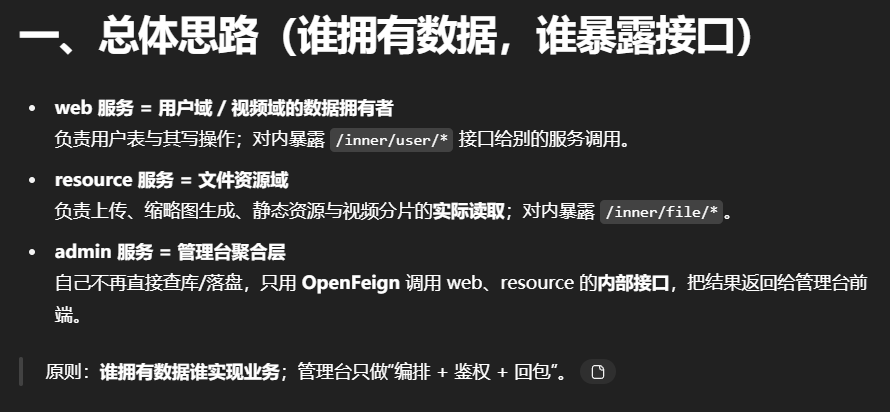
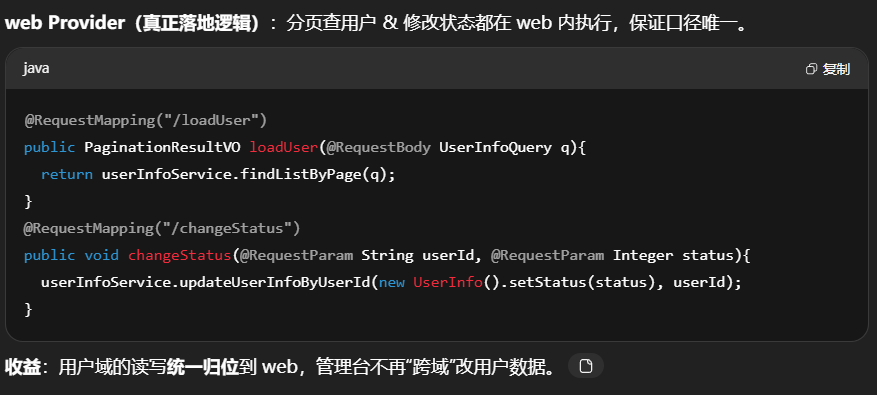
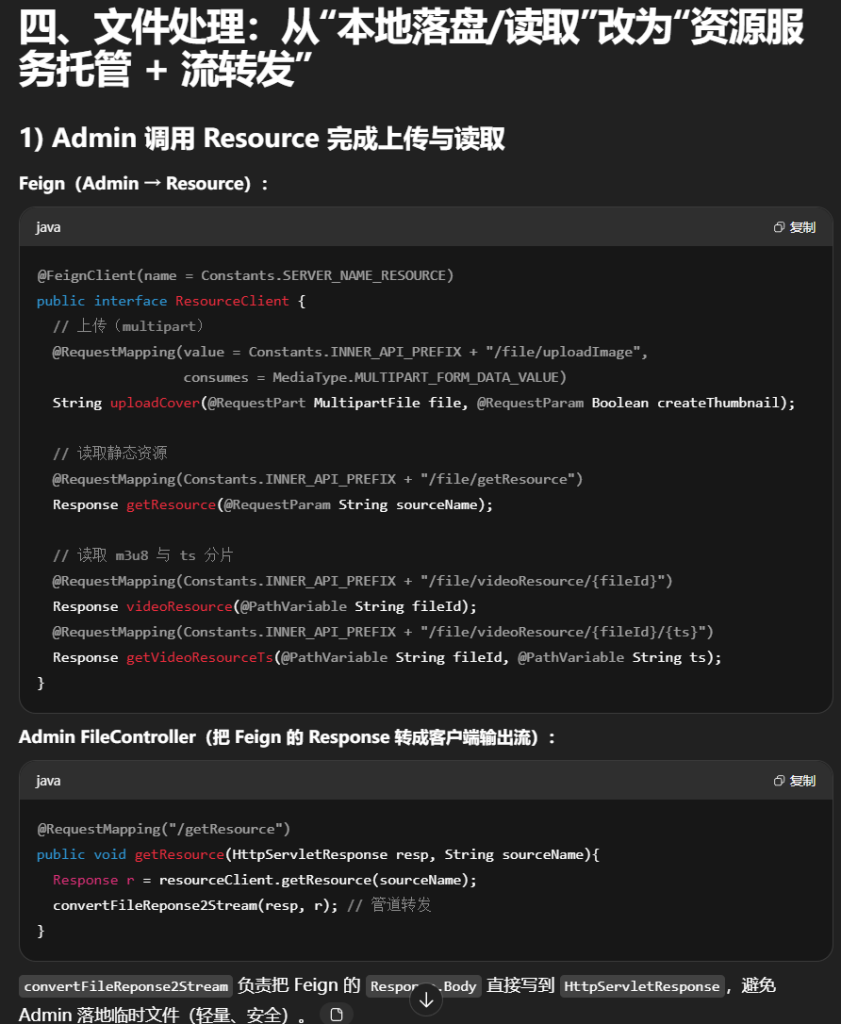
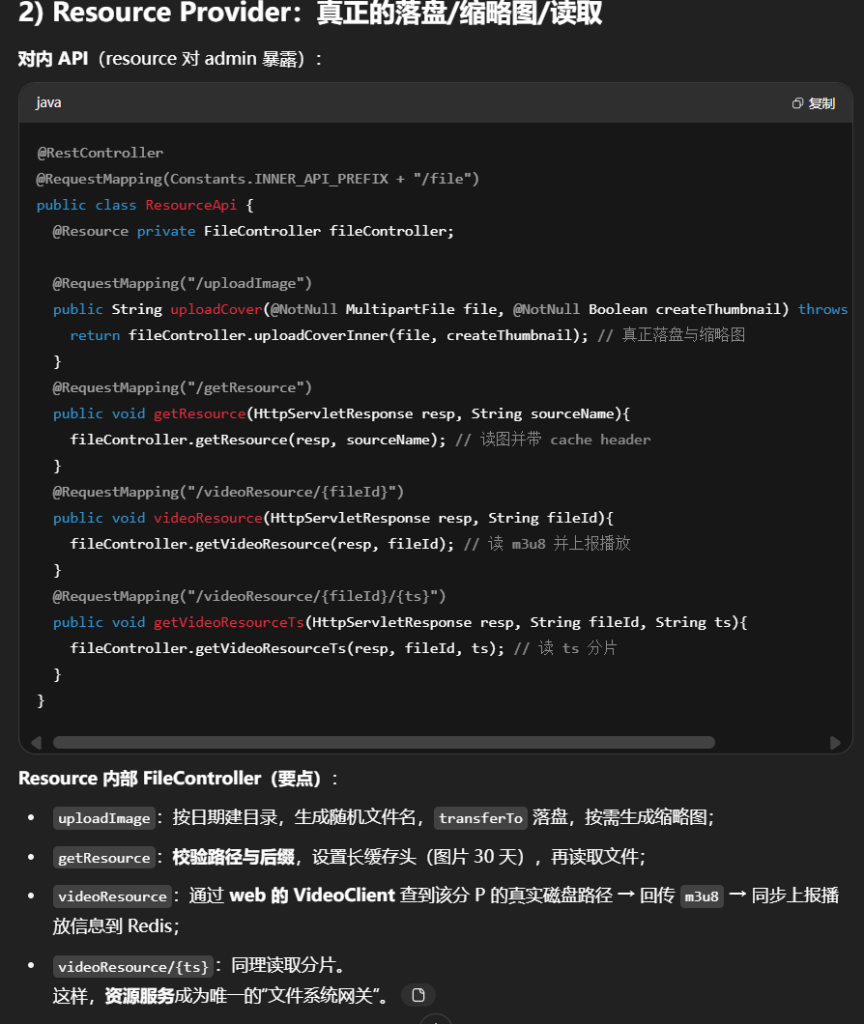
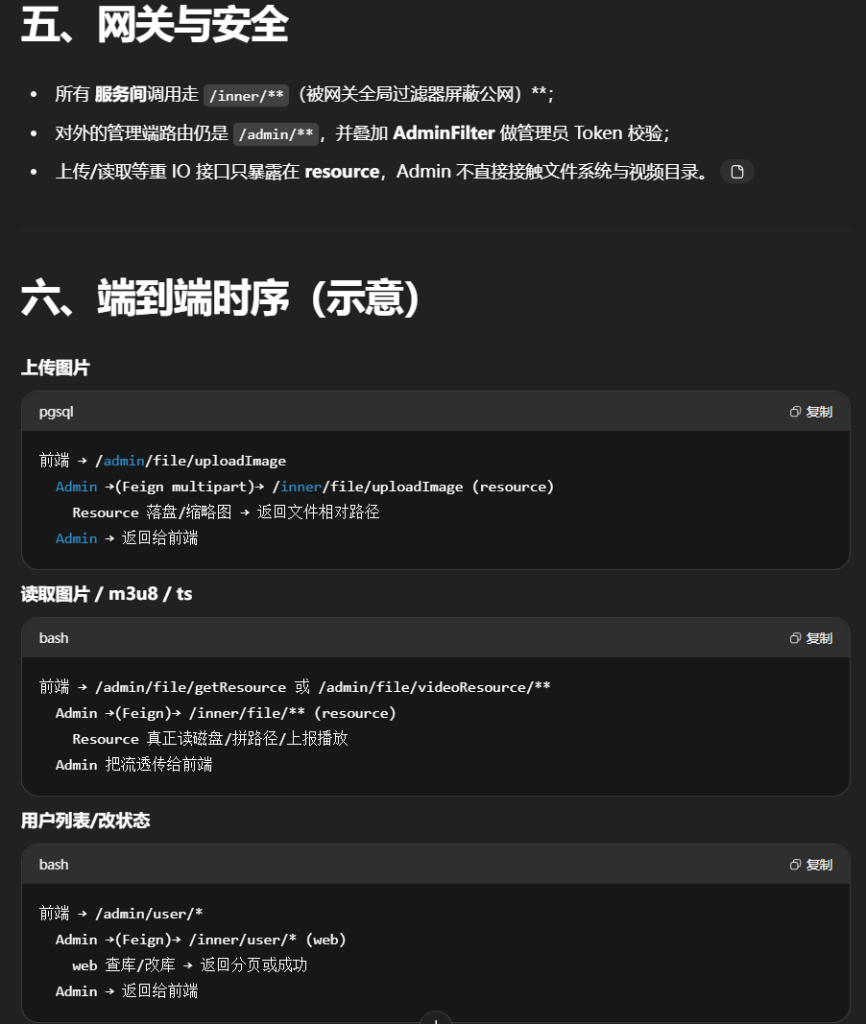
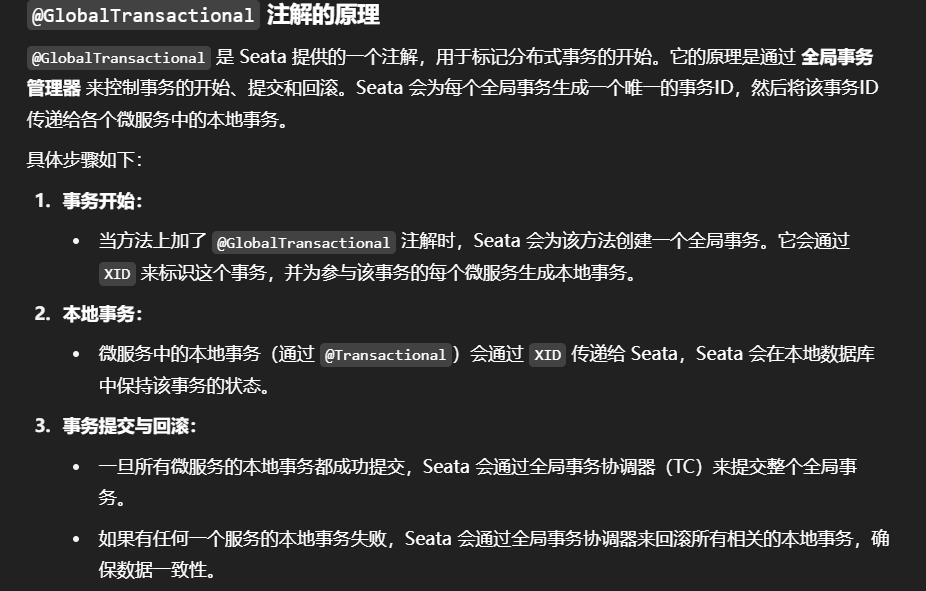
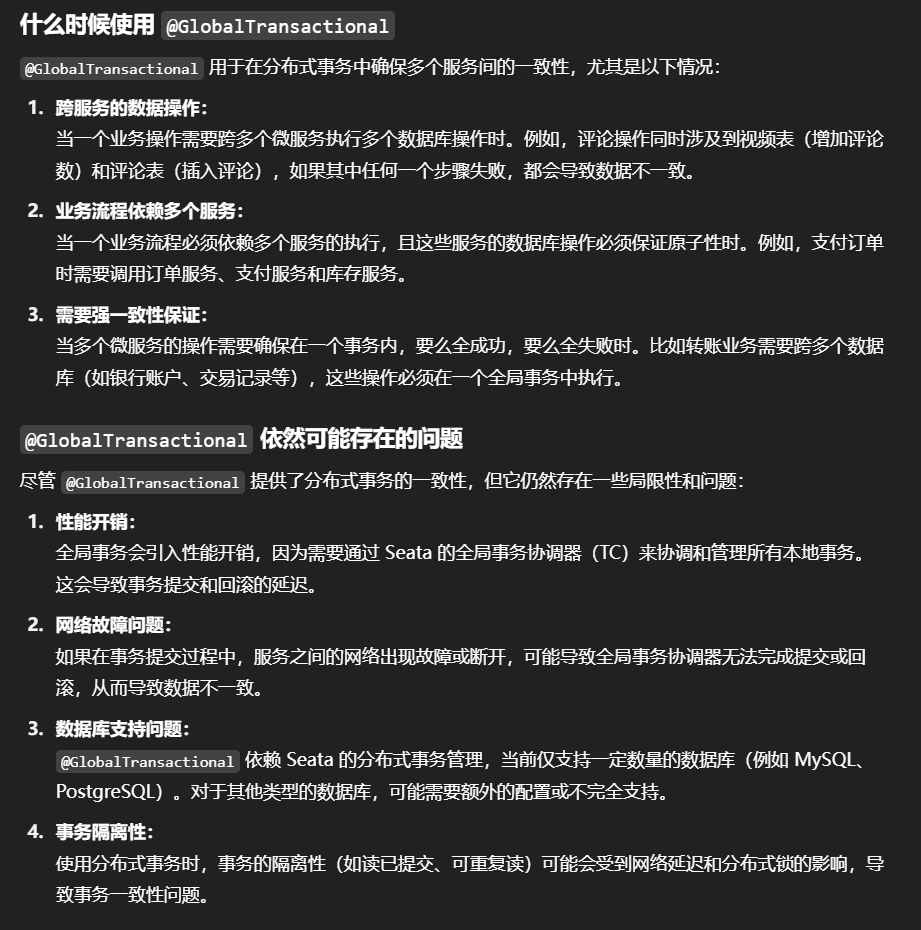
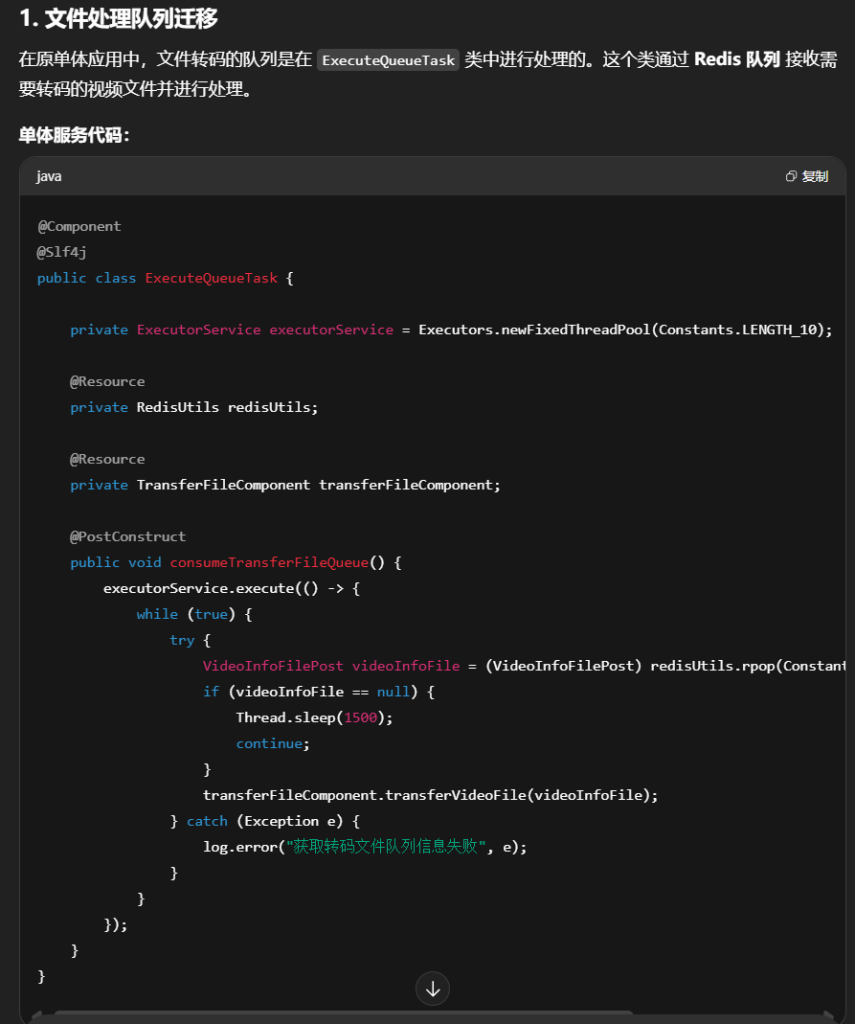
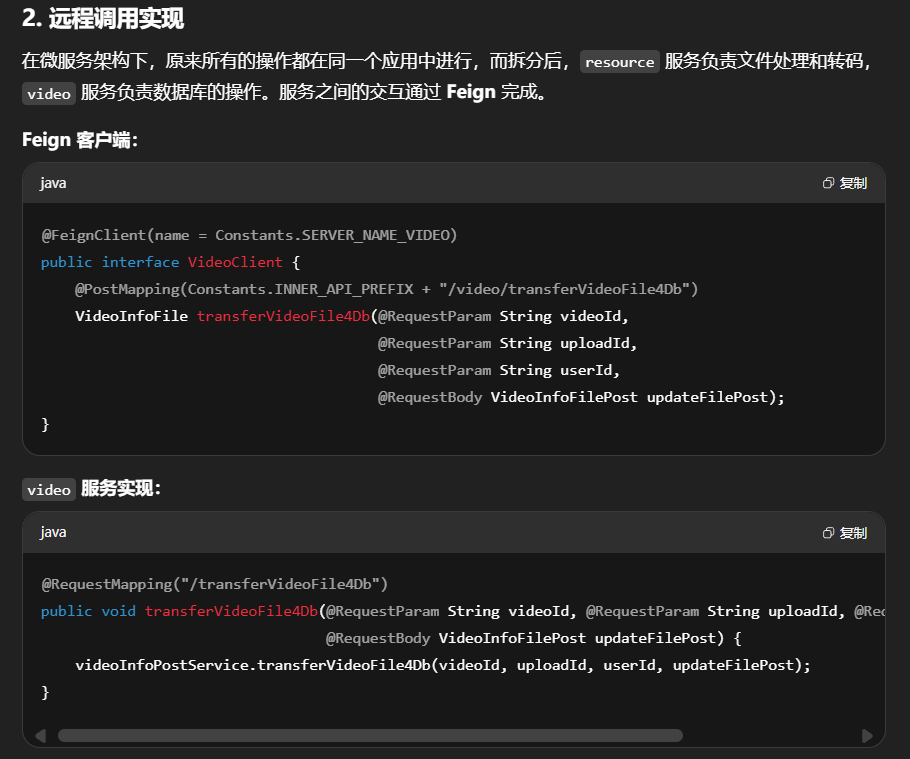
1.系统架构图
2.构建项目
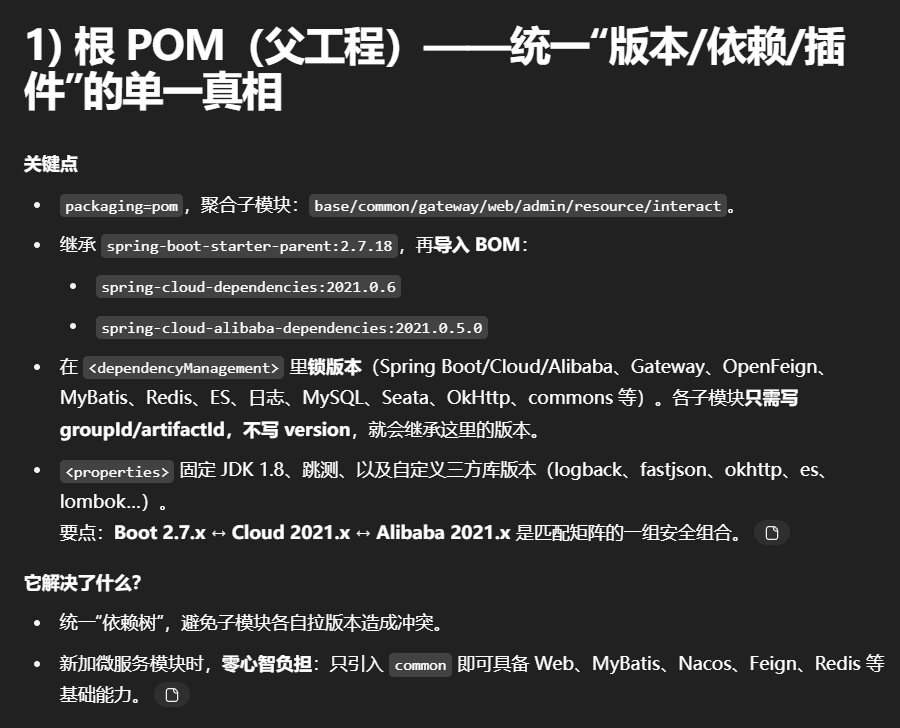
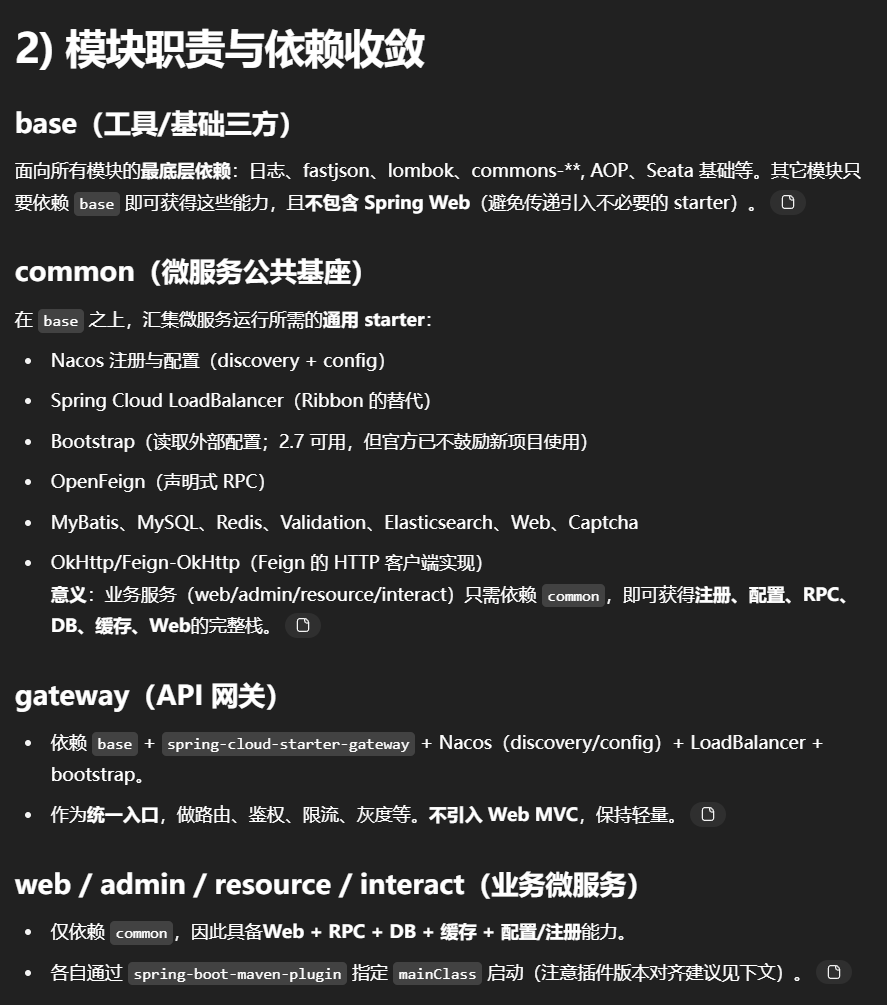
各个模块pom.xml
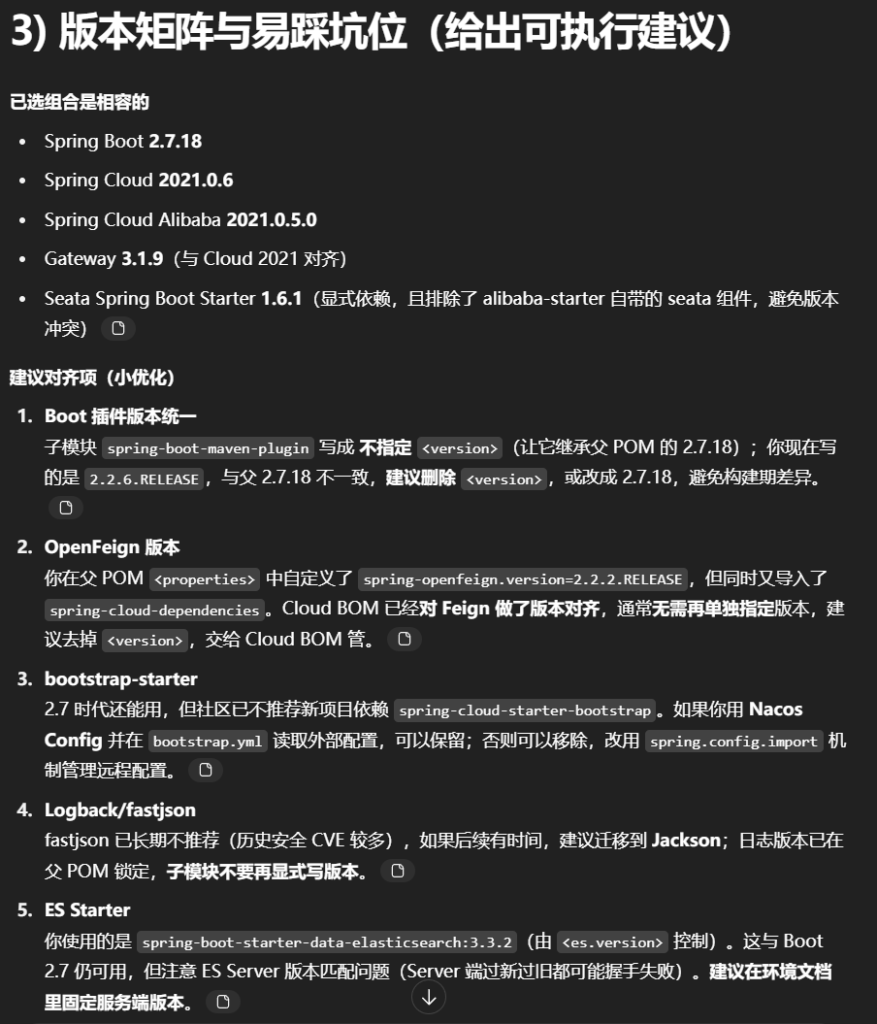
根目录pom
1
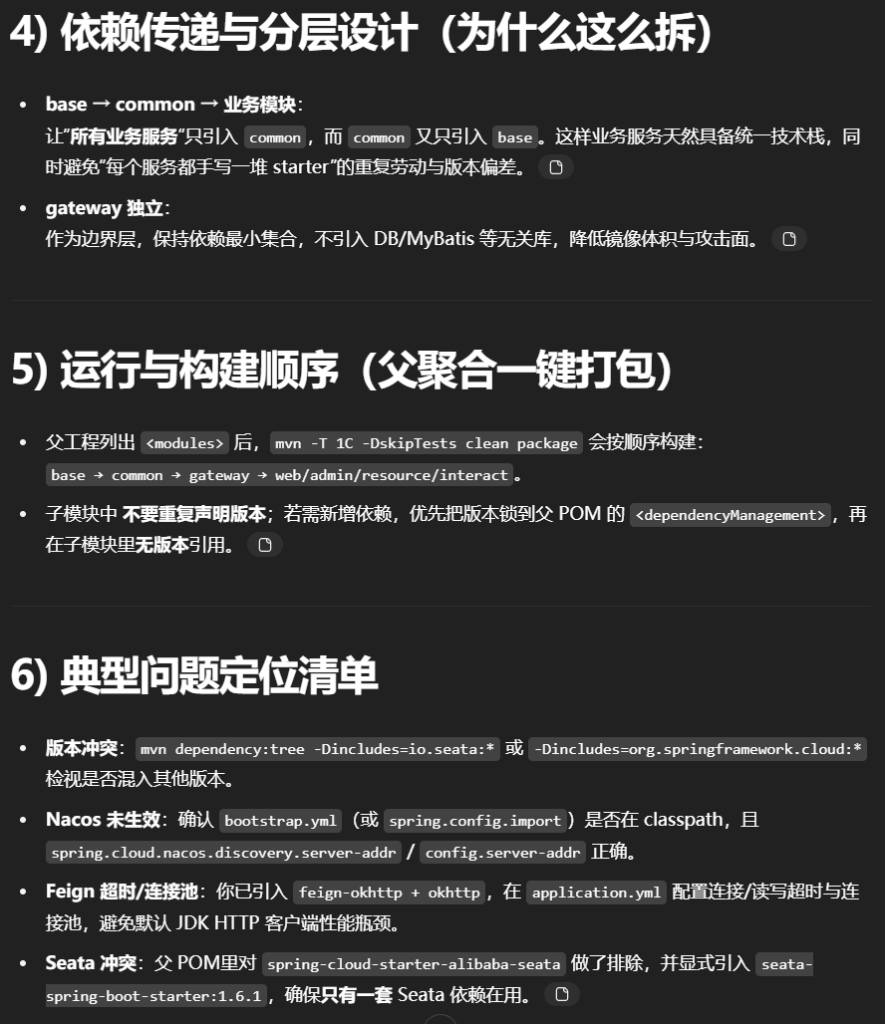
2
3
4
5
6
7
8
9
10
11
12
13
14
15
16
17
18
19
20
21
22
23
24
25
26
27
28
29
30
31
32
33
34
35
36
37
38
39
40
41
42
43
44
45
46
47
48
49
50
51
52
53
54
55
56
57
58
59
60
61
62
63
64
65
66
67
68
69
70
71
72
73
74
75
76
77
78
79
80
81
82
83
84
85
86
87
88
89
90
91
92
93
94
95
96
97
98
99
100
101
102
103
104
105
106
107
108
109
110
111
112
113
114
115
116
117
118
119
120
121
122
123
124
125
126
127
128
129
130
131
132
133
134
135
136
137
138
139
140
141
142
143
144
145
146
147
148
149
150
151
152
153
154
155
156
157
158
159
160
161
162
163
164
165
166
167
168
169
170
171
172
173
174
175
176
177
178
179
180
181
182
183
184
185
186
187
188
189
190
191
192
193
194
195
196
197
198
199
200
201
202
203
204
205
206
207
208
209
210
211
212
213
214
215
216
217
218
219
220
221
222
223
224
225
226
227
228
229
230
231
232
233
234
235
236
<?xml version="1.0" encoding="UTF-8" ?> <project xmlns ="http://maven.apache.org/POM/4.0.0" xmlns:xsi ="http://www.w3.org/2001/XMLSchema-instance" xsi:schemaLocation ="http://maven.apache.org/POM/4.0.0 http://maven.apache.org/xsd/maven-4.0.0.xsd" > <modelVersion > 4.0.0</modelVersion > <parent > <groupId > org.springframework.boot</groupId > <artifactId > spring-boot-starter-parent</artifactId > <version > 2.7.18</version > <relativePath /> </parent > <groupId > com.easylive.cloud</groupId > <artifactId > easylive-cloud</artifactId > <version > 1.0</version > <packaging > pom</packaging > <modules > <module > easylive-cloud-base</module > <module > easylive-cloud-common</module > <module > easylive-cloud-gateway</module > <module > easylive-cloud-web</module > <module > easylive-cloud-admin</module > <module > easylive-cloud-resource</module > <module > easylive-cloud-interact</module > </modules > <properties > <project.build.sourceEncoding > UTF-8</project.build.sourceEncoding > <maven.compiler.source > 1.8</maven.compiler.source > <maven.compiler.target > 1.8</maven.compiler.target > <skipTests > true</skipTests > <springboot.version > 2.7.18</springboot.version > <spring-cloud.version > 2021.0.6</spring-cloud.version > <spring-cloud-alibaba.version > 2021.0.5.0</spring-cloud-alibaba.version > <spring-openfeign.version > 2.2.2.RELEASE</spring-openfeign.version > <spring-cloud-gateway.version > 3.1.9</spring-cloud-gateway.version > <mybatis.version > 1.3.2</mybatis.version > <logback.version > 1.2.10</logback.version > <mysql.version > 8.0.23</mysql.version > <aspectjweaver.version > 1.9.3</aspectjweaver.version > <fastjson.version > 1.2.83</fastjson.version > <commons.lang3.version > 3.4</commons.lang3.version > <commons.csv.version > 1.2</commons.csv.version > <commons.codec.version > 1.9</commons.codec.version > <commons.io.version > 2.5</commons.io.version > <feign-okhttp.version > 10.2.0</feign-okhttp.version > <okhttp3.version > 4.12.0</okhttp3.version > <lombok.version > 1.18.22</lombok.version > <captcha.verion > 1.6.2</captcha.verion > <es.version > 3.3.2</es.version > </properties > <dependencyManagement > <dependencies > <dependency > <groupId > org.springframework.boot</groupId > <artifactId > spring-boot-starter-web</artifactId > <version > $ {springboot.version} </version > <exclusions > <exclusion > <groupId > ch.qos.logback</groupId > <artifactId > logback-classic</artifactId > </exclusion > <exclusion > <groupId > ch.qos.logback</groupId > <artifactId > logback-core</artifactId > </exclusion > </exclusions > </dependency > <dependency > <groupId > org.springframework.cloud</groupId > <artifactId > spring-cloud-dependencies</artifactId > <version > $ {spring-cloud.version} </version > <type > pom</type > <scope > import</scope > </dependency > <dependency > <groupId > com.alibaba.cloud</groupId > <artifactId > spring-cloud-alibaba-dependencies</artifactId > <version > $ {spring-cloud-alibaba.version} </version > <type > pom</type > <scope > import</scope > </dependency > <dependency > <groupId > org.springframework.cloud</groupId > <artifactId > spring-cloud-starter-openfeign</artifactId > <version > $ {spring-openfeign.version} </version > </dependency > <dependency > <groupId > org.springframework.cloud</groupId > <artifactId > spring-cloud-starter-gateway</artifactId > <version > $ {spring-cloud-gateway.version} </version > </dependency > <dependency > <groupId > com.alibaba.cloud</groupId > <artifactId > spring-cloud-starter-alibaba-seata</artifactId > <version > 2021.0.5.0</version > <exclusions > <exclusion > <groupId > io.seata</groupId > <artifactId > seata-spring-boot-starter</artifactId > </exclusion > <exclusion > <groupId > io.seata</groupId > <artifactId > seata-all</artifactId > </exclusion > <exclusion > <groupId > org.springframework.boot</groupId > <artifactId > spring-boot-starter-aop</artifactId > </exclusion > </exclusions > </dependency > <dependency > <groupId > org.springframework.boot</groupId > <artifactId > spring-boot-starter-aop</artifactId > <version > 2.7.18</version > </dependency > <dependency > <groupId > io.seata</groupId > <artifactId > seata-spring-boot-starter</artifactId > <version > 1.6.1</version > </dependency > <dependency > <groupId > org.mybatis.spring.boot</groupId > <artifactId > mybatis-spring-boot-starter</artifactId > <version > $ {mybatis.version} </version > </dependency > <dependency > <groupId > mysql</groupId > <artifactId > mysql-connector-java</artifactId > <version > $ {mysql.version} </version > </dependency > <dependency > <groupId > ch.qos.logback</groupId > <artifactId > logback-classic</artifactId > <version > $ {logback.version} </version > </dependency > <dependency > <groupId > ch.qos.logback</groupId > <artifactId > logback-core</artifactId > <version > $ {logback.version} </version > </dependency > <dependency > <groupId > org.aspectj</groupId > <artifactId > aspectjweaver</artifactId > <version > $ {aspectjweaver.version} </version > </dependency > <dependency > <groupId > com.squareup.okhttp3</groupId > <artifactId > okhttp</artifactId > <version > $ {okhttp3.version} </version > </dependency > <dependency > <groupId > com.alibaba</groupId > <artifactId > fastjson</artifactId > <version > $ {fastjson.version} </version > </dependency > <dependency > <groupId > org.apache.commons</groupId > <artifactId > commons-csv</artifactId > <version > $ {commons.csv.version} </version > </dependency > <dependency > <groupId > org.apache.commons</groupId > <artifactId > commons-lang3</artifactId > <version > $ {commons.lang3.version} </version > </dependency > <dependency > <groupId > commons-codec</groupId > <artifactId > commons-codec</artifactId > <version > $ {commons.codec.version} </version > </dependency > <dependency > <groupId > commons-io</groupId > <artifactId > commons-io</artifactId > <version > $ {commons.io.version} </version > </dependency > <dependency > <groupId > org.springframework.boot</groupId > <artifactId > spring-boot-starter-data-redis</artifactId > <version > $ {springboot.version} </version > </dependency > <dependency > <groupId > org.projectlombok</groupId > <artifactId > lombok</artifactId > <version > $ {lombok.version} </version > </dependency > <dependency > <groupId > org.springframework.boot</groupId > <artifactId > spring-boot-starter-data-elasticsearch</artifactId > <version > $ {es.version} </version > </dependency > <dependency > <groupId > com.github.whvcse</groupId > <artifactId > easy-captcha</artifactId > <version > $ {captcha.verion} </version > </dependency > </dependencies > </dependencyManagement > </project >
admin模块pom
1
2
3
4
5
6
7
8
9
10
11
12
13
14
15
16
17
18
19
20
21
22
23
24
25
26
27
28
29
30
31
32
33
34
35
36
37
38
39
40
41
42
43
<?xml version="1.0" encoding="UTF-8" ?> <project xmlns ="http://maven.apache.org/POM/4.0.0" xmlns:xsi ="http://www.w3.org/2001/XMLSchema-instance" xsi:schemaLocation ="http://maven.apache.org/POM/4.0.0 http://maven.apache.org/xsd/maven-4.0.0.xsd" > <modelVersion > 4.0.0</modelVersion > <parent > <groupId > com.easylive.cloud</groupId > <artifactId > easylive-cloud</artifactId > <version > 1.0</version > </parent > <groupId > com.easylive.cloud</groupId > <artifactId > easylive-cloud-admin</artifactId > <version > 1.0</version > <packaging > jar</packaging > <properties > <project.build.sourceEncoding > UTF-8</project.build.sourceEncoding > <maven.compiler.source > 1.8</maven.compiler.source > <maven.compiler.target > 1.8</maven.compiler.target > <skipTests > true</skipTests > </properties > <dependencies > <dependency > <groupId > com.easylive.cloud</groupId > <artifactId > easylive-cloud-common</artifactId > <version > 1.0</version > </dependency > </dependencies > <build > <plugins > <plugin > <groupId > org.springframework.boot</groupId > <artifactId > spring-boot-maven-plugin</artifactId > <version > 2.2.6.RELEASE</version > <configuration > <mainClass > com.easylive.EasyliveCloudAdminRunApplication</mainClass > </configuration > </plugin > </plugins > </build > </project >
base模块pom
1
2
3
4
5
6
7
8
9
10
11
12
13
14
15
16
17
18
19
20
21
22
23
24
25
26
27
28
29
30
31
32
33
34
35
36
37
38
39
40
41
42
43
44
45
46
47
48
49
50
51
52
53
54
55
56
57
58
59
60
61
62
63
64
65
66
67
68
69
70
71
72
73
74
75
76
77
78
79
80
81
82
<?xml version="1.0" encoding="UTF-8" ?> <project xmlns ="http://maven.apache.org/POM/4.0.0" xmlns:xsi ="http://www.w3.org/2001/XMLSchema-instance" xsi:schemaLocation ="http://maven.apache.org/POM/4.0.0 http://maven.apache.org/xsd/maven-4.0.0.xsd" > <modelVersion > 4.0.0</modelVersion > <parent > <groupId > com.easylive.cloud</groupId > <artifactId > easylive-cloud</artifactId > <version > 1.0</version > </parent > <groupId > com.easylive.cloud</groupId > <artifactId > easylive-cloud-base</artifactId > <version > 1.0</version > <packaging > jar</packaging > <properties > <project.build.sourceEncoding > UTF-8</project.build.sourceEncoding > <maven.compiler.source > 1.8</maven.compiler.source > <maven.compiler.target > 1.8</maven.compiler.target > <skipTests > true</skipTests > </properties > <dependencies > <dependency > <groupId > ch.qos.logback</groupId > <artifactId > logback-classic</artifactId > </dependency > <dependency > <groupId > ch.qos.logback</groupId > <artifactId > logback-core</artifactId > </dependency > <dependency > <groupId > com.alibaba</groupId > <artifactId > fastjson</artifactId > </dependency > <dependency > <groupId > org.projectlombok</groupId > <artifactId > lombok</artifactId > </dependency > <dependency > <groupId > org.apache.commons</groupId > <artifactId > commons-csv</artifactId > </dependency > <dependency > <groupId > org.apache.commons</groupId > <artifactId > commons-lang3</artifactId > </dependency > <dependency > <groupId > commons-codec</groupId > <artifactId > commons-codec</artifactId > </dependency > <dependency > <groupId > commons-io</groupId > <artifactId > commons-io</artifactId > </dependency > <dependency > <groupId > com.alibaba.cloud</groupId > <artifactId > spring-cloud-starter-alibaba-seata</artifactId > </dependency > <dependency > <groupId > org.springframework.boot</groupId > <artifactId > spring-boot-starter-aop</artifactId > </dependency > <dependency > <groupId > io.seata</groupId > <artifactId > seata-spring-boot-starter</artifactId > </dependency > </dependencies > </project >
common模块pom
1
2
3
4
5
6
7
8
9
10
11
12
13
14
15
16
17
18
19
20
21
22
23
24
25
26
27
28
29
30
31
32
33
34
35
36
37
38
39
40
41
42
43
44
45
46
47
48
49
50
51
52
53
54
55
56
57
58
59
60
61
62
63
64
65
66
67
68
69
70
71
72
73
74
75
76
77
78
79
80
81
82
83
84
85
86
87
88
89
90
91
92
93
94
95
96
97
98
99
100
101
102
103
104
105
106
107
108
109
110
111
112
113
114
115
116
117
<?xml version="1.0" encoding="UTF-8" ?> <project xmlns ="http://maven.apache.org/POM/4.0.0" xmlns:xsi ="http://www.w3.org/2001/XMLSchema-instance" xsi:schemaLocation ="http://maven.apache.org/POM/4.0.0 http://maven.apache.org/xsd/maven-4.0.0.xsd" > <modelVersion > 4.0.0</modelVersion > <parent > <groupId > com.easylive.cloud</groupId > <artifactId > easylive-cloud</artifactId > <version > 1.0</version > </parent > <groupId > com.easylive.cloud</groupId > <artifactId > easylive-cloud-common</artifactId > <version > 1.0</version > <packaging > jar</packaging > <properties > <project.build.sourceEncoding > UTF-8</project.build.sourceEncoding > <maven.compiler.source > 1.8</maven.compiler.source > <maven.compiler.target > 1.8</maven.compiler.target > <skipTests > true</skipTests > </properties > <dependencies > <dependency > <groupId > com.easylive.cloud</groupId > <artifactId > easylive-cloud-base</artifactId > <version > 1.0</version > </dependency > <dependency > <groupId > com.alibaba.cloud</groupId > <artifactId > spring-cloud-starter-alibaba-nacos-discovery</artifactId > </dependency > <dependency > <groupId > com.alibaba.cloud</groupId > <artifactId > spring-cloud-starter-alibaba-nacos-config</artifactId > </dependency > <dependency > <groupId > org.springframework.cloud</groupId > <artifactId > spring-cloud-starter-loadbalancer</artifactId > </dependency > <dependency > <groupId > org.springframework.cloud</groupId > <artifactId > spring-cloud-starter-bootstrap</artifactId > </dependency > <dependency > <groupId > org.springframework.cloud</groupId > <artifactId > spring-cloud-starter-openfeign</artifactId > </dependency > <dependency > <groupId > org.mybatis.spring.boot</groupId > <artifactId > mybatis-spring-boot-starter</artifactId > </dependency > <dependency > <groupId > mysql</groupId > <artifactId > mysql-connector-java</artifactId > </dependency > <dependency > <groupId > org.springframework.boot</groupId > <artifactId > spring-boot-starter-data-redis</artifactId > </dependency > <dependency > <groupId > org.aspectj</groupId > <artifactId > aspectjweaver</artifactId > </dependency > <dependency > <groupId > com.squareup.okhttp3</groupId > <artifactId > okhttp</artifactId > </dependency > <dependency > <groupId > com.squareup.okhttp3</groupId > <artifactId > okhttp-sse</artifactId > </dependency > <dependency > <groupId > io.github.openfeign</groupId > <artifactId > feign-okhttp</artifactId > </dependency > <dependency > <groupId > org.springframework.boot</groupId > <artifactId > spring-boot-starter-validation</artifactId > </dependency > <dependency > <groupId > org.springframework.boot</groupId > <artifactId > spring-boot-starter-data-elasticsearch</artifactId > </dependency > <dependency > <groupId > org.springframework.boot</groupId > <artifactId > spring-boot-starter-web</artifactId > </dependency > <dependency > <groupId > com.github.whvcse</groupId > <artifactId > easy-captcha</artifactId > </dependency > </dependencies > </project >
gateway模块pom
1
2
3
4
5
6
7
8
9
10
11
12
13
14
15
16
17
18
19
20
21
22
23
24
25
26
27
28
29
30
31
32
33
34
35
36
37
38
39
40
41
42
43
44
45
46
47
48
49
50
51
52
53
54
55
56
57
58
59
60
61
62
63
64
65
66
67
68
69
70
<?xml version="1.0" encoding="UTF-8" ?> <project xmlns ="http://maven.apache.org/POM/4.0.0" xmlns:xsi ="http://www.w3.org/2001/XMLSchema-instance" xsi:schemaLocation ="http://maven.apache.org/POM/4.0.0 http://maven.apache.org/xsd/maven-4.0.0.xsd" > <modelVersion > 4.0.0</modelVersion > <parent > <groupId > com.easylive.cloud</groupId > <artifactId > easylive-cloud</artifactId > <version > 1.0</version > </parent > <groupId > com.easylive</groupId > <artifactId > easylive-cloud-gateway</artifactId > <version > 1.0</version > <packaging > jar</packaging > <properties > <project.build.sourceEncoding > UTF-8</project.build.sourceEncoding > <maven.compiler.source > 1.8</maven.compiler.source > <maven.compiler.target > 1.8</maven.compiler.target > <skipTests > true</skipTests > </properties > <dependencies > <dependency > <groupId > com.easylive.cloud</groupId > <artifactId > easylive-cloud-base</artifactId > <version > 1.0</version > </dependency > <dependency > <groupId > com.alibaba.cloud</groupId > <artifactId > spring-cloud-starter-alibaba-nacos-discovery</artifactId > </dependency > <dependency > <groupId > com.alibaba.cloud</groupId > <artifactId > spring-cloud-starter-alibaba-nacos-config</artifactId > </dependency > <dependency > <groupId > org.springframework.cloud</groupId > <artifactId > spring-cloud-starter-gateway</artifactId > </dependency > <dependency > <groupId > org.springframework.cloud</groupId > <artifactId > spring-cloud-starter-bootstrap</artifactId > </dependency > <dependency > <groupId > org.springframework.cloud</groupId > <artifactId > spring-cloud-starter-loadbalancer</artifactId > </dependency > </dependencies > <build > <plugins > <plugin > <groupId > org.springframework.boot</groupId > <artifactId > spring-boot-maven-plugin</artifactId > <version > 2.2.6.RELEASE</version > <configuration > <mainClass > com.easylive.gateway.EasyliveCloudGatewayRunApplication</mainClass > </configuration > </plugin > </plugins > </build > </project >
interact模块pom
1
2
3
4
5
6
7
8
9
10
11
12
13
14
15
16
17
18
19
20
21
22
23
24
25
26
27
28
29
30
31
32
33
34
35
36
37
38
39
40
41
42
43
<?xml version="1.0" encoding="UTF-8" ?> <project xmlns ="http://maven.apache.org/POM/4.0.0" xmlns:xsi ="http://www.w3.org/2001/XMLSchema-instance" xsi:schemaLocation ="http://maven.apache.org/POM/4.0.0 http://maven.apache.org/xsd/maven-4.0.0.xsd" > <modelVersion > 4.0.0</modelVersion > <parent > <groupId > com.easylive.cloud</groupId > <artifactId > easylive-cloud</artifactId > <version > 1.0</version > </parent > <groupId > com.easylive.cloud</groupId > <artifactId > easylive-cloud-interact</artifactId > <version > 1.0</version > <packaging > jar</packaging > <properties > <project.build.sourceEncoding > UTF-8</project.build.sourceEncoding > <maven.compiler.source > 1.8</maven.compiler.source > <maven.compiler.target > 1.8</maven.compiler.target > <skipTests > true</skipTests > </properties > <dependencies > <dependency > <groupId > com.easylive.cloud</groupId > <artifactId > easylive-cloud-common</artifactId > <version > 1.0</version > </dependency > </dependencies > <build > <plugins > <plugin > <groupId > org.springframework.boot</groupId > <artifactId > spring-boot-maven-plugin</artifactId > <version > 2.2.6.RELEASE</version > <configuration > <mainClass > com.easylive.EasyliveCloudInteractRunApplication</mainClass > </configuration > </plugin > </plugins > </build > </project >
resource模块pom
1
2
3
4
5
6
7
8
9
10
11
12
13
14
15
16
17
18
19
20
21
22
23
24
25
26
27
28
29
30
31
32
33
34
35
36
37
38
39
40
41
42
43
<?xml version="1.0" encoding="UTF-8" ?> <project xmlns ="http://maven.apache.org/POM/4.0.0" xmlns:xsi ="http://www.w3.org/2001/XMLSchema-instance" xsi:schemaLocation ="http://maven.apache.org/POM/4.0.0 http://maven.apache.org/xsd/maven-4.0.0.xsd" > <modelVersion > 4.0.0</modelVersion > <parent > <groupId > com.easylive.cloud</groupId > <artifactId > easylive-cloud</artifactId > <version > 1.0</version > </parent > <groupId > com.easylive.cloud</groupId > <artifactId > easylive-cloud-resource</artifactId > <version > 1.0</version > <packaging > jar</packaging > <properties > <project.build.sourceEncoding > UTF-8</project.build.sourceEncoding > <maven.compiler.source > 1.8</maven.compiler.source > <maven.compiler.target > 1.8</maven.compiler.target > <skipTests > true</skipTests > </properties > <dependencies > <dependency > <groupId > com.easylive.cloud</groupId > <artifactId > easylive-cloud-common</artifactId > <version > 1.0</version > </dependency > </dependencies > <build > <plugins > <plugin > <groupId > org.springframework.boot</groupId > <artifactId > spring-boot-maven-plugin</artifactId > <version > 2.2.6.RELEASE</version > <configuration > <mainClass > com.easylive.resource.EasyliveCloudResourceRunApplication</mainClass > </configuration > </plugin > </plugins > </build > </project >
web模块pom
1
2
3
4
5
6
7
8
9
10
11
12
13
14
15
16
17
18
19
20
21
22
23
24
25
26
27
28
29
30
31
32
33
34
35
36
37
38
39
40
41
42
<?xml version="1.0" encoding="UTF-8" ?> <project xmlns ="http://maven.apache.org/POM/4.0.0" xmlns:xsi ="http://www.w3.org/2001/XMLSchema-instance" xsi:schemaLocation ="http://maven.apache.org/POM/4.0.0 http://maven.apache.org/xsd/maven-4.0.0.xsd" > <modelVersion > 4.0.0</modelVersion > <parent > <groupId > com.easylive.cloud</groupId > <artifactId > easylive-cloud</artifactId > <version > 1.0</version > </parent > <groupId > com.easylive</groupId > <artifactId > easylive-cloud-web</artifactId > <version > 1.0</version > <packaging > jar</packaging > <properties > <project.build.sourceEncoding > UTF-8</project.build.sourceEncoding > <maven.compiler.source > 1.8</maven.compiler.source > <maven.compiler.target > 1.8</maven.compiler.target > <skipTests > true</skipTests > </properties > <dependencies > <dependency > <groupId > com.easylive.cloud</groupId > <artifactId > easylive-cloud-common</artifactId > <version > 1.0</version > </dependency > </dependencies > <build > <plugins > <plugin > <groupId > org.springframework.boot</groupId > <artifactId > spring-boot-maven-plugin</artifactId > <version > 2.2.6.RELEASE</version > <configuration > <mainClass > com.easylive.EasyliveCloudWebRunApplication</mainClass > </configuration > </plugin > </plugins > </build > </project >
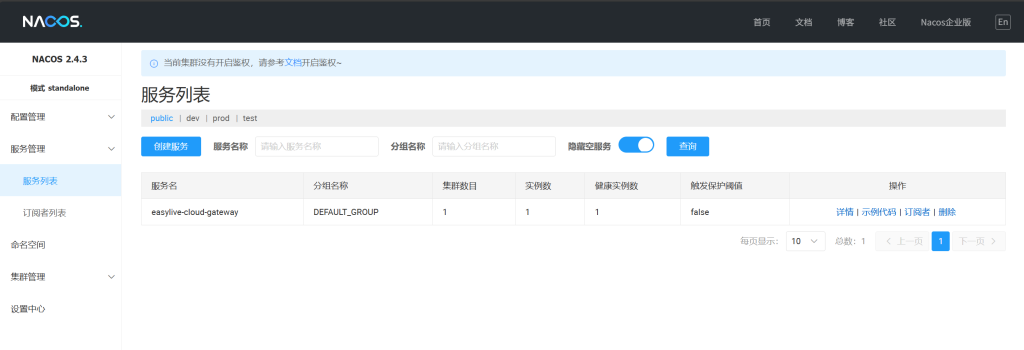
3.nacos实例
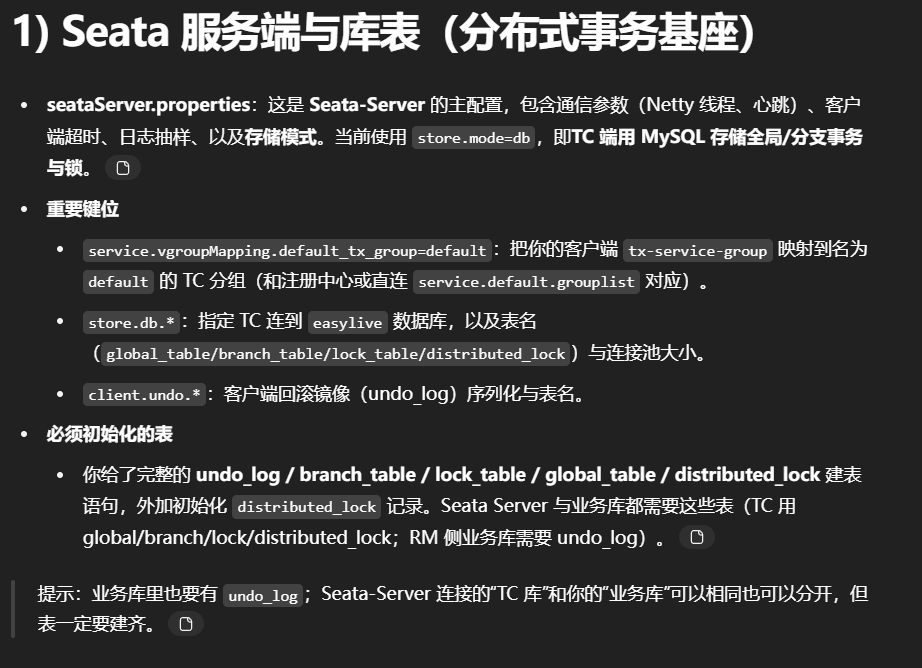
1.seata配置文件
seataServer.properties
1 2 3 4 5 6 7 8 9 10 11 12 13 14 15 16 17 18 19 20 21 22 23 24 25 26 27 28 29 30 31 32 33 34 35 36 37 38 39 40 41 42 43 44 45 46 47 48 49 50 51 52 53 54 55 56 57 58 59 60 61 62 63 64 65 66 67 68 69 70 71 72 73 74 75 76 77 78 79 80 81 82 83 84 85 86 87 88 89 90 91 92 93 94 95 96 97 98 99 100 101 102 103 104 105 106 107 108 109 110 111 112 113 transport.type =TCPtransport.server =NIOtransport.heartbeat =true transport.enableTmClientBatchSendRequest =false transport.enableRmClientBatchSendRequest =true transport.enableTcServerBatchSendResponse =false transport.rpcRmRequestTimeout =30000 transport.rpcTmRequestTimeout =30000 transport.rpcTcRequestTimeout =30000 transport.threadFactory.bossThreadPrefix =NettyBosstransport.threadFactory.workerThreadPrefix =NettyServerNIOWorkertransport.threadFactory.serverExecutorThreadPrefix =NettyServerBizHandlertransport.threadFactory.shareBossWorker =false transport.threadFactory.clientSelectorThreadPrefix =NettyClientSelectortransport.threadFactory.clientSelectorThreadSize =1 transport.threadFactory.clientWorkerThreadPrefix =NettyClientWorkerThreadtransport.threadFactory.bossThreadSize =1 transport.threadFactory.workerThreadSize =defaulttransport.shutdown.wait =3 transport.serialization =seatatransport.compressor =noneservice.vgroupMapping.default_tx_group =defaultservice.default.grouplist =127.0 .0.1 :8091 service.enableDegrade =false service.disableGlobalTransaction =false client.rm.asyncCommitBufferLimit =10000 client.rm.lock.retryInterval =10 client.rm.lock.retryTimes =30 client.rm.lock.retryPolicyBranchRollbackOnConflict =true client.rm.reportRetryCount =5 client.rm.tableMetaCheckEnable =true client.rm.tableMetaCheckerInterval =60000 client.rm.sqlParserType =druidclient.rm.reportSuccessEnable =false client.rm.sagaBranchRegisterEnable =false client.rm.sagaJsonParser =fastjsonclient.rm.tccActionInterceptorOrder =-2147482648 client.tm.commitRetryCount =5 client.tm.rollbackRetryCount =5 client.tm.defaultGlobalTransactionTimeout =60000 client.tm.degradeCheck =false client.tm.degradeCheckAllowTimes =10 client.tm.degradeCheckPeriod =2000 client.tm.interceptorOrder =-2147482648 client.undo.dataValidation =true client.undo.logSerialization =jacksonclient.undo.onlyCareUpdateColumns =true server.undo.logSaveDays =7 server.undo.logDeletePeriod =86400000 client.undo.logTable =undo_logclient.undo.compress.enable =true client.undo.compress.type =zipclient.undo.compress.threshold =64 ktcc.fence.logTableName =tcc_fence_logtcc.fence.cleanPeriod =1 hlog.exceptionRate =100 store.mode =dbstore.lock.mode =dbstore.session.mode =dbstore.db.datasource =druidstore.db.dbType =mysqlstore.db.driverClassName =com.mysql.cj.jdbc.Driverstore.db.url =jdbc:mysql://127.0 .0.1 :3306 /easylive?useSSL=false &&serverTimezone=GMT%2 B8&useInformationSchema=true store.db.user =rootstore.db.password =rootstore.db.minConn =5 store.db.maxConn =30 store.db.globalTable =global_tablestore.db.branchTable =branch_tablestore.db.distributedLockTable =distributed_lockstore.db.queryLimit =100 store.db.lockTable =lock_tablestore.db.maxWait =5000 server.recovery.committingRetryPeriod =1000 server.recovery.asynCommittingRetryPeriod =1000 server.recovery.rollbackingRetryPeriod =1000 server.recovery.timeoutRetryPeriod =1000 server.maxCommitRetryTimeout =-1 server.maxRollbackRetryTimeout =-1 server.rollbackRetryTimeoutUnlockEnable =false server.distributedLockExpireTime =10000 server.xaerNotaRetryTimeout =60000 server.session.branchAsyncQueueSize =5000 server.session.enableBranchAsyncRemove =false server.enableParallelRequestHandle =false metrics.enabled =false metrics.registryType =compactmetrics.exporterList =prometheusmetrics.exporterPrometheusPort =9898
新建seata日志表
1
2
3
4
5
6
7
8
9
10
11
12
13
14
15
16
17
18
19
20
21
22
23
24
25
26
27
28
29
30
31
32
33
34
35
36
37
38
39
40
41
42
43
44
45
46
47
48
49
50
51
52
53
54
55
56
57
58
59
60
61
62
63
64
65
66
67
68
69
70
71
72
73
74
75
76
77
78
79
CREATE TABLE `undo_log` ( `id` bigint(20 ) NOT NULL AUTO_INCREMENT, `branch_id` bigint(20 ) NOT NULL, `xid` varchar(100 ) NOT NULL, `context` varchar(128 ) NOT NULL, `rollback_info` longblob NOT NULL, `log_status` int(11 ) NOT NULL, `log_created` datetime NOT NULL, `log_modified` datetime NOT NULL, `ext` varchar(100 ) DEFAULT NULL, PRIMARY KEY (`id`), UNIQUE KEY `ux_undo_log` (`xid`,`branch_id`) ) ENGINE=InnoDB AUTO_INCREMENT=1 DEFAULT CHARSET=utf8 CREATE TABLE `branch_table` ( `branch_id` bigint(20 ) NOT NULL, `xid` varchar(128 ) NOT NULL, `transaction_id` bigint(20 ) DEFAULT NULL, `resource_group_id` varchar(32 ) DEFAULT NULL, `resource_id` varchar(256 ) DEFAULT NULL, `branch_type` varchar(8 ) DEFAULT NULL, `status` tinyint(4 ) DEFAULT NULL, `client_id` varchar(64 ) DEFAULT NULL, `application_data` varchar(2000 ) DEFAULT NULL, `gmt_create` datetime(6 ) DEFAULT NULL, `gmt_modified` datetime(6 ) DEFAULT NULL, PRIMARY KEY (`branch_id`), KEY `idx_xid` (`xid`) ) ENGINE=InnoDB DEFAULT CHARSET=utf8mb4 CREATE TABLE `lock_table` ( `row_key` varchar(128 ) NOT NULL, `xid` varchar(128 ) DEFAULT NULL, `transaction_id` bigint(20 ) DEFAULT NULL, `branch_id` bigint(20 ) NOT NULL, `resource_id` varchar(256 ) DEFAULT NULL, `table_name` varchar(32 ) DEFAULT NULL, `pk` varchar(36 ) DEFAULT NULL, `status` tinyint(4) NOT NULL DEFAULT '0' COMMENT '0:locked ,1: rollbacking', `gmt_create` datetime DEFAULT NULL, `gmt_modified` datetime DEFAULT NULL, PRIMARY KEY (`row_key`), KEY `idx_status` (`status`), KEY `idx_branch_id` (`branch_id`), KEY `idx_xid` (`xid`) ) ENGINE=InnoDB DEFAULT CHARSET=utf8mb4 CREATE TABLE IF NOT EXISTS `global_table` ( `xid` VARCHAR(128 ) NOT NULL, `transaction_id` BIGINT, `status` TINYINT NOT NULL, `application_id` VARCHAR(32 ), `transaction_service_group` VARCHAR(32 ), `transaction_name` VARCHAR(128 ), `timeout` INT, `begin_time` BIGINT, `application_data` VARCHAR(2000 ), `gmt_create` DATETIME, `gmt_modified` DATETIME, PRIMARY KEY (`xid`), KEY `idx_status_gmt_modified` (`status` , `gmt_modified`), KEY `idx_transaction_id` (`transaction_id`) ) ENGINE = InnoDB DEFAULT CHARSET = utf8mb4 CREATE TABLE IF NOT EXISTS `distributed_lock` ( `lock_key` CHAR(20 ) NOT NULL, `lock_value` VARCHAR(20 ) NOT NULL, `expire` BIGINT, primary key (`lock_key`) ) ENGINE = InnoDB DEFAULT CHARSET = utf8mb4 INSERT INTO `distributed_lock` (lock_key, lock_value, expire) VALUES ('AsyncCommitting', ' ', 0 ) INSERT INTO `distributed_lock` (lock_key, lock_value, expire) VALUES ('RetryCommitting', ' ', 0 ) INSERT INTO `distributed_lock` (lock_key, lock_value, expire) VALUES ('RetryRollbacking', ' ', 0 ) INSERT INTO `distributed_lock` (lock_key, lock_value, expire) VALUES ('TxTimeoutCheck', ' ', 0 )
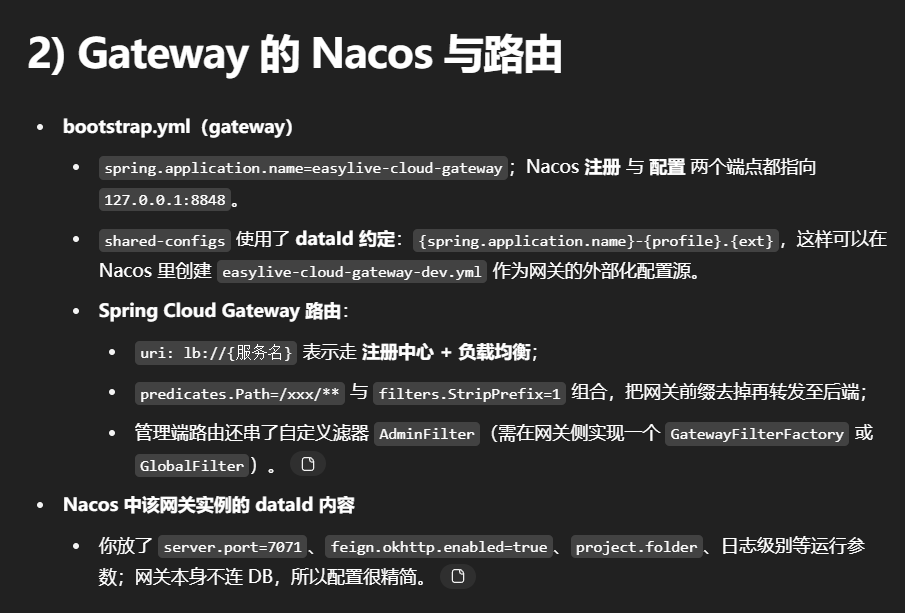
2.在gateway的resources中创建bootstrap.yml并配置nacos实例并配置
bootstrap.yml
1
2
3
4
5
6
7
8
9
10
11
12
13
14
15
16
17
18
19
20
21
22
23
24
25
26
27
28
29
30
31
32
33
34
35
36
37
38
39
40
41
42
43
44
45
46
47
48
49
50
51
52
spring : profiles : active : dev application : name : easylive-cloud-gateway cloud : nacos : discovery : server-addr : 127.0.0.1:8848 config : server-addr : 127.0.0.1:8848 file-extension : yml shared-configs : - ${spring.application.name}-${spring.profiles.active}.${spring.cloud.nacos.config.file-extension} gateway : routes : - id: video uri : lb://easylive-cloud-web predicates : - Path=/web/** filters : - StripPrefix=1 - id: interact uri : lb://easylive-cloud-interact predicates : - Path=/interact/** filters : - StripPrefix=1 - id: user uri : lb://easylive-cloud-ucenter predicates : - Path=/user/** filters : - StripPrefix=1 - id: resource uri : lb://easylive-cloud-resource predicates : - Path=/file/** filters : - StripPrefix=1 - id: admin uri : lb://easylive-cloud-admin predicates : - Path=/admin/** filters : - StripPrefix=1 - AdminFilter
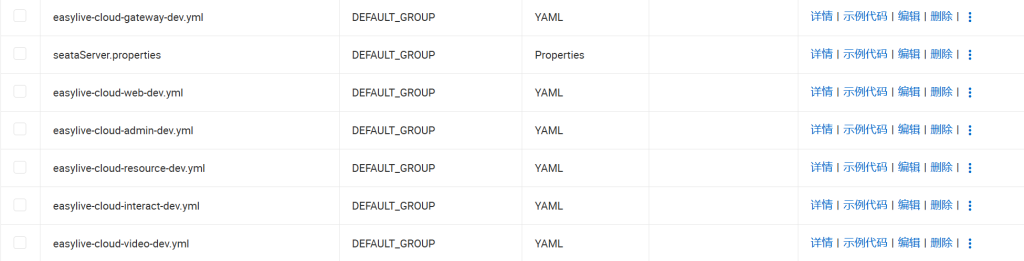
在nacos创建实例并配置
1
2
3
4
5
6
7
8
9
10
11
feign: okhttp: enabled: true server: port: 7071 project: folder: d:/webser/easylive log: root: level: debug
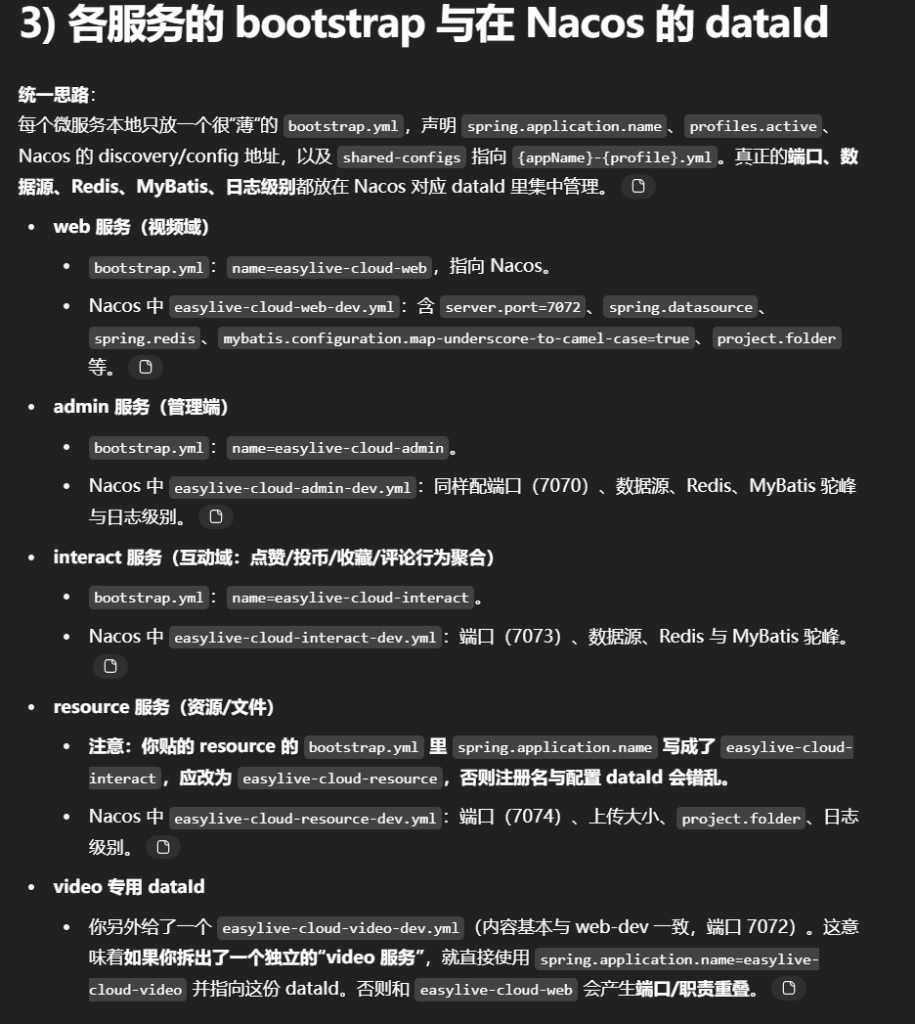
3.在web的resources中创建bootstrap.yml并配置nacos实例并配置
bootstrap.yml中
1
2
3
4
5
6
7
8
9
10
11
12
13
14
15
16
17
18
19
spring: mvc: throw-exception-if-no-handler-found: true web: resources: add-mappings: false application: name: easylive-cloud-web profiles: active: dev cloud: nacos: discovery: server-addr: 127.0 .0.1 :8848 config: server-addr: 127.0 .0.1 :8848 file-extension: yml shared-configs: - ${spring.application.name}-${spring.profiles.active}.${spring.cloud.nacos.config.file-extension}
在nacos创建实例,并配置
1
2
3
4
5
6
7
8
9
10
11
12
13
14
15
16
17
18
19
20
21
22
23
24
25
26
27
28
29
30
31
32
33
34
35
36
37
38
39
40
41
42
43
server: port: 7072 spring: servlet: multipart: max-file-size: 10 MB max-request-size: 15 MB datasource: url: jdbc:mysql:// 127.0 .0.1 :3306 / easylive? serverTimezone= GMT%2 B8&useUnicode= true &characterEncoding= utf8&autoReconnect= true &allowMultiQueries= true &useSSL= false username: root password: 123456 driver-class-name: com.mysql.cj.jdbc.Driver hikari: pool-name: HikariCPDatasource minimum-idle: 5 idle-timeout: 180000 maximum-pool-size: 10 auto-commit: true max-lifetime: 1800000 connection-timeout: 30000 connection-test-query: SELECT 1 redis: database: 0 host: 127.0 .0.1 port: 6379 jedis: pool: max-active: 20 max-wait: - 1 max-idle: 10 min-idle: 0 timeout: 2000 mybatis: configuration: map-underscore-to-camel-case: true project: folder: d:/ webser/ easylive/ log: root: level: debug
4.在admin的resources中创建bootstrap.yml并配置nacos实例并配置
bootstrap.yml
1
2
3
4
5
6
7
8
9
10
11
12
13
14
spring : application : name : easylive-cloud-admin profiles : active : dev cloud : nacos : discovery : server-addr : 127.0.0.1:8848 config : server-addr : 127.0.0.1:8848 file-extension : yml shared-configs : - ${spring.application.name}-${spring.profiles.active}.${spring.cloud.nacos.config.file-extension}
在nacos创建实例,并配置
1
2
3
4
5
6
7
8
9
10
11
12
13
14
15
16
17
18
19
20
21
22
23
24
25
26
27
28
29
30
31
32
33
34
35
36
37
38
39
40
41
42
43
server: port: 7070 spring: servlet: multipart: max-file-size: 10 MB max-request-size: 15 MB datasource: url: jdbc:mysql:// 127.0 .0.1 :3306 / easylive? serverTimezone= GMT%2 B8&useUnicode= true &characterEncoding= utf8&autoReconnect= true &allowMultiQueries= true &useSSL= false username: root password: 123456 driver-class-name: com.mysql.cj.jdbc.Driver hikari: pool-name: HikariCPDatasource minimum-idle: 5 idle-timeout: 180000 maximum-pool-size: 10 auto-commit: true max-lifetime: 1800000 connection-timeout: 30000 connection-test-query: SELECT 1 redis: database: 0 host: 127.0 .0.1 port: 6379 jedis: pool: max-active: 20 max-wait: - 1 max-idle: 10 min-idle: 0 timeout: 2000 mybatis: configuration: map-underscore-to-camel-case: true project: folder: d:/ webser/ easylive/ log: root: level: debug
5.在interact的resources中创建bootstrap.yml并配置nacos实例并配置
bootstrap.yml
1
2
3
4
5
6
7
8
9
10
11
12
13
14
spring : application : name : easylive-cloud-interact profiles : active : dev cloud : nacos : discovery : server-addr : 127.0.0.1:8848 config : server-addr : 127.0.0.1:8848 file-extension : yml shared-configs : - ${spring.application.name}-${spring.profiles.active}.${spring.cloud.nacos.config.file-extension}
在nacos创建实例,并配置
1
2
3
4
5
6
7
8
9
10
11
12
13
14
15
16
17
18
19
20
21
22
23
24
25
26
27
28
29
30
31
32
33
34
35
36
37
38
39
40
41
server: port: 7073 spring: datasource: url: jdbc:mysql:// 127.0 .0.1 :3306 / easylive? serverTimezone= GMT%2 B8&useUnicode= true &characterEncoding= utf8&autoReconnect= true &allowMultiQueries= true &useSSL= false username: root password: 123456 driver-class-name: com.mysql.cj.jdbc.Driver hikari: pool-name: HikariCPDatasource minimum-idle: 5 idle-timeout: 180000 maximum-pool-size: 10 auto-commit: true max-lifetime: 1800000 connection-timeout: 30000 connection-test-query: SELECT 1 redis: database: 0 host: 127.0 .0.1 port: 6379 jedis: pool: max-active: 20 max-wait: - 1 max-idle: 10 min-idle: 0 timeout: 2000 mybatis: configuration: map-underscore-to-camel-case: true project: folder: d:/ webser/ easylive/ log: root: level: debug
6.在resource的resources中创建bootstrap.yml并配置nacos实例并配置
bootstrap.yml
1
2
3
4
5
6
7
8
9
10
11
12
13
14
spring : application : name : easylive-cloud-resource profiles : active : dev cloud : nacos : discovery : server-addr : 127.0.0.1:8848 config : server-addr : 127.0.0.1:8848 file-extension : yml shared-configs : - ${spring.application.name}-${spring.profiles.active}.${spring.cloud.nacos.config.file-extension}
在nacos创建实例,并配置
1
2
3
4
5
6
7
8
9
10
11
12
server: port: 7074 spring: servlet: multipart: max-file-size: 10 MB max-request-size: 15 MB project: folder: d:/ webser/ easylive/ log: root: level: debug
7.创建video的nacos实例easylive-cloud-video-dev.yml
1
2
3
4
5
6
7
8
9
10
11
12
13
14
15
16
17
18
19
20
21
22
23
24
25
26
27
28
29
30
31
32
33
34
35
36
37
38
39
40
41
42
server: port: 7072 spring: servlet: multipart: max-file-size: 10 MB max-request-size: 15 MB datasource: url: jdbc:mysql:// 127.0 .0.1 :3306 / easylive? serverTimezone= GMT%2 B8&useUnicode= true &characterEncoding= utf8&autoReconnect= true &allowMultiQueries= true &useSSL= false username: root password: 123456 driver-class-name: com.mysql.cj.jdbc.Driver hikari: pool-name: HikariCPDatasource minimum-idle: 5 idle-timeout: 180000 maximum-pool-size: 10 auto-commit: true max-lifetime: 1800000 connection-timeout: 30000 connection-test-query: SELECT 1 redis: database: 0 host: 127.0 .0.1 port: 6379 jedis: pool: max-active: 20 max-wait: - 1 max-idle: 10 min-idle: 0 timeout: 2000 mybatis: configuration: map-underscore-to-camel-case: true project: folder: d:/ webser/ easylive/ log: root: level: debug
端到端路由示例(请求如何走)
浏览器请求 GET /web/category/loadAllCategory;
网关匹配到 id: video 路由 → uri: lb://easylive-cloud-web;
StripPrefix=1 去掉 /web,转发到 http://{web实例}/category/loadAllCategory;easylive-cloud-web 在 Nacos 注册发现 ;如果有多实例,则由 LoadBalancer 轮询转发
4.网关gateway配置
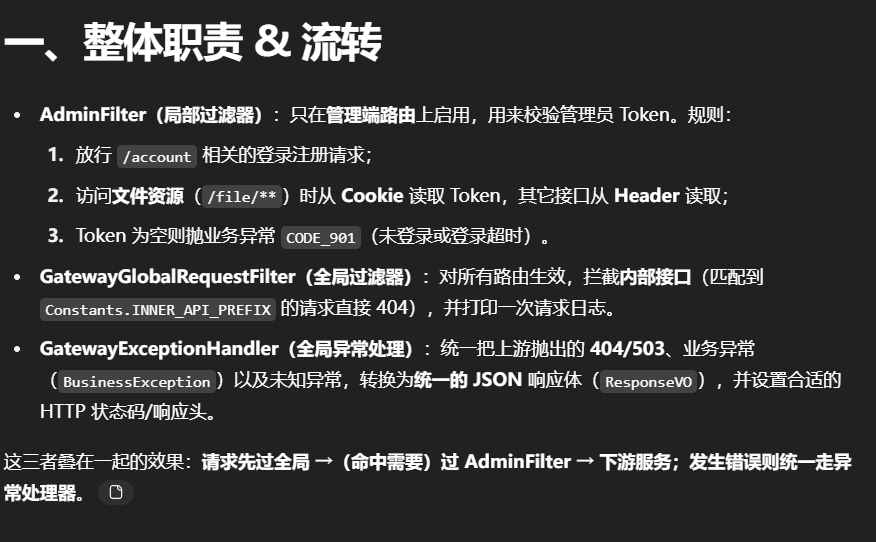
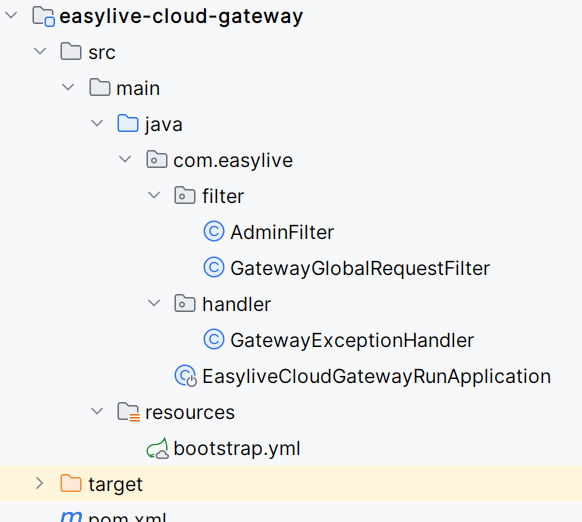
在创建如下结构fliter、handler
AdminFilter —— 只给管理端路由用的局部鉴权
典型用法:在 application.yml 的某条 admin 路由上追加 filters: - AdminFilter。
1
2
3
4
5
6
7
8
9
10
11
12
13
14
15
16
17
18
19
20
21
22
23
24
25
26
27
28
29
30
31
32
33
34
35
36
37
38
39
40
41
42
43
@Component @Slf4j public class AdminFilter extends AbstractGatewayFilterFactory private static final String URL_ACCOUNT = "/account" ; private static final String URL_FILE = "/file" ; @Override public GatewayFilter apply(Object config) { return (exchange, chain) -> { ServerHttpRequest request = exchange.getRequest(); if (request.getURI().getRawPath().contains(URL_ACCOUNT)) { return chain.filter(exchange); } String token = getToken(request); if (request.getURI().getRawPath().contains(URL_FILE)) { token = getTokenFromCookie(request); } if (StringTools.isEmpty(token)) { throw new } return chain.filter(exchange); }; } private String getToken(ServerHttpRequest request) { return request.getHeaders().getFirst(Constants.TOKEN_ADMIN); } private String getTokenFromCookie(ServerHttpRequest request) { return request.getCookies().getFirst(Constants.TOKEN_ADMIN).getValue(); } }
要点/建议
该过滤器只应挂在管理端路由 上,避免误伤普通用户接口。
GatewayGatewayGlobalRequestFilter —— 全局拦截内部接口 & 打日志
1
2
3
4
5
6
7
8
9
10
11
12
13
14
15
16
17
18
19
20
21
22
23
24
25
@Component @Slf4j public class GatewayGlobalRequestFilter implements GlobalFilter Ordered @Override public Mono<Void > filter(ServerWebExchange exchange, GatewayFilterChain chain) { String rawpath = exchange.getRequest().getURI().getRawPath(); if (rawpath.indexOf(Constants.INNER_API_PREFIX) != -1 ) { throw new } log.info("GatewayGlobalRequestFilter: {}" , rawpath); return chain.filter(exchange); } @Override public int getOrder() { return 0 ; } }
要点
这是全局 过滤器,所有路由都会经过。
用 Ordered 控制执行顺序;一般把“禁止访问内部 API”的检查放尽量靠前
GatewayExceptionHandler —— 统一 JSON 错误响应
1
2
3
4
5
6
7
8
9
10
11
12
13
14
15
16
17
18
19
20
21
22
23
24
25
26
27
28
29
30
31
32
33
34
35
36
37
38
39
40
41
42
43
44
45
46
47
48
49
50
51
52
53
54
55
56
57
58
59
60
61
@Slf4j @Order(-1) @Component public class GatewayExceptionHandler implements WebExceptionHandler { protected static final String STATUC_ERROR = "error" ; @Override public Mono<Void> handle (ServerWebExchange exchange, Throwable throwable) { log.error("网关请求错误 url:{}, 错误信息:" , exchange.getRequest().getPath(), throwable); ResponseVO responseVO = getResponse(exchange, throwable); ServerHttpResponse response = exchange.getResponse(); response.getHeaders().setContentType(MediaType.APPLICATION_JSON); DataBuffer buf = response.bufferFactory() .wrap(JsonUtils.convertObj2Json(responseVO) .getBytes(StandardCharsets.UTF_8)); return response.writeWith(Mono.just(buf)); } private ResponseVO getResponse (ServerWebExchange exchange, Throwable throwable) { ResponseVO vo = new ResponseVO (); vo.setStatus(STATUC_ERROR); if (throwable instanceof ResponseStatusException) { ResponseStatusException ex = (ResponseStatusException) throwable; if (HttpStatus.NOT_FOUND == ex.getStatus()) { vo.setCode(ResponseCodeEnum.CODE_404.getCode()); vo.setInfo(ResponseCodeEnum.CODE_404.getMsg()); return vo; } else if (HttpStatus.SERVICE_UNAVAILABLE == ex.getStatus()) { vo.setCode(ResponseCodeEnum.CODE_503.getCode()); vo.setInfo(ResponseCodeEnum.CODE_503.getMsg()); return vo; } else { vo.setCode(ex.getStatus().value()); vo.setInfo(ResponseCodeEnum.CODE_500.getMsg()); return vo; } } else if (throwable instanceof BusinessException) { BusinessException be = (BusinessException) throwable; vo.setCode(be.getCode()); vo.setInfo(be.getMessage()); return vo; } vo.setCode(ResponseCodeEnum.CODE_500.getCode()); vo.setInfo(ResponseCodeEnum.CODE_500.getMsg()); return vo; } }
要点
统一把各种异常变成前端能识别的统一 JSON ;
@Order(-1) 保证这个异常处理器能尽量早 地接管错误输出;也可以在这里根据异常类型设置 HTTP 状态码 (当前代码只设置了 JSON 内容类型,返回码沿用默认)。
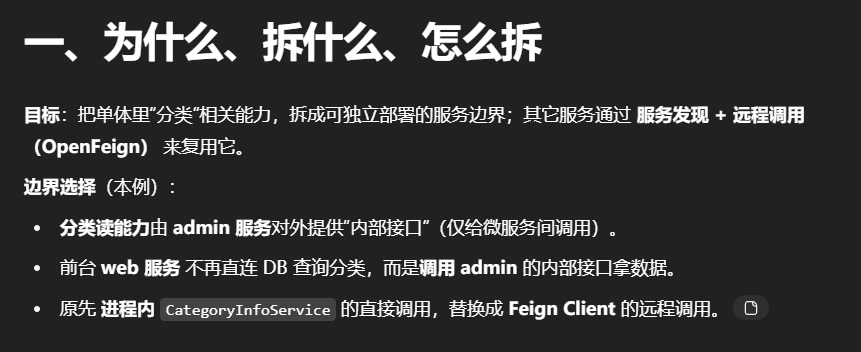
5.分类信息拆分(Openfeign)
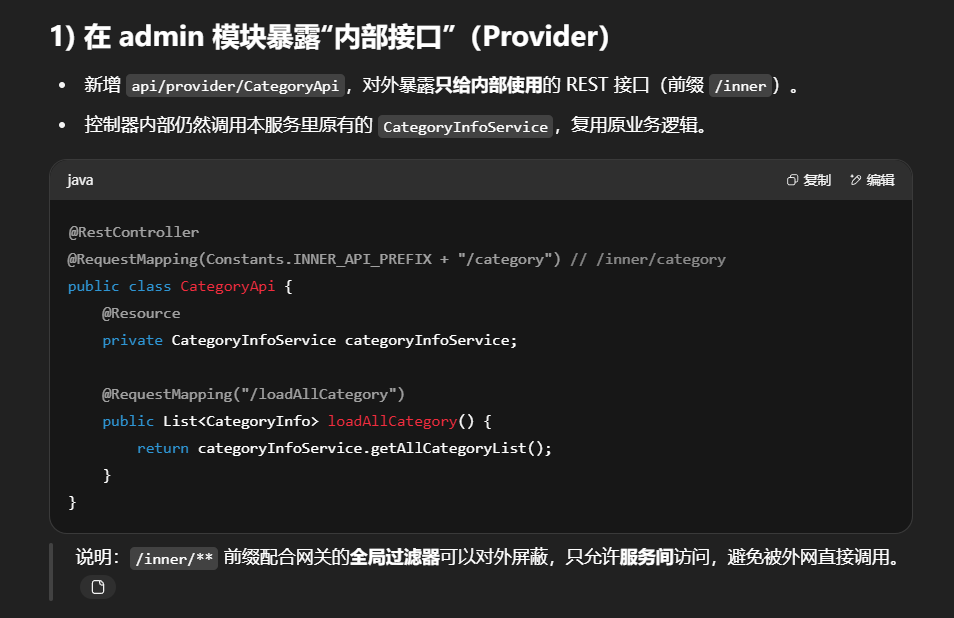
创建目录结构:在admin和web模块下创建api目录里边包含两个目录consumer和provider
admin模块下api-provider-CategoryApi接口
1
2
3
4
5
6
7
8
9
10
11
12
13
14
15
16
17
18
19
20
21
22
23
24
package com.easylive.api.provider;import com.easylive.entity.constants.Constants;import com.easylive.entity.po.CategoryInfo;import com.easylive.service.CategoryInfoService;import org.springframework.web.bind.annotation .RequestMapping;import org.springframework.web.bind.annotation .RestController;import javax.annotation .Resource;import java.util.List;@RestController @RequestMapping(Constants.INNER_API_PREFIX + "/category" ) public class CategoryApi { @Resource private CategoryInfoService categoryInfoService; @RequestMapping("/loadAllCategory" ) public List<CategoryInfo> loadAllCategory() { List<CategoryInfo> categoryInfoList = categoryInfoService.getAllCategoryList(); return categoryInfoList; } }
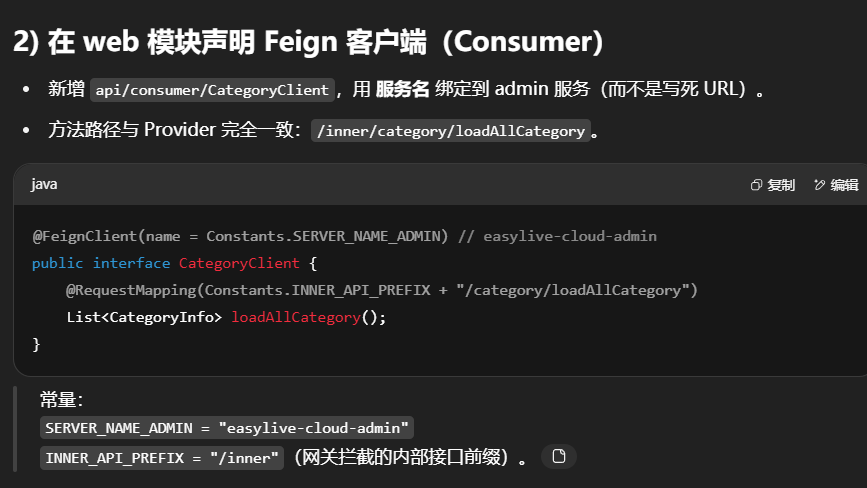
web模块下api-consumer-CategoryClient接口
1
2
3
4
5
6
7
8
9
10
11
12
13
14
package com.easylive.api.consumer;import com.easylive.entity.constants.Constants;import com.easylive.entity.po.CategoryInfo;import org.springframework.cloud.openfeign.FeignClient;import org.springframework.web.bind.annotation.RequestMapping;import java.util.List;@FeignClient(name = Constants.SERVER_NAME_ADMIN) public interface CategoryClient { @RequestMapping(Constants.INNER_API_PREFIX + "/category/loadAllCategory") List<CategoryInfo> loadAllCategory () ; }
其中
1
2
public static final String SERVER_NAME_ADMIN = "easylive-cloud-admin" ;public static final String INNER_API_PREFIX = "/inner" ;
接下来把分类中要用的po、vo、query、service、mapper等信息进行迁移,在此省略不做阐述(为了让 admin 和 web 在 RPC 中传同一种对象 ,需要把 po/vo/query/service 接口/mapper 接口 等通用模型 抽到公共依赖(比如 easylive-cloud-common),两边都依赖它,避免重复拷贝与类型不一致。文档中这一步“迁移细节省略”——实践里一定要做。)
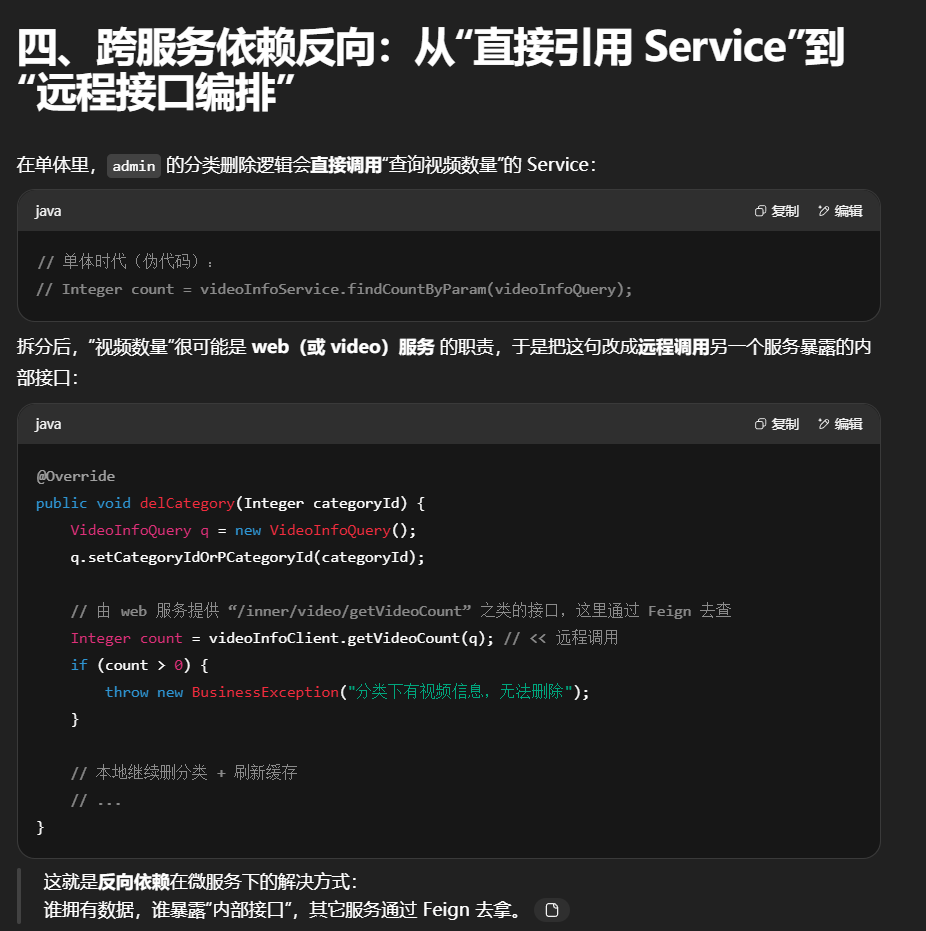
注释掉单服务的部分代码方便后期拓展为微服务
在admin模块下的categoryInfoServiceImpl中
1
2
3
4
5
6
7
8
9
10
11
12
13
14
15
16
17
18
19
@Override public void delCategory (Integer categoryId) { VideoInfoQuery videoInfoQuery = new VideoInfoQuery (); videoInfoQuery.setCategoryIdOrPCategoryId(categoryId); Integer count = videoInfoClient.getVideoCount(videoInfoQuery); if (count > 0 ) { throw new BusinessException ("分类下有视频信息,无法删除" ); } CategoryInfoQuery categoryInfoQuery = new CategoryInfoQuery (); categoryInfoQuery.setCategoryIdOrPCategoryId(categoryId); categoryInfoMapper.deleteByParam(categoryInfoQuery); save2Redis(); }
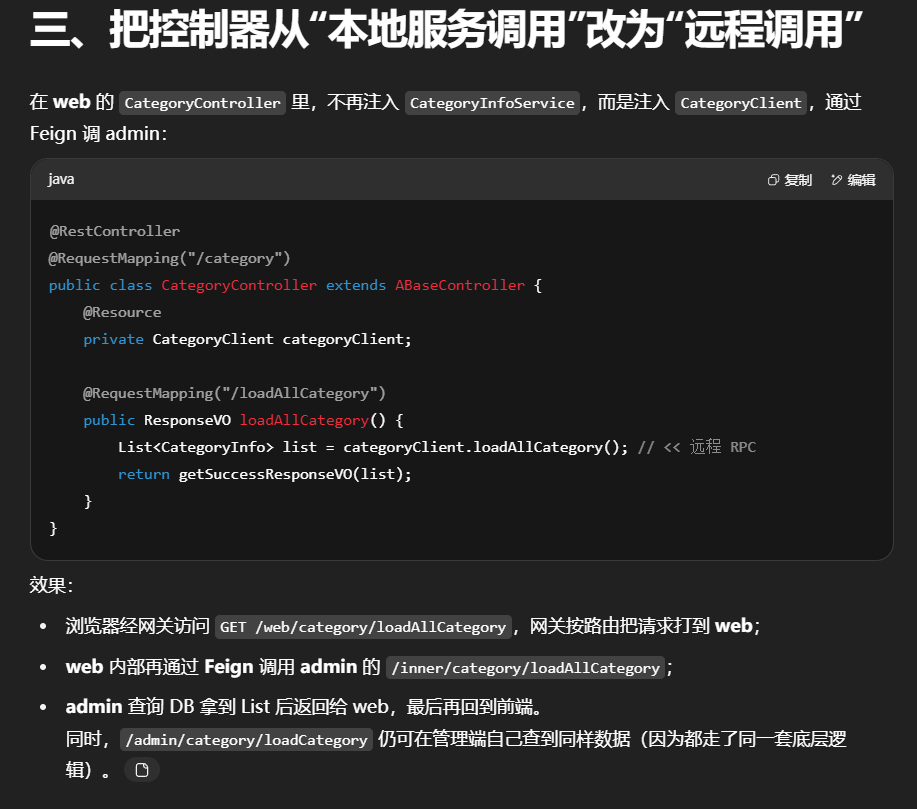
在web模块下的CategoryController
1
2
3
4
5
6
7
8
9
10
11
12
13
14
15
16
17
18
19
import org.springframework.web.bind.annotation.RequestMapping ;import org.springframework.web.bind.annotation.RestController ;import javax.annotation.Resource ;import java.util.List ;@RestController @Validated @RequestMapping ("/category" )public class CategoryController extends ABaseController @Resource private CategoryClient categoryClient; @RequestMapping ("/loadAllCategory" ) public ResponseVO loadAllCategory() { List <CategoryInfo > categoryInfoList = categoryClient.loadAllCategory(); return getSuccessResponseVO(categoryInfoList); }
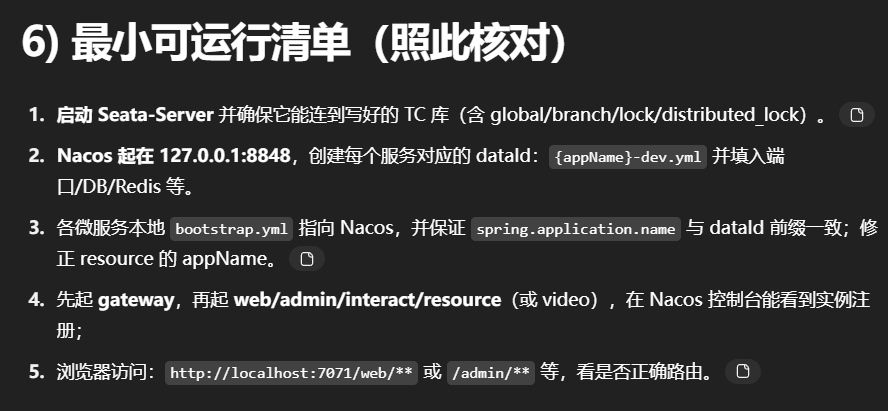
输入localhost:7071/web/category/loadAllCategory,localhost:7071/admin/category/loadCategory都能成功读到分类列表两边数据是一样的
成功通过gateway从7071端口访问到了7072web模块下的内容与7070admin下的内容
小结
Provider 在 admin 暴露 /inner/category/*,Consumer 在 web 通过 Feign 调用,完成“读分类”的跨服务化 ;业务上“删除分类前检查视频数”的进程内依赖 ,改为调用视频服务的内部接口 ;
网关负责路由与保护 ,公共模型抽到 common ,整条链路就从“单体方法调用”变成了“服务发现 + RPC ”的微服务协作。
6.web模块拆分获取首页信息
首先先把首页中要用的po、vo、query、service、mapper等信息进行迁移,在此省略不做阐述
注释掉单服务的部分代码方便后期拓展为微服务
videoInfoServiceImpl
1 2 3 4 5 6 7 8 9 10 11 12 13 14 15 16 17 18 19 20 21 22 23 24 25 26 27 28 29 30 31 32 33 executorService.execute(() -> { VideoInfoFileQuery q = new VideoInfoFileQuery (); q.setVideoId(videoId); List<VideoInfoFile> parts = videoInfoFileMapper.selectList(q); videoInfoFileMapper.deleteByParam(q); VideoInfoFilePostQuery pq = new VideoInfoFilePostQuery (); pq.setVideoId(videoId); videoInfoFilePostMapper.deleteByParam(pq); for (VideoInfoFile p : parts) { try { FileUtils.deleteDirectory(new File (appConfig.getProjectFolder() + p.getFilePath())); } catch (IOException e) { log.error("删除文件失败,文件路径: {}" , p.getFilePath(), e); } } });
VideoController中
1 2 3 4 5 6 7 8 9 10 11 12 13 14 15 16 17 18 19 20 21 22 23 24 25 26 27 28 29 30 31 32 @RequestMapping("/getVideoInfo") public ResponseVO getVideoInfo (@NotEmpty String videoId) { VideoInfo videoInfo = videoInfoService.getVideoInfoByVideoId(videoId); if (null == videoInfo) { throw new BusinessException (ResponseCodeEnum.CODE_404); } TokenUserInfoDto userInfoDto = getTokenUserInfoDto(); List<UserAction> userActionList = new ArrayList <>(); if (userInfoDto != null ) { UserActionQuery actionQuery = new UserActionQuery (); actionQuery.setVideoId(videoId); actionQuery.setUserId(userInfoDto.getUserId()); actionQuery.setActionTypeArray(new Integer []{UserActionTypeEnum.VIDEO_LIKE.getType(), UserActionTypeEnum.VIDEO_COLLECT.getType(), UserActionTypeEnum.VIDEO_COIN.getType(),}); } VideoInfoResultVo resultVo = new VideoInfoResultVo (videoInfo,userActionList); return getSuccessResponseVO(resultVo); }
变动解析:
注意 :为了让 userActionService 变成可以调用的微服务接口,通常会使用 OpenFeign 来进行远程服务调用,这就要求互动模块暴露相应的 API 接口,供视频模块消费。
7.resource模块中调用资源服务获取文件信息
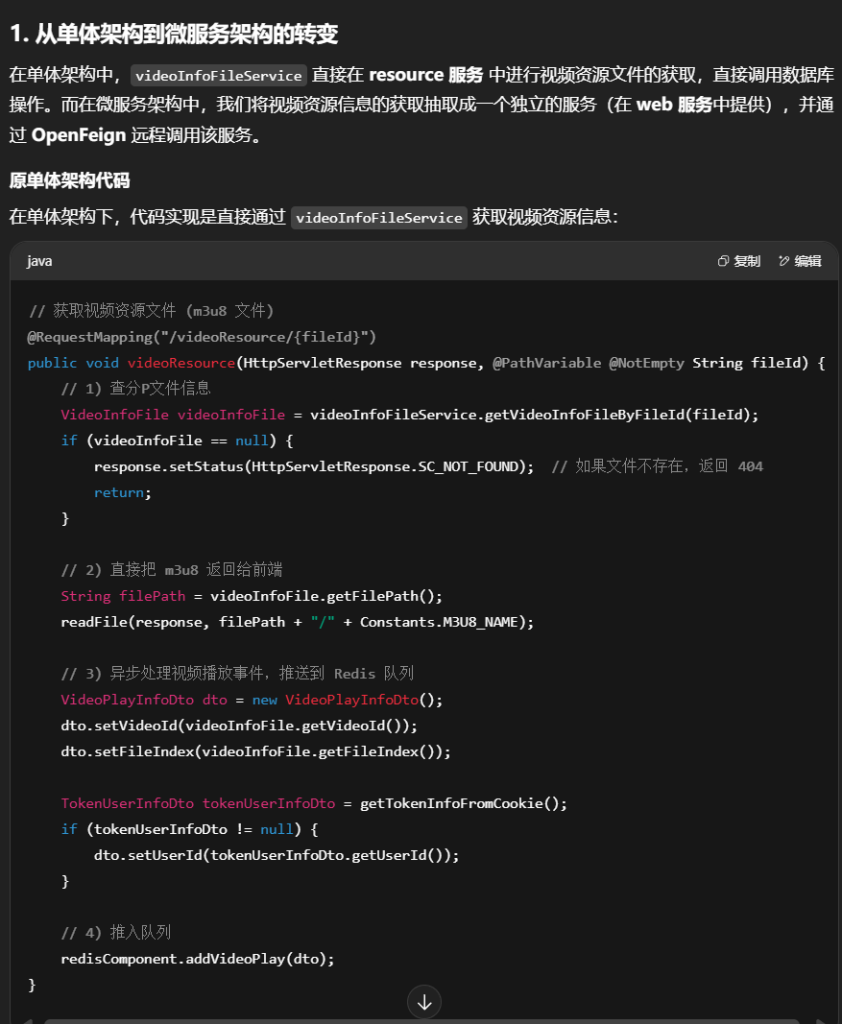
resource模块 从单体架构拆分为微服务架构的过程主要体现在如何将 视频资源的获取 (如视频文件和文件片段的处理)从原来在同一个应用中完成,拆分到微服务中,并通过 OpenFeign 来调用其他服务获取数据。
首先先把首页中要用的po、vo、query、service、mapper等信息进行迁移,在此省略不做阐述
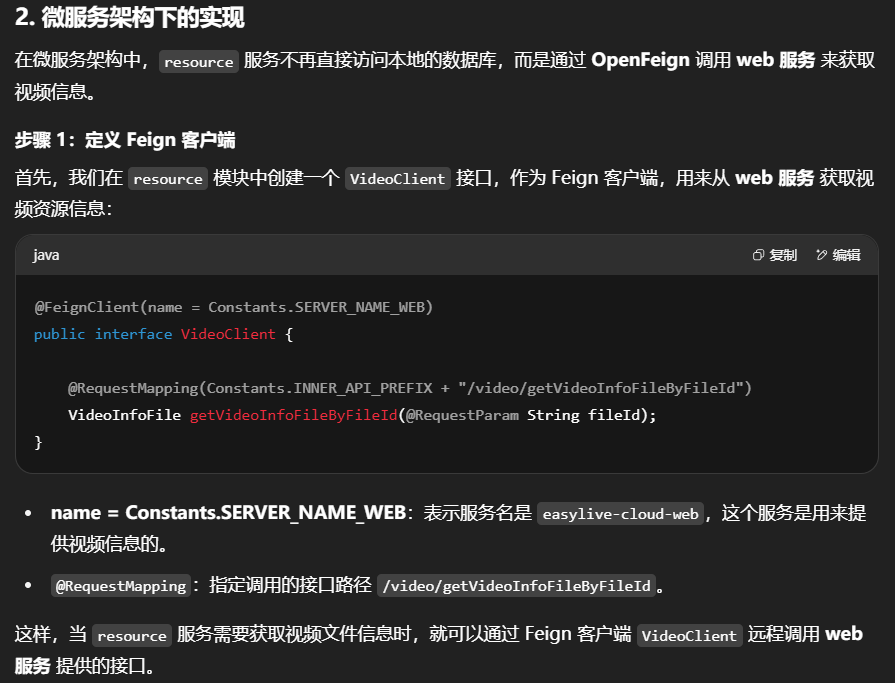
在resource模块下创建api-consumer-VideoClient
1
2
3
4
5
6
@FeignClient (name = Constants.SERVER_NAME_WEB)public interface VideoClient { @RequestMapping (Constants.INNER_API_PREFIX + "/video/getVideoInfoFileByFileId" ) VideoInfoFile getVideoInfoFileByFileId (@RequestParam String fileId); }
在web模块下provider-VideoInfoApi
1
2
3
4
5
6
7
8
9
10
11
12
13
14
15
16
17
18
19
@RestController @RequestMapping(Constants.INNER_API_PREFIX + "/video" ) @Validated public class VideoInfoApi { @Resource private VideoInfoService videoInfoService; @Resource private VideoInfoFileService videoInfoFileService; @RequestMapping("/getVideoInfoFileByFileId" ) public VideoInfoFile getVideoInfoFileByFileId(@NotEmpty String fileId) { VideoInfoFile videoInfoFile = videoInfoFileService.getVideoInfoFileByFileId(fileId); return videoInfoFile; } }
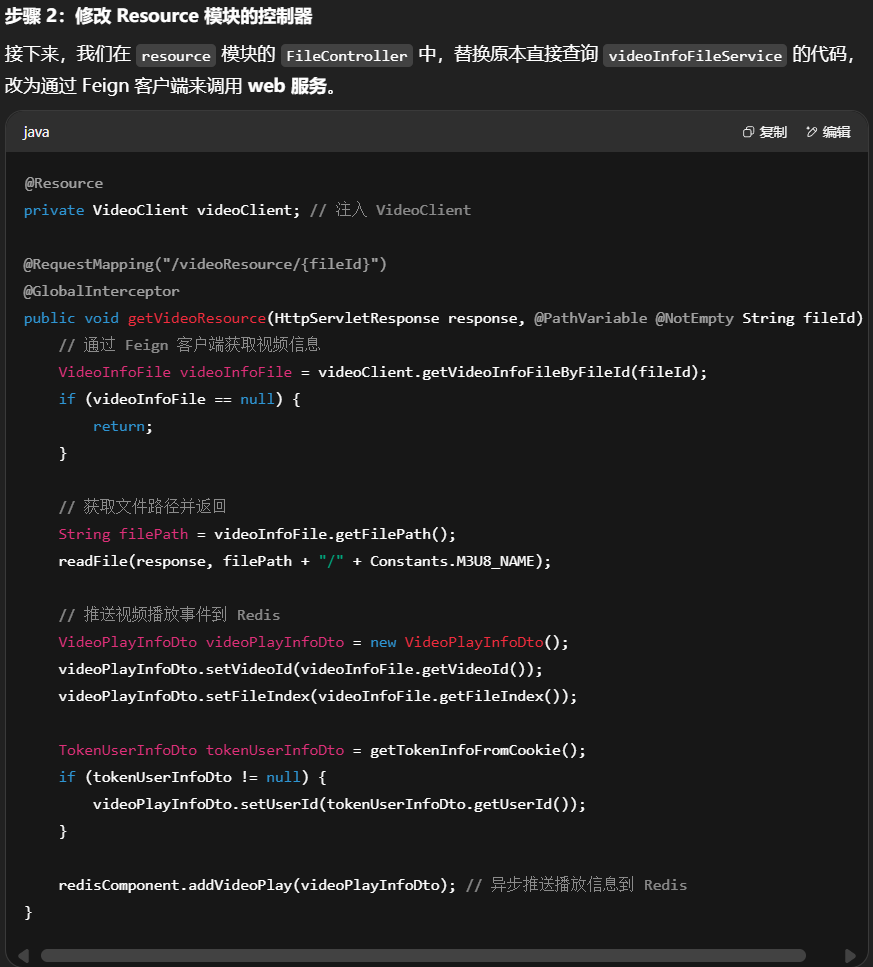
在resource模块下的FileController
注释掉单服务的部分代码方便后期拓展为微服务
1
2
3
4
5
6
7
8
9
10
11
12
13
14
15
16
17
18
19
20
21
22
23
24
25
26
27
28
29
30
31
32
33
34
35
36
37
38
39
40
41
42
43
44
45
46
47
48
49
50
51
52
53
54
55
56
57
58
59
60
61
62
63
64
65
66
67
68
69
70
71
72
73
74
75
76
77
78
79
80
81
82
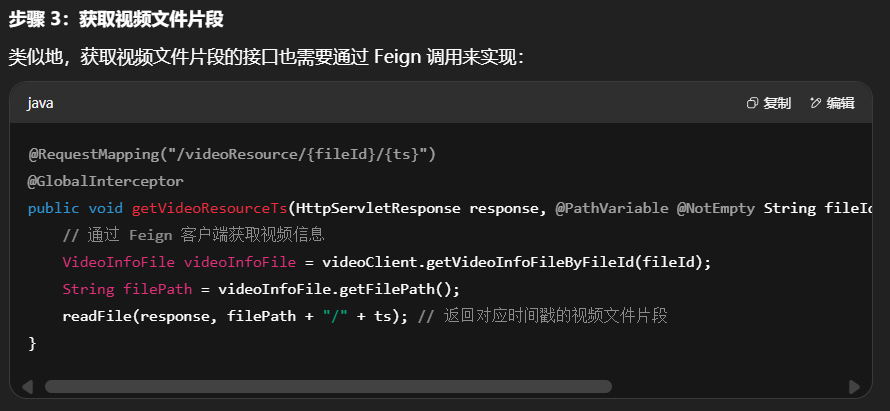
@Resource private VideoClient videoClient; @RequestMapping ("/videoResource/{fileId}" ) @GlobalInterceptor public void getVideoResource (HttpServletResponse response, @PathVariable @NotEmpty String fileId VideoInfoFile videoInfoFile = videoClient.getVideoInfoFileByFileId (fileId); if (videoInfoFile == null ) { return ; } String filePath = videoInfoFile.getFilePath (); readFile (response, filePath + "/" + Constants .M3U8_NAME ); VideoPlayInfoDto videoPlayInfoDto = new VideoPlayInfoDto (); videoPlayInfoDto.setVideoId (videoInfoFile.getVideoId ()); videoPlayInfoDto.setFileIndex (videoInfoFile.getFileIndex ()); TokenUserInfoDto tokenUserInfoDto = getTokenInfoFromCookie (); if (tokenUserInfoDto != null ) { videoPlayInfoDto.setUserId (tokenUserInfoDto.getUserId ()); } redisComponent.addVideoPlay (videoPlayInfoDto); } @RequestMapping ("/videoResource/{fileId}/{ts}" ) @GlobalInterceptor public void getVideoResourceTs (HttpServletResponse response, @PathVariable @NotEmpty String fileId, @PathVariable @NotNull String ts VideoInfoFile videoInfoFile = videoClient.getVideoInfoFileByFileId (fileId); String filePath = videoInfoFile.getFilePath () + "" ; readFile (response, filePath + "/" + ts); }
这段代码做了以下几件事:
查询视频文件信息 :根据 fileId 查找对应的视频文件信息(包括文件路径、视频ID等)。返回视频资源 :返回 m3u8 格式的文件内容。异步处理播放事件 :将视频播放信息推送到 Redis 队列,以便后续处理(例如统计、推荐等)。
问题 :
这个代码处理逻辑是单体架构 中,videoInfoFileService 和资源服务都在一个进程中。当拆分为微服务架构时,videoInfoFileService 被拆到了 web 服务 中,resource 服务需要通过远程调用来获取视频信息。
总结与改动点 改动点 :
远程调用 :从直接调用 videoInfoFileService,改为通过 VideoClient(Feign)调用 web 服务 。控制器调整 :原本在 resource 服务中处理的视频资源文件获取逻辑 ,改成了通过 Feign 调用其他服务(web)来获取数据。解耦 :服务之间通过 API 进行通信,避免了单体架构下的“强耦合”。扩展性 :当业务拆分为多个微服务后,每个模块都可以独立扩展,符合微服务架构的职责单一化 。
好处 :
模块解耦 :将视频相关操作从 resource 服务中拆分,resource 服务只负责文件资源相关的逻辑,而视频信息的处理交给 web 服务 ,提高了服务的内聚性与职责单一性。可扩展性 :如果以后需要对视频模块的功能进行扩展或优化,可以独立修改 web 服务 ,不影响其他模块。服务复用 :通过 OpenFeign 实现服务间的调用,避免了重复代码,增强了代码复用性。
8.interact模块调用互动服务
首先先把互动相关要用的po、vo、query、service、mapper等信息进行迁移,在此省略不做阐述
1.在interact模块下api-consumer-VideoClient
1
2
3
4
5
6
7
8
9
10
11
12
13
14
15
16
17
18
19
20
21
22
23
24
25
26
27
28
29
30
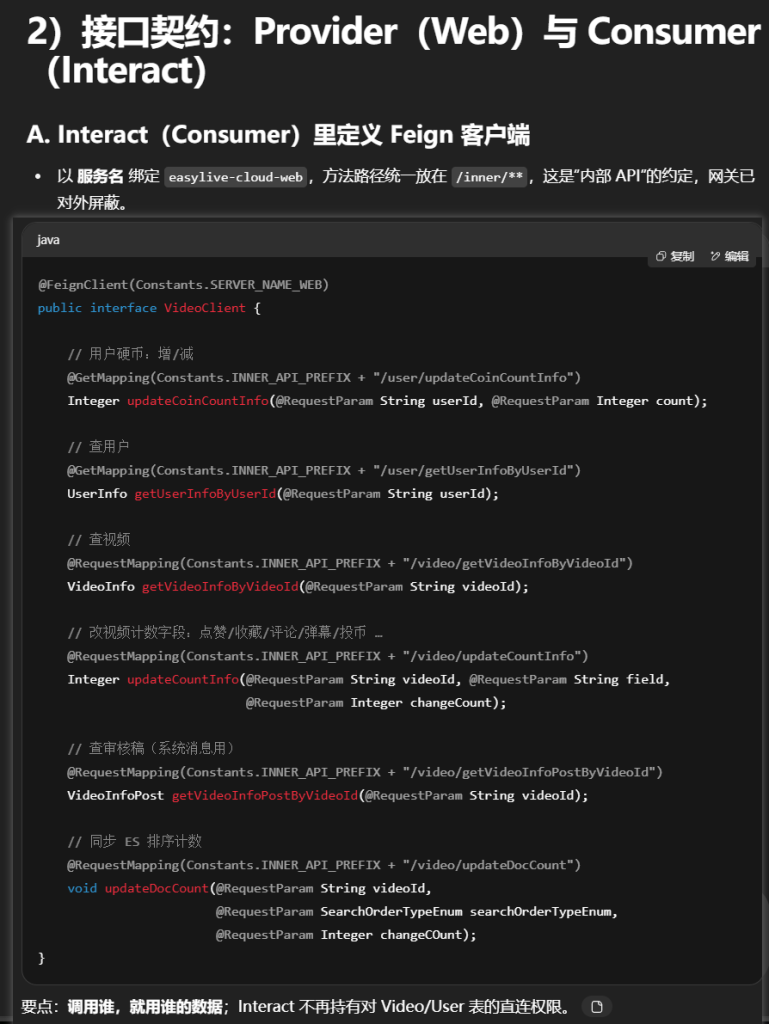
@FeignClient (Constants.SERVER_NAME_WEB)public interface VideoClient { @GetMapping (Constants.INNER_API_PREFIX + "/user/updateCoinCountInfo" ) Integer updateCoinCountInfo (@RequestParam String userId, @RequestParam Integer count); @GetMapping (Constants.INNER_API_PREFIX + "/user/getUserInfoByUserId" ) UserInfo getUserInfoByUserId (@RequestParam String userId); @RequestMapping (Constants.INNER_API_PREFIX + "/video/getVideoInfoByVideoId" ) VideoInfo getVideoInfoByVideoId (@RequestParam String videoId); @RequestMapping (Constants.INNER_API_PREFIX + "/video/updateCountInfo" ) Integer updateCountInfo (@RequestParam String videoId, @RequestParam String field, @RequestParam Integer changeCount); @RequestMapping (Constants.INNER_API_PREFIX + "/video/getVideoInfoPostByVideoId" ) VideoInfoPost getVideoInfoPostByVideoId (@RequestParam String videoId); @RequestMapping (Constants.INNER_API_PREFIX + "/video/updateDocCount" ) void updateDocCount (@RequestParam String videoId, @RequestParam SearchOrderTypeEnum searchOrderTypeEnum, @RequestParam Integer changeCOunt); }
把单体里的本地依赖改成远程依赖(三大核心场景)
场景一:点赞/收藏/投币(UserActionServiceImpl)在UserActionServiceImpl中
事务边界:加了 @GlobalTransactional
领域编排:Interact 判断旧行为、写 user_action 表;需要改视频计数/扣硬币时,让 Web 去做 。
1
2
3
4
5
6
7
8
9
10
11
12
13
14
15
16
17
18
19
20
21
22
23
24
25
26
27
28
29
30
31
32
33
34
35
36
37
38
39
40
41
42
43
44
45
46
47
48
49
50
51
52
53
54
55
56
57
58
59
60
61
62
63
64
65
66
67
68
69
70
71
72
73
74
75
76
77
78
79
80
81
82
83
84
85
86
87
88
89
90
91
92
93
94
95
96
97
98
99
100
101
102
103
104
105
106
107
108
109
110
111
112
113
114
115
116
117
118
119
120
121
122
123
124
125
126
127
128
129
130
131
132
133
134
135
136
137
138
139
140
141
142
143
144
145
146
147
148
149
150
151
152
153
154
155
156
157
158
159
160
161
162
163
164
165
166
167
168
169
170
171
172
173
174
175
176
177
178
179
180
181
182
183
184
185
186
187
188
189
190
191
192
193
194
195
196
197
198
199
200
201
@Resource private VideoClient videoClient; // 单服务版本中 // /** // * 保存用户操作。 // * // * @param bean 用户操作实体 // * @throws BusinessException 业务异常 // */ // @Override // @Transactional(rollbackFor = Exception.class) // public void saveAction(UserAction bean) { // // 获取视频信息,验证视频是否存在 // VideoInfo videoInfo = videoInfoMapper.selectByVideoId(bean.getVideoId() ); // if (videoInfo == null) { // throw new BusinessException(ResponseCodeEnum.CODE_600) ; // 如果视频不存在,抛出异常 // } // bean.set VideoUserId(videoInfo.getUserId() );// 设置视频用户ID // // 获取操作类型枚举 // UserActionTypeEnum actionTypeEnum = UserActionTypeEnum.getByType(bean.getActionType() ); // if (actionTypeEnum == null) { // throw new BusinessException(ResponseCodeEnum.CODE_600) ; // 如果操作类型无效,抛出异常 // } // // 查询是否已有相同的用户行为记录,如果有则删除旧的记录并更新计数器,如果没有则插入新记录并更新计数器。 // UserAction dbAction = userActionMapper.selectByVideoIdAndCommentIdAndActionTypeAndUserId(bean.getVideoId() , bean.getCommentId() , bean.getActionType() , // bean.getUserId() ); // bean.set ActionTime(new Date() ); // 设置操作时间 // // 根据行为类型进行操作(点赞、收藏) // switch (actionTypeEnum) { // // 点赞,收藏 // case VIDEO_LIKE: // case VIDEO_COLLECT: // // 点赞或收藏:如果已经有行为记录,删除记录;如果没有,插入新记录 // if (dbAction != null) { // userActionMapper.deleteByActionId(dbAction.getActionId() );// 删除旧记录 // } else { // userActionMapper.insert(bean) ;// 插入新记录 // } // Integer changeCount = dbAction == null ? 1 : -1;// 增加或减少计数 // videoInfoMapper.updateCountInfo(bean.getVideoId() , actionTypeEnum.getField() , changeCount); // 更新视频统计信息 // if (actionTypeEnum == UserActionTypeEnum.VIDEO_COLLECT) { // // 更新es收藏数量 // esSearchComponent.updateDocCount(videoInfo.getVideoId() , SearchOrderTypeEnum.VIDEO_COLLECT.getField() , changeCount); // } // break; // case VIDEO_COIN: // // 1. 检查UP主是否给自己投币 // if (videoInfo.getUserId() .equals (bean.getUserId() )) { // throw new BusinessException("UP主不能给自己投币") ; // } // // 2. 检查该视频是否已投币 // if (dbAction != null) { // throw new BusinessException("对本稿件的投币枚数已用完") ; // } // // 3. 减少用户的硬币数量 // Integer updateCount = userInfoMapper.updateCoinCountInfo(bean.getUserId() , -bean.getActionCount() ); // if (updateCount == 0) { // throw new BusinessException("币不够") ; // } // // 4. 给视频作者增加硬币 // updateCount = userInfoMapper.updateCoinCountInfo(videoInfo.getUserId() , bean.getActionCount() ); // if (updateCount == 0) { // throw new BusinessException("投币失败") ; // } // // 5. 保存用户的投币行为记录 // userActionMapper.insert(bean) ; // // 6. 更新视频的投币统计 // videoInfoMapper.updateCountInfo(bean.getVideoId() , actionTypeEnum.getField() , bean.getActionCount() ); // break; // // 评论类行为:点赞 / 讨厌 // case COMMENT_LIKE: // case COMMENT_HATE: // // 1) 计算“对立行为类型”(点赞 的对立是 讨厌;讨厌 的对立是 点赞) // UserActionTypeEnum opposeTypeEnum = // (actionTypeEnum == UserActionTypeEnum.COMMENT_LIKE) // ? UserActionTypeEnum.COMMENT_HATE // : UserActionTypeEnum.COMMENT_LIKE; // // 2) 查出“对立行为”是否存在(同一用户、同一视频、同一评论) // UserAction opposeAction = userActionMapper // .selectByVideoIdAndCommentIdAndActionTypeAndUserId ( // bean.getVideoId() , // 视频 // bean.getCommentId() , // 评论 // opposeTypeEnum.getType() , // 对立动作类型 // bean.getUserId() ); // 当前用户 // // 如果“对立行为”存在,先删掉它(保持互斥) // if (opposeAction != null) { // userActionMapper.deleteByActionId(opposeAction.getActionId() ); // } // // 3) 查询“本次动作”是否已存在(用于“二次点击取消”) // dbAction = userActionMapper // .selectByVideoIdAndCommentIdAndActionTypeAndUserId ( // bean.getVideoId() , // bean.getCommentId() , // actionTypeEnum.getType() , // 本次动作类型 // bean.getUserId() ); // if (dbAction != null) { // // 已点过同一动作 -> 本次操作等于“取消”该动作 // userActionMapper.deleteByActionId(dbAction.getActionId() ); // } else { // // 首次点击该动作 -> 插入行为记录 // userActionMapper.insert(bean) ; // } // // 4) 计算计数变化量: // // - 如果是“首次点击”:本动作 +1; // // - 如果是“取消点击”:本动作 -1; // changeCount = (dbAction == null) ? 1 : -1; // // - 若存在“对立行为”,意味着这次从对立动作切换过来, // // 需要把“对立动作计数”做一个相反的变更(+1 的反向是 -1) // Integer opposeChangeCount = changeCount * -1; // // 5) 一次 SQL 同步更新评论上的两个计数字段(本动作字段 + 对立字段) // videoCommentMapper.updateCountInfo( // bean.getCommentId() , // 哪条评论 // actionTypeEnum.getField() , // 本动作对应的计数字段名(like_count / hate_count) // changeCount, // 本动作变更量 // (opposeAction == null) ? null : // 对立字段:只有当“对立行为存在”时才需要回滚 // opposeTypeEnum.getField() , // opposeChangeCount); // 对立字段的反向变更量 // break; // } // } // 微服务版本中 @Override @GlobalTransactional(rollbackFor = Exception.class) public void saveAction(UserAction bean) { // 1) 校验视频存在(向 Web 查) VideoInfo videoInfo = videoClient.getVideoInfoByVideoId(bean.getVideoId() ); if (videoInfo == null) throw new BusinessException(ResponseCodeEnum.CODE_600) ; bean.set VideoUserId(videoInfo.getUserId() ); UserActionTypeEnum type = UserActionTypeEnum.getByType(bean.getActionType() ); UserAction dbAction = userActionMapper.selectByVideoIdAndCommentIdAndActionTypeAndUserId( bean.getVideoId() , bean.getCommentId() , bean.getActionType() , bean.getUserId() ); bean.set ActionTime(new Date() ); switch (type) { // 点赞/收藏:二次点击取消,变更量 ±1;更新视频计数在 Web case VIDEO_LIKE: case VIDEO_COLLECT: if (dbAction != null) userActionMapper.deleteByActionId(dbAction.getActionId() ); else userActionMapper.insert(bean) ; int delta = (dbAction == null) ? 1 : -1; videoClient.updateCountInfo(bean.getVideoId() , type.getField() , delta); if (type == UserActionTypeEnum.VIDEO_LIKE) { // 示例中把 ES 收藏数量也放这里改(按你文档) videoClient.updateDocCount(videoInfo.getVideoId() , SearchOrderTypeEnum.VIDEO_COLLECT, delta); } break; // 评论点赞/讨厌:互斥;同时更新对立计数 case COMMENT_LIKE: case COMMENT_HATE: UserActionTypeEnum oppose = (type == UserActionTypeEnum.COMMENT_LIKE) ? UserActionTypeEnum.COMMENT_HATE : UserActionTypeEnum.COMMENT_LIKE; UserAction opposeAction = userActionMapper.selectByVideoIdAndCommentIdAndActionTypeAndUserId( bean.getVideoId() , bean.getCommentId() , oppose.getType() , bean.getUserId() ); if (opposeAction != null) userActionMapper.deleteByActionId(opposeAction.getActionId() ); if (dbAction != null) userActionMapper.deleteByActionId(dbAction.getActionId() ); else userActionMapper.insert(bean) ; delta = (dbAction == null) ? 1 : -1; Integer opposeDelta = delta * -1; videoCommentMapper.updateCountInfo( bean.getCommentId() , bean.getUserId() , type.getField() , delta, (opposeAction == null) ? null : oppose.getField() , opposeDelta); break; // 投币:扣自己 + 加 UP 主;都由 Web 的用户领域来执行;并更新视频投币计数 case VIDEO_COIN: if (bean.getActionCount() != 1 && bean.getActionCount() != 2) throw new BusinessException(ResponseCodeEnum.CODE_600) ; if (videoInfo.getUserId() .equals (bean.getUserId() )) throw new BusinessException("UP主不能给自己投币") ; if (dbAction != null) throw new BusinessException("对本稿件的投币枚数已用完") ; // 扣自己 Integer r1 = videoClient.updateCoinCountInfo(bean.getUserId() , -bean.getActionCount() ); if (r1 == 0) throw new BusinessException("币不够") ; // 给 UP 主加 Integer r2 = videoClient.updateCoinCountInfo(videoInfo.getUserId() , bean.getActionCount() ); if (r2 == 0) throw new BusinessException("投币失败") ; userActionMapper.insert(bean) ; videoClient.updateCountInfo(bean.getVideoId() , type.getField() , bean.getActionCount() ); break; } }
对比单体:原来这些“扣/加硬币、改视频计数、改 ES”都在同服务内直接操作 —— 现在改为远程调用 Web 来执行,Interact 只保留“行为事实”。
场景二:评论(VideoCommentServiceImpl)
VideoCommentServiceImpl将原本videoInfoMapper调用的方法改为videoClient调用的
发表/删除/置顶评论时,涉及“校验视频状态(是否关闭评论)”“变更视频评论数(一级评论±1)”,都通过 VideoClient 访问 Web;
评论实体的增删改仍在 Interact 自己的库里完成。
1
2
3
4
5
6
7
8
9
10
11
12
13
14
15
16
17
18
19
20
21
22
23
24
25
26
27
28
29
30
31
32
33
34
35
36
37
38
39
40
41
42
43
44
45
46
47
48
49
50
51
52
53
54
55
56
57
58
59
60
61
62
63
64
65
66
67
68
69
70
71
72
73
74
75
76
77
78
79
80
81
82
83
84
85
86
87
88
89
90
91
92
93
94
95
96
97
98
99
100
101
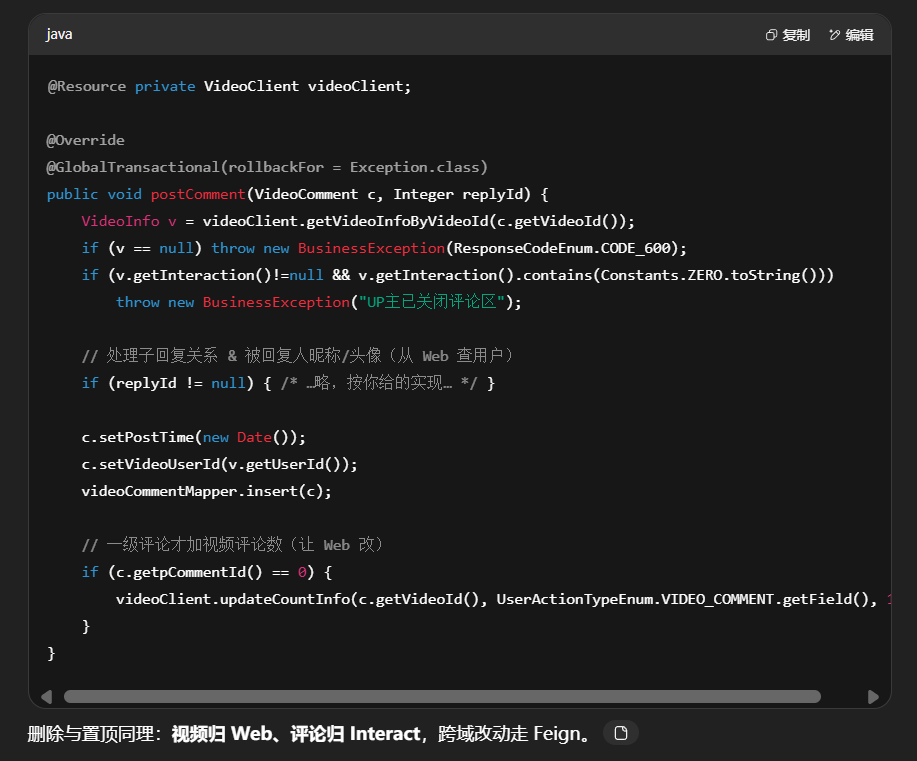
@Resource private VideoClient videoClient; @Override @GlobalTransactional(rollbackFor = Exception.class) public void postComment (VideoComment comment, Integer replyCommentId) { VideoInfo videoInfo = videoClient.getVideoInfoByVideoId(comment.getVideoId()); if (videoInfo == null ) { throw new BusinessException (ResponseCodeEnum.CODE_600); } if (videoInfo.getInteraction() != null && videoInfo.getInteraction().contains(Constants.ZERO.toString())) { throw new BusinessException ("UP主已关闭评论区" ); } if (replyCommentId != null ) { VideoComment replyComment = getVideoCommentByCommentId(replyCommentId); if (replyComment == null || !replyComment.getVideoId().equals(comment.getVideoId())) { throw new BusinessException (ResponseCodeEnum.CODE_600); } if (replyComment.getpCommentId() == 0 ) { comment.setpCommentId(replyComment.getCommentId()); } else { comment.setpCommentId(replyComment.getpCommentId()); comment.setReplyUserId(replyComment.getUserId()); } UserInfo userInfo = videoClient.getUserInfoByUserId(replyComment.getUserId()); comment.setReplyNickName(userInfo.getNickName()); comment.setReplyAvatar(userInfo.getAvatar()); } else { comment.setpCommentId(0 ); } comment.setPostTime(new Date ()); comment.setVideoUserId(videoInfo.getUserId()); this .videoCommentMapper.insert(comment); if (comment.getpCommentId() == 0 ) { this .videoClient.updateCountInfo(comment.getVideoId(), UserActionTypeEnum.VIDEO_COMMENT.getField(), 1 ); } } @Override public void deleteComment (String userId, Integer commentId) { VideoComment comment = videoCommentMapper.selectByCommentId(commentId); if (null == comment) { throw new BusinessException (ResponseCodeEnum.CODE_600); } VideoInfo videoInfo = videoClient.getVideoInfoByVideoId(comment.getVideoId()); if (null == videoInfo) { throw new BusinessException (ResponseCodeEnum.CODE_600); } if (userId != null && !videoInfo.getUserId().equals(userId) && !comment.getUserId().equals(userId)) { throw new BusinessException (ResponseCodeEnum.CODE_600); } videoCommentMapper.deleteByCommentId(commentId); if (comment.getpCommentId() == 0 ) { videoClient.updateCountInfo(videoInfo.getVideoId(), UserActionTypeEnum.VIDEO_COMMENT.getField(), -1 ); VideoCommentQuery videoCommentQuery = new VideoCommentQuery (); videoCommentQuery.setpCommentId(commentId); videoCommentMapper.deleteByParam(videoCommentQuery); } } @Override @GlobalTransactional(rollbackFor = Exception.class) public void topComment (Integer commentId, String userId) { this .cancelTopComment(commentId, userId); VideoComment videoComment = new VideoComment (); videoComment.setTopType(CommentTopTypeEnum.TOP.getType()); videoCommentMapper.updateByCommentId(videoComment, commentId); } @Override public void cancelTopComment (Integer commentId, String userId) { VideoComment dbVideoComment = videoCommentMapper.selectByCommentId(commentId); if (dbVideoComment == null ) { throw new BusinessException (ResponseCodeEnum.CODE_600); } VideoInfo videoInfo = videoClient.getVideoInfoByVideoId(dbVideoComment.getVideoId()); if (videoInfo == null ) { throw new BusinessException (ResponseCodeEnum.CODE_600); } if (!videoInfo.getUserId().equals(userId)) { throw new BusinessException (ResponseCodeEnum.CODE_600); } VideoComment videoComment = new VideoComment (); videoComment.setTopType(CommentTopTypeEnum.NO_TOP.getType()); VideoCommentQuery videoCommentQuery = new VideoCommentQuery (); videoCommentQuery.setVideoId(dbVideoComment.getVideoId()); videoCommentQuery.setTopType(CommentTopTypeEnum.TOP.getType()); videoCommentMapper.updateByParam(videoComment, videoCommentQuery); }
场景三站内消息(UserMessageServiceImpl)
UserMessageServiceImpl将原本videoInfoMapper调用的方法改为videoClient调用的
1
2
3
4
5
6
7
8
9
10
11
12
13
14
15
16
17
18
19
20
21
22
23
24
25
26
27
28
29
30
31
32
33
34
35
36
37
38
39
40
41
42
43
44
45
46
47
48
49
50
51
52
53
54
55
56
@Resource private VideoClient videoClient; @Override @Async public void saveUserMessage (String videoId, String sendUserId, MessageTypeEnum messageTypeEnum, String content, Integer replyCommentId) { VideoInfo videoInfo = this .videoClient.getVideoInfoByVideoId(videoId); if (videoInfo == null ) { return ; } UserMessageExtendDto extendDto = new UserMessageExtendDto (); extendDto.setMessageContent(content); String userId = videoInfo.getUserId(); if (ArrayUtils.contains(new Integer []{MessageTypeEnum.LIKE.getType(), MessageTypeEnum.COLLECTION.getType()}, messageTypeEnum.getType())) { UserMessageQuery userMessageQuery = new UserMessageQuery (); userMessageQuery.setSendUserId(sendUserId); userMessageQuery.setVideoId(videoId); userMessageQuery.setMessageType(messageTypeEnum.getType()); Integer count = userMessageMapper.selectCount(userMessageQuery); if (count > 0 ) { return ; } } UserMessage userMessage = new UserMessage (); userMessage.setUserId(userId); userMessage.setVideoId(videoId); userMessage.setReadType(MessageReadTypeEnum.NO_READ.getType()); userMessage.setCreateTime(new Date ()); userMessage.setMessageType(messageTypeEnum.getType()); userMessage.setSendUserId(sendUserId); if (replyCommentId != null ) { VideoComment commentInfo = videoCommentMapper.selectByCommentId(replyCommentId); if (null != commentInfo) { userId = commentInfo.getUserId(); extendDto.setMessageContentReply(commentInfo.getContent()); } } if (userId.equals(sendUserId)) { return ; } if (MessageTypeEnum.SYS == messageTypeEnum) { VideoInfoPost videoInfoPost = videoClient.getVideoInfoPostByVideoId(videoId); extendDto.setAuditStatus(videoInfoPost.getStatus()); } userMessage.setUserId(userId); userMessage.setExtendJson(JsonUtils.convertObj2Json(extendDto)); this .userMessageMapper.insert(userMessage); }
需要拿“视频作者是谁”“系统审核状态”等信息:一律从 Web 查 (VideoInfo / VideoInfoPost)。收藏/点赞消息做幂等去重
场景四:弹幕(VideoDanmuServiceImpl)
VideoDanmuServiceImpl将原本videoInfoMapper调用的方法改为videoClient调用的
1
2
3
4
5
6
7
8
9
10
11
12
13
14
15
16
17
18
19
20
21
22
23
24
25
26
27
28
29
30
31
32
33
34
35
36
@Resource private VideoClient videoClient; @Override @GlobalTransactional(rollbackFor = Exception.class) public void saveVideoDanmu (VideoDanmu bean) { VideoInfo videoInfo = videoClient.getVideoInfoByVideoId(bean.getVideoId()); if (videoInfo == null ) { throw new BusinessException (ResponseCodeEnum.CODE_600); } if (videoInfo.getInteraction() != null && videoInfo.getInteraction().contains(Constants.ONE.toString())) { throw new BusinessException ("UP主已关闭弹幕" ); } this .videoDanmuMapper.insert(bean); this .videoClient.updateCountInfo(bean.getVideoId(), UserActionTypeEnum.VIDEO_DANMU.getField(), 1 ); videoClient.updateDocCount(bean.getVideoId(), SearchOrderTypeEnum.VIDEO_DANMU, 1 ); } @Override public void deleteDanmu (String userId, Integer danmuId) { VideoDanmu danmu = videoDanmuMapper.selectByDanmuId(danmuId); if (null == danmu) { throw new BusinessException (ResponseCodeEnum.CODE_600); } VideoInfo videoInfo = videoClient.getVideoInfoByVideoId(danmu.getVideoId()); if (null == videoInfo) { throw new BusinessException (ResponseCodeEnum.CODE_600); } if (userId != null && !videoInfo.getUserId().equals(userId)) { throw new BusinessException (ResponseCodeEnum.CODE_600); } videoDanmuMapper.deleteByDanmuId(danmuId); }
2.在web模块下-api-provider
UserInfoApi
1
2
3
4
5
6
7
8
9
10
11
12
13
@Resource private UserInfoService userInfoService; @RequestMapping ("/updateCoinCountInfo" ) public Integer updateCoinCountInfo (@NotEmpty String userId, @NotNull Integer count) { return userInfoService .updateCoinCountInfo (userId, count); } @RequestMapping ("/getUserInfoByUserId" ) public UserInfo getUserInfoByUserId (@NotEmpty String userId) { return userInfoService .getUserInfoByUserId (userId); }
VideoInfoApi
1
2
3
4
5
6
7
8
9
10
11
12
13
14
15
16
17
18
19
20
21
22
23
24
25
26
27
28
29
30
31
32
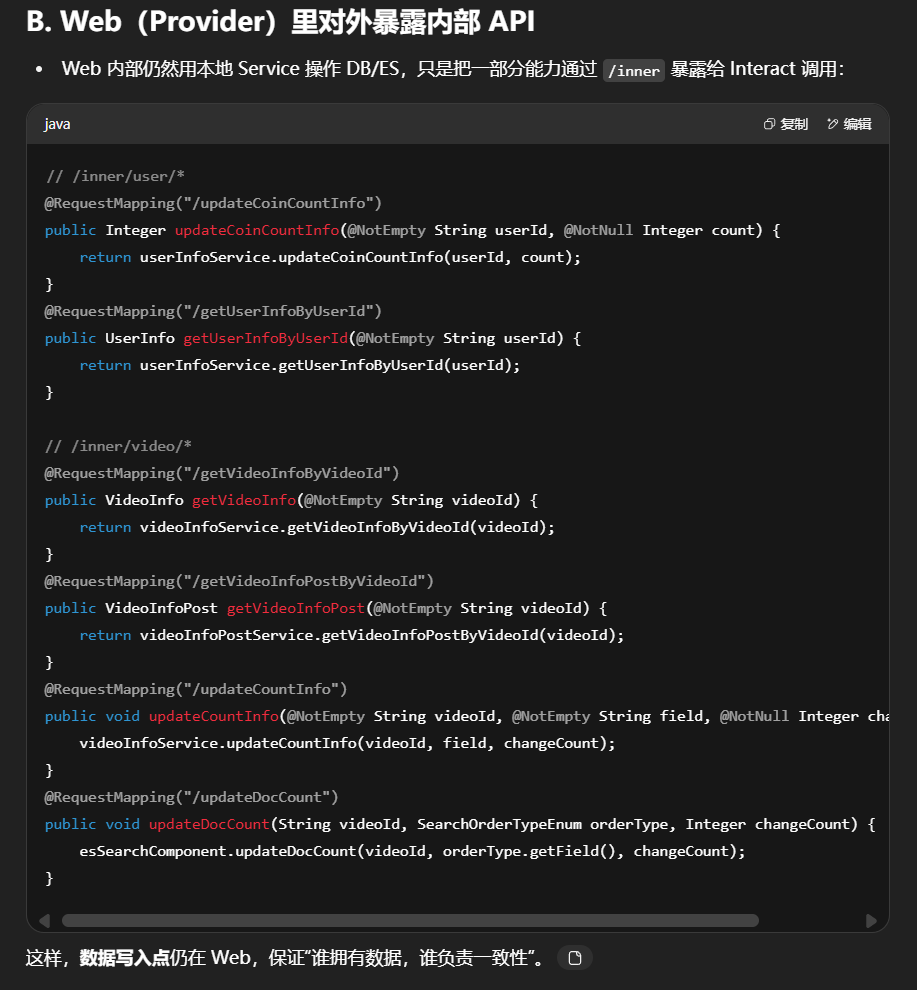
@Resource private VideoInfoService videoInfoService; @Resource private VideoInfoPostService videoInfoPostService; @Resource private VideoInfoFileService videoInfoFileService; @Resource private VideoInfoFilePostService videoInfoFilePostService; @Resource private EsSearchComponent esSearchComponent; @RequestMapping ("/getVideoInfoByVideoId" ) public VideoInfo getVideoInfo (@NotEmpty String videoId) { return videoInfoService .getVideoInfoByVideoId (videoId); } @RequestMapping ("/getVideoInfoPostByVideoId" ) public VideoInfoPost getVideoInfoPost (@NotEmpty String videoId) { return videoInfoPostService .getVideoInfoPostByVideoId (videoId); } @RequestMapping ("/updateCountInfo" ) public void updateCountInfo (@NotEmpty String videoId, @NotEmpty String field, @NotNull Integer changeCount) { videoInfoService .updateCountInfo (videoId, field, changeCount); } @RequestMapping ("/updateDocCount" ) public void updateDocCount (String videoId, SearchOrderTypeEnum searchOrderTypeEnum, Integer changeCOunt) { esSearchComponent .updateDocCount (videoId, searchOrderTypeEnum.getField (), changeCOunt); }
小结
这次拆分的核心是让拥有数据的服务暴露内部接口,行为服务只做编排 :
Interact 自己只持有“行为事实库”(action/comment/danmu/message),
任何“用户/视频侧的状态变更”都让 Web 去做;
通过 Feign + Seata 把一次用户行为变成“跨服务的一致动作”。
9.interact模块互动服务-评论、弹幕
把上报在线人数单独抽取到interact模块下的OnlineController
1
2
3
4
5
6
7
8
9
@Resource private RedisComponent redisComponent; @RequestMapping ("/reportVideoPlayOnline" ) @GlobalInterceptor public ResponseVO reportVideoPlayOnline (@NotEmpty String fileId, String deviceId Integer count = redisComponent.reportVideoPlayOnline (fileId, deviceId); return getSuccessResponseVO (count); }
videoCommentController中将原本videoInfoService调用的方法改为videoClient调用的
1
2
3
4
5
6
7
8
9
10
11
12
13
14
15
16
17
18
19
20
21
22
23
24
25
26
27
28
29
30
31
32
33
34
35
36
37
38
39
40
41
42
43
44
45
46
47
48
49
50
51
52
53
54
55
56
@Resource private VideoClient videoClient; @RequestMapping("/loadComment") @GlobalInterceptor public ResponseVO loadComment (@NotEmpty String videoId, Integer pageNo, Integer orderType) { VideoInfo videoInfo = videoClient.getVideoInfoByVideoId(videoId); if (videoInfo.getInteraction() != null && videoInfo.getInteraction().contains(Constants.ONE.toString())) { return getSuccessResponseVO(new ArrayList <>()); } VideoCommentQuery q = new VideoCommentQuery (); q.setVideoId(videoId); q.setLoadChildren(true ); q.setPageNo(pageNo); q.setPageSize(PageSize.SIZE15.getSize()); q.setpCommentId(0 ); String orderBy = (orderType == null || orderType == 0 ) ? "like_count desc,comment_id desc" : "comment_id desc" ; q.setOrderBy(orderBy); PaginationResultVO<VideoComment> commentData = videoCommentService.findListByPage(q); List<VideoComment> topCommentList = topComment(videoId); if (!topCommentList.isEmpty()) { List<VideoComment> rest = commentData.getList().stream() .filter(x -> !x.getCommentId().equals(topCommentList.get(0 ).getCommentId())) .collect(Collectors.toList()); rest.addAll(0 , topCommentList); commentData.setList(rest); } VideoCommentResultVO vo = new VideoCommentResultVO (); vo.setCommentData(commentData); List<UserAction> userActionList = new ArrayList <>(); TokenUserInfoDto token = getTokenUserInfoDto(); if (token != null ) { UserActionQuery uaq = new UserActionQuery (); uaq.setUserId(token.getUserId()); uaq.setVideoId(videoId); uaq.setActionTypeArray(new Integer []{ UserActionTypeEnum.COMMENT_LIKE.getType(), UserActionTypeEnum.COMMENT_HATE.getType() }); userActionList = userActionService.findListByParam(uaq); } vo.setUserActionList(userActionList); return getSuccessResponseVO(vo); }
变化点:
视频策略来源改变 :从“本地 service”改为“Feign→web”;列表编排仍在本域 :分页、置顶合并、个人态渲染都在 interact。
VideoDanmuController中将原本videoInfoService调用的方法改为videoClient调用的
1
2
3
4
5
6
7
8
9
10
11
12
13
14
15
16
17
18
19
20
@Resource private VideoClient videoClient;@RequestMapping ("/loadDanmu" )@GlobalInterceptor public ResponseVO loadDanmu (@NotEmpty String fileId, @NotEmpty String videoId VideoInfo videoInfo = videoClient.getVideoInfoByVideoId (videoId); if (videoInfo.getInteraction () != null && videoInfo.getInteraction ().contains (Constants .ZERO .toString ())) { return getSuccessResponseVO (new ArrayList <>()); } VideoDanmuQuery q = new VideoDanmuQuery (); q.setFileId (fileId); q.setOrderBy ("danmu_id asc" ); return getSuccessResponseVO (videoDanmuService.findListByParam (q)); }
要点:
关/开弹幕 判定权仍在视频域;interact 只负责按 fileId 取弹幕流并排序输出
调用链怎么走(一次评论/弹幕查询)
10.创作中心
首先先把创作中心相关要用的po、vo、query、service、mapper等信息进行迁移,在此省略不做阐述
将查询所有视频接口从交互模块的UcenterController拆分到web模块的UcenterInteractController中
1
2
3
4
5
6
7
8
9
10
11
12
13
14
15
16
17
18
@RestController @Validated @RequestMapping ("/ucenter" )public class UCenterInteractController extends ABaseController @Resource private VideoInfoPostService videoInfoPostService; @RequestMapping ("/loadAllVideo" ) @GlobalInterceptor (checkLogin = true ) public ResponseVO loadAllVideo() { TokenUserInfoDto tokenUserInfoDto = getTokenUserInfoDto(); VideoInfoPostQuery videoInfoPostQuery = new VideoInfoPostQuery (); videoInfoPostQuery.setUserId(tokenUserInfoDto.getUserId()); videoInfoPostQuery.setOrderBy("create_time desc" ); List <VideoInfoPost > videoInfoPostList = videoInfoPostService.findListByParam(videoInfoPostQuery); return getSuccessResponseVO(videoInfoPostList); }
11.个人中心
把web端中UHomeController中展示用户收藏列表的接口拆分到互动模块的UHomeController
1
2
3
4
5
6
7
8
9
10
11
12
13
14
15
16
17
18
19
20
21
22
@RestController @Validated @RequestMapping ("/uhome" )public class UcHomeController extends ABaseController @Resource private UserActionService userActionService; @RequestMapping ("/loadUserCollection" ) @GlobalInterceptor public ResponseVO loadUserCollection(@NotEmpty String userId, Integer pageNo) { UserActionQuery actionQuery = new UserActionQuery (); actionQuery.setActionType(UserActionTypeEnum .VIDEO_COLLECT .getType()); actionQuery.setUserId(userId); actionQuery.setPageNo(pageNo); actionQuery.setQueryVideoInfo(true ); actionQuery.setOrderBy("action_time desc" ); PaginationResultVO resultVO = userActionService.findListByPage(actionQuery); return getSuccessResponseVO(resultVO); }
12.管理后台-数据统计
单体 → 微服务:控制器与调用链怎么变
这样 Admin 仅承担“API 编排”,真正的统计在 Web 。
Web 暴露 provider 接口 StatisticsInfoApi 完成原来的统计计算:
/getActualTimeStatisticsInfo:查 T-1 按类型汇总 + 以全站用户总数覆盖“用户/粉丝”项 + 返回累计总览;/getWeekStatisticsInfo:非“用户”类型走 statistics_info,用户 类型走 user_info 聚合;对 7 天日期序列补 0 输出。挪到了 Web 并对外暴露为内部接口)
在admin模块下api-consumer-WebClient
1
2
3
4
5
6
7
8
9
10
11
12
13
14
15
16
17
18
19
20
21
22
23
24
25
26
27
28
29
30
31
32
33
@FeignClient (name = Constants.SERVER_NAME_WEB)public interface WebClient { @RequestMapping (Constants.INNER_API_PREFIX + "/video/getVideoCount" ) Integer getVideoCount (@RequestBody VideoInfoQuery videoInfoQuery); @RequestMapping (Constants.INNER_API_PREFIX + "/user/loadUser" ) PaginationResultVO loadUser (@RequestBody UserInfoQuery userInfoQuery); @RequestMapping (Constants.INNER_API_PREFIX + "/user/changeStatus" ) void changeStatus (@RequestParam String userId, @RequestParam Integer status); @RequestMapping (Constants.INNER_API_PREFIX + "/video/admin/loadVideoList" ) PaginationResultVO loadVideoList (@RequestBody VideoInfoPostQuery videoInfoPostQuery); @RequestMapping (Constants.INNER_API_PREFIX + "/video/admin/recommendVideo" ) void recommendVideo (@RequestParam String videoId); @RequestMapping (Constants.INNER_API_PREFIX + "/video/admin/auditVideo" ) Response auditVideo (@RequestParam String videoId, @RequestParam Integer status, @RequestParam String reason); @RequestMapping (Constants.INNER_API_PREFIX + "/video/admin/deleteVideo" ) void deleteVideo (@RequestParam String videoId); @RequestMapping (Constants.INNER_API_PREFIX + "/video/admin/loadVideoPList" ) List<VideoInfoFilePost> loadVideoPList (@RequestParam String videoId); @RequestMapping (Constants.INNER_API_PREFIX + "/statistics/admin/getActualTimeStatisticsInfo" ) Map getActualTimeStatisticsInfo (); @RequestMapping (Constants.INNER_API_PREFIX + "/statistics/admin/getWeekStatisticsInfo" ) List<StatisticsInfo> getWeekStatisticsInfo (@RequestParam Integer dataType); }
InteractClient
1
2
3
4
5
6
7
8
9
10
11
12
13
14
15
16
17
18
19
20
21
22
23
24
25
26
package com .easylive .api .consumer ;import com .easylive .entity .constants .Constants ;import com .easylive .entity .vo .PaginationResultVO ;import org .springframework .cloud .openfeign .FeignClient ;import org .springframework .web .bind .annotation .RequestMapping ;import org .springframework .web .bind .annotation .RequestParam ;@FeignClient (name = Constants.SERVER_NAME_INTERACT) public interface InteractClient { @RequestMapping (Constants.INNER_API_PREFIX + "/danmu/admin/loadDanmu" ) PaginationResultVO loadDanmu (@RequestParam (required = false) Integer pageNo, @RequestParam (required = false) String videoNameFuzzy); @RequestMapping (Constants.INNER_API_PREFIX + "/danmu/admin/delDanmu" ) void delDanmu (@RequestParam Integer danmuId); @RequestMapping (Constants.INNER_API_PREFIX + "/comment/admin/loadComment" ) PaginationResultVO loadComment (@RequestParam (required = false) Integer pageNo, @RequestParam (required = false) String videoNameFuzzy); @RequestMapping (Constants.INNER_API_PREFIX + "/comment/admin/delComment" ) void delComment (@RequestParam Integer commentId); @RequestMapping (Constants.INNER_API_PREFIX + "/message/admin/saveUserMessage" ) void saveUserMessage (@RequestParam String videoId, @RequestParam String content); }
admin模块下的IndexController
1
2
3
4
5
6
7
8
9
10
11
12
13
14
15
16
17
18
19
20
21
22
23
24
25
26
27
28
29
30
31
32
33
34
35
36
37
38
39
40
41
42
43
44
45
46
47
48
49
50
51
52
53
54
55
56
57
58
59
60
61
62
63
64
65
66
67
68
69
70
71
72
73
74
75
76
77
78
79
80
81
82
83
84
85
86
87
88
89
90
91
92
93
94
95
96
// 单服务版本 // /** // * 平台级“昨日概览 + 累计概览” // * - 昨日:基于 statistics_info 的 T-1 汇总(平台维度,不带 userId) // * - 粉丝:把“昨日粉丝”替换为“当前全站用户总数”(理解为用户规模) // * - 累计:各计数总和 + 全站用户总量 // */ // @RequestMapping("/getActualTimeStatisticsInfo") // public ResponseVO getActualTimeStatisticsInfo() { // String preDate = DateUtil.getBeforeDayDate(1) ; // 昨日 yyyy-MM-dd // StatisticsInfoQuery param = new StatisticsInfoQuery() ; // param.set StatisticsDate(preDate) ; // // ① 昨日各项:平台合计(Mapper 会 sum 并 group by data_type, statistics_date) // List<StatisticsInfo> preDayData = // statisticsInfoService.findListTotalInfoByParam(param) ; // // ② 用全站用户总数覆盖“粉丝”项 // Integer userCount = userInfoService.findCountByParam(new UserInfoQuery() ); // preDayData.forEach(item -> { // if (StatisticsTypeEnum.FANS.getType() .equals (item.getDataType() )) { // item.set StatisticsCount(userCount) ; // } // }); // // ③ 转成 map: dataType -> count,便于前端按枚举渲染卡片 // Map<Integer, Integer> preDayDataMap = preDayData.stream() // .collect (Collectors.toMap(StatisticsInfo::getDataType, // StatisticsInfo::getStatisticsCount, // (a, b) -> b)); // // ④ 累计概览:传 null → 统计平台总量;同时返回 userCount(全站用户数) // Map<String, Integer> totalCountInfo = // statisticsInfoService.getStatisticsInfoActualTime(null) ; // Map<String, Object> result = new HashMap<>() ; // result.put("preDayData", preDayDataMap) ; // result.put("totalCountInfo", totalCountInfo) ; // return getSuccessResponseVO(result) ; // } // /** // * 平台级“近7天趋势” // * - dataType 非 FANS:取 statistics_info 的平台汇总 // * - dataType = FANS:取 user_info 按 join_time 的每日计数 // * - 对缺失日期补 0,保证 7 天等长序列 // */ // @RequestMapping("/getWeekStatisticsInfo") // public ResponseVO getWeekStatisticsInfo(Integer dataType) { // List<String> dateList = DateUtil.getBeforeDates(7) ; // 最近7天日期(不含今天) // StatisticsInfoQuery param = new StatisticsInfoQuery() ; // param.set DataType(dataType) ; // param.set StatisticsDateStart(dateList.get(0) ); // param.set StatisticsDateEnd(dateList.get(dateList.size() - 1)); // param.set OrderBy("statistics_date asc") ; // // FANS 走 user_info 聚合,其它走 statistics_info 聚合 // List<StatisticsInfo> statisticsInfoList = // !StatisticsTypeEnum.FANS.getType() .equals (dataType) // ? statisticsInfoService.findListTotalInfoByParam(param) // : statisticsInfoService.findUserCountTotalInfoByParam(param) ; // // 映射为 date -> item,便于补零 // Map<String, StatisticsInfo> dataMap = statisticsInfoList.stream() // .collect (Collectors.toMap(StatisticsInfo::getStatisticsDate, // Function.identity() , // (a, b) -> b)); // // 按日期顺序补零输出 // List<StatisticsInfo> resultDataList = new ArrayList<>() ; // for (String date : dateList) { // StatisticsInfo item = dataMap.get(date) ; // if (item == null) { // item = new StatisticsInfo() ; // item.set StatisticsDate(date) ; // item.set StatisticsCount(0) ; // } // resultDataList.add(item) ; // } // return getSuccessResponseVO(resultDataList) ; // } // 微服务版本 @Resource private WebClient webClient; @RequestMapping("/getActualTimeStatisticsInfo") public ResponseVO getActualTimeStatisticsInfo() { return getSuccessResponseVO(webClient.getActualTimeStatisticsInfo() ); } @RequestMapping("/getWeekStatisticsInfo") public ResponseVO getWeekStatisticsInfo(Integer dataType) { return getSuccessResponseVO(webClient.getWeekStatisticsInfo(dataType) ); }
单服务的逻辑拆解到web模块-api-provider-StatisticsInfoApi
1
2
3
4
5
6
7
8
9
10
11
12
13
14
15
16
17
18
19
20
21
22
23
24
25
26
27
28
29
30
31
32
33
34
35
36
37
38
39
40
41
42
43
44
45
46
47
48
49
50
51
52
53
54
55
56
57
58
59
60
61
62
@RestController @Validated @RequestMapping (Constants .INNER_API_PREFIX + "/statistics/admin" )public class StatisticsInfoApi { @Resource private StatisticsInfoService statisticsInfoService; @Resource private UserInfoService userInfoService; @RequestMapping ("/getActualTimeStatisticsInfo" ) public Map getActualTimeStatisticsInfo ( String preDate = DateUtil .getBeforeDayDate (1 ); StatisticsInfoQuery param = new StatisticsInfoQuery (); param.setStatisticsDate (preDate); List <StatisticsInfo > preDayData = statisticsInfoService.findListTotalInfoByParam (param); Integer userCount = userInfoService.findCountByParam (new UserInfoQuery ()); preDayData.forEach (item -> { if (StatisticsTypeEnum .USER .getType ().equals (item.getDataType ())) { item.setStatisticsCount (userCount); } }); Map <Integer , Integer > preDayDataMap = preDayData.stream ().collect (Collectors .toMap (StatisticsInfo ::getDataType, StatisticsInfo ::getStatisticsCount, (item1, item2) -> item2)); Map <String , Integer > totalCountInfo = statisticsInfoService.getStatisticsInfoActualTime (null ); Map <String , Object > result = new HashMap <>(); result.put ("preDayData" , preDayDataMap); result.put ("totalCountInfo" , totalCountInfo); return result; } @RequestMapping ("/getWeekStatisticsInfo" ) public List <StatisticsInfo > getWeekStatisticsInfo (Integer dataType List <String > dateList = DateUtil .getBeforeDates (7 ); List <StatisticsInfo > statisticsInfoList = new ArrayList <>(); StatisticsInfoQuery param = new StatisticsInfoQuery (); param.setDataType (dataType); param.setStatisticsDateStart (dateList.get (0 )); param.setStatisticsDateEnd (dateList.get (dateList.size () - 1 )); param.setOrderBy ("statistics_date asc" ); if (!StatisticsTypeEnum .USER .getType ().equals (dataType)) { statisticsInfoList = statisticsInfoService.findListTotalInfoByParam (param); } else { statisticsInfoList = statisticsInfoService.findUserCountTotalInfoByParam (param); } Map <String , StatisticsInfo > dataMap = statisticsInfoList.stream ().collect (Collectors .toMap (item -> item.getStatisticsDate (), Function .identity (), (data1, data2) -> data2)); List <StatisticsInfo > resultDataList = new ArrayList <>(); for (String date : dateList) { StatisticsInfo dataItem = dataMap.get (date); if (dataItem == null ) { dataItem = new StatisticsInfo (); dataItem.setStatisticsCount (0 ); dataItem.setStatisticsDate (date); } resultDataList.add (dataItem); } return resultDataList; } }
同理,近 7 天趋势也是这条链路。
13.管理后台-视频管理
改造admin模块中VideoInfoController
1
2
3
4
5
6
7
8
9
10
11
12
13
14
15
16
17
18
19
20
21
22
23
24
25
26
27
28
29
30
31
32
33
34
35
36
37
@Resource private WebClient webClient;@RequestMapping ("/loadVideoList" )public ResponseVO loadVideoList (VideoInfoPostQuery videoInfoPostQuery videoInfoPostQuery.setOrderBy ("last_update_time desc" ); videoInfoPostQuery.setQueryCountInfo (true ); videoInfoPostQuery.setQueryUserInfo (true ); PaginationResultVO resultVO = webClient.loadVideoList (videoInfoPostQuery); return getSuccessResponseVO (resultVO); } @RequestMapping ("/recommendVideo" )public ResponseVO recommendVideo (@NotEmpty String videoId webClient.recommendVideo (videoId); return getSuccessResponseVO (null ); } @RequestMapping ("/auditVideo" )@RecordUserMessage (messageType = MessageTypeEnum .SYS )public ResponseVO auditVideo (HttpServletResponse servletResponse, @NotEmpty String videoId, @NotNull Integer status, String reason webClient.auditVideo (videoId, status, reason); return getSuccessResponseVO (null ); } @RequestMapping ("/deleteVideo" )public ResponseVO deleteVideo (@NotEmpty String videoId webClient.deleteVideo (videoId); return getSuccessResponseVO (null ); } @RequestMapping ("/loadVideoPList" )public ResponseVO loadVideoPList (@NotEmpty String videoId List <VideoInfoFilePost > videoInfoFilePostsList = webClient.loadVideoPList (videoId); return getSuccessResponseVO (videoInfoFilePostsList); }
WebClient
1
2
3
4
5
6
7
8
9
10
11
12
13
14
15
16
17
18
19
20
21
22
23
24
25
26
27
28
29
30
31
32
33
34
35
36
37
38
@FeignClient (name = Constants.SERVER_NAME_WEB)public interface WebClient { @RequestMapping (Constants.INNER_API_PREFIX + "/video/getVideoCount" ) Integer getVideoCount (@RequestBody VideoInfoQuery videoInfoQuery); @RequestMapping (Constants.INNER_API_PREFIX + "/user/loadUser" ) PaginationResultVO loadUser (@RequestBody UserInfoQuery userInfoQuery); @RequestMapping (Constants.INNER_API_PREFIX + "/user/changeStatus" ) void changeStatus (@RequestParam String userId, @RequestParam Integer status); @RequestMapping (Constants.INNER_API_PREFIX + "/video/admin/loadVideoList" ) PaginationResultVO loadVideoList (@RequestBody VideoInfoPostQuery videoInfoPostQuery); @RequestMapping (Constants.INNER_API_PREFIX + "/video/admin/recommendVideo" ) void recommendVideo (@RequestParam String videoId); @RequestMapping (Constants.INNER_API_PREFIX + "/video/admin/auditVideo" ) Response auditVideo (@RequestParam String videoId, @RequestParam Integer status, @RequestParam String reason); @RequestMapping (Constants.INNER_API_PREFIX + "/video/admin/deleteVideo" ) void deleteVideo (@RequestParam String videoId); @RequestMapping (Constants.INNER_API_PREFIX + "/video/admin/loadVideoPList" ) List<VideoInfoFilePost> loadVideoPList (@RequestParam String videoId); @RequestMapping (Constants.INNER_API_PREFIX + "/statistics/admin/getActualTimeStatisticsInfo" ) Map getActualTimeStatisticsInfo (); @RequestMapping (Constants.INNER_API_PREFIX + "/statistics/admin/getWeekStatisticsInfo" ) List<StatisticsInfo> getWeekStatisticsInfo (@RequestParam Integer dataType); }
真正实现在web模块中api-provider-VideoInfoApi中
1
2
3
4
5
6
7
8
9
10
11
12
13
14
15
16
17
18
19
20
21
22
23
24
25
26
27
28
29
30
31
32
33
34
35
36
37
38
39
40
41
42
43
@RestController @RequestMapping (Constants .INNER_API_PREFIX + "/video" )public class VideoInfoApi { @RequestMapping ("/admin/loadVideoList" ) public PaginationResultVO loadVideoList (@RequestBody VideoInfoPostQuery q q.setOrderBy ("v.last_update_time desc" ); q.setQueryCountInfo (true ); q.setQueryUserInfo (true ); return videoInfoPostService.findListByPage (q); } @RequestMapping ("/admin/recommendVideo" ) public void recommendVideo (String videoIdrecommendVideo (videoId); } @RequestMapping ("/admin/auditVideo" ) public void auditVideo (String videoId,Integer status,String reasonauditVideo (videoId,status,reason); } @RequestMapping ("/admin/deleteVideo" ) public void deleteVideo (String videoIddeleteVideo (videoId,null ); } @RequestMapping ("/admin/loadVideoPList" ) public List <VideoInfoFilePost > loadVideoPList (String videoId VideoInfoFilePostQuery q = new VideoInfoFilePostQuery (); q.setOrderBy ("file_index asc" ); q.setVideoId (videoId); return videoInfoFilePostService.findListByParam (q); } @RequestMapping ("/updateCountInfo" ) public void updateCountInfo (String videoId,String field,Integer changeupdateCountInfo (videoId,field,change); } @RequestMapping ("/updateDocCount" ) public void updateDocCount (String videoId,SearchOrderTypeEnum type ,Integer changeupdateDocCount (videoId,type .getField (),change); } @RequestMapping ("/getVideoInfoByVideoId" ) public VideoInfo getVideoInfo (String videoIdreturn videoInfoService.getVideoInfoByVideoId (videoId); } @RequestMapping ("/getVideoInfoPostByVideoId" ) public VideoInfoPost getVideoInfoPost (String videoIdreturn videoInfoPostService.getVideoInfoPostByVideoId (videoId); } }
/inner/ 路径只允许服务间访问(网关全局过滤器已屏蔽公网)。
Admin 只做编排/鉴权/返回 ;Web 负责真实业务 与数据一致性。
14.管理后台-互动管理
在admin模块-api-consumer-ResourceClient
1
2
3
4
5
6
7
8
9
10
11
12
13
14
15
16
17
18
@FeignClient (name = Constants.SERVER_NAME_RESOURCE)public interface ResourceClient { @RequestMapping (value = Constants.INNER_API_PREFIX + "/file/uploadImage" , consumes = MediaType.MULTIPART_FORM_DATA_VALUE) String uploadCover (@RequestPart MultipartFile file, @RequestParam Boolean createThumbnail); @RequestMapping (value = Constants.INNER_API_PREFIX + "/file/getResource" ) Response getResource (@RequestParam String sourceName); @RequestMapping (Constants.INNER_API_PREFIX + "/file/videoResource/{fileId}" ) Response videoResource (@PathVariable @NotEmpty String fileId); @RequestMapping (Constants.INNER_API_PREFIX + "/file/videoResource/{fileId}/{ts}" ) Response getVideoResourceTs (@PathVariable @NotEmpty String fileId, @PathVariable @NotNull String ts);
改造admin模块下InteractController
1
2
3
4
5
6
7
8
9
10
11
12
13
14
15
16
17
18
19
20
21
22
23
24
25
@Resource private InteractClient interactClient; @RequestMapping ("/loadDanmu" ) public ResponseVO loadDanmu (Integer pageNo, String videoNameFuzzy return getSuccessResponseVO (interactClient.loadDanmu (pageNo, videoNameFuzzy)); } @RequestMapping ("/delDanmu" ) public ResponseVO delDanmu (@NotNull Integer danmuId interactClient.delDanmu (danmuId); return getSuccessResponseVO (null ); } @RequestMapping ("/loadComment" ) public ResponseVO loadComment (Integer pageNo, String videoNameFuzzy return getSuccessResponseVO (interactClient.loadComment (pageNo, videoNameFuzzy)); } @RequestMapping ("/delComment" ) public ResponseVO delComment (@NotNull Integer commentId interactClient.delComment (commentId); return getSuccessResponseVO (null ); }
真正的实现在互动模块下api-provider-VideoCommentApi与VideoDanmuController
VideoCommentController
1
2
3
4
5
6
7
8
9
10
11
12
13
14
15
16
17
18
19
20
21
22
23
24
25
26
27
28
29
30
31
@RestController @RequestMapping (Constants .INNER_API_PREFIX + "/comment" )@Validated public class VideoCommentApi { @Resource private VideoCommentService videoCommentService; @RequestMapping ("/delCommentByVideoId" ) public void delCommentByVideoId (@NotEmpty String videoId VideoCommentQuery videoCommentQuery = new VideoCommentQuery (); videoCommentQuery.setVideoId (videoId); videoCommentService.deleteByParam (videoCommentQuery); } @RequestMapping ("/admin/loadComment" ) public PaginationResultVO loadComment (Integer pageNo, String videoNameFuzzy VideoCommentQuery commentQuery = new VideoCommentQuery (); commentQuery.setOrderBy ("comment_id desc" ); commentQuery.setPageNo (pageNo); commentQuery.setQueryVideoInfo (true ); commentQuery.setVideoNameFuzzy (videoNameFuzzy); PaginationResultVO resultVO = videoCommentService.findListByPage (commentQuery); return resultVO; } @RequestMapping ("/admin/delComment" ) public void delComment (@NotNull Integer commentId videoCommentService.deleteComment (null , commentId); } }
VideoDanmuController
1
2
3
4
5
6
7
8
9
10
11
12
13
14
15
16
17
18
19
20
21
22
23
24
25
26
27
28
29
30
31
32
33
34
@RestController @RequestMapping (Constants .INNER_API_PREFIX + "/danmu" )@Validated public class VideoDanmuApi { @Resource private VideoDanmuService videoDanmuService; @RequestMapping ("/delDanmByVideoId" ) public void delDanmByVideoId (@NotEmpty String videoId VideoDanmuQuery videoDanmuQuery = new VideoDanmuQuery (); videoDanmuQuery.setVideoId (videoId); videoDanmuService.deleteByParam (videoDanmuQuery); } @RequestMapping ("/admin/loadDanmu" ) public PaginationResultVO loadDanmu (Integer pageNo, String videoNameFuzzy VideoDanmuQuery danmuQuery = new VideoDanmuQuery (); danmuQuery.setOrderBy ("danmu_id desc" ); danmuQuery.setPageNo (pageNo); danmuQuery.setQueryVideoInfo (true ); danmuQuery.setVideoNameFuzzy (videoNameFuzzy); PaginationResultVO resultVO = videoDanmuService.findListByPage (danmuQuery); return resultVO; } @RequestMapping ("/admin/delDanmu" ) public void delDanmu (@NotNull Integer danmuId videoDanmuService.deleteDanmu (null , danmuId); } }
删除弹幕/评论的链路相同,只是调用的 provider 接口不同
15.管理后台用户,系统设置,文件处理
1.系统用户
改造admin模块下的USerController
1
2
3
4
5
6
7
8
9
10
11
12
13
@Resource private WebClient webClient; @RequestMapping ("/loadUser" ) public ResponseVO loadUser (UserInfoQuery userInfoQuery return getSuccessResponseVO (webClient.loadUser (userInfoQuery)); } @RequestMapping ("/changeStatus" ) public ResponseVO changeStatus (String userId, Integer status webClient.changeStatus (userId, status); return getSuccessResponseVO (null ); }
admin模块下的api-consumer-WebClient
1
2
3
4
5
6
@RequestMapping (Constants.INNER_API_PREFIX + "/user/loadUser" ) PaginationResultVO loadUser (@RequestBody UserInfoQuery userInfoQuery); @RequestMapping (Constants.INNER_API_PREFIX + "/user/changeStatus" ) void changeStatus (@RequestParam String userId, @RequestParam Integer status);
真正的实现在web模块下api-provider-UserInfo
1
2
3
4
5
6
7
8
9
10
11
12
13
14
15
16
17
@RequestMapping ("/getUserInfoByUserId" ) public UserInfo getUserInfoByUserId (@NotEmpty String userId return userInfoService.getUserInfoByUserId (userId); } @RequestMapping ("/loadUser" ) public PaginationResultVO loadUser (@RequestBody UserInfoQuery userInfoQuery PaginationResultVO resultVO = userInfoService.findListByPage (userInfoQuery); return resultVO; } @RequestMapping ("/changeStatus" ) public void changeStatus (@RequestParam String userId, @RequestParam Integer status UserInfo userInfo = new UserInfo (); userInfo.setStatus (status); userInfoService.updateUserInfoByUserId (userInfo, userId); }
2.系统设置
系统设置无耦合外部域,直接沿用原实现即可;若后续要多端复用,再抽 provider。
3.文件处理
在admin模块下api-consumer-ResourceClient
1
2
3
4
5
6
7
8
9
10
11
12
13
14
15
16
17
18
19
20
21
22
23
24
25
26
27
28
29
30
package com .easylive .api .consumer ;import com .easylive .entity .constants .Constants ;import feign .Response ;import org .springframework .cloud .openfeign .FeignClient ;import org .springframework .http .MediaType ;import org .springframework .web .bind .annotation .PathVariable ;import org .springframework .web .bind .annotation .RequestMapping ;import org .springframework .web .bind .annotation .RequestParam ;import org .springframework .web .bind .annotation .RequestPart ;import org .springframework .web .multipart .MultipartFile ;import javax .validation .constraints .NotEmpty ;import javax .validation .constraints .NotNull ;@FeignClient (name = Constants.SERVER_NAME_RESOURCE) public interface ResourceClient { @RequestMapping (value = Constants.INNER_API_PREFIX + "/file/uploadImage" , consumes = MediaType.MULTIPART_FORM_DATA_VALUE) String uploadCover (@RequestPart MultipartFile file, @RequestParam Boolean createThumbnail); @RequestMapping (value = Constants.INNER_API_PREFIX + "/file/getResource" ) Response getResource (@RequestParam String sourceName); @RequestMapping (Constants.INNER_API_PREFIX + "/file/videoResource/{fileId}" ) Response videoResource (@PathVariable @NotEmpty String fileId); @RequestMapping (Constants.INNER_API_PREFIX + "/file/videoResource/{fileId}/{ts}" ) Response getVideoResourceTs (@PathVariable @NotEmpty String fileId, @PathVariable @NotNull String ts); }
在resource模块下api-provider-ResourceApi
1
2
3
4
5
6
7
8
9
10
11
12
13
14
15
16
17
18
19
20
21
22
23
24
25
26
27
28
@RestController @Validated @RequestMapping (Constants.INNER_API_PREFIX + "/file" )public class ResourceApi { @Resource private FileController fileController; @RequestMapping ("/uploadImage" ) public String uploadCover (@NotNull MultipartFile file, @NotNull Boolean createThumbnail) throws IOException { return fileController .uploadCoverInner (file, createThumbnail); } @RequestMapping (value = "/getResource" ) public void getResource (HttpServletResponse response, @NotEmpty String sourceName) { fileController .getResource (response, sourceName); } @RequestMapping ("/videoResource/{fileId}" ) public void videoResource (HttpServletResponse response, @PathVariable @NotEmpty String fileId) { fileController .getVideoResource (response, fileId); } @RequestMapping ("/videoResource/{fileId}/{ts}" ) @GlobalInterceptor public void getVideoResourceTs (HttpServletResponse response, @PathVariable @NotEmpty String fileId, @PathVariable @NotNull String ts) { fileController .getVideoResourceTs (response, fileId, ts); }
resource下的FileController中
1 2 3 4 5 6 7 8 9 10 11 12 13 14 15 16 17 18 19 20 21 22 23 24 25 26 27 28 29 30 31 32 33 34 35 36 37 38 39 40 41 42 43 44 45 46 47 48 49 50 51 52 53 54 55 56 57 58 59 60 61 62 63 64 65 66 67 68 69 70 71 72 73 74 75 76 @RequestMapping("/uploadImage") @GlobalInterceptor(checkLogin = true) public ResponseVO uploadCover (@NotNull MultipartFile file, @NotNull Boolean createThumbnail) throws IOException { return getSuccessResponseVO(uploadCoverInner(file, createThumbnail)); } public String uploadCoverInner (MultipartFile file, Boolean createThumbnail) throws IOException { String day = DateUtil.format(new Date (), DateTimePatternEnum.YYYYMMDD.getPattern()); String folder = appConfig.getProjectFolder() + Constants.FILE_FOLDER + Constants.FILE_COVER + day; File folderFile = new File (folder); if (!folderFile.exists()) { folderFile.mkdirs(); } String fileName = file.getOriginalFilename(); String fileSuffix = fileName.substring(fileName.lastIndexOf("." )); String realFileName = StringTools.getRandomString(Constants.LENGTH_30) + fileSuffix; String filePath = folder + "/" + realFileName; file.transferTo(new File (filePath)); if (createThumbnail) { fFmpegUtils.createImageThumbnail(filePath); } return Constants.FILE_COVER + day + "/" + realFileName; } @RequestMapping("/getResource") @GlobalInterceptor public void getResource (HttpServletResponse response, @NotEmpty String sourceName) { if (!StringTools.pathIsOk(sourceName)) { throw new BusinessException (ResponseCodeEnum.CODE_600); } String suffix = StringTools.getFileSuffix(sourceName); FileTypeEnum fileTypeEnum = FileTypeEnum.getBySuffix(suffix); if (null == fileTypeEnum) { throw new BusinessException (ResponseCodeEnum.CODE_600); } switch (fileTypeEnum) { case IMAGE: response.setHeader("Cache-Control" , "max-age=" + 30 * 24 * 60 * 60 ); response.setContentType("image/" + suffix.replace("." , "" )); break ; } readFile(response, sourceName); } @RequestMapping("/videoResource/{fileId}") @GlobalInterceptor public void getVideoResource (HttpServletResponse response, @PathVariable @NotEmpty String fileId) { VideoInfoFile videoInfoFile = videoClient.getVideoInfoFileByFileId(fileId); if (videoInfoFile == null ) { return ; } String filePath = videoInfoFile.getFilePath(); readFile(response, filePath + "/" + Constants.M3U8_NAME); VideoPlayInfoDto videoPlayInfoDto = new VideoPlayInfoDto (); videoPlayInfoDto.setVideoId(videoInfoFile.getVideoId()); videoPlayInfoDto.setFileIndex(videoInfoFile.getFileIndex()); TokenUserInfoDto tokenUserInfoDto = getTokenInfoFromCookie(); if (tokenUserInfoDto != null ) { videoPlayInfoDto.setUserId(tokenUserInfoDto.getUserId()); } redisComponent.addVideoPlay(videoPlayInfoDto); } @RequestMapping("/videoResource/{fileId}/{ts}") @GlobalInterceptor public void getVideoResourceTs (HttpServletResponse response, @PathVariable @NotEmpty String fileId, @PathVariable @NotNull String ts) { VideoInfoFile videoInfoFile = videoClient.getVideoInfoFileByFileId(fileId); String filePath = videoInfoFile.getFilePath() + "" ; readFile(response, filePath + "/" + ts); }
admin下的FileController
1
2
3
4
5
6
7
8
9
10
11
12
13
14
15
16
17
18
19
20
21
22
23
24
25
26
27
28
29
30
31
@Validated @Slf4j @RestController @RequestMapping ("/file" )public class FileController extends ABaseController { @Resource private ResourceClient resourceClient; @RequestMapping ("/uploadImage" ) public ResponseVO uploadImage (@NotNull MultipartFile file, @NotNull Boolean createThumbnail return getSuccessResponseVO (resourceClient.uploadCover (file, createThumbnail)); } @RequestMapping ("/getResource" ) public void getResource (HttpServletResponse servletResponse, @NotEmpty String sourceName Response response = resourceClient.getResource (sourceName); convertFileReponse2Stream (servletResponse, response); } @RequestMapping ("/videoResource/{fileId}" ) public void getVideoResource (HttpServletResponse response, @PathVariable @NotEmpty String fileId convertFileReponse2Stream (response, resourceClient.videoResource (fileId)); } @RequestMapping ("/videoResource/{fileId}/{ts}" ) public void getVideoResourceTs (HttpServletResponse response, @PathVariable @NotEmpty String fileId, @PathVariable @NotNull String ts convertFileReponse2Stream (response, resourceClient.getVideoResourceTs (fileId, ts)); } }
ABaseController下创建convertFileReponse2Stream方法
1
2
3
4
5
6
7
8
9
10
11
12
13
14
public void convertFileReponse2Stream(HttpServletResponse servletResponse, Response response) { Response.Body body = response.body (); try (InputStream fileInputStream = body .asInputStream(); OutputStream outStream = servletResponse.getOutputStream()) { byte [] bytes = new byte [1024 ]; int len; while ((len = fileInputStream.read(bytes)) != -1 ) { outStream.write(bytes, 0 , len); } outStream.flush(); } catch (Exception e) { log.error("读取文件流失败" , e); } }
16.处理TODO
1.第一个TODO
视频信息的查询与用户行为获取(视频详情)
在原单体应用中,VideoControllerWeb 服务负责提供视频信息,Interact 服务负责提供用户行为。
在web模块下-api-consumer-
web模块下的VideoController-负责调用 videoInfoService 获取视频信息,并通过 Feign 调用 Interact 服务 获取当前用户的行为(如视频点赞、评论等)。
1
2
3
4
5
6
7
8
9
10
11
12
13
14
15
16
17
18
19
20
21
22
23
24
25
26
27
28
@RequestMapping("/getVideoInfo") public ResponseVO getVideoInfo (@NotEmpty String videoId) { VideoInfo videoInfo = videoInfoService.getVideoInfoByVideoId(videoId); if (videoInfo == null ) { throw new BusinessException (ResponseCodeEnum.CODE_404); } TokenUserInfoDto userInfoDto = getTokenUserInfoDto(); List<UserAction> userActionList = new ArrayList <>(); if (userInfoDto != null ) { UserActionQuery actionQuery = new UserActionQuery (); actionQuery.setVideoId(videoId); actionQuery.setUserId(userInfoDto.getUserId()); actionQuery.setActionTypeArray(new Integer []{ UserActionTypeEnum.VIDEO_LIKE.getType(), UserActionTypeEnum.VIDEO_COLLECT.getType(), UserActionTypeEnum.VIDEO_COIN.getType() }); userActionList = interactClient.getUserActionList(actionQuery); } VideoInfoResultVo resultVo = new VideoInfoResultVo (); resultVo.setVideoInfo(CopyTools.copy(videoInfo, VideoInfoVo.class)); resultVo.setUserActionList(userActionList); return getSuccessResponseVO(resultVo); }
InteractClient Interact 服务获取用户行为数据(例如评论、点赞等)。
1
2
3
4
5
6
7
@FeignClient (name = Constants.SERVER_NAME_INTERACT)public interface InteractClient { @RequestMapping (Constants.INNER_API_PREFIX + "/userAction/getUserActionList" ) List<UserAction> getUserActionList (@RequestBody UserActionQuery actionQuery); }
在interact模块下-api-provider-UserActionApi
1
2
3
4
5
6
7
8
9
10
11
12
13
14
15
16
17
18
@FeignClient (name = Constants.SERVER_NAME_INTERACT)public interface InteractClient { @RequestMapping (Constants.INNER_API_PREFIX + "/danmu/admin/loadDanmu" ) PaginationResultVO loadDanmu (@RequestParam (required = false) Integer pageNo, @RequestParam (required = false) String videoNameFuzzy); @RequestMapping (Constants.INNER_API_PREFIX + "/danmu/admin/delDanmu" ) void delDanmu (@RequestParam Integer danmuId); @RequestMapping (Constants.INNER_API_PREFIX + "/comment/admin/loadComment" ) PaginationResultVO loadComment (@RequestParam (required = false) Integer pageNo, @RequestParam (required = false) String videoNameFuzzy); @RequestMapping (Constants.INNER_API_PREFIX + "/comment/admin/delComment" ) void delComment (@RequestParam Integer commentId); @RequestMapping (Constants.INNER_API_PREFIX + "/message/admin/saveUserMessage" ) void saveUserMessage (@RequestParam String videoId, @RequestParam String content); }
2.第二个TODO
删除分类时检查视频数量
原本在单体应用中,删除分类时会直接进行操作,而在微服务拆分后,Web 服务 提供了一个查询接口来获取该分类下的视频数量,确保如果分类下有视频,不能删除该分类。
admin模块下的CategoryInfoServiceImpl
在 delCategory 方法中,首先调用 Web 服务 提供的接口查询该分类下的视频数量,然后判断是否可以删除该分类。
1
2
3
4
5
6
7
8
9
10
11
12
13
14
15
16
17
@Override public void delCategory (Integer categoryId) { VideoInfoQuery videoInfoQuery = new VideoInfoQuery (); videoInfoQuery.setCategoryIdOrPCategoryId(categoryId); Integer count = videoInfoClient.getVideoCount(videoInfoQuery); if (count > 0 ) { throw new BusinessException ("分类下有视频信息,无法删除" ); } CategoryInfoQuery categoryInfoQuery = new CategoryInfoQuery (); categoryInfoQuery.setCategoryIdOrPCategoryId(categoryId); categoryInfoMapper.deleteByParam(categoryInfoQuery); save2Redis(); }
在admin模块-api-consumer-WebClient
Feign 接口查询视频数量:
1
2
@RequestMapping (Constants.INNER_API_PREFIX + "/video/getVideoCount" ) Integer getVideoCount (@RequestBody VideoInfoQuery videoInfoQuery);
真正的实现在web模块-api-provider-VideoInfoApi中
Web 服务提供视频数量查询接口:
1
2
3
4
@RequestMapping ("/getVideoCount" )public Integer getVideoCount (@RequestBody VideoInfoQuery videoInfoQuery) { return videoInfoService .findCountByParam (videoInfoQuery); }
3.第三个TODO
删除视频时调用互动服务删除弹幕和评论
在删除视频的过程中,需要清理该视频相关的评论和弹幕。原单体中,这些操作可能在同一个服务中进行,但在微服务架构中,删除操作会调用 Interact 服务 中的弹幕与评论删除接口。
web模块下的VideoInfoServiceImpl-在删除视频时,调用 Interact 服务 提供的删除接口来删除该视频的弹幕和评论。
1 2 3 4 5 6 7 8 9 10 11 12 13 14 15 16 17 18 19 20 21 22 23 24 25 26 27 28 29 30 31 32 33 34 35 36 37 38 executorService.execute(() -> { VideoInfoFileQuery videoInfoFileQuery = new VideoInfoFileQuery(); videoInfoFileQuery.setVideoId(videoId); //查询分P List<VideoInfoFile> videoInfoFileList = this.videoInfoFileMapper.selectList(videoInfoFileQuery); // 删除分P videoInfoFileMapper.deleteByParam(videoInfoFileQuery); VideoInfoFilePostQuery videoInfoFilePostQuery = new VideoInfoFilePostQuery(); videoInfoFilePostQuery.setVideoId(videoId); videoInfoFilePostMapper.deleteByParam(videoInfoFilePostQuery); /* //删除弹幕 VideoDanmuQuery videoDanmuQuery = new VideoDanmuQuery(); videoDanmuQuery.setVideoId(videoId); videoDanmuMapper.deleteByParam(videoDanmuQuery); // 删除评论 VideoCommentQuery videoCommentQuery = new VideoCommentQuery(); videoCommentQuery.setVideoId(videoId); videoCommentMapper.deleteByParam(videoCommentQuery);*/ //TODO 调用互动模块 删除弹幕 删除评论 interactClient.delDanmuByVideoId(videoId); interactClient.delCommentByVideoId(videoId); // 删除文件 for (VideoInfoFile item : videoInfoFileList) { try { FileUtils.deleteDirectory(new File(appConfig.getProjectFolder() + item.getFilePath())); } catch (IOException e) { log.error("删除文件失败,文件路径:{}" , item.getFilePath()); } } }) ;}
web模块下-api-consumer-InteractClient
删除弹幕和评论的方法通过 Feign 调用 Interact 服务 :
1
2
3
4
5
6
7
8
9
10
11
12
13
14
15
16
17
18
19
20
21
22
23
@FeignClient (name = Constants.SERVER_NAME_INTERACT)public interface InteractClient { @RequestMapping (Constants.INNER_API_PREFIX + "/danmu/delDanmByVideoId" ) void delDanmuByVideoId (@RequestParam String videoId); @RequestMapping (Constants.INNER_API_PREFIX + "/comment/delCommentByVideoId" ) void delCommentByVideoId (@RequestParam String videoId); @RequestMapping (Constants.INNER_API_PREFIX + "/userAction/getUserActionList" ) List<UserAction> getUserActionList (@RequestBody UserActionQuery actionQuery); }
真正的实现在interact模块-api-provider-VideoCommentApi和VideoDanmuApi
在 Interact 服务 中,提供具体的删除弹幕与评论的 API:
VideoCommentApi
1
2
3
4
5
6
7
8
9
10
11
12
13
14
15
@RestController @RequestMapping (Constants .INNER_API_PREFIX + "/comment" )@Validated public class VideoCommentApi { @Resource private VideoCommentService videoCommentService; @RequestMapping ("/delCommentByVideoId" ) public void delCommentByVideoId (@NotEmpty String videoId VideoCommentQuery videoCommentQuery = new VideoCommentQuery (); videoCommentQuery.setVideoId (videoId); videoCommentService.deleteByParam (videoCommentQuery); } }
VideoDanmuApi
1
2
3
4
5
6
@RequestMapping ("/delDanmByVideoId" ) public void delDanmByVideoId (@NotEmpty String videoId VideoDanmuQuery videoDanmuQuery = new VideoDanmuQuery (); videoDanmuQuery.setVideoId (videoId); videoDanmuService.deleteByParam (videoDanmuQuery); }
4.第四个TODO
网关中的 AdminFilter 过滤器
在微服务架构中,所有服务间的调用需要进行安全性验证,特别是后台服务的管理接口。AdminFilter 用来对请求进行 Token 校验,确保只有合法的管理员可以访问管理接口。
gateway模块下filter中的AdminFilter
1
2
3
4
5
6
7
8
9
10
11
12
13
14
15
16
17
18
19
20
21
22
23
24
25
26
27
28
29
30
31
32
33
34
35
36
37
38
@Component @Slf4j public class AdminFilter extends AbstractGatewayFilterFactory { private final static String URL_ACCOUNT = "/account" ; private final static String URL_FILE = "/file" ; @Override public GatewayFilter apply (Object config return (exchange, chain) -> { ServerHttpRequest request = exchange.getRequest (); if (request.getURI ().getRawPath ().contains (URL_ACCOUNT )) { return chain.filter (exchange); } String token = getToken (request); if (request.getURI ().getRawPath ().contains (URL_FILE )) { token = getTokenFromCookie (request); } if (StringTools .isEmpty (token)) { throw new BusinessException (ResponseCodeEnum .CODE_901 ); } return chain.filter (exchange); }; } private String getToken (ServerHttpRequest request String token = request.getHeaders ().getFirst (Constants .TOKEN_ADMIN ); return token; } private String getTokenFromCookie (ServerHttpRequest request return request.getCookies ().getFirst (Constants .TOKEN_ADMIN ).getValue (); } }
结论:
微服务拆分 后,数据和逻辑的边界更加清晰:各个服务只负责自己的数据和功能。控制台服务(Admin)通过 Feign 调用其他服务(如 Interact 服务 )来执行复杂的操作,避免重复开发。
安全性 也得到了增强,特别是在微服务架构中,各个服务之间的通信可以通过安全认证进行保护。
17.使用Seata解决分布式事务
在分布式系统中,多个微服务之间可能会操作不同的数据库,因此每个服务的事务操作不会像单体应用中的 @Transactional 那样直接支持分布式事务。为了确保多个服务间的事务一致性,Seata 提供了 @GlobalTransactional 注解,允许在分布式系统中实现全局事务。
在单服务中评论模块涉及到两个表:评论表,视频信息表,可能出现这样的情况评论发出去了,视频信息表中数量没更新成功,导致数据不一致
单服务我们用的是@Transactional(rollbackFor = Exception.class)
但在微服务中不起作用,这是因为在微服务中是模块间的调用而每个模块连接自己的数据库
这时候我们就要借助seata,只需要把@Transactional(rollbackFor = Exception.class)改为@GlobalTransactional(rollbackFor = Exception.class)
1
2
3
4
5
6
7
8
9
10
11
12
13
14
15
16
17
18
19
20
21
22
23
24
25
26
27
28
29
30
31
32
33
34
35
36
37
38
39
40
41
42
43
44
@Override @GlobalTransactional(rollbackFor = Exception.class) public void postComment (VideoComment comment, Integer replyCommentId) { VideoInfo videoInfo = videoClient.getVideoInfoByVideoId(comment.getVideoId()); if (videoInfo == null ) { throw new BusinessException (ResponseCodeEnum.CODE_600); } if (videoInfo.getInteraction() != null && videoInfo.getInteraction().contains(Constants.ZERO.toString())) { throw new BusinessException ("UP主已关闭评论区" ); } if (replyCommentId != null ) { VideoComment replyComment = getVideoCommentByCommentId(replyCommentId); if (replyComment == null || !replyComment.getVideoId().equals(comment.getVideoId())) { throw new BusinessException (ResponseCodeEnum.CODE_600); } if (replyComment.getpCommentId() == 0 ) { comment.setpCommentId(replyComment.getCommentId()); } else { comment.setpCommentId(replyComment.getpCommentId()); comment.setReplyUserId(replyComment.getUserId()); } UserInfo userInfo = videoClient.getUserInfoByUserId(replyComment.getUserId()); comment.setReplyNickName(userInfo.getNickName()); comment.setReplyAvatar(userInfo.getAvatar()); } else { comment.setpCommentId(0 ); } comment.setPostTime(new Date ()); comment.setVideoUserId(videoInfo.getUserId()); this .videoCommentMapper.insert(comment); if (comment.getpCommentId() == 0 ) { this .videoClient.updateCountInfo(comment.getVideoId(), UserActionTypeEnum.VIDEO_COMMENT.getField(), 1 ); } }
其他也有类似问题的都加上这个注解,这里就不费篇幅了
总结
@GlobalTransactional 提供了一个简便的方式来处理分布式事务,但它适用于跨服务的事务管理场景,尤其是在需要保证多个服务间数据一致性的业务流程中。然而,使用分布式事务依然会带来性能开销和一些网络故障处理的挑战,因此在拆分微服务时需要综合考虑性能与一致性的需求,避免滥用全局事务。
18.文件处理,定时任务处理
拆分过程讲解
在这个流程中,原本是一个单体应用 ,所有的文件处理、视频转码、数据库操作等功能都在一个应用内完成。随着系统的发展,拆分为微服务架构 后,文件处理和视频转码功能被迁移到了 resource 服务中,并且所有服务通过远程调用(Feign)进行协作。
把ExecuteQueueTask中处理转码的队列迁移到resource模块下
1
2
3
4
5
6
7
8
9
10
11
12
13
14
15
16
17
18
19
20
21
22
23
24
25
26
27
28
29
30
@Component @Slf4j public class ExecuteQueueTask { private ExecutorService executorService = Executors.newFixedThreadPool(Constants.LENGTH_10); @Resource private RedisUtils redisUtils; @Resource private TransferFileComponent transferFileComponent; @PostConstruct public void consumeTransferFileQueue() { executorService.execute(() -> { while (true ) { try { VideoInfoFilePost videoInfoFile = (VideoInfoFilePost) redisUtils.rpop(Constants.REDIS_KEY_QUEUE_TRANSFER); if (videoInfoFile == null ) { Thread.sleep(1500 ); continue ; } transferFileComponent.transferVideoFile(videoInfoFile); } catch (Exception e) { log.error("获取转码文件队列信息失败" , e); } } }) ; }
拆分后:
文件转码的处理迁移到 resource 模块中。新的 TransferFileComponent 处理视频文件的上传、转码、切割等操作,并将转码结果更新到数据库。
把单服务中的VideoInfoPostServiceImpl中的这些方法迁移过来,并把以前videoInfoFilePostMapper和videoInfoPostMapper调用的方法全部改为由videoClient调用
1
2
3
4
5
6
7
8
9
10
11
12
13
14
15
16
17
18
19
20
21
22
23
24
25
26
27
28
29
30
31
32
33
34
35
36
37
38
39
40
41
42
43
44
45
46
47
48
49
50
51
52
53
54
55
56
57
58
59
60
61
62
63
64
65
66
67
68
69
70
71
72
73
74
75
76
77
78
79
80
81
82
83
84
85
86
87
88
89
90
91
92
93
94
95
96
97
98
99
100
101
102
103
104
105
106
107
108
109
110
111
112
113
114
115
116
117
118
119
120
121
122
123
124
@Component @Slf4j public class TransferFileComponent { @Resource private RedisComponent redisComponent; @Resource private AppConfig appConfig; @Resource private FFmpegUtils fFmpegUtils; @Resource private VideoClient videoClient; public void transferVideoFile (VideoInfoFilePost videoInfoFile) { VideoInfoFilePost updateFilePost = new VideoInfoFilePost (); try { UploadingFileDto fileDto = redisComponent.getUploadingVideoFile(videoInfoFile.getUserId(), videoInfoFile.getUploadId()); String tempFilePath = appConfig.getProjectFolder() + Constants.FILE_FOLDER + Constants.FILE_FOLDER_TEMP + fileDto.getFilePath(); File tempFile = new File (tempFilePath); String targetFilePath = appConfig.getProjectFolder() + Constants.FILE_FOLDER + Constants.FILE_VIDEO + fileDto.getFilePath(); File taregetFile = new File (targetFilePath); if (!taregetFile.exists()) { taregetFile.mkdirs(); } FileUtils.copyDirectory(tempFile, taregetFile); FileUtils.forceDelete(tempFile); redisComponent.delVideoFileInfo(videoInfoFile.getUserId(), videoInfoFile.getUploadId()); String completeVideo = targetFilePath + Constants.TEMP_VIDEO_NAME; this .union(targetFilePath, completeVideo, true ); Integer duration = fFmpegUtils.getVideoInfoDuration(completeVideo); updateFilePost.setDuration(duration); updateFilePost.setFileSize(new File (completeVideo).length()); updateFilePost.setFilePath(Constants.FILE_VIDEO + fileDto.getFilePath()); updateFilePost.setTransferResult(VideoFileTransferResultEnum.SUCCESS.getStatus()); this .convertVideo2Ts(completeVideo); } catch (Exception e) { log.error("文件转码失败" , e); updateFilePost.setTransferResult(VideoFileTransferResultEnum.FAIL.getStatus()); } finally { videoClient.transferVideoFile4Db(videoInfoFile.getVideoId(), videoInfoFile.getUploadId(), videoInfoFile.getUserId(), updateFilePost); } } public static void union (String dirPath, String toFilePath, boolean delSource) throws BusinessException { File dir = new File (dirPath); if (!dir.exists()) { throw new BusinessException ("目录不存在" ); } File fileList[] = dir.listFiles(); File targetFile = new File (toFilePath); try (RandomAccessFile writeFile = new RandomAccessFile (targetFile, "rw" )) { byte [] b = new byte [1024 * 10 ]; for (int i = 0 ; i < fileList.length; i++) { int len = -1 ; File chunkFile = new File (dirPath + File.separator + i); RandomAccessFile readFile = null ; try { readFile = new RandomAccessFile (chunkFile, "r" ); while ((len = readFile.read(b)) != -1 ) { writeFile.write(b, 0 , len); } } catch (Exception e) { log.error("合并分片失败" , e); throw new BusinessException ("合并文件失败" ); } finally { readFile.close(); } } } catch (Exception e) { throw new BusinessException ("合并文件" + dirPath + "出错了" ); } finally { if (delSource) { for (int i = 0 ; i < fileList.length; i++) { fileList[i].delete(); } } } } private void convertVideo2Ts (String videoFilePath) { File videoFile = new File (videoFilePath); File tsFolder = videoFile.getParentFile(); String codec = fFmpegUtils.getVideoCodec(videoFilePath); if (Constants.VIDEO_CODE_HEVC.equals(codec)) { String tempFileName = videoFilePath + Constants.VIDEO_CODE_TEMP_FILE_SUFFIX; new File (videoFilePath).renameTo(new File (tempFileName)); fFmpegUtils.convertHevc2Mp4(tempFileName, videoFilePath); new File (tempFileName).delete(); } fFmpegUtils.convertVideo2Ts(tsFolder, videoFilePath); videoFile.delete(); } }
在resource模块-api-consumer-VideoClient提供接口
1
2
3
4
5
6
@PostMapping (Constants.INNER_API_PREFIX + "/video/transferVideoFile4Db" ) VideoInfoFile transferVideoFile4Db (@RequestParam String videoId, @RequestParam String uploadId, @RequestParam String userId, @RequestBody VideoInfoFilePost updateFilePost); }
在web模块-api-provider-VideoInfoApi中实现
1
2
3
4
5
@RequestMapping ("/transferVideoFile4Db" ) public void transferVideoFile4Db (@RequestParam String videoId, @RequestParam String uploadId, @RequestParam String userId, @RequestBody VideoInfoFilePost updateFilePost) { videoInfoPostService .transferVideoFile4Db (videoId, uploadId, userId, updateFilePost); }
VideoInfoPostService
1 2 3 4 void transferVideoFile4Db (String videoId, String uploadId, String userId, VideoInfoFilePost updateFilePost)
VideoInfoPostServiceImpl
1
2
3
4
5
6
7
8
9
10
11
12
13
14
15
16
17
18
19
20
21
22
23
24
25
26
27
@Override @GlobalTransactional(rollbackFor = Exception.class) public void transferVideoFile4Db (String videoId, String uploadId, String userId, VideoInfoFilePost updateFilePost) { videoInfoFilePostMapper.updateByUploadIdAndUserId(updateFilePost, uploadId, userId); VideoInfoFilePostQuery fileQuery = new VideoInfoFilePostQuery (); fileQuery.setVideoId(videoId); fileQuery.setTransferResult(VideoFileTransferResultEnum.FAIL.getStatus()); Integer failCount = videoInfoFilePostMapper.selectCount(fileQuery); if (failCount > 0 ) { VideoInfoPost videoUpdate = new VideoInfoPost (); videoUpdate.setStatus(VideoStatusEnum.STATUS1.getStatus()); videoInfoPostMapper.updateByVideoId(videoUpdate, videoId); return ; } fileQuery.setTransferResult(VideoFileTransferResultEnum.TRANSFER.getStatus()); Integer transferCount = videoInfoFilePostMapper.selectCount(fileQuery); if (transferCount == 0 ) { Integer duration = videoInfoFilePostMapper.sumDuration(videoId); VideoInfoPost videoUpdate = new VideoInfoPost (); videoUpdate.setStatus(VideoStatusEnum.STATUS2.getStatus()); videoUpdate.setDuration(duration); videoInfoPostMapper.updateByVideoId(videoUpdate, videoId); } }
为了保证文件转码和数据库更新的原子性,使用了 Seata 提供的 @GlobalTransactional 注解来实现分布式事务。当涉及到跨服务的操作时,需要确保这些操作要么全成功,要么全失败。@GlobalTransactional 会在事务回滚时自动回滚所有参与的本地事务,确保数据一致性。
总结
从单体到微服务的拆分 :文件处理(转码、合并、切割)模块被拆分到 resource 服务服务之间的交互 :使用 Feign 完成 resource 服务video 服务分布式事务 :@GlobalTransactional 保证跨服务的数据一致性,使得文件转码与数据库更新能够保持原子性。
微服务版本完结