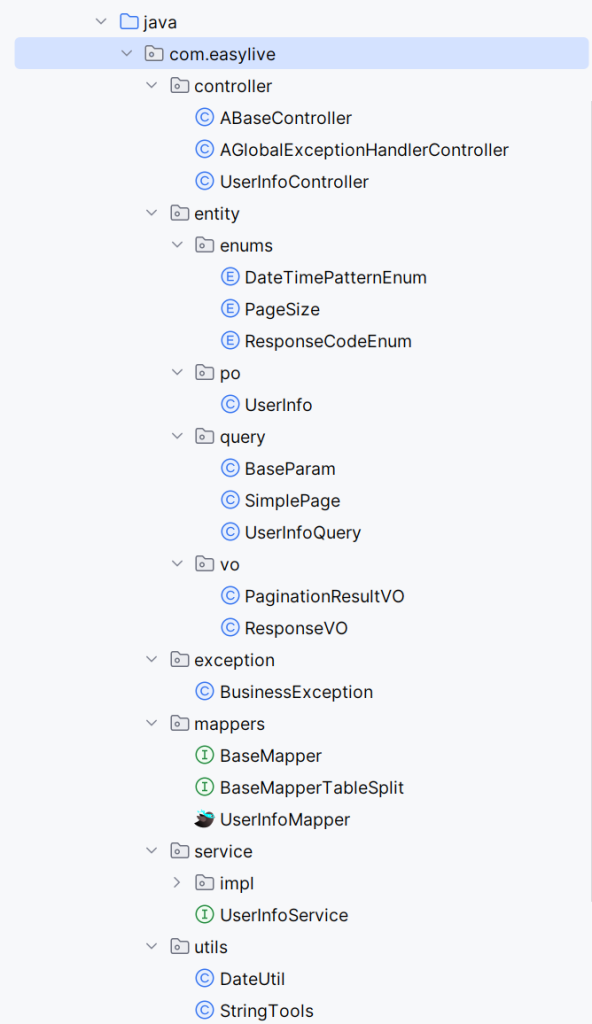
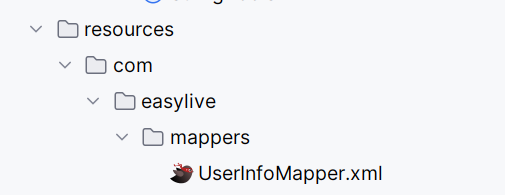
我在数据库easylive加入了一张表
1
2
3
4
5
6
7
8
9
10
11
12
13
CREATE TABLE `user_info` ( `user_id` varchar (12 ) NOT NULL COMMENT '用户ID' , `email` varchar (50 ) DEFAULT NULL COMMENT '邮箱' , `nick_name` varchar (20 ) DEFAULT NULL COMMENT '昵称' , `avatar` varchar (50 ) DEFAULT NULL COMMENT '用户头像' , `password ` varchar (32 ) DEFAULT NULL COMMENT '密码' , `status` tinyint(1 ) DEFAULT NULL COMMENT '状态' , `create_time` datetime DEFAULT NULL COMMENT '创建时间' , `last_login_time` datetime DEFAULT NULL COMMENT '最后登录时间' , `integral` int (11 ) DEFAULT '0' COMMENT '积分' , PRIMARY KEY (`user_id`) USING BTREE, UNIQUE KEY `idx_key_email` (`email`) USING BTREE ) ENGINE=InnoDB DEFAULT CHARSET=utf8mb4 ROW_FORMAT=DYNAMIC COMMENT ='用户信息' ;
生成后的代码就是easylive中的代码
接下来我将逐一讲解easyjava代码生成器生成的那些代码
1. PO实体类-UserInfo
UserInfo 实体类(PO)是什么
定位 :PO(Persistence Object),用于和数据库表 user_info 一一映射,承载单行数据。作用场景 :Mapper 层返回、Service/Controller 在入参与出参中传递、序列化到 JSON 返回给前端。
字段与表结构的对应关系与意义
1 2 3 4 5 6 7 8 9 10 11 12 13 14 15 16 17 18 19 20 21 22 23 24 25 26 27 28 29 30 31 32 33 34 35 36 37 38 39 40 41 42 43 44 45 46 47 48 49 50 51 52 public class UserInfo implements Serializable private String userId; private String email; private String nickName; private String avatar; private String password; private Integer status; private Integer integral; @JsonFormat (pattern = "yyyy-MM-dd HH:mm:ss" , timezone = "GMT+8" ) @DateTimeFormat (pattern = "yyyy-MM-dd HH:mm:ss" ) private Date createTime; @JsonFormat (pattern = "yyyy-MM-dd HH:mm:ss" , timezone = "GMT+8" ) @DateTimeFormat (pattern = "yyyy-MM-dd HH:mm:ss" ) private Date lastLoginTime;
userId(varchar(12) 主键) :业务主键,字符串存储更灵活(可自定义/跨库唯一)。email(varchar(50),唯一索引) :登录/联系账号,DB 层唯一约束(在 XML/数据库侧体现,实体不直接承载约束注解)。nickName(varchar(20)) :昵称。avatar(varchar(50)) :头像 URL/路径。password(varchar(32)) :密码摘要(应为加密后的摘要值,非明文)。status(tinyint(1)) :状态位(如 0/1),用 Integer 以便表示空值。createTime、lastLoginTime(datetime) :创建/最后登录时间。integral(int(11) 默认0) :积分,业务计数。
时间字段的序列化与绑定
1
2
3
@JsonFormat (pattern = "yyyy-MM-dd HH:mm:ss" , timezone = "GMT+8" )@DateTimeFormat (pattern = "yyyy-MM-dd HH:mm:ss" )private Date createTime;
@JsonFormat :控制 JSON 输出格式与时区(出参序列化)。@DateTimeFormat :控制接口入参(表单/查询参数)向 Date 的解析(入参绑定)。模式固定使用 yyyy-MM-dd HH:mm:ss,与前端/DB 时间展示保持一致。
Getter/Setter 与可空性
生成了完整 Getter/Setter,便于 MyBatis 反射映射与 Spring 绑定。
字段多为可空(与 DDL 默认 NULL 对齐),业务层应做非空与范围校验。
可序列化与跨层传输
implements Serializable:便于放入 Session/缓存、消息队列传输或远程调用返回。
toString 用于调试与日志
1
2
3
4
@Override public String toString (){ return "用户ID:"+(userId == null ? "空" : userId)+",邮箱:"+(email == null ? "空" : email)+",昵称:"+(nickName == null ? "空" : nickName)+",用户头像:"+(avatar == null ? "空" : avatar)+",密码:"+(password == null ? "空" : password )+",状态:"+(status == null ? "空" : status)+",创建时间:"+(createTime == null ? "空" : DateUtil.format(createTime, DateTimePatternEnum.YYYY_MM_DD_HH_MM_SS.getPattern()))+",最后登录时间:"+(lastLoginTime == null ? "空" : DateUtil.format(lastLoginTime, DateTimePatternEnum.YYYY_MM_DD_HH_MM_SS.getPattern()))+",积分:"+(integral == null ? "空" : integral); }
使用 DateUtil.format 与 DateTimePatternEnum 统一日期格式,避免 null 导致异常。
注意:这里直接输出了 password,生产日志中建议避免打印敏感字段。
与查询对象的分工
UserInfo 表示“一行数据”的实体。UserInfoQuery 表示“查询条件与分页”的模型(含模糊匹配、时间区间),两者职责分离,便于复用。
2.Query(查询对象)-UserInfoQuery/BaseParam/SimplePage
UserInfoQuery(查询对象)是什么
定位 :承载“查询条件与分页信息”的对象,服务于列表/检索接口。继承关系 :继承 BaseParam,天然包含分页与排序能力。
1 2 3 4 public class UserInfoQuery extends BaseParam
字段设计与意义
精确匹配字段 :userId、email、nickName、avatar、password、status、integral 等,对应实体主字段;当这些字段非空时,通常在 XML 中以 = 精确匹配。模糊匹配字段 :为每个字符串型字段提供 xxxFuzzy(如 emailFuzzy、nickNameFuzzy),用于 LIKE '%xxx%'。时间区间查询 :createTimeStart、createTimeEnd 用于创建时间闭区间;lastLoginTimeStart、lastLoginTimeEnd 用于最后登录时间闭区间;这些字段在 XML 中通常以 >=、<= 条件组合出现。
1 2 3 4 5 6 7 8 9 10 11 12 13 14 15 16 17 private String createTime;private String createTimeStart;private String createTimeEnd;private String lastLoginTime;private String lastLoginTimeStart;private String lastLoginTimeEnd;
为何用 String 承载时间 :便于前端传参与多格式兼容,XML 内部再按固定格式解析或直接作为字符串条件拼接(以项目约定为准)。
BaseParam(分页与排序基类)
字段 :pageNo:当前页码(1 开始)pageSize:每页大小orderBy:排序子句(如 "create_time desc")simplePage:计算好偏移量的分页对象
1
2
3
4
5
6
7
8
public class BaseParam { private SimplePage simplePage; private Integer pageNo; private Integer pageSize; private String orderBy; public SimplePage getSimplePage ( return simplePage; }
使用建议 :orderBy 应在服务层做白名单校验,避免 SQL 注入。控制层把 pageNo/pageSize/orderBy 组装进 BaseParam,再交由服务/Mapper 使用。
SimplePage(分页核心计算)
职责 :依据总数 countTotal、页码 pageNo、每页大小 pageSize,计算 start(offset)、end(limit size)、pageTotal。默认与收敛 :当 pageSize <= 0 时,默认使用 PageSize.SIZE20;
将 pageNo 收敛到 [1, pageTotal];
计算公式:start = (pageNo - 1) * pageSize,end = pageSize。
1
2
3
4
5
6
7
8
9
10
11
12
13
14
15
16
17
18
19
20
public void action() { if (this .pageSize <= 0 ) { this .pageSize = PageSize.SIZE20.getSize(); } if (this .countTotal > 0 ) { this .pageTotal = this .countTotal % this .pageSize == 0 ? this .countTotal / this .pageSize : this .countTotal / this .pageSize + 1 ; } else { pageTotal = 1 ; } if (pageNo <= 1 ) { pageNo = 1 ; } if (pageNo > pageTotal) { pageNo = pageTotal; } this .start = (pageNo - 1 ) * pageSize; this .end = this .pageSize; }
典型用法 :
先查总数 countTotal;2) 用 new SimplePage(pageNo, countTotal, pageSize) 计算;3) 在列表查询中 LIMIT start, end。
示例 :总数 105、pageSize=20、pageNo=3 → pageTotal=6、start=40、end=20。
查询对象的一般使用流
控制层接收 UserInfoQuery(包含页码、大小、排序与筛选条件)。
服务层补全或校验条件(如 orderBy 白名单、时间格式)。
Mapper XML 读取 query 中的非空字段,动态拼接 WHERE 与 ORDER BY,并使用 simplePage.start/end 分页。
3. UserInfoMapper 与 XML
UserInfoMapper(接口)与 UserInfoMapper.xml(SQL)是什么
定位 :UserInfoMapper<T,P> 继承通用 BaseMapper<T,P>,定义了按业务键的定制 CRUD;UserInfoMapper.xml 以 MyBatis 动态 SQL 实现这些方法。泛型 :T 为实体(这里用 UserInfo),P 为查询对象(这里用 UserInfoQuery)。
1 2 3 4 public interface UserInfoMapper <T ,P > extends BaseMapper <T ,P > {
字段映射与通用列
1 2 3 4 5 6 7 8 9 10 11 <resultMap id ="base_result_map" type ="com.easylive.entity.po.UserInfo" > <result column ="user_id" property ="userId" /> ... </resultMap > <sql id ="base_column_list" > u.user_id,u.email,u.nick_name,u.avatar,u.password, u.status,u.create_time,u.last_login_time,u.integral </sql >
将表字段与实体属性一一对应,用于 select 结果映射。
条件构造(精确、模糊、时间区间)
1 2 3 4 5 6 7 8 9 10 11 12 13 14 15 16 17 18 19 <sql id ="base_condition_filed" > <if test ="query.userId != null and query.userId!=''" > and u.user_id = # {query.userId} </if > ... <if test ="query.createTime != null and query.createTime!=''" > <![CDATA[ and u.create_time=str_to_date(# {query.createTime} , '%Y-%m-%d') ]]> </if > </sql > <sql id ="query_condition" > <where > <include refid ="base_condition_filed" /> <if test ="query.emailFuzzy!= null and query.emailFuzzy!=''" > and u.email like concat('%', # {query.emailFuzzy} , '%') </if > ... <if test ="query.createTimeEnd!= null and query.createTimeEnd!=''" > <![CDATA[ and u.create_time< date_sub(str_to_date(# {query.createTimeEnd} ,'%Y-%m-%d'),interval -1 day) ]]> </if > </where > </sql >
精确匹配:直接 =。
模糊匹配:like concat('%', #{...}, '%')。
时间点与区间:将字符串转日期比较;区间上界使用 < date_sub(..., interval -1 day) 实现含当日的闭区间。
列表与计数(分页与排序)
1 2 3 4 5 <select id ="selectList" resultMap ="base_result_map" > SELECT <include refid ="base_column_list" /> FROM user_info u <include refid ="query_condition" /> <if test ="query.orderBy!=null" > order by $ {query.orderBy} </if > <if test ="query.simplePage!=null" > limit # {query.simplePage.start} ,# {query.simplePage.end} </if > </select >
order by ${query.orderBy} 使用占位符拼接,务必业务侧做白名单校验。分页基于 SimplePage.start/end。
插入与插入或更新
1
2
3
4
5
<insert id= "insert" parameterType= "com.easylive.entity.po.UserInfo" > INSERT INTO user_info <trim prefix= "(" suffix= ")" suffixOverrides= "," > ... </trim> <trim prefix= "values (" suffix= ")" suffixOverrides= "," > ... </trim> </insert>
1 2 3 4 5 <insert id="insertOrUpdate" ...> INSERT INTO user_info (...) values (...) on DUPLICATE key update <trim ...> 仅对非空字段进行更新 </trim > </insert >
基于唯一键(如主键或唯一索引 email)实现 UPSERT,且只更新传入非空字段。
批量插入与批量 UPSERT
1 2 <insert id="insertBatch" > ... <foreach collection ="list" item="item" separator="," > (...) </foreach> </insert > <insert id="insertOrUpdateBatch" > ... on DUPLICATE key update ... </insert >
适用于导入或同步场景,UPSERT 会覆盖冲突行的字段值。
条件更新与删除
1 2 3 4 5 <update id="updateByParam" parameterType="com.easylive.entity.query.UserInfoQuery" > UPDATE user_info u <set > 仅对 bean 非空字段赋值 </set > <include refid="query_condition" /> </update >
bean 是要赋值的新内容,query 是过滤条件。删除同理用 <delete>。
按业务键的定制方法
1 2 3 4 5 6 <update id="updateByUserId" > ... where user_id=#{userId} </update > <delete id="deleteByUserId" > delete from user_info where user_id=#{userId} </delete > <select id="selectByUserId" > select ... where user_id=#{userId} </select > <update id="updateByEmail" > ... where email=#{email} </update > <delete id="deleteByEmail" > delete from user_info where email=#{email} </delete > <select id="selectByEmail" > select ... where email=#{email} </select >
与接口 UserInfoMapper 上的方法一一对应。
本栏要点:接口声明与 XML 动态 SQL 对应一致;query_condition 统一管理条件;分页与排序通过 BaseParam/SimplePage 注入;提供按主键与唯一键的便捷 CRUD;批量与 UPSERT 支持高效导入与覆盖。
4讲解基础 Mapper(BaseMapper、BaseMapperTableSplit)
BaseMapper 是什么(通用 Mapper 接口)
定位 :为所有实体提供统一的 CRUD 接口定义,减少每张表重复代码。泛型 :T 为实体类型(如 UserInfo),P 为查询对象(如 UserInfoQuery)。参数命名规范 :通过 @Param("bean")、@Param("query") 约定 MyBatis XML 中的取值路径。
1
2
3
interface BaseMapper <T , P > { List<T> selectList(@Param("query" ) P p);
核心方法说明 :selectList(P query):按条件返回列表,通常配合分页。selectCount(P query):统计总数,用于分页总页数计算。insert(T bean):插入(一般为“非空字段插入”动态 SQL)。insertOrUpdate(T bean):存在则更新,不存在则插入(依赖唯一约束)。insertBatch(List<T>):批量插入。insertOrUpdateBatch(List<T>):批量 UPSERT。updateByParam(T bean, P query):将符合条件的记录更新为 bean 非空字段值。deleteByParam(P query):按条件删除。设计优点 :统一方法命名与参数规范,所有具体表的 Mapper 都能直接复用;XML 可以共用一套动态 SQL 模版思想(或由代码生成器生成)。
BaseMapperTableSplit 是什么(分表场景的通用 Mapper)
定位 :与 BaseMapper 功能相同,但多了 tableName 作为显式入参,支持运行时动态指定物理表名(如 user_info_2025)。泛型 :同 BaseMapper。参数命名规范 :增加 @Param("tableName") String tableName。
1
2
3
interface BaseMapperTableSplit <T , P > List<T> selectList(@Param ("tableName" )String tableName,@Param ("query" ) P p);
核心方法说明 :与 BaseMapper 一一对应,只是多了 tableName。例如 selectList(tableName, query)、insert(tableName, bean)、updateByParam(tableName, bean, query) 等。
XML 使用特征 :SQL 中表名位置写成 ${tableName}(字符串替换),因此必须在服务层严格校验 tableName 白名单,避免 SQL 注入。
其它参数可继续使用 #{} 安全占位符。
两者如何协同代码生成
常规表:生成 XXXMapper extends BaseMapper<PO, Query> 与对应 XML。
分表表:生成 XXXMapper extends BaseMapperTableSplit<PO, Query> 与对应 XML,在运行期传入路由后的真实表名。
本栏要点:BaseMapper 抽象通用 CRUD;BaseMapperTableSplit 在此基础上引入 tableName 以支持分表路由;参数命名统一,便于 XML 取值与代码生成器批量套用。
5.Service层
UserInfoService(接口)是什么
定位 :定义面向业务的用户信息服务能力,对外屏蔽底层 Mapper 细节。方法分组 :查询:findListByParam、findCountByParam、findListByPage
新增:add、addBatch、addOrUpdateBatch
条件更新/删除:updateByParam、deleteByParam
业务键便捷方法:get/update/deleteByUserId 与 get/update/deleteByEmail
1 2 3 4 public interface UserInfoService {
UserInfoServiceImpl(实现)做了什么
依赖注入 :@Resource UserInfoMapper<UserInfo, UserInfoQuery>,调用底层通用 CRUD。分页编排 :先 selectCount 得到总数;
计算 pageSize(默认 PageSize.SIZE15);
构建 SimplePage 写回到 param;
再按条件查列表,封装 PaginationResultVO 返回。
1
2
3
4
5
6
7
8
9
10
public PaginationResultVO<UserInfo> findListByPage(UserInfoQuery param) { int count = this .findCountByParam(param); int pageSize = param.getPageSize() == null ? PageSize.SIZE15.getSize() : param.getPageSize(); SimplePage page = new SimplePage(param.getPageNo(), count , pageSize); param.setSimplePage(page); List<UserInfo> list = this .findListByParam(param); PaginationResultVO<UserInfo> result = new PaginationResultVO(count , page.getPageSize(), page.getPageNo(), page.getPageTotal(), list); return result; }
批量空集合短路 :addBatch、addOrUpdateBatch 在空集合时直接返回 0,避免落库。安全校验 :在 updateByParam、deleteByParam 前调用 StringTools.checkParam(param),通常用于避免无条件更新/删除。便捷方法 :按 userId、email 查询/更新/删除,与 UserInfoMapper.xml 的定制 SQL 一一对应。本栏要点:Service 层对分页做编排、对危险操作做前置校验、对外提供语义化方法,并把通用 Mapper 能力转化为业务友好的接口。
6.Controller层
UserInfoController(接口设计与入参出参)
类与路由 @RestController("userInfoController") + @RequestMapping("/userInfo"),所有接口前缀为 /userInfo。继承 ABaseController,统一使用 getSuccessResponseVO 返回标准响应。
1
2
3
4
5
@RestController ("userInfoController" )@RequestMapping ("/userInfo" )public class UserInfoController extends ABaseController @Resource private UserInfoService userInfoService;
1 2 3 4 @RequestMapping("/loadDataList" ) public ResponseVO loadDataList(UserInfoQuery query){ return getSuccessResponseVO(userInfoService.findListByPage(query)); }
入参为 UserInfoQuery(表单/查询参数绑定),出参为 ResponseVO<PaginationResultVO<UserInfo>>。
新增/批量
1 2 3 4 5 6 7 8 9 10 @RequestMapping("/add" ) public ResponseVO add(UserInfo bean) { userInfoService.add(bean); return getSuccessResponseVO(null ); } @RequestMapping("/addBatch" ) public ResponseVO addBatch(@RequestBody List<UserInfo> listBean) { userInfoService.addBatch(listBean); return getSuccessResponseVO(null ); }
单条新增走表单绑定;批量新增用 @RequestBody 接收 JSON 数组。
批量新增/修改(UPSERT)
1
2
3
4
5
@RequestMapping ("/addOrUpdateBatch" )public ResponseVO addOrUpdateBatch (@RequestBody List<UserInfo> listBean) { userInfoService .addBatch (listBean); return getSuccessResponseVO (null); }
注意:这里调用了 addBatch,按语义应调用 addOrUpdateBatch(可能是小疏漏)。
按业务键的便捷接口 get/update/deleteUserInfoByUserIdget/update/deleteUserInfoByEmail更新接口入参 UserInfo bean 只需传需要变更的非空字段;查询/删除通过简单字符串参数接收。
ABaseController(统一响应包装)
提供成功、业务异常、服务端异常的快捷封装;状态字段使用 status/code/info/data 四元组。
1
2
3
4
5
6
7
8
protected <T> ResponseVO getSuccessResponseVO(T t) { ResponseVO<T> responseVO = new ResponseVO<>() responseVO.setStatus(STATUC_SUCCESS) responseVO.setCode(ResponseCodeEnum.CODE_200.getCode()) responseVO.setInfo(ResponseCodeEnum.CODE_200.getMsg()) responseVO.setData(t) return responseVO }
AGlobalExceptionHandlerController(全局异常处理)
统一捕获异常并转为标准响应,且记录错误日志。
404 → CODE_404
业务异常 → CODE_600 或自定义
参数绑定/类型错误 → CODE_600
唯一键冲突 → CODE_601
其它 → CODE_500
1
2
3
4
5
6
7
8
9
10
11
12
13
14
15
16
17
18
19
20
21
22
23
24
25
26
27
28
29
30
31
32
33
34
35
36
37
38
@RestControllerAdvice public class AGlobalExceptionHandlerController extends ABaseController private static final Logger logger = LoggerFactory.getLogger(AGlobalExceptionHandlerController.class); @ExceptionHandler (value = Exception.class) Object handleException (Exception e, HttpServletRequest request) { logger.error ("请求错误,请求地址{},错误信息:" , request.getRequestURL(), e); ResponseVO ajaxResponse = new ResponseVO(); if (e instanceof NoHandlerFoundException) { ajaxResponse.setCode(ResponseCodeEnum.CODE_404.getCode()); ajaxResponse.setInfo(ResponseCodeEnum.CODE_404.getMsg()); ajaxResponse.setStatus(STATUC_ERROR); } else if (e instanceof BusinessException) BusinessException biz = (BusinessException) e; ajaxResponse.setCode(biz.getCode() == null ? ResponseCodeEnum.CODE_600.getCode() : biz.getCode()); ajaxResponse.setInfo(biz.getMessage()); ajaxResponse.setStatus(STATUC_ERROR); } else if (e instanceof BindException|| e instanceof MethodArgumentTypeMismatchException) ajaxResponse.setCode(ResponseCodeEnum.CODE_600.getCode()); ajaxResponse.setInfo(ResponseCodeEnum.CODE_600.getMsg()); ajaxResponse.setStatus(STATUC_ERROR); } else if (e instanceof DuplicateKeyException) ajaxResponse.setCode(ResponseCodeEnum.CODE_601.getCode()); ajaxResponse.setInfo(ResponseCodeEnum.CODE_601.getMsg()); ajaxResponse.setStatus(STATUC_ERROR); } else { ajaxResponse.setCode(ResponseCodeEnum.CODE_500.getCode()); ajaxResponse.setInfo(ResponseCodeEnum.CODE_500.getMsg()); ajaxResponse.setStatus(STATUC_ERROR); } return ajaxResponse; } }
标准响应模型
ResponseVO<T>:status(success/error)、code、info、data。
PaginationResultVO<T>:totalCount、pageSize、pageNo、pageTotal、list;分页列表时作为 data 返回。
本栏覆盖了 UserInfoController 的路由与参数绑定方式、标准响应封装以及全局异常到响应码的映射;并指出了 addOrUpdateBatch 可能的调用方法疏漏。
7.通用响应模型与枚举
通用响应模型与枚举
ResponseVO(统一响应包装) 字段:status(success/error)、code、info、data。
用法:控制器通过 ABaseController#getSuccessResponseVO 快速返回成功结果;异常统一在全局异常处理器中包装为错误结果。
1
2
3
4
5
public class ResponseVO<T> { private String status ; private Integer code; private String info; private T data ;
PaginationResultVO(分页结果体) 字段:totalCount、pageSize、pageNo、pageTotal、list。
用法:Service 计算分页信息后,构造该对象作为 ResponseVO.data 返回。
1
2
3
4
5
6
public class PaginationResultVO<T> { private Integer totalCount; private Integer pageSize; private Integer pageNo; private Integer pageTotal; private List<T> list = new ArrayList<T>();
ResponseCodeEnum(响应码与默认提示) 约定:200 成功;404 路由不存在;600 参数错误(含绑定错误);601 唯一键冲突;500 服务器错误。
被 ABaseController、全局异常处理器引用,保障全链路返回码一致。
1
2
3
4
5
6
public enum ResponseCodeEnum { CODE_200 (200 , "请求成功" ), CODE_404 (404 , "请求地址不存在" ), CODE_600 (600 , "请求参数错误" ), CODE_601 (601 , "信息已经存在" ), CODE_500 (500 , "服务器返回错误,请联系管理员" );
PageSize(分页枚举) 提供常用页大小:15、20、30、40、50。
在 Service 中作为默认 pageSize 兜底,统一前后端分页体验。
1
2
public enum PageSize { SIZE15 (15 ), SIZE20 (20 ), SIZE30 (30 ), SIZE40 (40 ), SIZE50 (50 );
8.工具类与基础枚举
工具与基础
DateTimePatternEnum(日期格式枚举) 统一日期格式常量:yyyy-MM-dd HH:mm:ss、yyyy-MM-dd,用于序列化、日志与工具类。
1
2
public enum DateTimePatternEnum { YYYY_MM_DD_HH_MM_SS ("yyyy-MM-dd HH:mm:ss" ), YYYY_MM_DD ("yyyy-MM-dd" );
DateUtil(线程安全的日期工具) 基于 ThreadLocal<SimpleDateFormat> 缓存,避免多线程下 SimpleDateFormat 非线程安全问题。
format(Date, pattern)、parse(String, pattern) 两个核心方法,配合 DateTimePatternEnum 统一格式。parse 失败时返回 new Date()(注意:生产可考虑抛异常或返回 null)。
1
2
3
4
private static Map <String , ThreadLocal <SimpleDateFormat >> sdfMap = new HashMap <String , ThreadLocal <SimpleDateFormat >>();... public static String format (Date date, String patternreturn getSdf (pattern).format (date); }public static Date parse (String dateStr, String pattern
StringTools(字符串与参数校验) checkParam(Object param):反射遍历 getXxx(),确保至少有一个非空条件;否则抛出 BusinessException。用于防止无条件更新/删除。upperCaseFirstLetter(String):首字母大写(避开第二个字母大写的缩写场景)。isEmpty(String):对 null、空串、“null”、“\u0000”、全空白等判空。
1
2
3
4
5
6
7
8
9
10
11
12
13
14
public static void checkParam (Object param Field [] fields = param.getClass ().getDeclaredFields (); boolean notEmpty = false ; for (Field field : fields) { String methodName = "get" + StringTools .upperCaseFirstLetter (field.getName ()); Method method = param.getClass ().getMethod (methodName); Object object = method.invoke (param); if (object != null && object instanceof java.lang .String && !StringTools .isEmpty (object .toString ()) || object != null && !(object instanceof java.lang .String )) { notEmpty = true ; break ; } } if (!notEmpty) { throw new BusinessException ("多参数更新,删除,必须有非空条件" ); } }
BusinessException(业务异常) 继承 RuntimeException,支持三种构造:纯消息、码+消息、ResponseCodeEnum。
重写 fillInStackTrace 返回自身,避免填充堆栈,减小开销(用于可预期的业务异常)。
被全局异常处理器捕获并映射成标准响应。
1
2
3
4
public class BusinessException extends RuntimeException private ResponseCodeEnum codeEnum; private Integer code; private String message;
已讲解日期格式与工具类在实体/日志/SQL条件中的统一作用,参数校验如何保护危险操作,以及业务异常如何转化为一致的错误响应。
9.基础控制器与全局异常
ABaseController(统一响应帮助类) 提供三个便捷方法:成功返回、业务异常返回、服务器异常返回;内部使用 ResponseCodeEnum 约束 code 与默认 info。
1
2
3
4
5
6
7
8
protected <T> ResponseVO getSuccessResponseVO(T t) { ResponseVO<T> responseVO = new ResponseVO<>() responseVO.setStatus(STATUC_SUCCESS) responseVO.setCode(ResponseCodeEnum.CODE_200.getCode()) responseVO.setInfo(ResponseCodeEnum.CODE_200.getMsg()) responseVO.setData(t) return responseVO }
控制器继承它之后,能统一出参格式,避免每个接口手写状态码与提示语。
AGlobalExceptionHandlerController(全局异常处理器) 通过 @RestControllerAdvice + @ExceptionHandler(Exception.class) 捕获所有未处理异常,日志记录后,转为标准响应返回。
规则映射:
NoHandlerFoundException → 404BusinessException → 取其自带 code/message,默认 600BindException、MethodArgumentTypeMismatchException → 600(参数错误)DuplicateKeyException → 601(唯一键冲突)其它异常 → 500(服务器错误)
1
2
3
@RestControllerAdvice public class AGlobalExceptionHandlerController extends ABaseController private static final Logger logger = LoggerFactory .getLogger(AGlobalExceptionHandlerController .class );
全链路关系 控制器 → 使用 ABaseController 统一成功返回。
业务异常 → 抛出 BusinessException,被全局异常处理器捕获并转成标准错误响应。
其它异常 → 同样被全局捕获,避免堆栈外泄,保证前端拿到结构化错误。
10.补充的工具类(常用)
JsonUtils(对象/数组 JSON 转换)
定位 :基于 Fastjson 的轻量封装,提供对象、数组与字符串之间的便捷转换。方法清单 :convertObj2Json(Object obj) → 序列化对象为 JSON 字符串。convertJson2Obj(String json, Class<T> classz) → 反序列化 JSON 为对象。convertJsonArray2List(String json, Class<T> classz) → 反序列化 JSON 数组为 List<T>。
1
2
3
4
5
6
7
8
9
10
11
12
13
14
public class JsonUtils { public static String convertObj2Json (Object obj return JSON .toJSONString (obj); } public static <T> T convertJson2Obj (String json, Class <T> classz return JSON Object .parseObject (json, classz); } public static <T> List <T> convertJsonArray2List (String json, Class <T> classz return JSON Array .parseArray (json, classz); } }
使用建议与注意点 :建议配合统一的 VO/DTO 使用,避免直接序列化带有敏感字段的实体(如 password)。
对时间字段,尽量在序列化前规范格式(如 @JsonFormat 或统一 DateUtil)。
Fastjson 在高版本 JDK 与安全配置下需留意依赖版本与白名单配置;如对安全合规更敏感,可考虑 Jackson。
RedisConfig(序列化策略与容器)
1
2
3
4
5
6
7
8
9
10
11
12
13
14
15
16
17
18
19
20
21
22
23
24
25
26
27
28
@Configuration public class RedisConfig<V> { private static final Logger logger = LoggerFactory.getLogger(RedisConfig.class ); @Bean ("redisTemplate" ) public RedisTemplate<String, V> redisTemplate(RedisConnectionFactory factory) { RedisTemplate<String, V> template = new RedisTemplate<>(); template .setConnectionFactory(factory); template .setKeySerializer(RedisSerializer.string ()); template .setValueSerializer(RedisSerializer.json()); template .setHashKeySerializer(RedisSerializer.string ()); template .setHashValueSerializer(RedisSerializer.json()); template .afterPropertiesSet(); return template ; } @Bean public RedisMessageListenerContainer container(RedisConnectionFactory connectionFactory) { RedisMessageListenerContainer container = new RedisMessageListenerContainer(); container.setConnectionFactory(connectionFactory); return container; } }
作用 :集中配置 RedisTemplate 的序列化方式,并注册消息监听容器。
核心 Bean :
RedisTemplate<String, V> redisTemplate
1
2
3
4
5
6
7
8
9
10
11
12
13
14
15
16
17
18
19
20

  :

  - `KeySerializer`:`RedisSerializer.string()`,人类可读的字符串键。
  - `ValueSerializer`:`RedisSerializer.json()`,值使用 JSON 序列化,便于跨语言/调试。
  - `HashKeySerializer`/`HashValueSerializer`:分别使用 String/JSON,保持一致性。
  - 依赖 `RedisConnectionFactory`,由 Spring Boot 自动配置(Lettuce/Jedis)。

- `RedisMessageListenerContainer`:用于基于 Redis Pub/Sub 的消息监听(后续可注册 `MessageListener` 监听频道)。

- **使用建议**:

- 泛型 `V` 建议为稳定的 DTO/VO,避免直接缓存持久化实体(字段变化会导致反序列化失败)。

- 若值类型多样,可基于 `RedisTemplate<String, Object>` 配合 Jackson 多态序列化,或自定义多个 `RedisTemplate`。

- 生产建议启用键前缀、超时策略与序列化白名单,确保缓存空间与安全。

### RedisUtils(KV、过期、列表、ZSet、计数)
@Component(“redisUtils”) {
@Resource
private RedisTemplate<String, V> redisTemplate;

private static final Logger logger = LoggerFactory.getLogger(RedisUtils.class);

/**
 * 删除缓存
 *
 * @param key 可以传一个值 或多个
 */
public void delete(String... key) {
    if (key != null && key.length > 0) {
        if (key.length == 1) {
            redisTemplate.delete(key[0]);
        } else {
            redisTemplate.delete((Collection<String>) CollectionUtils.arrayToList(key));
        }
    }
}

public V get(String key) {
    return key == null ? null : redisTemplate.opsForValue().get(key);
}

/**
 * 普通缓存放入
 *
 * @param key   键
 * @param value 值
 * @return true成功 false失败
 */
public boolean set(String key, V value) {
    try {
        redisTemplate.opsForValue().set(key, value);
        return true;
    } catch (Exception e) {
        logger.error("设置redisKey:{},value:{}失败", key, value);
        return false;
    }
}

public boolean keyExists(String key) {
    return redisTemplate.hasKey(key);
}

/**
 * 普通缓存放入并设置时间
 *
 * @param key   键
 * @param value 值
 * @param time  时间(秒) time要大于0 如果time小于等于0 将设置无限期
 * @return true成功 false 失败
 */
public boolean setex(String key, V value, long time) {
    try {
        if (time > 0) {
            redisTemplate.opsForValue().set(key, value, time, TimeUnit.MILLISECONDS);
        } else {
            set(key, value);
        }
        return true;
    } catch (Exception e) {
        logger.error("设置redisKey:{},value:{}失败", key, value);
        return false;
    }
}

public boolean expire(String key, long time) {
    try {
        if (time > 0) {
            redisTemplate.expire(key, time, TimeUnit.MILLISECONDS);
        }
        return true;
    } catch (Exception e) {
        e.printStackTrace();
        return false;
    }
}


public List<V> getQueueList(String key) {
    return redisTemplate.opsForList().range(key, 0, -1);
}


public boolean lpush(String key, V value, Long time) {
    try {
        redisTemplate.opsForList().leftPush(key, value);
        if (time != null && time > 0) {
            expire(key, time);
        }
        return true;
    } catch (Exception e) {
        e.printStackTrace();
        return false;
    }
}

public long remove(String key, Object value) {
    try {
        Long remove = redisTemplate.opsForList().remove(key, 1, value);
        return remove;
    } catch (Exception e) {
        e.printStackTrace();
        return 0;
    }
}

public boolean lpushAll(String key, List<V> values, long time) {
    try {
        redisTemplate.opsForList().leftPushAll(key, values);
        if (time > 0) {
            expire(key, time);
        }
        return true;
    } catch (Exception e) {
        e.printStackTrace();
        return false;
    }
}

public V rpop(String key) {
    try {
        return redisTemplate.opsForList().rightPop(key);
    } catch (Exception e) {
        e.printStackTrace();
        return null;
    }
}

public Long increment(String key) {
    Long count = redisTemplate.opsForValue().increment(key, 1);
    return count;
}

public Long incrementex(String key, long milliseconds) {
    Long count = redisTemplate.opsForValue().increment(key, 1);
    if (count == 1) {
        //设置过期时间1天
        expire(key, milliseconds);
    }
    return count;
}

public Long decrement(String key) {
    Long count = redisTemplate.opsForValue().increment(key, -1);
    if (count <= 0) {
        redisTemplate.delete(key);
    }
    logger.info("key:{},减少数量{}", key, count);
    return count;
}


public Set<String> getByKeyPrefix(String keyPrifix) {
    Set<String> keyList = redisTemplate.keys(keyPrifix + "*");
    return keyList;
}


public Map<String, V> getBatch(String keyPrifix) {
    Set<String> keySet = redisTemplate.keys(keyPrifix + "*");
    List<String> keyList = new ArrayList<>(keySet);
    List<V> keyValueList = redisTemplate.opsForValue().multiGet(keyList);
    Map<String, V> resultMap = keyList.stream().collect(Collectors.toMap(key -> key, value -> keyValueList.get(keyList.indexOf(value))));
    return resultMap;
}

public void zaddCount(String key, V v) {
    redisTemplate.opsForZSet().incrementScore(key, v, 1);
}


public List<V> getZSetList(String key, Integer count) {
    Set<V> topElements = redisTemplate.opsForZSet().reverseRange(key, 0, count);
    List<V> list = new ArrayList<>(topElements);
    return list;
}
}
1
2
3
4
5
6
7
8
9
10
11
12
13
14
15
16
17
18
19
20
21
22
23
24
25
26
27
28
29
30
31
32
- **定位** :在 `RedisTemplate<String, V>` 基础上的便捷封装,覆盖常见 KV、TTL、List、ZSet 与计数场景。- **KV 与过期** - `set(key, value)` :写入值,异常时记录错误日志并返回 false。- `get(key)` :读取值。- `setex(key, value, time)` :写入并设置过期(单位为毫秒;命名与 Redis 原生命令秒级语义不同,注意区分)。- `expire(key, time)` :设置过期(毫秒)。- `delete(String... key)` :删除一个或多个 key。- `keyExists(key)` :判定 key 是否存在。- **计数器** - `increment(key)` :自增 1。- `incrementex(key, milliseconds)` :自增并在首次创建时设置过期。- `decrement(key)` :自减 1,当计数 ≤ 0 时删除键(常用于并发配额/库存计数)。- **List 队列** - `lpush(key, value, time)` :左入队,支持可选过期。- `lpushAll(key, values, time)` :批量左入队并可设置过期。- `rpop(key)` :右出队(消费端)。- `getQueueList(key)` :获取整个列表(调试/观测)。- **ZSet 排序集合** - `zaddCount(key, v)` :对成员 `v` 的分值自增 1(用于热榜计数)。- `getZSetList(key, count)` :按分值从高到低取前 N 个。- **批量与扫描** - `getByKeyPrefix(prefix)` :按前缀扫描 key(注意生产环境下 `keys` 命令为 O(N),需谨慎)。- `getBatch(prefix)` :批量拉取前缀匹配的 KV 并组装为 `Map` 。- **注意点与建议** - 统一采用 JSON 序列化的 `RedisTemplate` ,`V` 的类型要稳定,避免字段变更导致反序列化失败。- TTL 单位为毫秒;如需秒级与 Redis 术语一致,可封一层秒级 API。- 高并发计数可考虑使用 `INCRBY` 、Lua 脚本或 Redisson 原子计数器来控制原子性与过期策略。- 批量 keys/scan 建议在后台任务或管理端使用,线上请求路径避免阻塞。### CopyTools(对象/列表属性复制)
public class CopyTools { copyList(List sList, Class classz) { list = new ArrayList();
public static <T, S> T copy(S s, Class<T> classz) {
    T t = null;
    try {
        t = classz.newInstance();
    } catch (Exception e) {
        e.printStackTrace();
    }
    BeanUtils.copyProperties(s, t);
    return t;
}

public static <T, S> void copyProperties(S s, T t) {
    BeanUtils.copyProperties(s, t);
}
}
1
2
3
4
5
6
7
8
9
10
11
12
13
- **定位**:对 `BeanUtils.copyProperties` 的轻量封装,简化对象间属性拷贝与列表转换。 - **核心方法**: - `copyList(List<S> sList, Class<T> classz)`:将 `List<S>` 转为 `List<T>`,逐个 `newInstance` 并拷贝。 - `copy(S s, Class<T> classz)`:将 `S` 转为 `T`。 - `copyProperties(S s, T t)`:直接把 `s` 的同名属性拷贝到 `t`。 - **使用建议**: - 适合 Controller/Service 层把 `PO` 转 `VO`、`DTO`,或将第三方对象映射为内部对象。 - 目标类需有无参构造方法;缺失会导致 `newInstance()` 异常。 - 仅按同名属性拷贝,复杂场景(嵌套对象、类型不一致、集合映射)建议用 MapStruct 这类编译期生成工具,性能更优且类型安全。 ### DateUtil 扩展(日期计算与最近 N 日列表)
public class DateUtil {
private static final Object lockObj = new Object();
private static Map<String, ThreadLocal<SimpleDateFormat>> sdfMap = new HashMap<String, ThreadLocal<SimpleDateFormat>>();

private static SimpleDateFormat getSdf(final String pattern) {
    ThreadLocal<SimpleDateFormat> tl = sdfMap.get(pattern);
    if (tl == null) {
        synchronized (lockObj) {
            tl = sdfMap.get(pattern);
            if (tl == null) {
                tl = new ThreadLocal<SimpleDateFormat>() {
                    @Override
                    protected SimpleDateFormat initialValue() {
                        return new SimpleDateFormat(pattern);
                    }
                };
                sdfMap.put(pattern, tl);
            }
        }
    }

    return tl.get();
}

public static String format(Date date, String pattern) {
    return getSdf(pattern).format(date);
}

public static Date parse(String dateStr, String pattern) {
    try {
        return getSdf(pattern).parse(dateStr);
    } catch (ParseException e) {
        e.printStackTrace();
    }
    return new Date();
}

public static String getBeforeDayDate(Integer day) {
    Calendar calendar = Calendar.getInstance();
    calendar.add(Calendar.DAY_OF_YEAR, -day);
    return format(calendar.getTime(), DateTimePatternEnum.YYYY_MM_DD.getPattern());
}

public static Date getDayAgo(Integer day) {
    Calendar calendar = Calendar.getInstance();
    calendar.add(Calendar.DAY_OF_YEAR, -day);
    return calendar.getTime();
}

public static List<String> getBeforeDates(Integer beforeDays) {
    LocalDate endDate = LocalDate.now();
    List<String> dateList = new ArrayList<>();
    DateTimeFormatter formatter = DateTimeFormatter.ofPattern("yyyy-MM-dd");
    for (int i = beforeDays; i > 0; i--) {
        dateList.add(endDate.minusDays(i).format(formatter));
    }
    return dateList;
}
}
1
2
3
4
5
6
7
8
9
10
11
12
13
14
15
- **相较基础版的增强** - 保留线程安全的 `format/parse` (`ThreadLocal<SimpleDateFormat>` )。- 新增日期偏移与序列生成能力,服务于统计报表、看板、Top-N 趋势等场景。- **新增方法** - `getBeforeDayDate(Integer day)` :返回 N 天前的日期字符串(`yyyy-MM-dd` )。常用于构造查询的开始日期。- `getDayAgo(Integer day)` :返回 N 天前的 `Date` 对象,便于与数据库时间字段直接比较。- `getBeforeDates(Integer beforeDays)` :生成最近 N 天的日期字符串列表(按升序:从 N 天前到昨天),常配合统计曲线补零使用。- **使用建议** - 若需要包含“今天”,可自行追加 `LocalDate.now()` 格式化值。- 跨时区场景建议统一在服务端固定时区或使用 `ZonedDateTime` 。- 大批量日期序列生成建议在服务层缓存,避免每次重复计算。### FFmpegUtils(缩略图、转码、切片、时长)
@Component
@Resource
private AppConfig appConfig;


/**
 * 生成图片缩略图
 *
 * @param filePath
 * @return
 */
public void createImageThumbnail(String filePath) {
    final String CMD_CREATE_IMAGE_THUMBNAIL = "ffmpeg -i \"%s\" -vf scale=200:-1 \"%s\"";
    String cmd = String.format(CMD_CREATE_IMAGE_THUMBNAIL, filePath, filePath + Constants.IMAGE_THUMBNAIL_SUFFIX);
    ProcessUtils.executeCommand(cmd, appConfig.getShowFFmpegLog());
}


/**
 * 获取视频编码
 *
 * @param videoFilePath
 * @return
 */
public String getVideoCodec(String videoFilePath) {
    final String CMD_GET_CODE = "ffprobe -v error -select_streams v:0 -show_entries stream=codec_name \"%s\"";
    String cmd = String.format(CMD_GET_CODE, videoFilePath);
    String result = ProcessUtils.executeCommand(cmd, appConfig.getShowFFmpegLog());
    result = result.replace("\n", "");
    result = result.substring(result.indexOf("=") + 1);
    String codec = result.substring(0, result.indexOf("["));
    return codec;
}

public void convertHevc2Mp4(String newFileName, String videoFilePath) {
    String CMD_HEVC_264 = "ffmpeg -i %s -c:v libx264 -crf 20 %s";
    String cmd = String.format(CMD_HEVC_264, newFileName, videoFilePath);
    ProcessUtils.executeCommand(cmd, appConfig.getShowFFmpegLog());
}

public void convertVideo2Ts(File tsFolder, String videoFilePath) {
    final String CMD_TRANSFER_2TS = "ffmpeg -y -i \"%s\"  -vcodec copy -acodec copy -bsf:v h264_mp4toannexb \"%s\"";
    final String CMD_CUT_TS = "ffmpeg -i \"%s\" -c copy -map 0 -f segment -segment_list \"%s\" -segment_time 10 %s/%%4d.ts";
    String tsPath = tsFolder + "/" + Constants.TS_NAME;
    //生成.ts
    String cmd = String.format(CMD_TRANSFER_2TS, videoFilePath, tsPath);
    ProcessUtils.executeCommand(cmd, appConfig.getShowFFmpegLog());
    //生成索引文件.m3u8 和切片.ts
    cmd = String.format(CMD_CUT_TS, tsPath, tsFolder.getPath() + "/" + Constants.M3U8_NAME, tsFolder.getPath());
    ProcessUtils.executeCommand(cmd, appConfig.getShowFFmpegLog());
    //删除index.ts
    new File(tsPath).delete();
}


public Integer getVideoInfoDuration(String completeVideo) {
    final String CMD_GET_CODE = "ffprobe -v error -show_entries format=duration -of default=noprint_wrappers=1:nokey=1 \"%s\"";
    String cmd = String.format(CMD_GET_CODE, completeVideo);
    String result = ProcessUtils.executeCommand(cmd, appConfig.getShowFFmpegLog());
    if (StringTools.isEmpty(result)) {
        return 0;
    }
    result = result.replace("\n", "");
    return new BigDecimal(result).intValue();
}
}
1
2
3
4
5
6
7
8
9
10
11
12
13
14
15
16
17
18
19
20
21
22
23
24
25
26
27
28
29
30
31
32
33
34
35
36
37
38
39
40
41
42
43
44
45
46
47
48
49
50
51
52
53
54
- **定位** :封装常用的 FFmpeg/FFprobe 命令,结合 `ProcessUtils` 执行系统命令完成多媒体处理。- **依赖** :`AppConfig` (是否打印日志等开关)、`Constants` (文件名常量)、`ProcessUtils` (跨平台命令执行)、`StringTools` 。- **核心方法** - createImageThumbnail(String filePath) :生成图片缩略图 - 命令:`ffmpeg -i "源" -vf scale=200:-1 "源+缩略图后缀"` - 等比缩放到宽 200 像素,高自适应。- getVideoCodec(String videoFilePath) :读取视频编码 - 命令:`ffprobe ... -show_entries stream=codec_name` - 解析输出得到 `codec` (如 h264、hevc)。- convertHevc2Mp4(String newFileName, String videoFilePath) :视频转码 - 命令:`ffmpeg -i 源 -c:v libx264 -crf 20 目标` - 将 HEVC 转成 H.264,`crf=20` 表示质量与大小的权衡,可按需求调整。- convertVideo2Ts(File tsFolder, String videoFilePath) :生成 HLS 切片 - 先转中间 `index.ts` ,再用 `-f segment -segment_list index.m3u8 -segment_time 10 %04d.ts` 切片,最后删除中间文件。 - 生成 `.m3u8` 与多个 `.ts` 切片,可用于点播/预览。- getVideoInfoDuration(String completeVideo) :获取视频时长(秒) - 命令:`ffprobe ... -show_entries format=duration` - 取返回秒数字符串转整型。- **使用建议** - 确保部署机有 `ffmpeg` /`ffprobe` 可执行程序,并在 PATH 中。- 大文件处理建议配合异步任务与进度上报,避免阻塞请求线程。- 对输入/输出路径做合法性检查,避免空格或特殊字符导致命令失败。- 转码参数(如 `crf` 、码率、分辨率)根据业务带宽成本与画质要求调优。### ProcessUtils(跨平台命令执行、输出收集、钩子)
public class ProcessUtils {
private static final String osName = System.getProperty("os.name").toLowerCase();

public static String executeCommand(String cmd, Boolean showLog) throws BusinessException {
    if (StringTools.isEmpty(cmd)) {
        return null;
    }

    Runtime runtime = Runtime.getRuntime();
    Process process = null;
    try {
        //判断操作系统
        if (osName.contains("win")) {
            process = Runtime.getRuntime().exec(cmd);
        } else {
            process = Runtime.getRuntime().exec(new String[]{"/bin/sh", "-c", cmd});
        }
        // 执行ffmpeg指令
        // 取出输出流和错误流的信息
        // 注意:必须要取出ffmpeg在执行命令过程中产生的输出信息,如果不取的话当输出流信息填满jvm存储输出留信息的缓冲区时,线程就回阻塞住
        PrintStream errorStream = new PrintStream(process.getErrorStream());
        PrintStream inputStream = new PrintStream(process.getInputStream());
        errorStream.start();
        inputStream.start();
        // 等待ffmpeg命令执行完
        process.waitFor();
        // 获取执行结果字符串
        String result = errorStream.stringBuffer.append(inputStream.stringBuffer + "\n").toString();
        // 输出执行的命令信息
        if (showLog) {
            logger.info("执行命令{}结果{}", cmd, result);
        }
        return result;
    } catch (Exception e) {
        logger.error("执行命令失败cmd{}失败:{} ", cmd, e.getMessage());
        throw new BusinessException("视频转换失败");
    } finally {
        if (null != process) {
            ProcessKiller ffmpegKiller = new ProcessKiller(process);
            runtime.addShutdownHook(ffmpegKiller);
        }
    }
}

/**
 * 在程序退出前结束已有的FFmpeg进程
 */
private static class ProcessKiller extends Thread {
    private Process process;

    public ProcessKiller(Process process) {
        this.process = process;
    }

    @Override
    public void run() {
        this.process.destroy();
    }
}


/**
 * 用于取出ffmpeg线程执行过程中产生的各种输出和错误流的信息
 */
static class PrintStream extends Thread {
    InputStream inputStream = null;
    BufferedReader bufferedReader = null;
    StringBuffer stringBuffer = new StringBuffer();

    public PrintStream(InputStream inputStream) {
        this.inputStream = inputStream;
    }

    @Override
    public void run() {
        try {
            if (null == inputStream) {
                return;
            }
            bufferedReader = new BufferedReader(new InputStreamReader(inputStream));
            String line = null;
            while ((line = bufferedReader.readLine()) != null) {
                stringBuffer.append(line);
            }
        } catch (Exception e) {
            logger.error("读取输入流出错了!错误信息:" + e.getMessage());
        } finally {
            try {
                if (null != bufferedReader) {
                    bufferedReader.close();
                }
                if (null != inputStream) {
                    inputStream.close();
                }
            } catch (IOException e) {
                logger.error("调用PrintStream读取输出流后,关闭流时出错!");
            }
        }
    }
}
}
1
2
3
4
5
6
7
8
9
10
11
12
13
14
15
16
17
18
19
- **定位** :跨平台执行外部命令(Windows/类 Unix),并安全收集标准输出与错误输出,结合 `BusinessException` 做统一错误抛出。- **跨平台执行** - Windows:`Runtime.exec(cmd)` - Linux/macOS:`Runtime.exec(new String[]{"/bin/sh","-c",cmd})` - 通过 `os.name` 判断系统类型。- **输出收集防阻塞** - 同时启动两个内部线程 `PrintStream` 读取 `process.getErrorStream()` 与 `process.getInputStream()` ,避免缓冲区塞满导致子进程阻塞。- `waitFor()` 等待命令执行结束,再拼接两路输出为结果字符串返回(按 `showLog` 决定是否日志输出)。- **失败处理与退出钩子** - 出错时记录错误日志并抛出 `BusinessException("视频转换失败")` 。- `finally` 中注册 `ProcessKiller` 作为 JVM 退出钩子,确保进程随应用退出而销毁,避免僵尸进程。- **使用建议** - 传入的 `cmd` 要对输入文件路径做转义(包含空格/特殊字符时需加引号)。- 长时间运行的命令建议在业务层设置超时策略或异步化处理。- 返回结果可依据需要进一步解析(例如筛选 ffmpeg 的进度行)。### GatewayExceptionHandler(WebFlux 网关统一异常)
@Slf4j
protected static final String STATUC_ERROR = "error";

@Override
public Mono<Void> handle(ServerWebExchange exchange, Throwable throwable) {
    log.error("网关请求错误url:{},错误信息", exchange.getRequest().getPath(), throwable);
    ResponseVO responseVO = getResponse(exchange, throwable);
    ServerHttpResponse response = exchange.getResponse();
    response.getHeaders().setContentType(MediaType.APPLICATION_JSON);
    DataBuffer dataBuffer = response.bufferFactory().wrap(JsonUtils.convertObj2Json(responseVO).getBytes(StandardCharsets.UTF_8));
    return response.writeWith(Mono.just(dataBuffer));
}

private ResponseVO getResponse(ServerWebExchange exchange, Throwable throwable) {
    ResponseVO responseVO = new ResponseVO();
    responseVO.setStatus(STATUC_ERROR);
    if (throwable instanceof ResponseStatusException) {
        ResponseStatusException responseStatusException = (ResponseStatusException) throwable;
        //404
        if (HttpStatus.NOT_FOUND == responseStatusException.getStatus()) {
            responseVO.setCode(ResponseCodeEnum.CODE_404.getCode());
            responseVO.setInfo(ResponseCodeEnum.CODE_404.getMsg());
            return responseVO;
        } else if (HttpStatus.SERVICE_UNAVAILABLE == responseStatusException.getStatus()) {
            //503
            responseVO.setCode(ResponseCodeEnum.CODE_503.getCode());
            responseVO.setInfo(ResponseCodeEnum.CODE_503.getMsg());
            return responseVO;
        } else {
            responseVO.setCode(responseStatusException.getStatus().value());
            responseVO.setInfo(ResponseCodeEnum.CODE_500.getMsg());
            return responseVO;
        }
        //业务异常
    } else if (throwable instanceof BusinessException) {
        BusinessException exception = (BusinessException) throwable;
        responseVO.setCode(exception.getCode());
        responseVO.setInfo(exception.getMessage());
        return responseVO;
    }
    responseVO.setCode(ResponseCodeEnum.CODE_500.getCode());
    responseVO.setInfo(ResponseCodeEnum.CODE_500.getMsg());
    return responseVO;
}
}
1
2
3
4
5
6
7
8
9
10
11
12
13
- **定位**: 在 Spring Cloud Gateway(WebFlux)链路中统一拦截异常,转为标准 `ResponseVO` JSON 响应,保证微服务前置网关的响应一致性。- **关键点**: - `WebExceptionHandler` 接口;`@Order(-1 )` 提高优先级,`@Component` 自动装配。 - 在 `handle` 中构造 `ResponseVO`,设置响应头为 `application/json`,使用 `JsonUtils` 写出。 - **异常映射策略**: - ``` ResponseStatusException
:
HttpStatus.NOT_FOUND → CODE_404
HttpStatus.SERVICE_UNAVAILABLE → CODE_503(注意:需要在 ResponseCodeEnum 中有 503 对应项;若当前没有,请补充枚举)
其它 → 使用状态码本身,info 统一为 500 的提示(“服务器返回错误,请联系管理员”)
BusinessException
1 2 3 4 5 6 7 8 9 10 11 12 13 14 15 16 17 18 19 20 21 22 23 24 25 26 27 28 : - 取异常内的 `code` 与 `message` - 其它异常: - 统一映射为 `CODE_500` - **响应写出** :- `response.getHeaders().setContentType(MediaType.APPLICATION_JSON)` - `response.writeWith(Mono.just(buffer))` 输出 `JsonUtils.convertObj2Json(responseVO)` 的字节。- **使用建议** :- 建议复用与业务服务端一致的 `ResponseVO` 、`ResponseCodeEnum` ,避免前端解析差异。- 统一在网关侧记录 `url + throwable` ,便于链路定位。- 对大多数路由异常(如没有匹配路由、服务不可用)直接在此处转化,避免透传到前端非结构化错误。### 注解:GlobalInterceptor(全局拦截开关) - **定位** :用于在切面层实现“是否需要登录”等通用拦截逻辑的开关注解。可标注在 Controller 类或方法上。- **注解定义** :
@Target({ElementType.METHOD, ElementType.TYPE})
1 2 3 4 5 6 7 8 9 10 11 12 13 14 - **典型用法** :- 在控制器方法上标注 `@GlobalInterceptor(checkLogin = true)` ,由全局切面 `GlobalOperationAspect` 在方法执行前校验登录态(如校验 token、会话、权限)。- 标注在类上可作为默认策略;方法上再次标注可覆盖类级默认。- **实现思路(切面侧)** :- 切点:匹配带有 `@GlobalInterceptor` 的类/方法。- 前置逻辑:若 `checkLogin = true` ,则读取上下文(Header/Cookie/ThreadLocal)校验;失败抛 `BusinessException(CODE_600/未登录)` 。- 统一异常:由全局异常处理器或网关异常处理器转成标准响应。### 注解:RecordUserMessage(行为转消息记录) - **定位** :把用户行为(点赞、评论、回复等)在切面层转化为站内消息,通知被影响的用户。- **注解定义** :
@Target({ElementType.METHOD, ElementType.TYPE})
1
2
3
4
5
6
7
8
9
10
11
12
13
14
15
16
17
18
19
20
21
22
23
24
25
26
27
- **典型用法** :- 在“点赞接口”、“评论接口”等方法上标注 `@RecordUserMessage(messageType = MessageTypeEnum.LIKE)` ;- 切面在方法成功后采集关键信息(操作者、目标对象、被通知人),写入消息表或投递消息队列。- **实现思路(切面侧)** :- 切点:匹配带 `@RecordUserMessage` 的方法;- 环绕/后置通知:在方法执行成功后,构建消息体(类型、业务ID、触发人、接收人、时间);- 持久化/投递:保存到 `user_message` 表,或发送 MQ(Kafka/RabbitMQ)供异步消费;- 幂等:基于业务键(行为人+目标+类型)做幂等去重,避免重复消息;- 性能:高频行为建议异步化,避免阻塞主流程。### 11.全栏收尾总结(EasyJava 生成文件详解 + 补充工具) - **实体与查询建模** - `UserInfo` (PO):严格映射 `user_info` 字段,时间字段用 `@JsonFormat/@DateTimeFormat` 统一格式,`toString` 使用 `DateUtil` 与 `DateTimePatternEnum` 。- `UserInfoQuery` :承载检索条件,提供精确/模糊字段与时间区间;继承 `BaseParam` 获得分页与排序。- `BaseParam` /`SimplePage` :分页核心(计算 `start/end/pageTotal` ),`orderBy` 统一排序入参。- **数据访问层(Mapper 与 XML)** - `BaseMapper` :通用 CRUD/批量/按条件更新删除;`BaseMapperTableSplit` :增加 `tableName` 支持分表。- ``` UserInfoMapper
+
:
resultMap、通用列片段、条件片段(精确/模糊/时间区间)。
列表/计数分页与排序;插入/批量/UPSERT;按业务键(userId/email)便捷 CRUD。
时间区间闭区间处理、orderBy 需白名单防注入。
服务与控制层
UserInfoService/Impl:分页编排(先计数再查列表)、空集合短路、StringTools.checkParam 防“无条件更新/删除”。
UserInfoController:路由分组 /userInfo;新增、批量、UPSERT(指出了一个调用 addBatch 的小疏漏应为 addOrUpdateBatch);
ABaseController:getSuccessResponseVO/getBusinessErrorResponseVO/getServerErrorResponseVO 标准响应封装。
AGlobalExceptionHandlerController:统一异常到 ResponseVO(404/600/601/500 等)。
通用响应与枚举
ResponseVO<T>:status/code/info/data 四元组。
PaginationResultVO<T>:totalCount/pageSize/pageNo/pageTotal/list。
ResponseCodeEnum:200/404/600/601/500(网关需要时补充 503)。
PageSize:常用页大小枚举(15/20/30/40/50)。
工具与基础
日期与字符串
DateTimePatternEnum:统一日期格式。DateUtil:线程安全 format/parse;扩展版支持获取 N 天前日期、日期序列。StringTools:checkParam 反射校验条件非空;isEmpty/upperCaseFirstLetter。
业务异常
BusinessException:支持码+消息/枚举构造,重写 fillInStackTrace 免堆栈提升性能;全局异常器统一转换。
JSON
JsonUtils(Fastjson):对象/数组与 JSON 互转;敏感字段与时间格式需注意。
Redis
RedisConfig:统一 RedisTemplate 序列化(String/JSON)、监听容器。RedisUtils:KV/TTL、列表队列、ZSet 热榜、计数器与首创建过期、前缀批量拉取。
多媒体与进程
FFmpegUtils:缩略图、编码识别、转码(x264 CRF)、HLS 切片、时长读取。ProcessUtils:跨平台执行命令、双流读取防阻塞、JVM 退出钩子、统一异常。
网关
GatewayExceptionHandler:WebFlux 网关统一异常到 ResponseVO(404/503/500/业务码),JSON 输出。
注解与切面语义
GlobalInterceptor:控制器/方法级登录校验开关,交由切面实现。RecordUserMessage:行为转站内消息,切面在方法成功后落库/投递,建议做幂等与异步化。
整体价值与落地建议
生成器输出构成“从表到接口”的最小闭环:PO/Query → Mapper/XML → Service → Controller → 统一响应/异常。
静态规范(时间格式、分页、响应码)+ 动态校验(参数非空、排序白名单)保持接口一致性与安全性。
对高频与重计算场景提供 Redis 与工具类支撑;对多媒体场景提供 FFmpeg 封装与进程安全执行。
建议清单:
Controller 中 addOrUpdateBatch 调用修正为 Service 的同名方法。
orderBy 做白名单校验;ResponseCodeEnum 补充 503(若使用网关映射)。Fastjson/Jackson 统一策略与版本安全;JsonUtils 保护敏感字段。
RedisUtils 的 keys/前缀操作仅用于运维/后台任务,在线路由避免使用。