基础篇
1.若依搭建
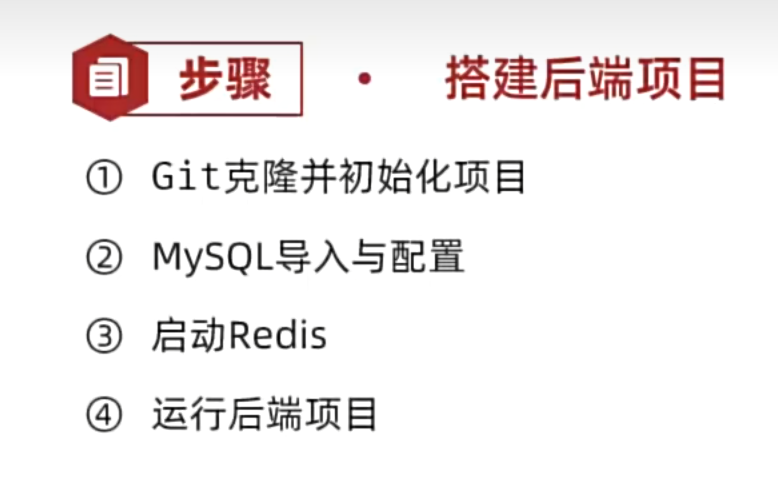
注意修改application-druid.yml 里的mysql的密码
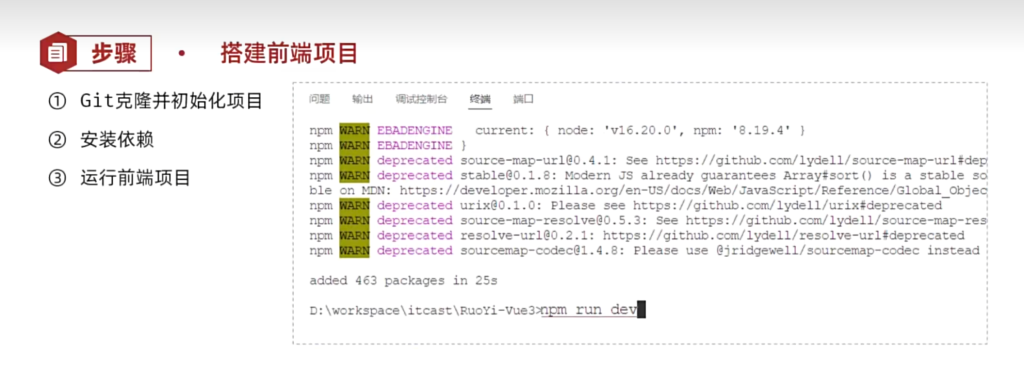

启动成功
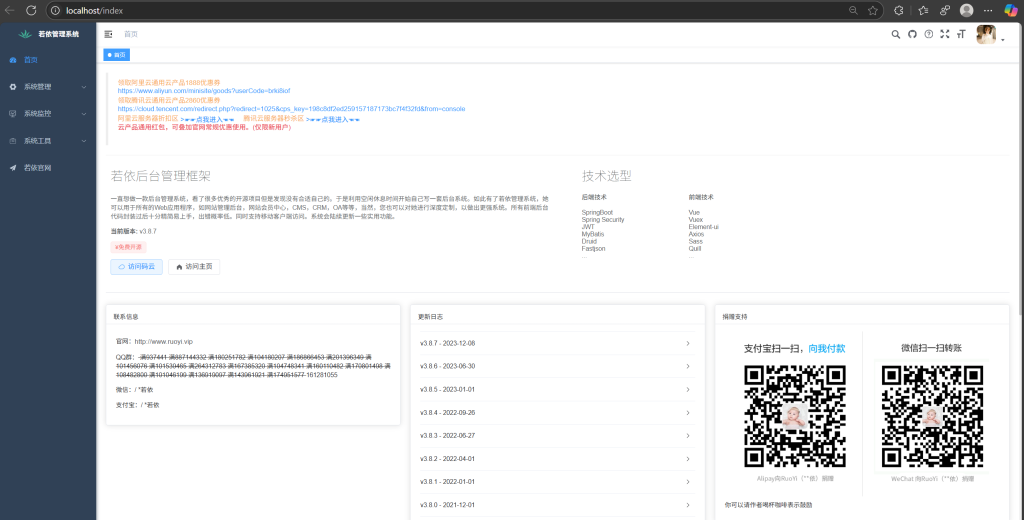
2.入门案例
接下来,我们将利用若依框架的代码生成器实现CRM系统中的课程管理功能,这将使我们能够实际体验并掌握如何在项目中有效使用这一工具。
2.1功能需求
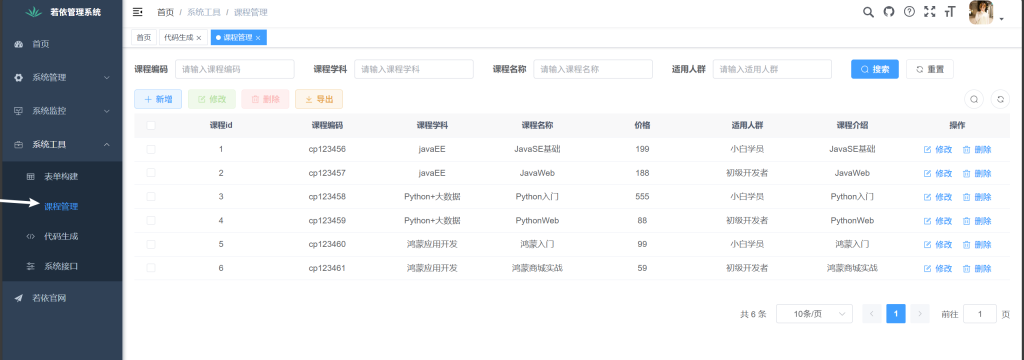
实现CRM系统中的课程管理功能,涵盖增加、删除、修改和查询课程信息的完整前后端代码。
原型地址:https://app.mockplus.cn/run/prototype/_lwaPYSV9Ue6/byFT7QUzmCqJ/2AadzZnerRIDo?cps=collapse&isShare=true
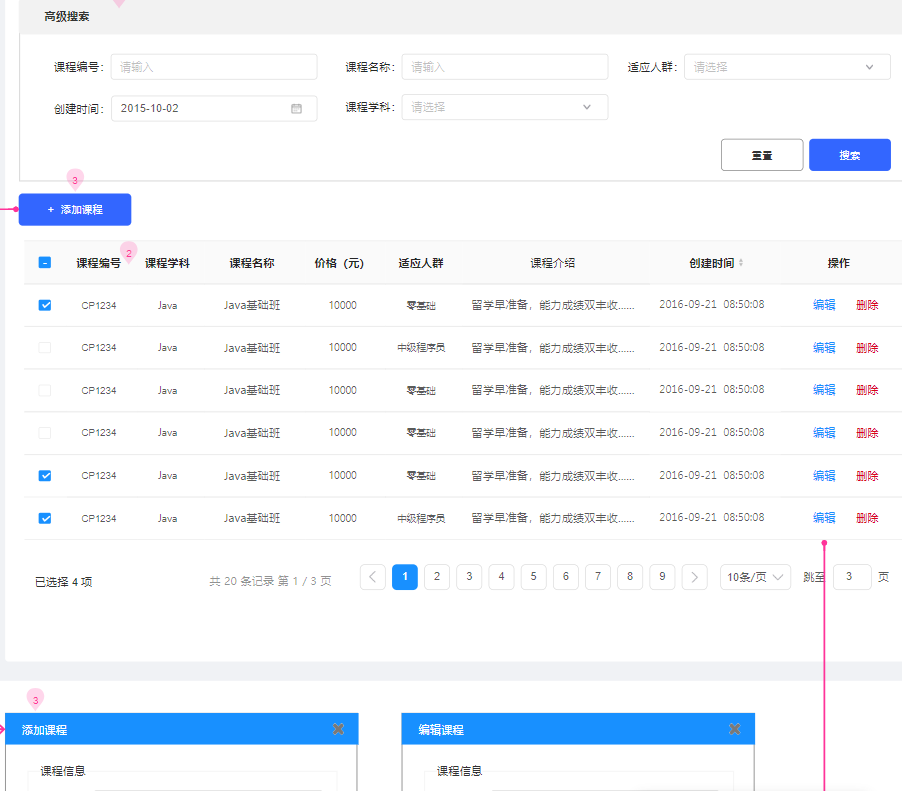
2.2步骤分析
- 1、准备课程表结构和数据sql文件,导入到数据库中
- 2、登录系统(系统工具 -> 代码生成 -> 导入课程表)
- 3、代码生成列表中找到课程表(可预览、编辑、同步、删除生成配置)
- 4、点击生成代码会得到一个
ruoyi.zip
- 5、执行sql文件导入菜单,按照包内目录结构复制到自己的项目中即可
2.3代码生成
2.3.1提供课程表
准备课程表结构和数据sql文件,导入到数据库中
2.3.2系统导入
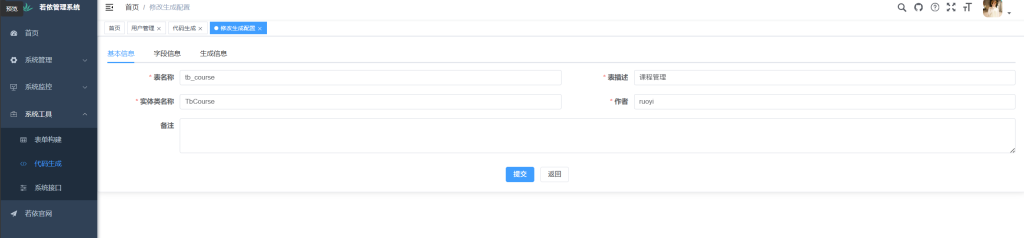
登录系统(系统工具 -> 代码生成 -> 导入课程表)
2.3.3配置代码
代码生成列表中找到课程表(可预览、编辑、同步、删除生成配置)根据业务需求进行修改
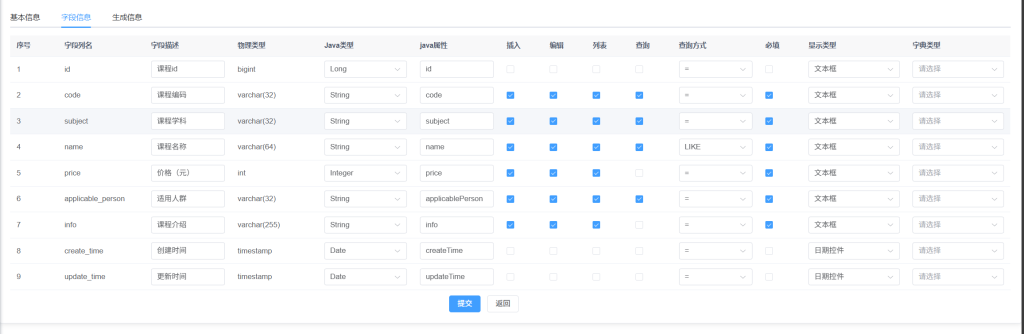
| 字段信息 |
描述 |
| 字段列名 |
表中的字段列名称 |
| 字段描述 |
字段的描述,读取的comment信息,可根据实际情况更改 |
| 物理类型 |
数据库所对应的字段类型 |
| Java类型 |
Java实体类中属性的类型,可改,例如,状态字段:Long类型可以修改为Integer |
| Java属性 |
Java实体类中所对应的属性名称 |
| 插入 |
新增的时候,需要插入的字段 |
| 编辑 |
修改的时候,需要插入的字段 |
| 列表 |
列表查询需要展示的字段 |
| 查询 |
列表查询,需要的条件字段 |
| 查询方式 |
与上面查询条件配合,选择对应的查询方式 |
| 必填 |
在插入和新增的时候,这个字段是否是必填项,可生成校验 |
| 显示类型 |
前端代码使用的组件,可根据实际情况选择 |
| 字典类型 |
字典管理是用来维护数据类型的数据,如下拉框、单选按钮等,可自定义 |
2.3.4导出代码并配置(略)

测试完成
3.功能详解
3.1系统管理
3.1.1 权限系统
演示
若依提供了企业级通用权限系统,我们这里拿CRM系统先给大家演示下:
地址:https://huike-crm.itheima.net/
- demo账号(超级管理员),可以查看所有功能菜单
- zhangsan账号(市场专员),可以查看线索管理菜单
- yueyue账号(销售专员),可以查看商机、合同等菜单
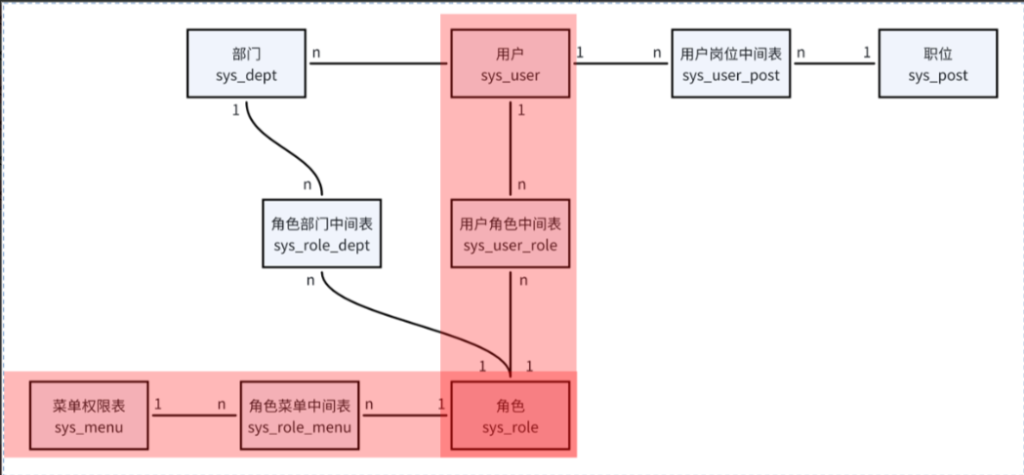
RBAC(Role-Based Access Control)
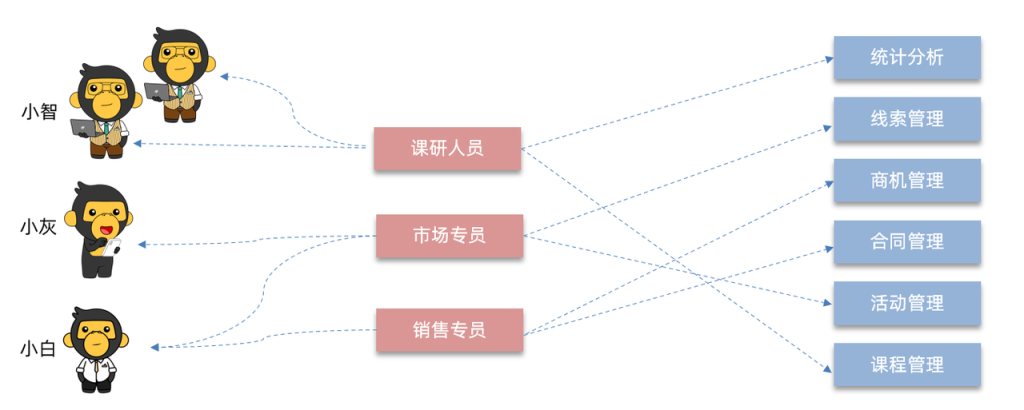
RBAC(基于角色的访问控制)是一种广泛使用的访问控制模型,通过角色来分配和管理用户的菜单权限。
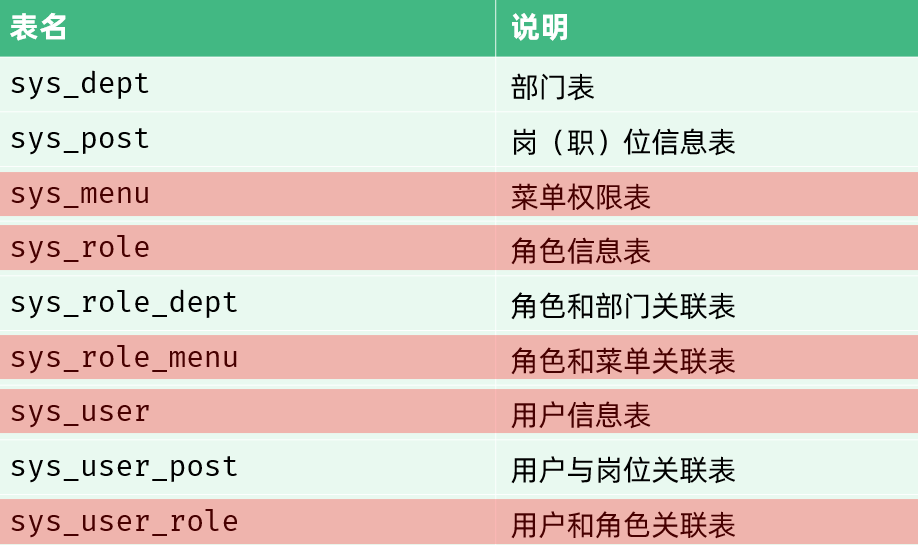
表关系
案例
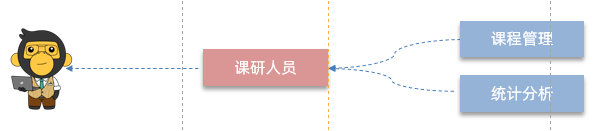
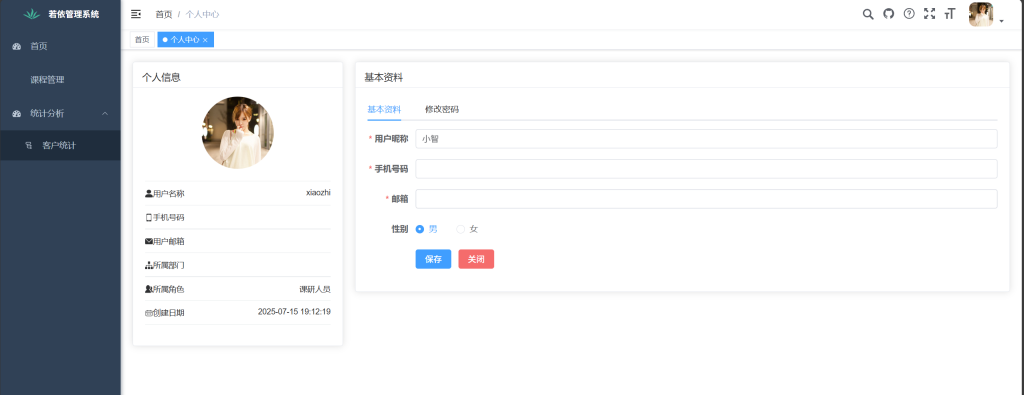
创建新用户小智并关联课研人员角色,仅限课程管理和统计分析菜单访问。
实现步骤**:**
①创建菜单
②创建角色,并分配权限
③创建用户,并关联角色
完成
3.1.2数据字典
介绍
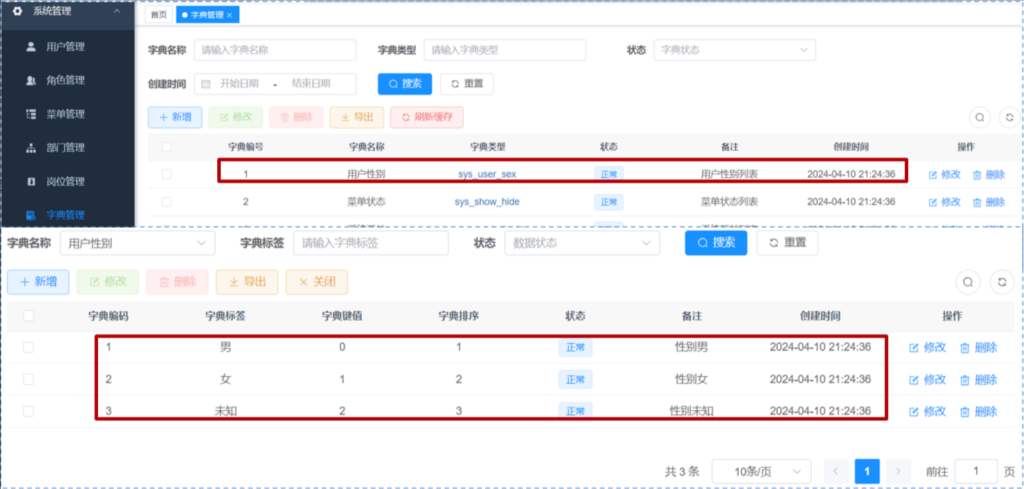
若依内置的数据字典,用于维护系统中常见的静态数据。例如:性别、状态…
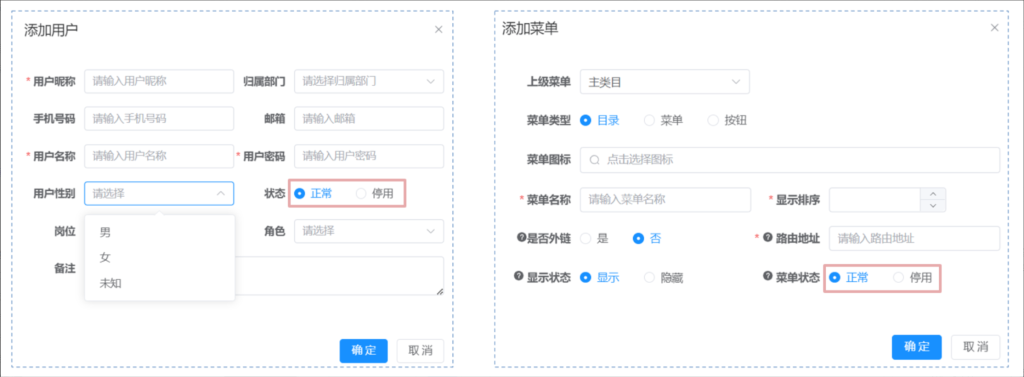
功能包括:字典类型管理、字典数据管理
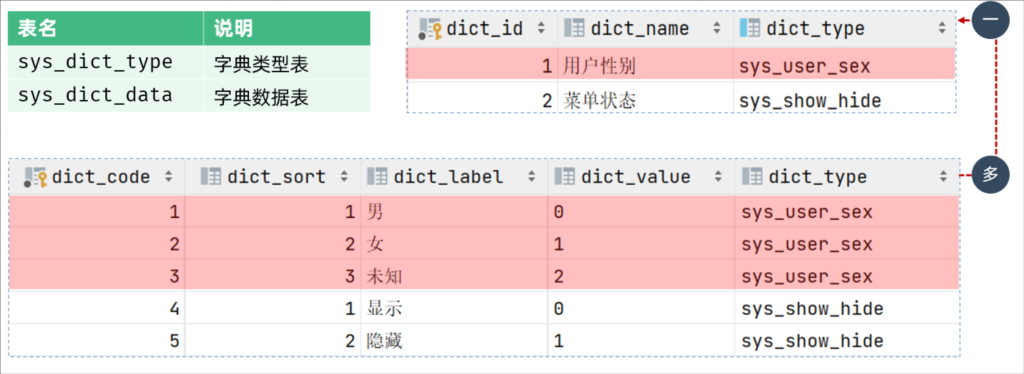
表关系
案例
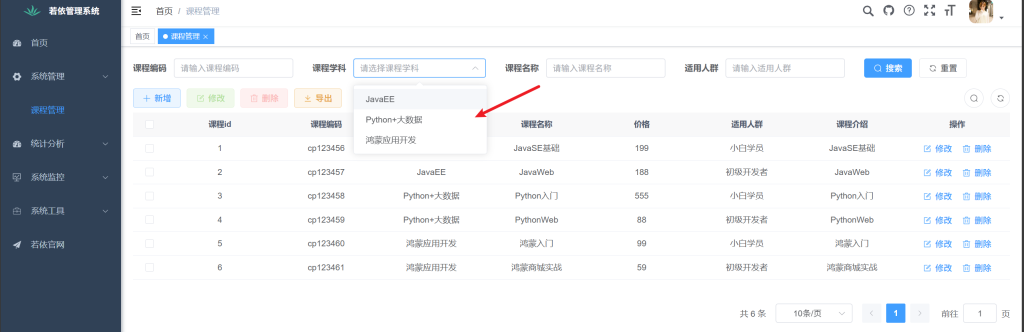
将课程管理的学科字段改为数据字典维护。
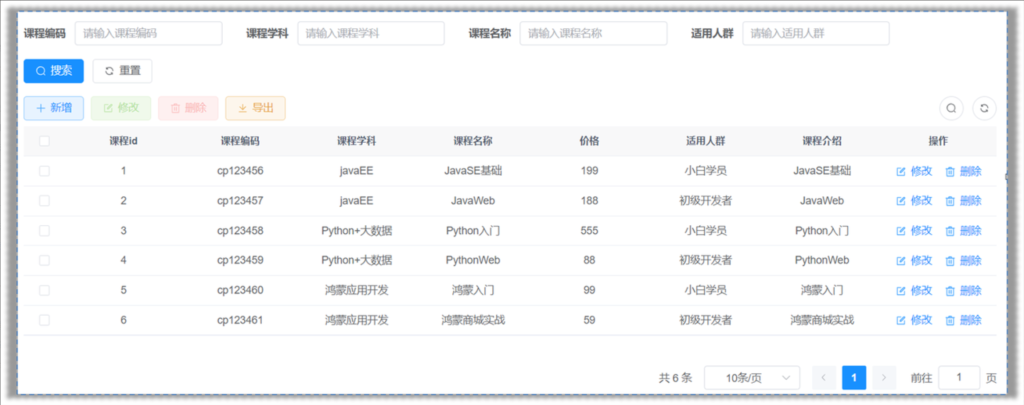
完成
3.1.3 参数设置
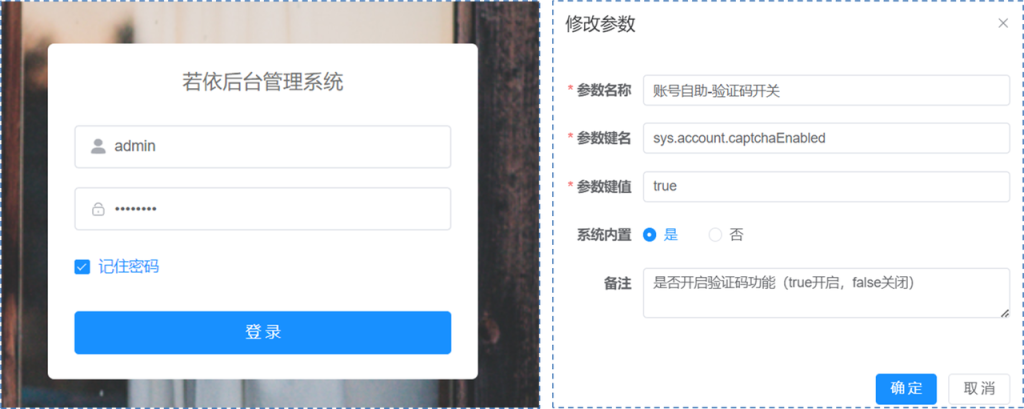
参数设置:对系统中的参数进行动态维护。
关闭登录验证码
3.1.4 通知公告
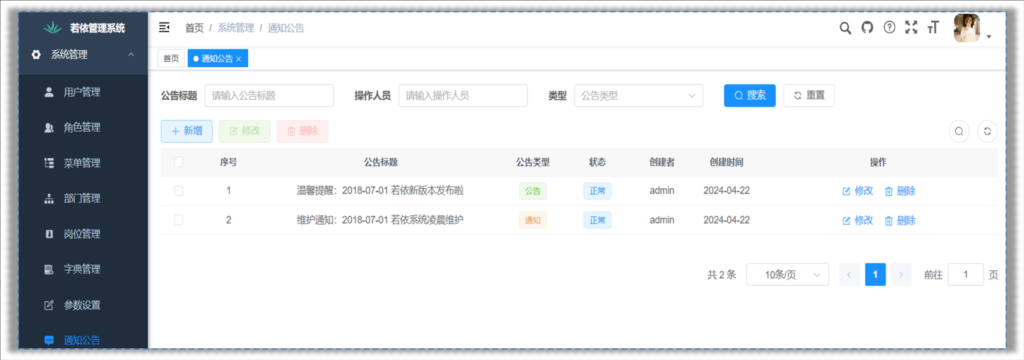
RuoYi的通知公告功能提供了一个方便的方式来发布和管理通知、公告和新闻等信息。管理员可以创建、编辑和删除通知(支持富文本编辑和附件上传)。
系统将信息发送给指定的用户、部门或角色。用户可以通过系统界面或电子邮件接收通知,从而确保信息及时传达(这部分需要自己开发)。
通知公告功能有助于组织内部沟通和信息传递,提高了工作效率和信息共享。
3.1.5 日志管理
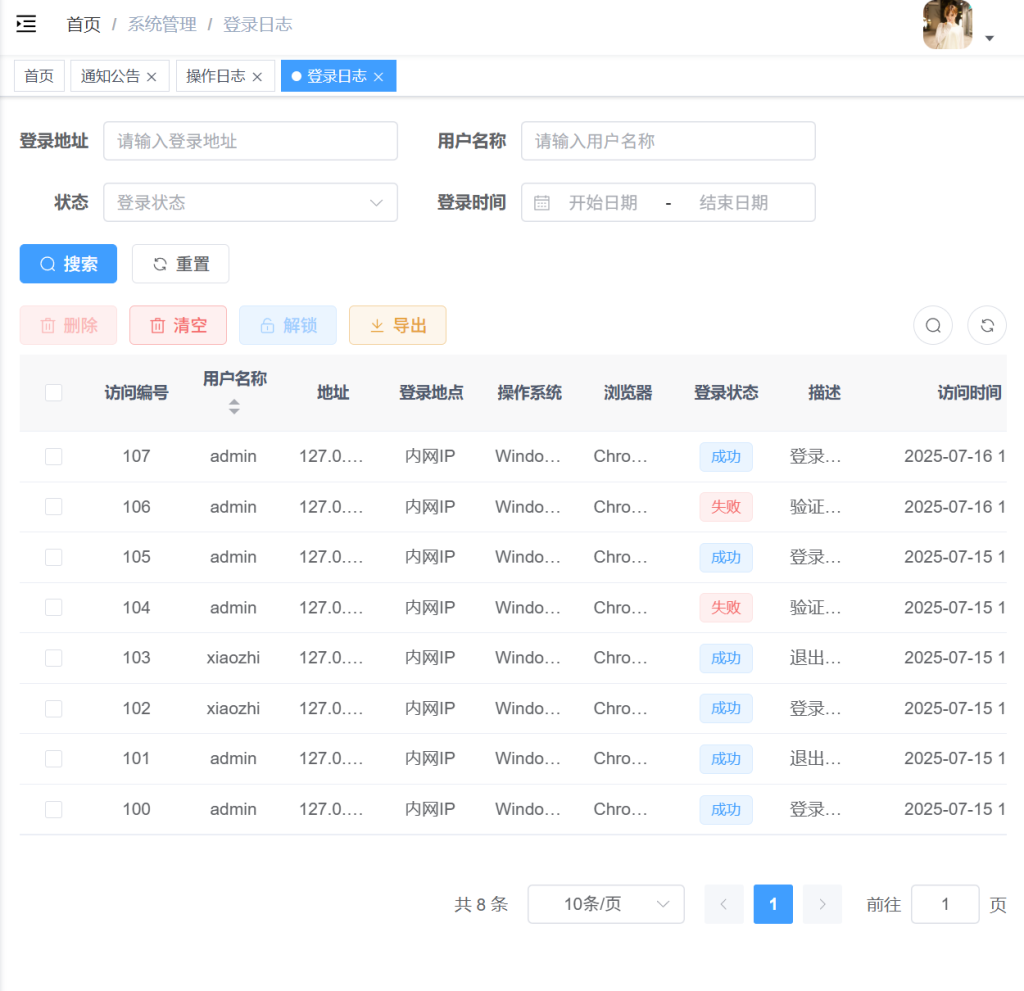
登录日志
- 记录用户的登录信息,包括登录时间和地点(IP地址)。
- 帮助管理员监控登录行为,及时发现任何可疑的登录尝试。
- 同样提供搜索和筛选功能,方便查找特定用户的登录历史。
操作日志
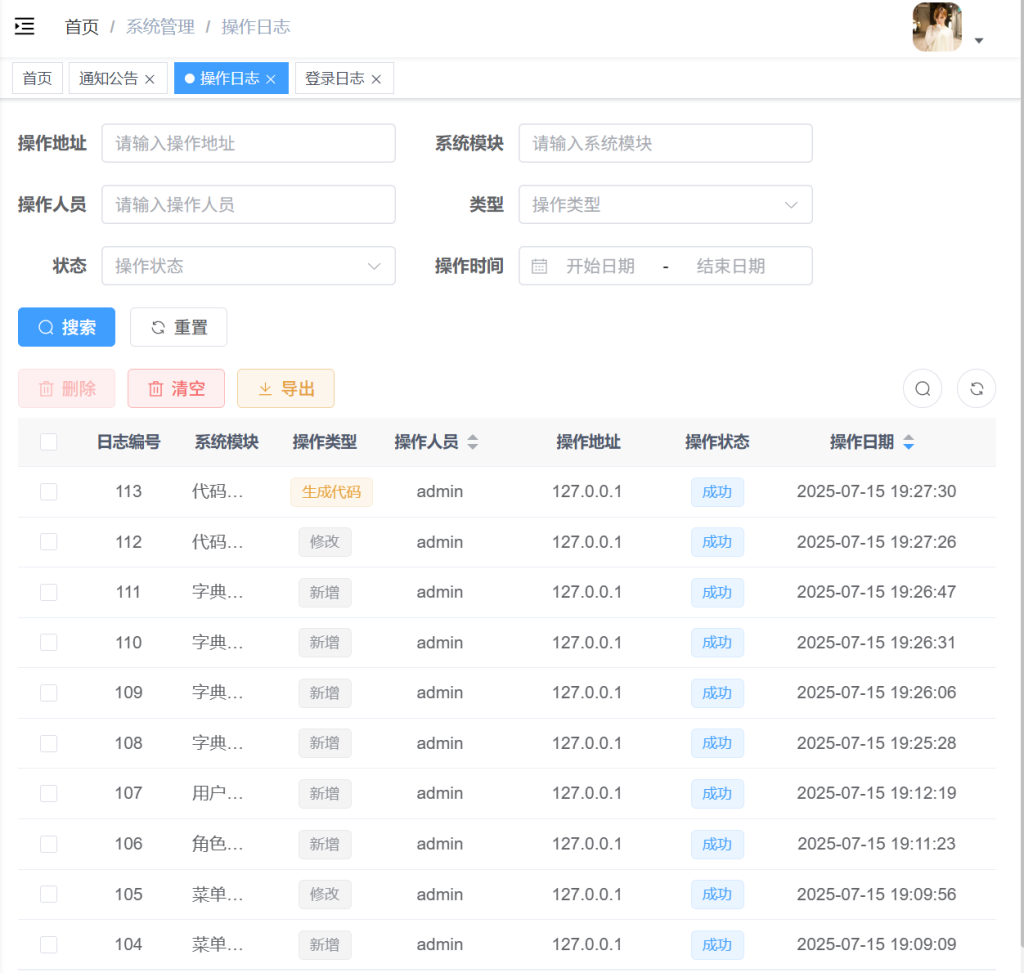
- 记录用户在系统中的所有操作,如查看、修改数据等。
- 帮助管理员检查谁做了什么,以及何时做的,确保数据准确无误。
- 可以快速搜索和找到特定的操作记录,便于管理和审查。
3.2 系统监控
3.2.1 监控相关
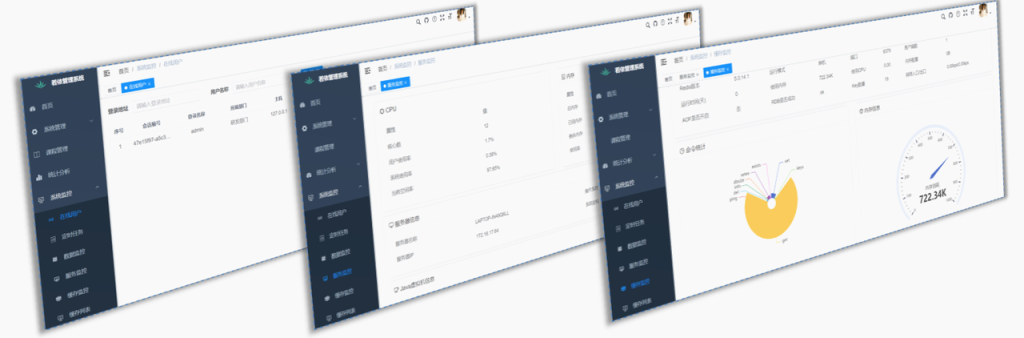
若依提供了一些列强大的监控工具,能够帮助开发者和运维快速了解应用程序的性能状态。
-
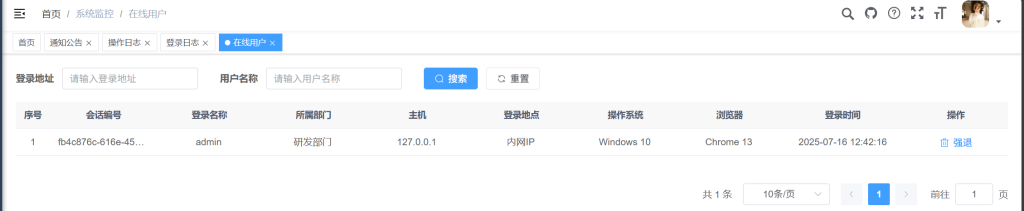
在线用户
:
- 管理员可以看到当前谁在系统里,他们什么时候登录的,从哪里登录的,属于哪个部门。
- 如果有人没权限还赖着不走,管理员可以一键让他们下线,保证系统的安全。
-
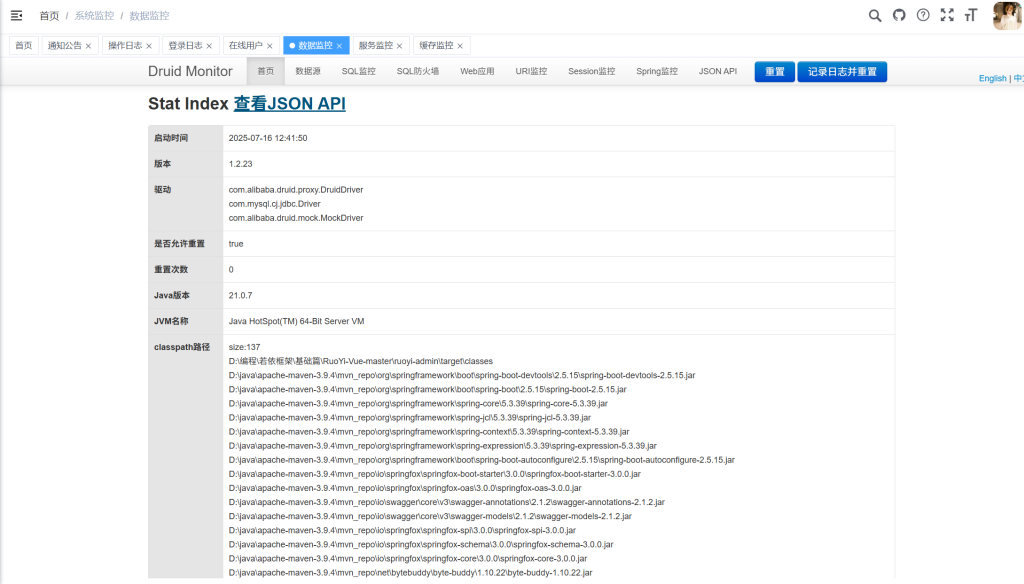
数据监控
:
- 管理员可以实时看到系统的各项指标,比如资源使用情况,数据库状态等。
- 通过图表可以直观地看出系统是否健康,如果出现问题,系统会发出警报。
-
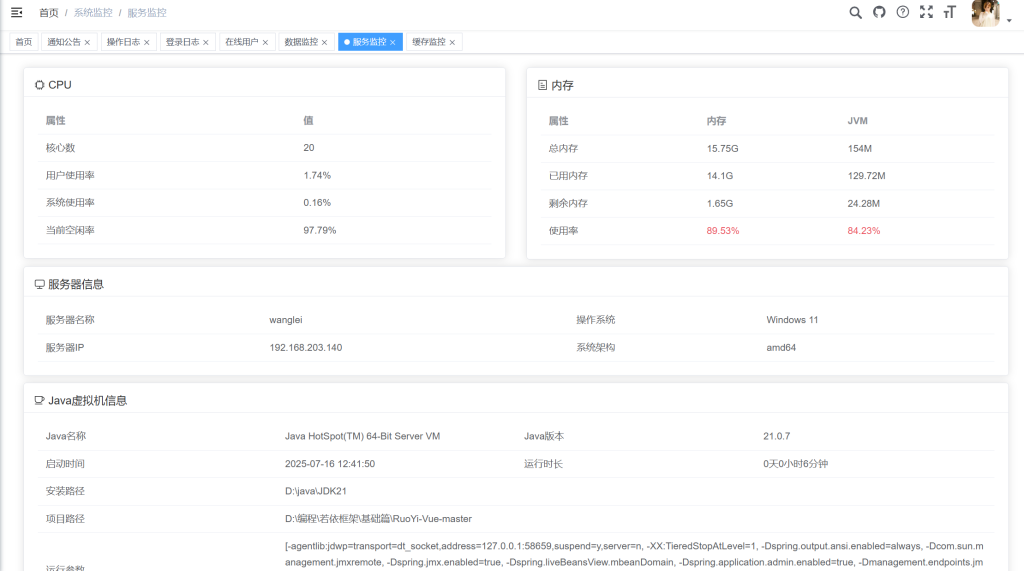
服务监控
:
- 管理员可以监控系统中各个服务是否正常运行,以及它们的性能指标。
- 如果服务出现问题,系统会立即通知管理员,并通过仪表板展示,方便管理员快速了解情况。
-
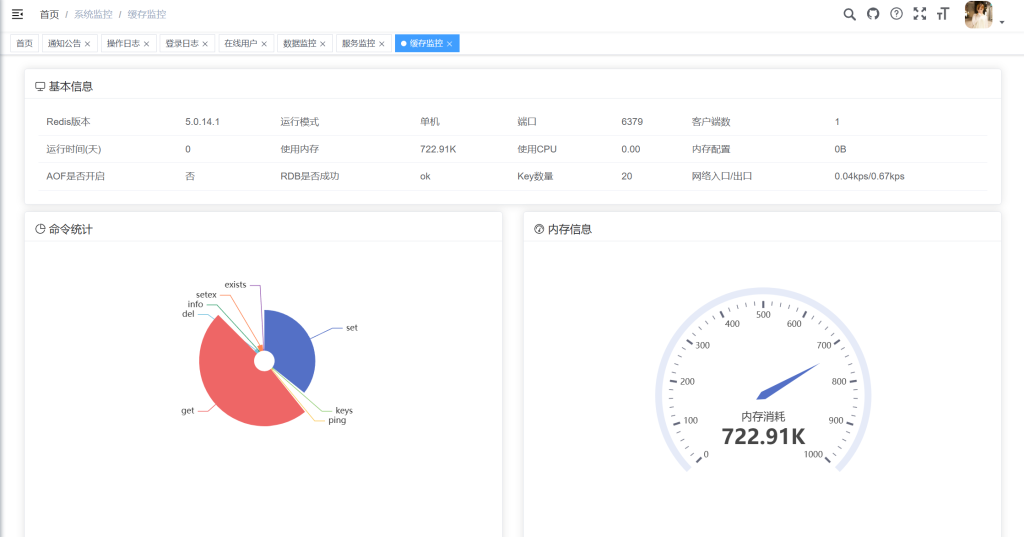
缓存监控
:
- 管理员可以监控系统的缓存使用情况,比如缓存是否经常被用到,缓存的大小等。
- 系统还可以自动清理缓存,保持数据的新鲜度,如果缓存有问题,也会发出警报
3.2.2 定时任务
介绍
若依为定时任务功能提供方便友好的web界面,实现动态管理任务。
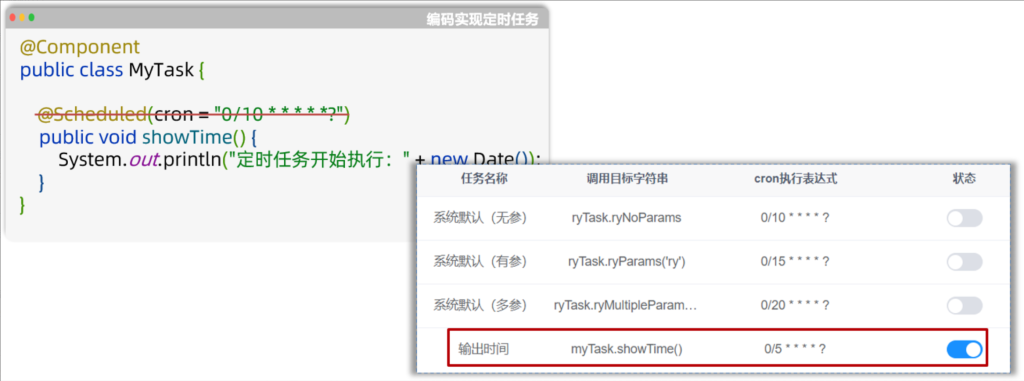
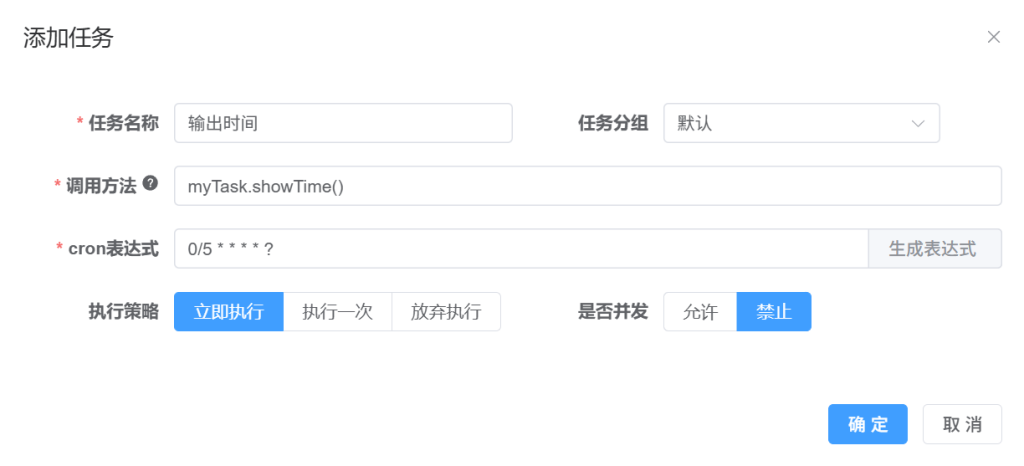
案例
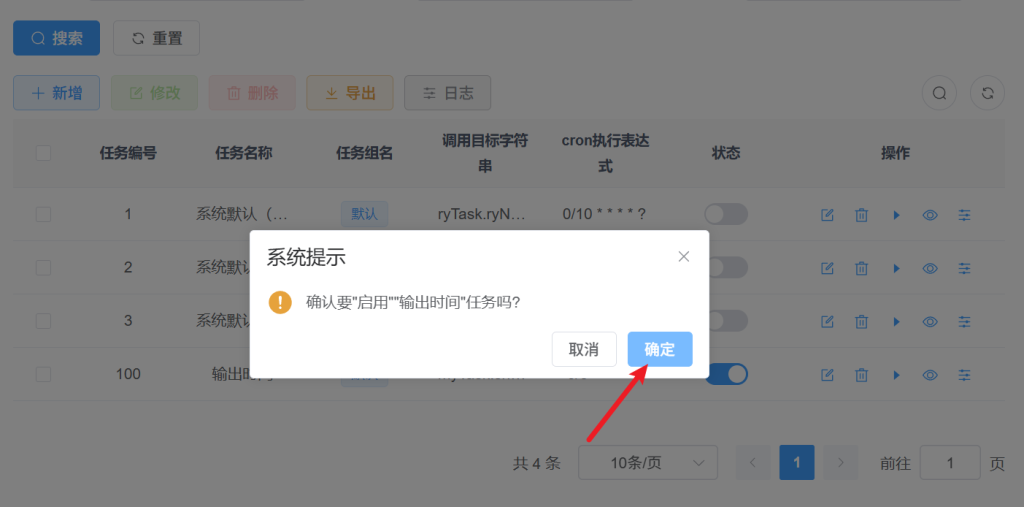
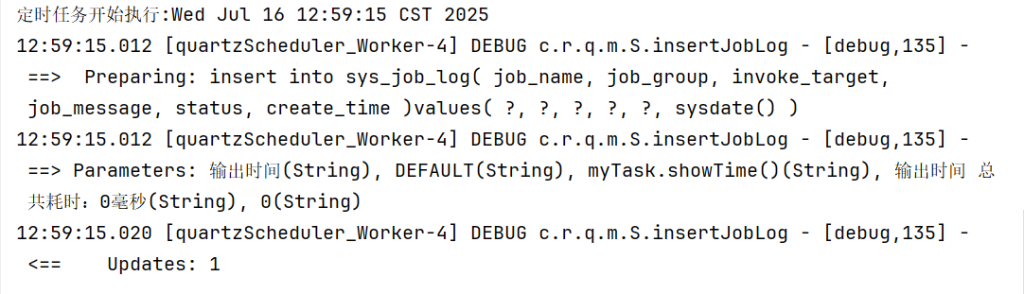
每间隔5秒,控制台输出系统时间。
实现步骤:
①创建任务类
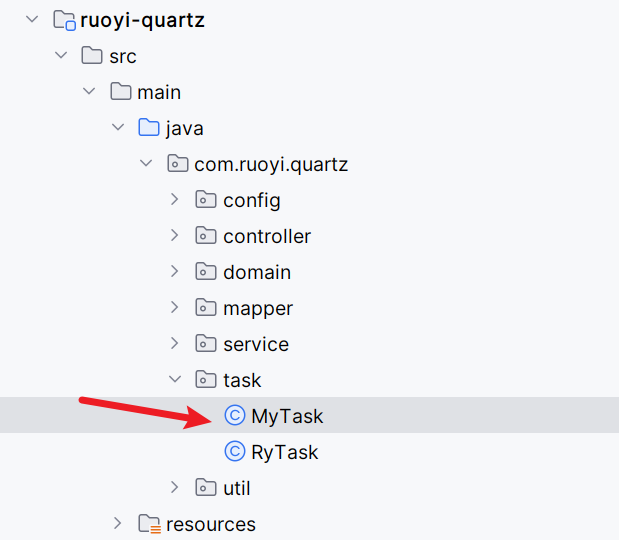
②添加任务规则
- 任务名称:自定义,如:定时查询任务状态
- 任务分组:根据字典
sys_job_group配置,可自行进行配置
- 调用目标字符串:设置后台任务方法名称参数
- 执行表达式:可查询官方
cron表达式介绍
- 执行策略:定时任务自定义执行策略(这是服务器宕机恢复后,对宕机期间的任务是否重新执行的几种策略)
- 并发执行:是否需要多个任务间同时执行
③启动任务
3.3 系统工具
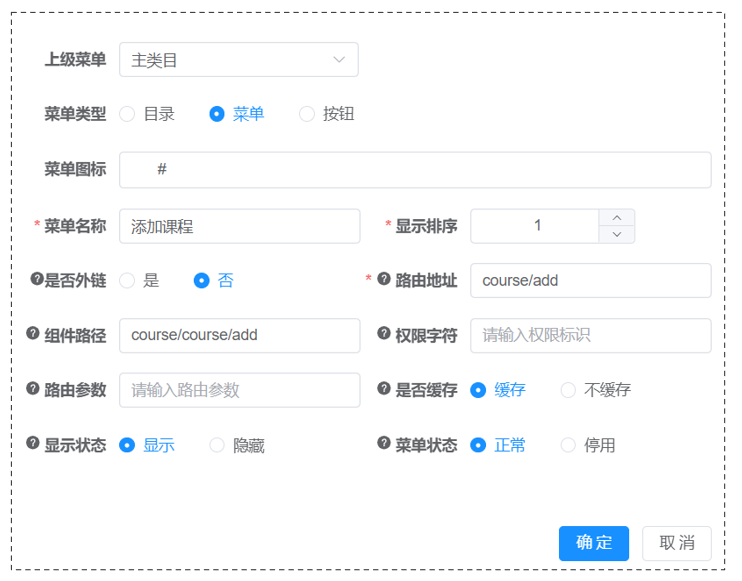
3.3.1 表单构建
介绍
- 允许用户通过拖放等可视化操作创建表单,比如用来收集数据的表格或调查问卷。
- 可以自定义表单的各个部分,比如添加不同的输入项和设置验证规则,无需编写代码。
- 提供了导出数据、导入数据、分享表单和设置权限的功能,方便数据管理和共享。
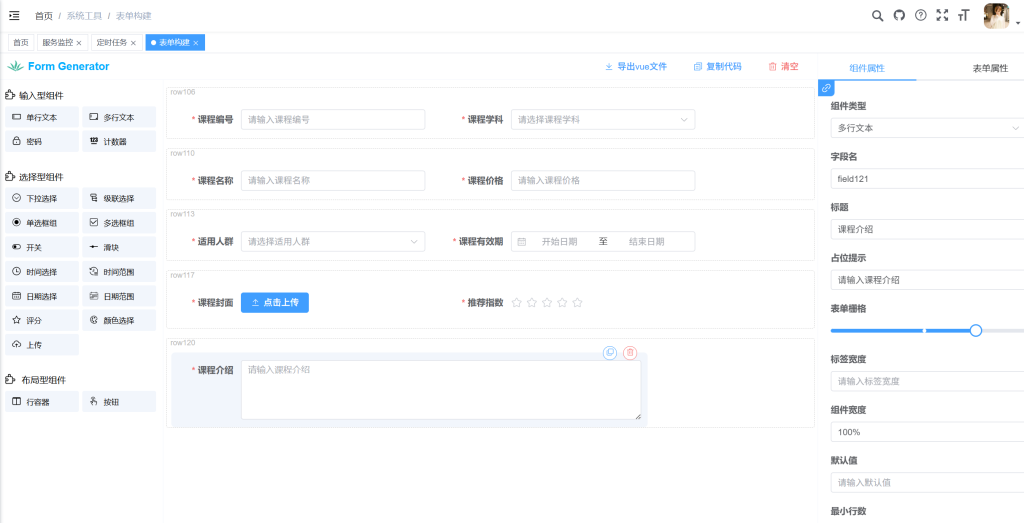
导出重命名为app.vue并放入前端工程中

3.3.2 代码生成
- 自动化工具,可以快速生成项目中常用的代码,如数据库操作类、后端控制器、前端页面等。
- 支持根据数据库的表结构反向生成代码,减少手动编写的工作量。
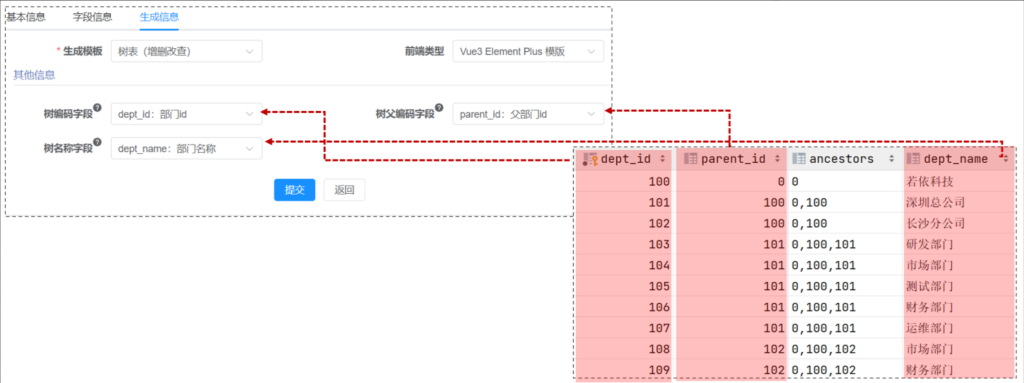
- 提供三种生成模板:单表、 树表、主子表(一对多),可以生成适用于Spring Boot、MyBatis等流行框架的代码,提高开发效率和代码质量。
- 树表是一种展示层级数据的表格,能展开折叠,清晰呈现父子关系,便于管理。
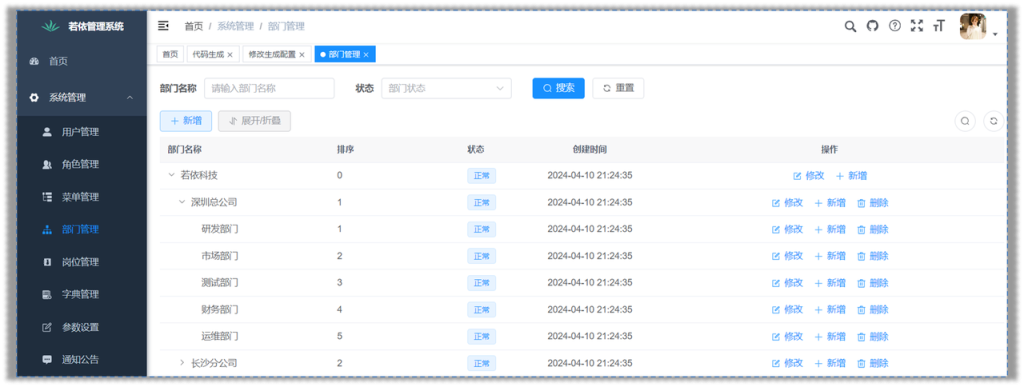
代码生成配置主表实现细节:
3.3.3 系统接口
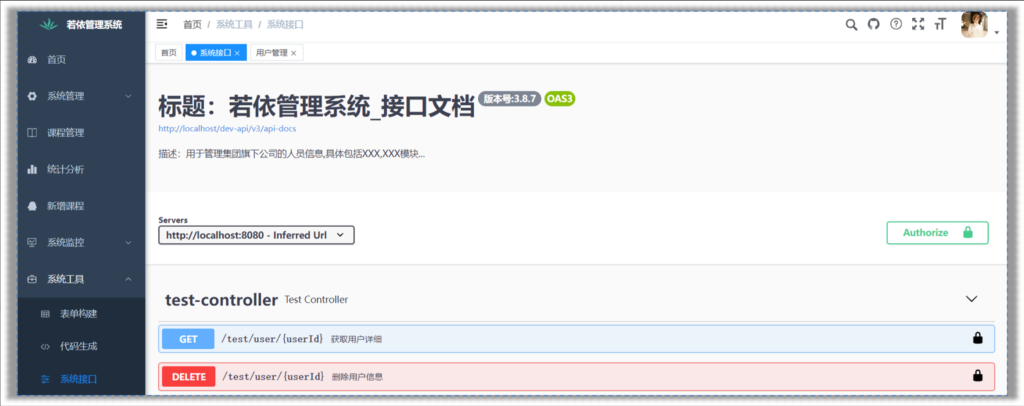
Swagger,能够自动生成 API 的同步在线文档,并提供Web界面进行接口调用和测试。
4.项目结构
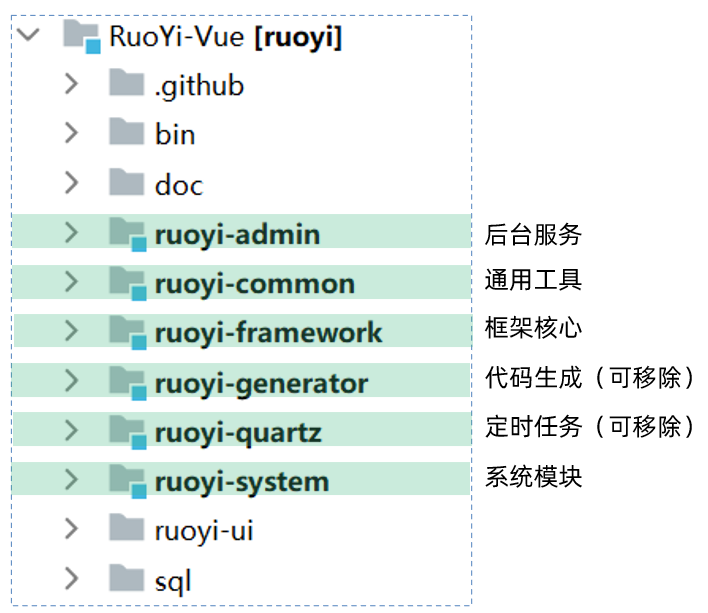
4.1 后端结构
1
2
3
4
5
6
7
8
9
10
11
12
13
14
15
16
17
18
19
20
21
22
23
24
25
26
27
28
| com.ruoyi
├── ruoyi-admin
│ └── web
│ └── RuoYiApplication
├── ruoyi-common
│ └── annotation
│ └── config
│ └── constant
│ └── core
│ └── enums
│ └── exception
│ └── filter
│ └── utils
│ └── xss
├── ruoyi-framework
│ └── aspectj
│ └── config
│ └── datasource
│ └── interceptor
│ └── manager
│ └── security
│ └── web
├── ruoyi-generator
├── ruoyi-quartz
├── ruoyi-system
│ └── domain
│ └── mapper
│ └── service
|
4.2 项目中配置
项目中的配置文件都在ruoyi-admin模块下,如下图:
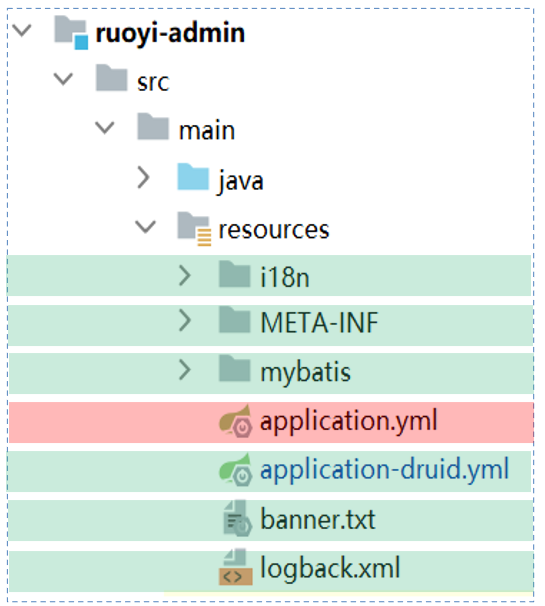
- i18n:国际化处理
- META-INF:存储了项目的元信息(描述数据的数据),无需修改
- mybatis:mybatis相关的配置信息
- application.yml:项目中的核心配置
- application-druid.yml:数据库连接配置
- banner.txt:默认的banner图标信息,项目启动,控制台打印显示
- logback.xml:日志配置
最主要的配置文件:application.yml
1
2
3
4
5
6
7
8
9
10
11
12
13
14
15
16
17
18
19
20
21
22
23
24
25
26
27
28
29
30
31
32
33
34
35
36
37
38
39
40
41
42
43
44
45
46
47
48
49
50
51
52
53
54
55
56
57
58
59
60
61
62
63
64
65
66
67
68
69
70
71
72
73
74
75
76
77
78
79
80
81
82
83
84
85
86
87
88
89
90
91
92
93
94
95
96
97
98
99
100
101
102
103
104
105
106
107
108
109
110
111
112
113
114
115
116
117
118
119
120
121
122
123
124
125
126
127
128
129
|
ruoyi:
name: RuoYi
version: 3.8.7
copyrightYear: 2024
profile: D:/ruoyi/uploadPath
addressEnabled: false
captchaType: math
server:
port: 8080
servlet:
context-path: /
tomcat:
uri-encoding: UTF-8
accept-count: 1000
threads:
max: 800
min-spare: 100
logging:
level:
com.ruoyi: debug
org.springframework: warn
user:
password:
maxRetryCount: 5
lockTime: 10
spring:
messages:
basename: i18n/messages
profiles:
active: druid
servlet:
multipart:
max-file-size: 10MB
max-request-size: 20MB
devtools:
restart:
enabled: true
redis:
host: localhost
port: 6379
database: 0
password: 123456
timeout: 10s
lettuce:
pool:
min-idle: 0
max-idle: 8
max-active: 8
max-wait: -1ms
token:
header: Authorization
secret: abcdefghijklmnopqrstuvwxyz
expireTime: 30
mybatis:
typeAliasesPackage: com.ruoyi.**.domain
mapperLocations: classpath*:mapper*Mapper.xml
configLocation: classpath:mybatis/mybatis-config.xml
pagehelper:
helperDialect: mysql
supportMethodsArguments: true
params: count=countSql
swagger:
enabled: true
pathMapping: /dev-api
xss:
enabled: true
excludes: /system/notice
urlPatterns: /system
|
4.3 模块依赖关系
各个模块之间的依赖关系:

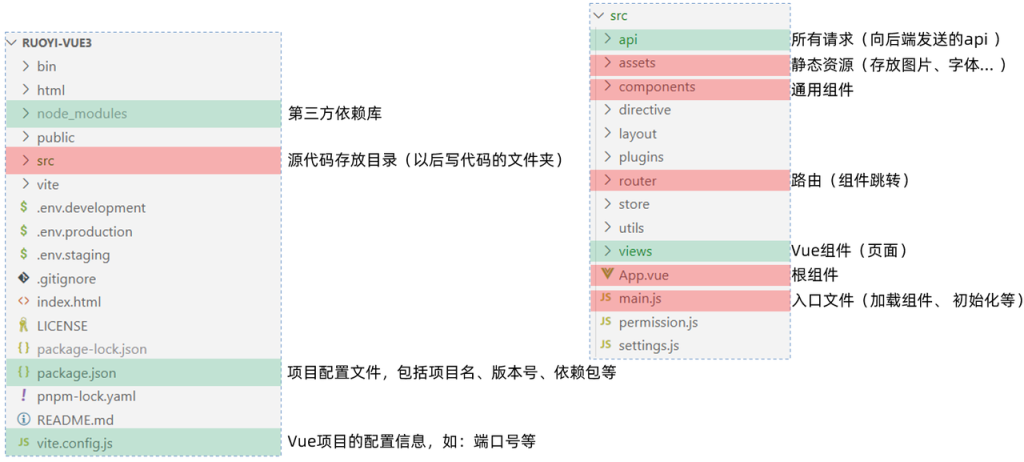
4.4 前端结构
1
2
3
4
5
6
7
8
9
10
11
12
13
14
15
16
17
18
19
20
21
22
23
24
25
26
27
28
29
| ruoyi-vue3
├── bin
├── html
├── node_modules
├── public
│ ├── favicon.ico
├── src // 源代码
│ ├── api
│ ├── assets
│ ├── components
│ ├── directive
│ ├── layout
│ ├── plugins
│ ├── router
│ ├── store
│ ├── utils
│ ├── views
│ ├── App.vue
│ ├── main.js
│ ├── permission.js
│ └── settings.js
├── vite
├── .env.development
├── .env.production
├── .env.staging
├── .gitignore
├── index.html
├── package.json
└── vue.config.js
|
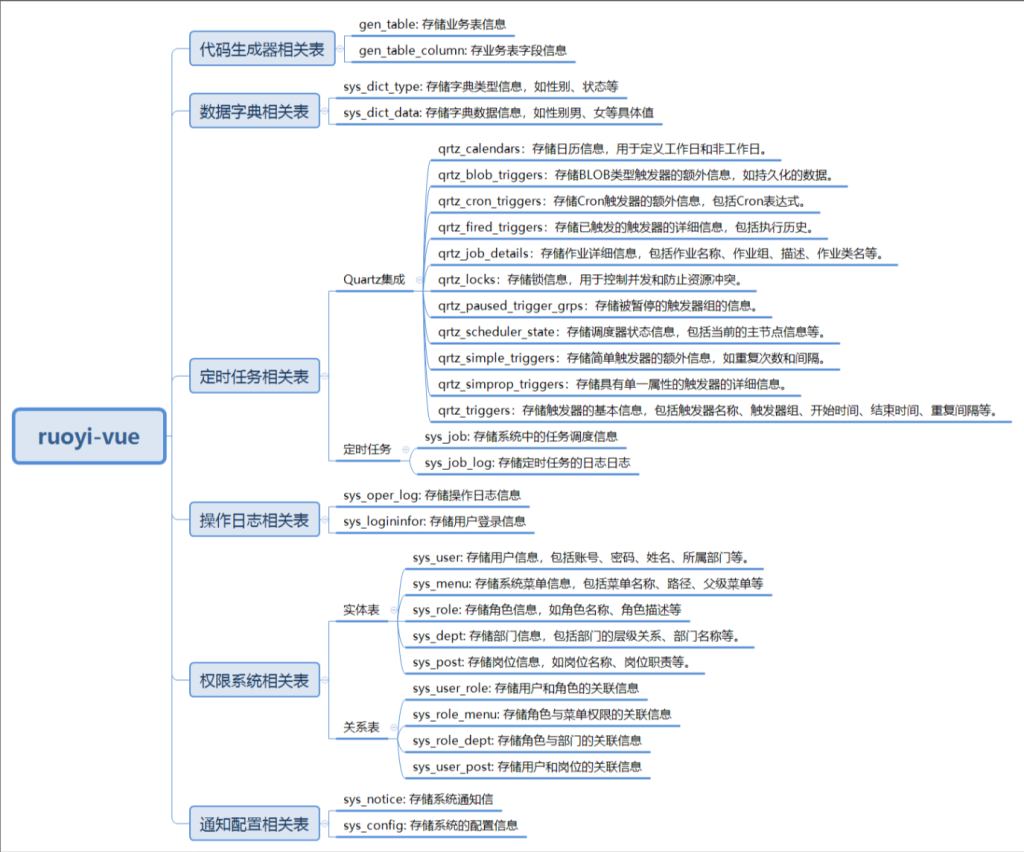
4.5 表结构介绍
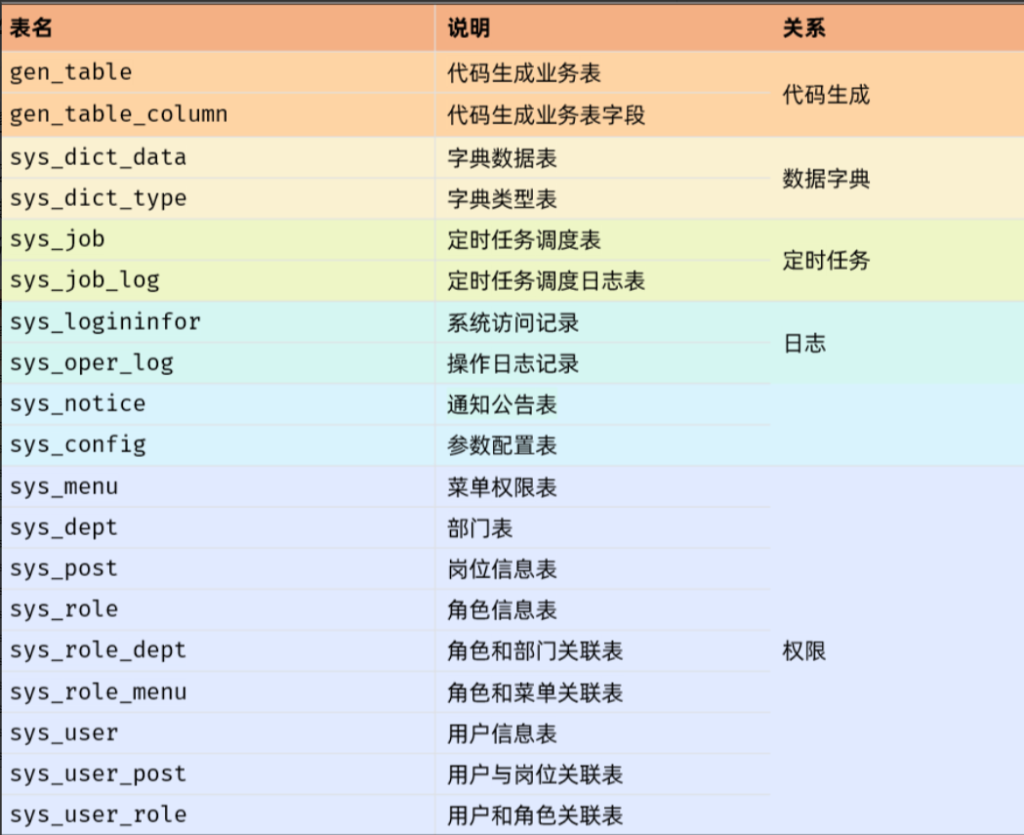
ruoyi-vue数据库设计包含了多个表结构,用于支持系统的各种功能模块。
这些表可以根据它们的功能和用途进行分类,以便在后期使用时能够快速定位和理解。以下是对这些表结构的分类和简要说明:
5.源码阅读
5.1 前端代码分析
找到src/views/course/course/index.vue文件,护理项目的前端代码已经添加了详细的注释,如下:
1
2
3
4
5
6
7
8
9
10
11
12
13
14
15
16
17
18
19
20
21
22
23
24
25
26
27
28
29
30
31
32
33
34
35
36
37
38
39
40
41
42
43
44
45
46
47
48
49
50
51
52
53
54
55
56
57
58
59
60
61
62
63
64
65
66
67
68
69
70
71
72
73
74
75
76
77
78
79
80
81
82
83
84
85
86
87
88
89
90
91
92
93
94
95
96
97
98
99
100
101
102
103
104
105
106
107
108
109
110
111
112
113
114
115
116
117
118
119
120
121
122
123
124
125
126
127
128
129
130
131
132
133
134
135
136
137
138
139
140
141
142
143
144
145
146
147
148
149
150
151
152
153
154
155
156
157
158
159
160
161
162
163
164
165
166
167
168
169
170
171
172
173
174
175
176
177
178
179
180
181
182
183
184
185
186
187
188
189
190
191
192
193
194
195
196
197
198
199
200
201
202
203
204
205
206
207
208
209
210
211
212
213
214
215
216
217
218
219
220
221
222
223
224
225
226
227
228
229
230
231
232
233
234
235
236
237
238
239
240
241
242
243
244
245
246
247
248
249
250
251
252
253
254
255
256
257
258
259
260
261
262
263
264
265
266
267
268
269
270
271
272
273
274
275
276
277
278
279
280
281
282
283
284
285
286
287
288
289
290
291
292
293
294
295
296
297
298
299
300
301
302
303
304
305
306
307
308
309
310
311
312
313
314
315
316
317
318
319
320
321
322
323
324
325
326
327
328
329
330
331
332
333
334
335
336
337
338
339
| <template>
<div class="app-container">
<el-form :model="queryParams" ref="queryRef" :inline="true" v-show="showSearch" label-width="68px">
<el-form-item label="课程编码" prop="code">
<el-input
v-model="queryParams.code"
placeholder="请输入课程编码"
clearable
@keyup.enter="handleQuery"
/>
</el-form-item>
<el-form-item label="课程学科" prop="subject">
<el-select v-model="queryParams.subject" placeholder="请选择课程学科" clearable>
<el-option
v-for="dict in course_subject"
:key="dict.value"
:label="dict.label"
:value="dict.value"
/>
</el-select>
</el-form-item>
<el-form-item label="课程名称" prop="name">
<el-input
v-model="queryParams.name"
placeholder="请输入课程名称"
clearable
@keyup.enter="handleQuery"
/>
</el-form-item>
<el-form-item label="适用人群" prop="applicablePerson">
<el-input
v-model="queryParams.applicablePerson"
placeholder="请输入适用人群"
clearable
@keyup.enter="handleQuery"
/>
</el-form-item>
<el-form-item>
<el-button type="primary" icon="Search" @click="handleQuery">搜索</el-button>
<el-button icon="Refresh" @click="resetQuery">重置</el-button>
</el-form-item>
</el-form>
<el-row :gutter="10" class="mb8">
<el-col :span="1.5">
<el-button
type="primary"
plain
icon="Plus"
@click="handleAdd"
v-hasPermi="['course:course:add']"
>新增</el-button>
</el-col>
<el-col :span="1.5">
<el-button
type="success"
plain
icon="Edit"
:disabled="single"
@click="handleUpdate"
v-hasPermi="['course:course:edit']"
>修改</el-button>
</el-col>
<el-col :span="1.5">
<el-button
type="danger"
plain
icon="Delete"
:disabled="multiple"
@click="handleDelete"
v-hasPermi="['course:course:remove']"
>删除</el-button>
</el-col>
<el-col :span="1.5">
<el-button
type="warning"
plain
icon="Download"
@click="handleExport"
v-hasPermi="['course:course:export']"
>导出</el-button>
</el-col>
<right-toolbar v-model:showSearch="showSearch" @queryTable="getList"></right-toolbar>
</el-row>
<el-table v-loading="loading" :data="courseList" @selection-change="handleSelectionChange">
<el-table-column type="selection" width="55" align="center" />
<el-table-column label="课程id" align="center" prop="id" />
<el-table-column label="课程编码" align="center" prop="code" />
<el-table-column label="课程学科" align="center" prop="subject">
<template #default="scope">
<dict-tag :options="course_subject" :value="scope.row.subject"/>
</template>
</el-table-column>
<el-table-column label="课程名称" align="center" prop="name" />
<el-table-column label="价格" align="center" prop="price" />
<el-table-column label="适用人群" align="center" prop="applicablePerson" />
<el-table-column label="课程介绍" align="center" prop="info" />
<el-table-column label="操作" align="center" class-name="small-padding fixed-width">
<template #default="scope">
<el-button link type="primary" icon="Edit" @click="handleUpdate(scope.row)" v-hasPermi="['course:course:edit']">修改</el-button>
<el-button link type="primary" icon="Delete" @click="handleDelete(scope.row)" v-hasPermi="['course:course:remove']">删除</el-button>
</template>
</el-table-column>
</el-table>
<pagination
v-show="total>0"
:total="total"
v-model:page="queryParams.pageNum"
v-model:limit="queryParams.pageSize"
@pagination="getList"
/>
<el-dialog :title="title" v-model="open" width="500px" append-to-body>
<el-form ref="courseRef" :model="form" :rules="rules" label-width="80px">
<el-form-item label="课程编码" prop="code">
<el-input v-model="form.code" placeholder="请输入课程编码" />
</el-form-item>
<el-form-item label="课程学科" prop="subject">
<el-select v-model="form.subject" placeholder="请选择课程学科">
<el-option
v-for="dict in course_subject"
:key="dict.value"
:label="dict.label"
:value="dict.value"
></el-option>
</el-select>
</el-form-item>
<el-form-item label="课程名称" prop="name">
<el-input v-model="form.name" placeholder="请输入课程名称" />
</el-form-item>
<el-form-item label="价格" prop="price">
<el-input v-model="form.price" placeholder="请输入价格" />
</el-form-item>
<el-form-item label="适用人群" prop="applicablePerson">
<el-input v-model="form.applicablePerson" placeholder="请输入适用人群" />
</el-form-item>
<el-form-item label="课程介绍" prop="info">
<el-input v-model="form.info" placeholder="请输入课程介绍" />
</el-form-item>
</el-form>
<template #footer>
<div class="dialog-footer">
<el-button type="primary" @click="submitForm">确 定</el-button>
<el-button @click="cancel">取 消</el-button>
</div>
</template>
</el-dialog>
</div>
</template>
<script setup name="Course">
import { listCourse, getCourse, delCourse, addCourse, updateCourse } from "@/api/course/course";
const { proxy } = getCurrentInstance();
const { course_subject } = proxy.useDict('course_subject');
const courseList = ref([]);
const open = ref(false);
const loading = ref(true);
const showSearch = ref(true);
const ids = ref([]);
const single = ref(true);
const multiple = ref(true);
const total = ref(0);
const title = ref("");
const data = reactive({
form: {},
queryParams: {
pageNum: 1,
pageSize: 10,
code: null,
subject: null,
name: null,
applicablePerson: null,
},
rules: {
code: [
{ required: true, message: "课程编码不能为空", trigger: "blur" }
],
subject: [
{ required: true, message: "课程学科不能为空", trigger: "change" }
],
name: [
{ required: true, message: "课程名称不能为空", trigger: "blur" }
],
price: [
{ required: true, message: "价格不能为空", trigger: "blur" }
],
applicablePerson: [
{ required: true, message: "适用人群不能为空", trigger: "blur" }
],
info: [
{ required: true, message: "课程介绍不能为空", trigger: "blur" }
],
}
});
const { queryParams, form, rules } = toRefs(data);
function getList() {
loading.value = true;
listCourse(queryParams.value).then(response => {
courseList.value = response.rows;
total.value = response.total;
loading.value = false;
});
}
function cancel() {
open.value = false;
reset();
}
function reset() {
form.value = {
id: null,
code: null,
subject: null,
name: null,
price: null,
applicablePerson: null,
info: null,
createTime: null,
updateTime: null
};
proxy.resetForm("courseRef");
}
function handleQuery() {
queryParams.value.pageNum = 1;
getList();
}
function resetQuery() {
proxy.resetForm("queryRef");
handleQuery();
}
function handleSelectionChange(selection) {
ids.value = selection.map(item => item.id);
single.value = selection.length != 1;
multiple.value = !selection.length;
}
function handleAdd() {
reset();
open.value = true;
title.value = "添加课程管理";
}
function handleUpdate(row) {
reset();
const _id = row.id || ids.value
getCourse(_id).then(response => {
form.value = response.data;
open.value = true;
title.value = "修改课程管理";
});
}
function submitForm() {
proxy.$refs["courseRef"].validate(valid => {
if (valid) {
if (form.value.id != null) {
updateCourse(form.value).then(response => {
proxy.$modal.msgSuccess("修改成功");
open.value = false;
getList();
});
} else {
addCourse(form.value).then(response => {
proxy.$modal.msgSuccess("新增成功");
open.value = false;
getList();
});
}
}
});
}
function handleDelete(row) {
const _ids = row.id || ids.value;
proxy.$modal.confirm('是否确认删除课程管理编号为"' + _ids + '"的数据项?').then(function() {
return delCourse(_ids);
}).then(() => {
getList();
proxy.$modal.msgSuccess("删除成功");
}).catch(() => {});
}
function handleExport() {
proxy.download('course/course/export', {
...queryParams.value
}, `course_${new Date().getTime()}.xlsx`)
}
getList();
</script>
|
5.2 后端代码分析
5.2.1 CourseController
ruoyi-admin模块下找到这个类:com.ruoyi.web.controller.course.CourseController里面有5个对应的方法接口,详细代码如下:
1
2
3
4
5
6
7
8
9
10
11
12
13
14
15
16
17
18
19
20
21
22
23
24
25
26
27
28
29
30
31
32
33
34
35
36
37
38
39
40
41
42
43
44
45
46
47
48
49
50
51
52
53
54
55
56
57
58
59
60
61
62
63
64
65
66
67
68
69
70
71
72
73
74
75
76
77
78
79
80
81
82
83
84
85
86
87
88
89
90
91
92
93
94
95
96
97
98
99
100
| package com.sky.course.controller;
import com.sky.common.annotation.Log;
import com.sky.common.core.controller.BaseController;
import com.sky.common.core.domain.AjaxResult;
import com.sky.common.core.page.TableDataInfo;
import com.sky.common.enums.BusinessType;
import com.sky.common.utils.poi.ExcelUtil;
import com.sky.course.domain.Course;
import com.sky.course.service.ICourseService;
import org.springframework.beans.factory.annotation.Autowired;
import org.springframework.security.access.prepost.PreAuthorize;
import org.springframework.web.bind.annotation.*;
import javax.servlet.http.HttpServletResponse;
import java.util.List;
@RestController
@RequestMapping("/course/course")
public class CourseController extends BaseController
{
@Autowired
private ICourseService courseService;
@PreAuthorize("@ss.hasPermi('course:course:list')")
@GetMapping("/list")
public TableDataInfo list(Course course)
{
startPage();
List<Course> list = courseService.selectCourseList(course);
return getDataTable(list);
}
@PreAuthorize("@ss.hasPermi('course:course:export')")
@Log(title = "课程管理", businessType = BusinessType.EXPORT)
@PostMapping("/export")
public void export(HttpServletResponse response, Course course)
{
List<Course> list = courseService.selectCourseList(course);
ExcelUtil<Course> util = new ExcelUtil<Course>(Course.class);
util.exportExcel(response, list, "课程管理数据");
}
@PreAuthorize("@ss.hasPermi('course:course:query')")
@GetMapping(value = "/{id}")
public AjaxResult getInfo(@PathVariable("id") Long id)
{
return success(courseService.selectCourseById(id));
}
@PreAuthorize("@ss.hasPermi('course:course:add')")
@Log(title = "课程管理", businessType = BusinessType.INSERT)
@PostMapping
public AjaxResult add(@RequestBody Course course)
{
return toAjax(courseService.insertCourse(course));
}
@PreAuthorize("@ss.hasPermi('course:course:edit')")
@Log(title = "课程管理", businessType = BusinessType.UPDATE)
@PutMapping
public AjaxResult edit(@RequestBody Course course)
{
return toAjax(courseService.updateCourse(course));
}
@PreAuthorize("@ss.hasPermi('course:course:remove')")
@Log(title = "课程管理", businessType = BusinessType.DELETE)
@DeleteMapping("/{ids}")
public AjaxResult remove(@PathVariable Long[] ids)
{
return toAjax(courseService.deleteCourseByIds(ids));
}
}
|
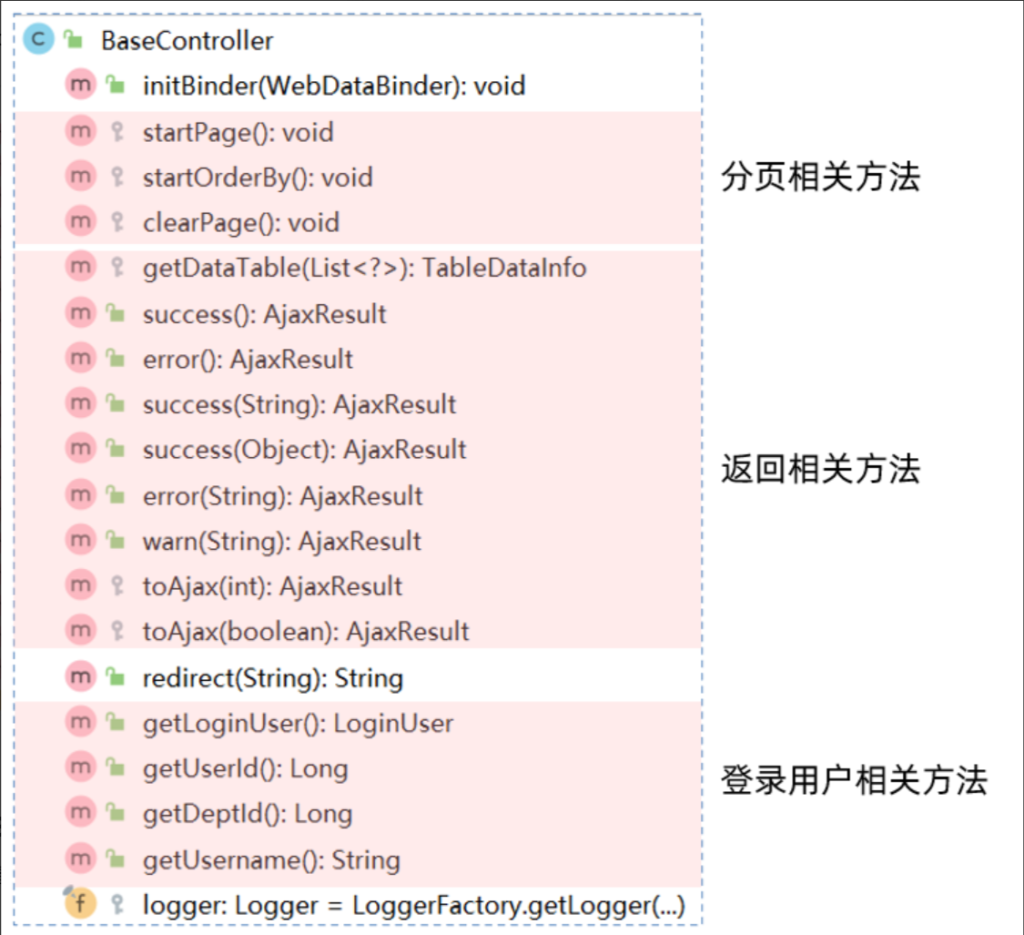
5.2.2 BaseController
Controller继承了BaseController,其中BaseController详细定义如下图:
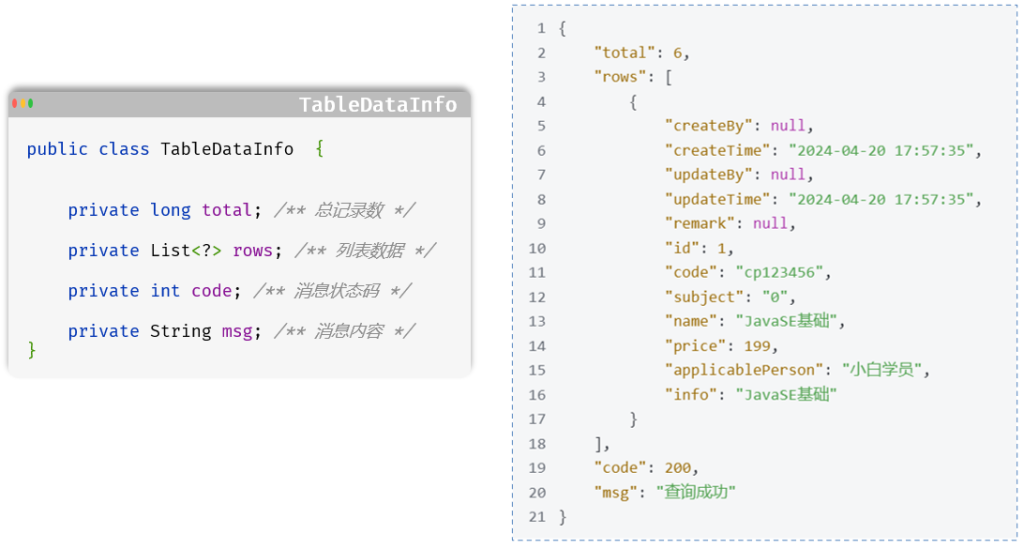
5.2.3 TableDataInfo
分页查询统一返回对象:表格分页数据对象
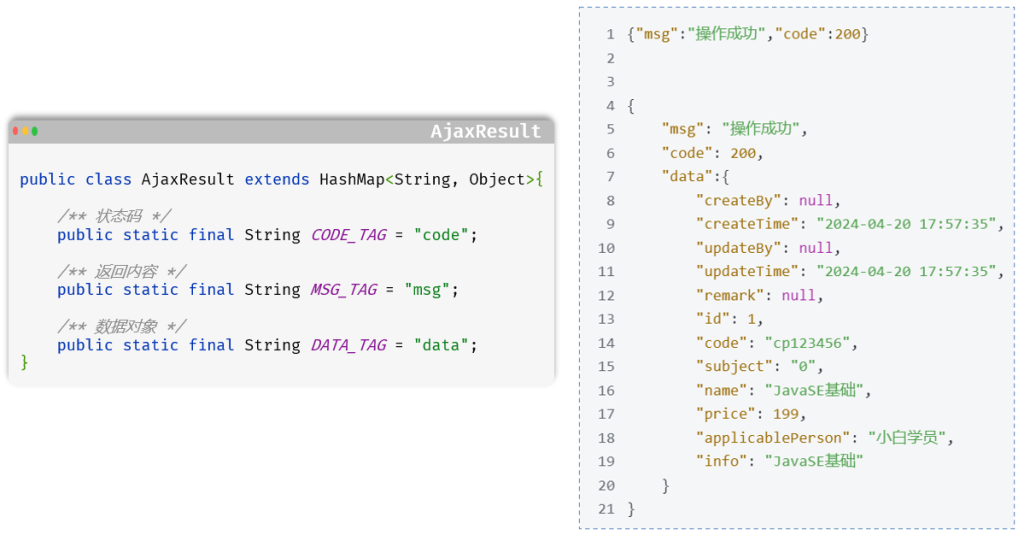
5.2.4 AjaxResult
增删改查统一返回对象:操作消息提醒
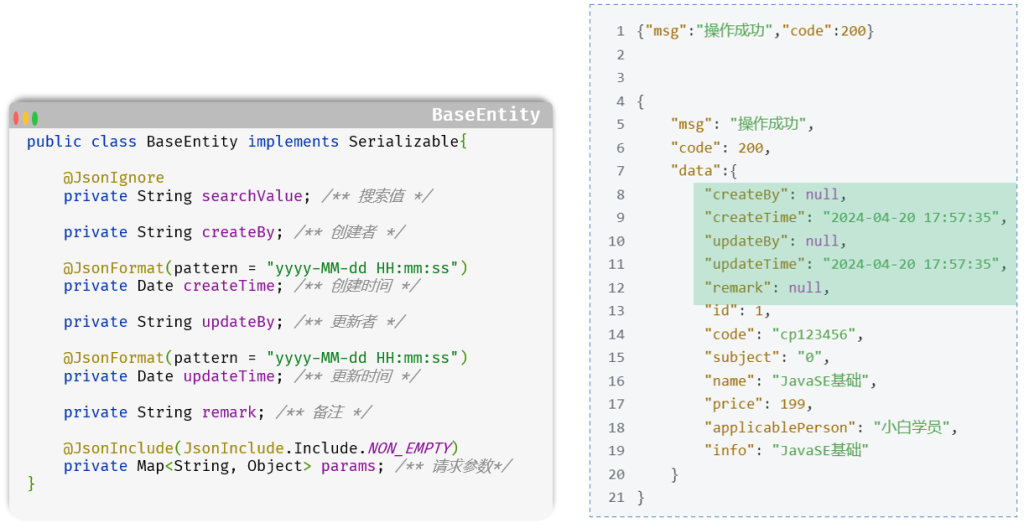
5.2.5 BaseEntity
所有实体类默认继承的BaseEntity基类
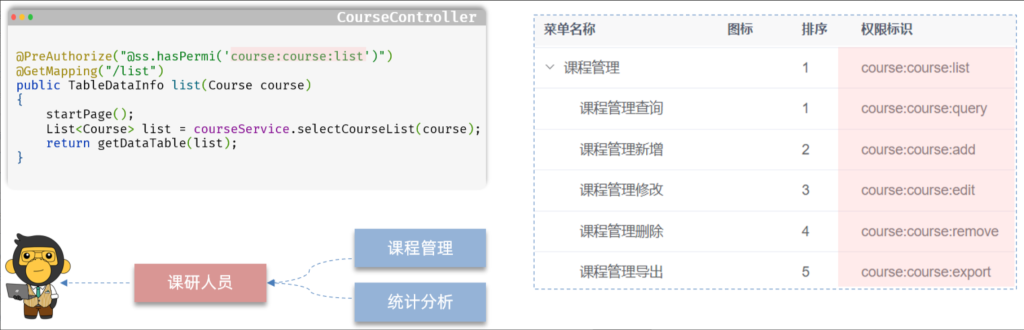
5.2.6 权限注解
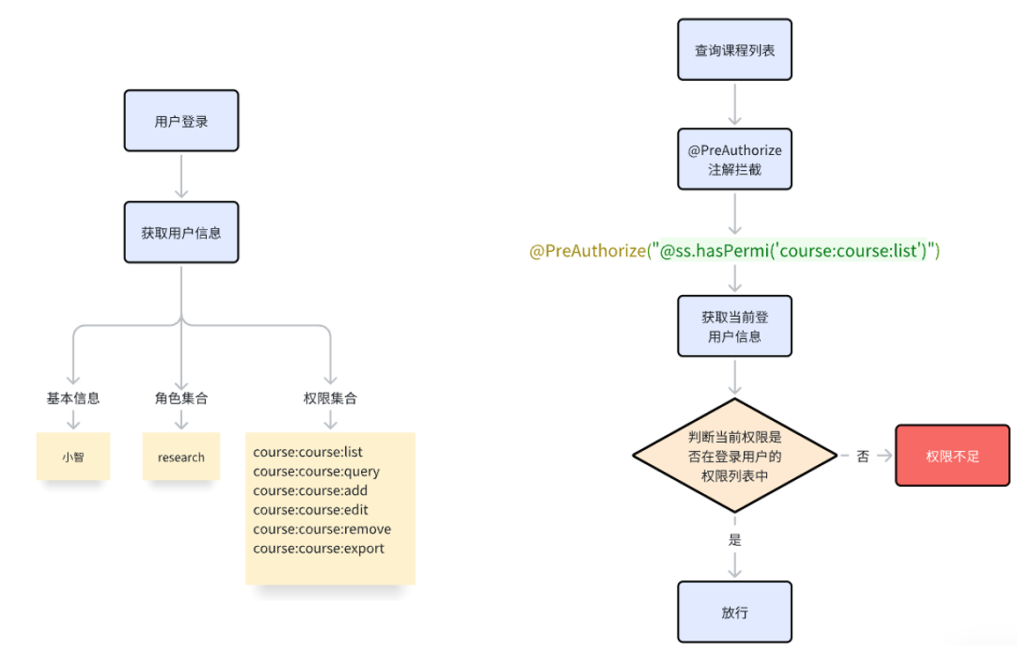
@PreAuthorize 注解是 Spring Security 框架中用来做权限检查的。
它在运行方法前先验证权限,权限够就放行,不够就拦截。
权限控制流程图
5.3 前后端交互流程
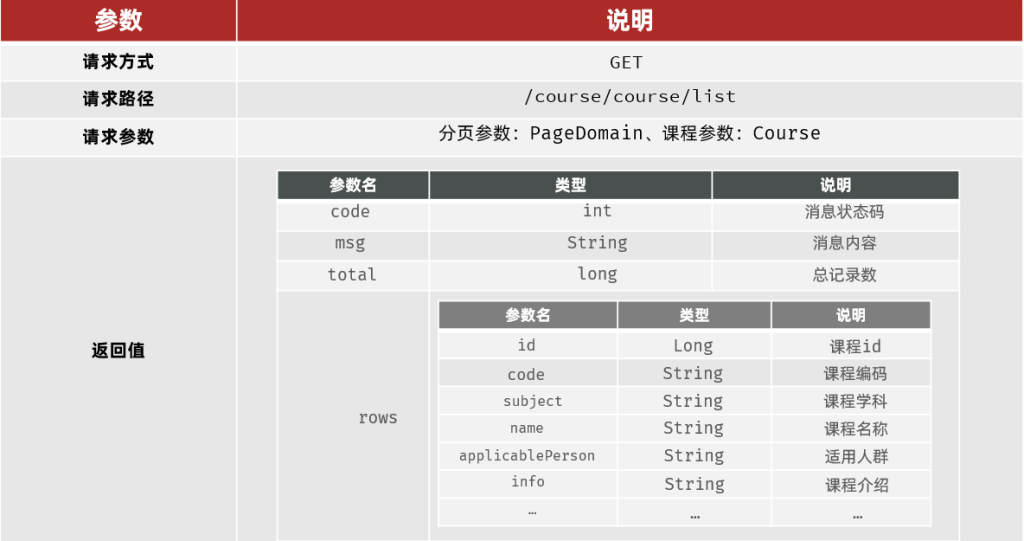
查询课程管理列表
5.3.1 接口文档
5.3.2 跨域
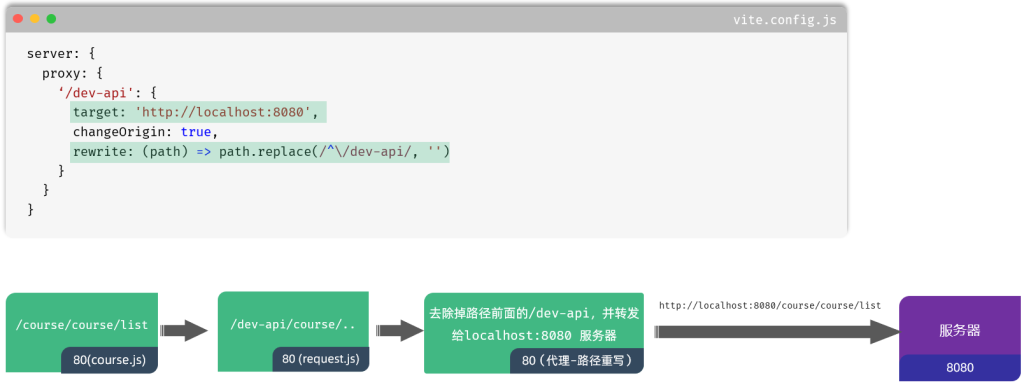
在前端开发中,跨域是一个常见的问题,特别是在使用Vue框架进行开发时。跨域是指在浏览器中发送的AJAX请求的目标地址与当前页面的地址不在同一个域下,这会导致浏览器的同源策略产生限制,从而阻止了跨域请求的发送。然而,我们可以通过代理服务器来解决这个问题。
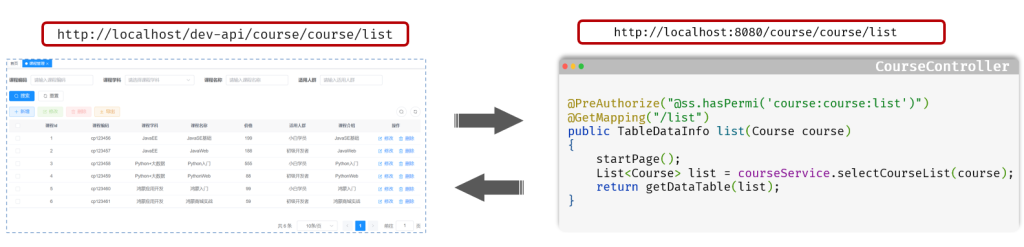
代理服务器是位于客户端和目标服务器之间的一台服务器,它接收客户端发送的请求,并将请求转发给目标服务器。通过在代理服务器上进行请求转发,可以绕过浏览器的同源策略限制,从而实现跨域请求。
在vue.config.js文件中添加以下内容:
6.二次开发
6.1 模块定制
6.1.1 若依框架修改器
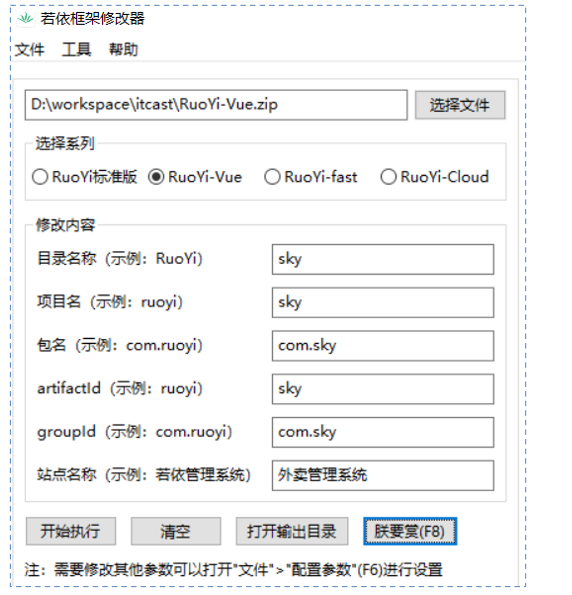
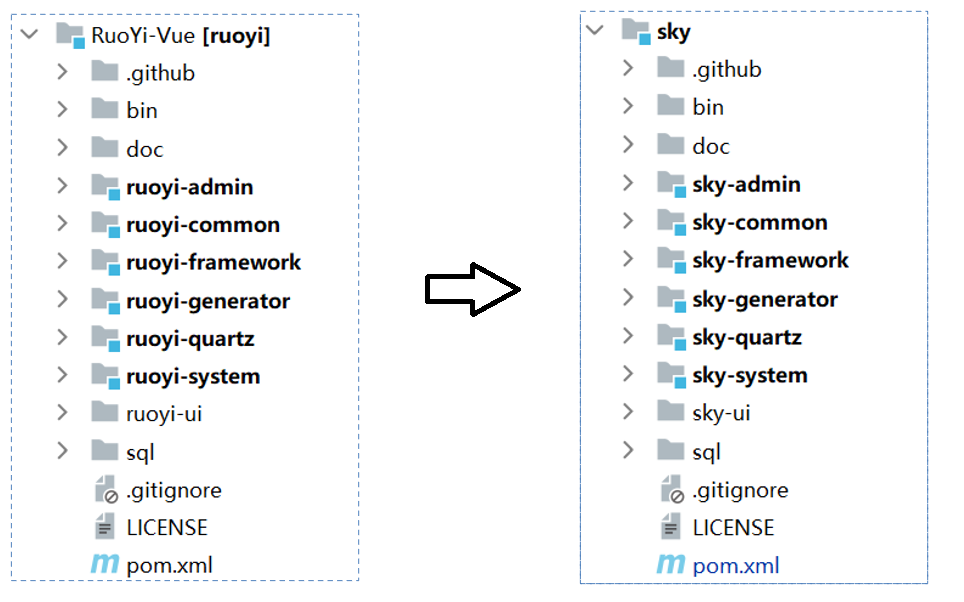
若依框架修改器是一个可以一键修改RuoYi框架包名、项目名等的工具。
地址:https://gitee.com/lpf_project/RuoYi-MT/releases
6.1.2 新建业务模块
新建子模块
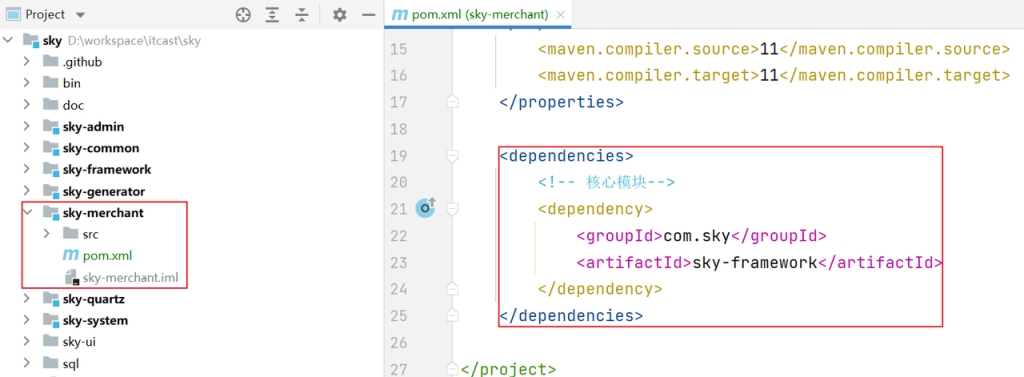
在sky父工程下创建sky-merchant子模块,在pom.xml中导入核心模块依赖
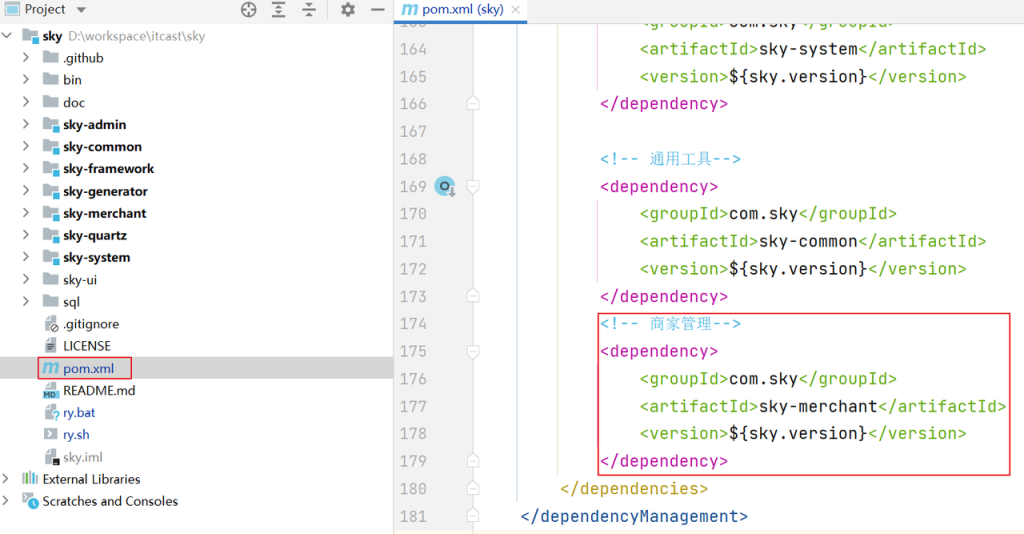
版本锁定
在RuoYi-Vue父工程pom.xml中进行版本锁定
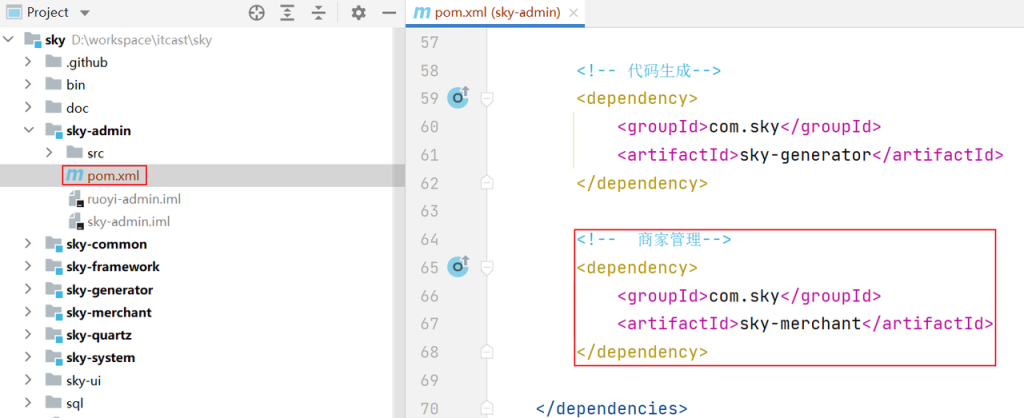
添加模块依赖
在ruoyi-admin模块pom.xml中添加模块依赖
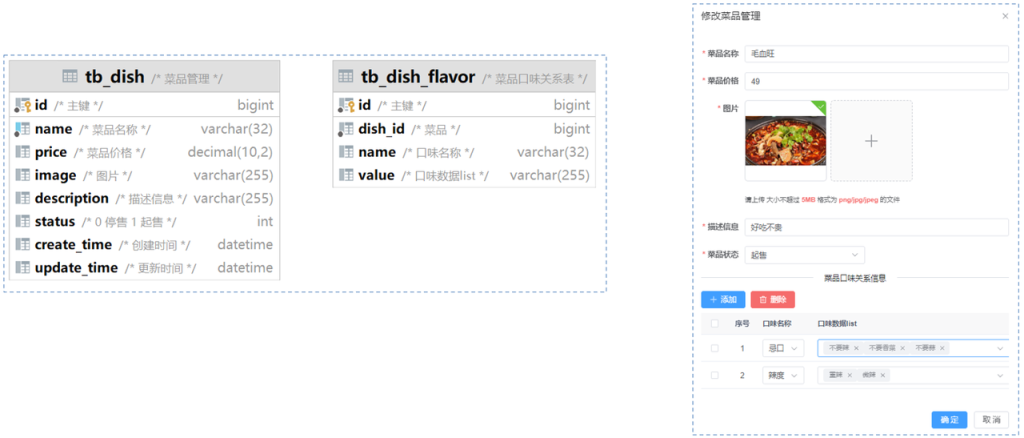
6.2 菜品管理
利用若依代码生成器(主子表模板),生成菜品管理的前后端代码。
6.2.1 代码生成
①准备SQL并导入数据库
②配置代码生成信息
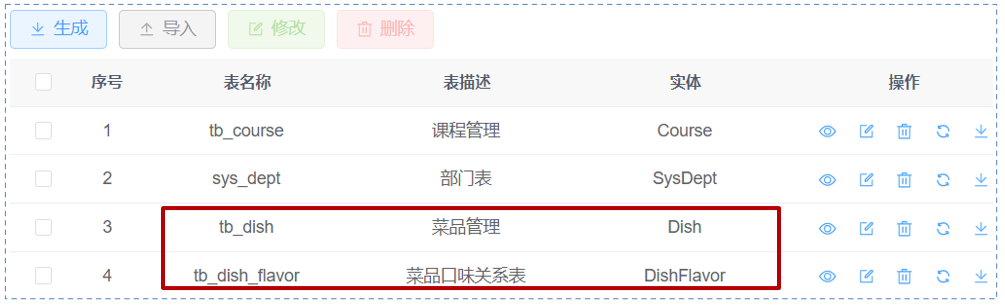
③下载代码并导入项目
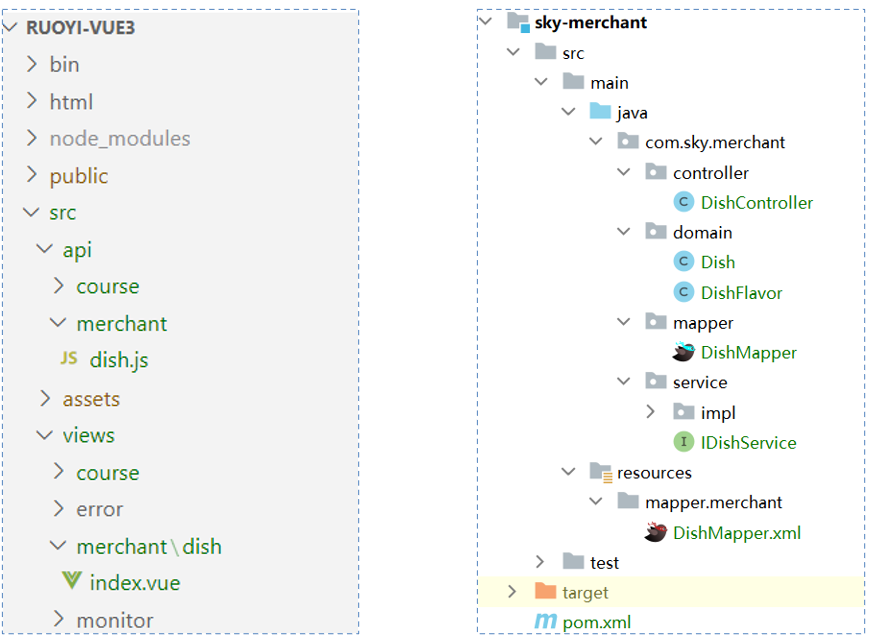
6.2.2 升级改造
页面组件
找到src/views/merchant/dish/index.vue文件,改造菜品查询列表和口味列表,如下:
1
2
3
4
5
6
7
8
9
10
11
12
13
14
15
16
17
18
19
20
21
22
23
24
25
26
27
28
29
30
31
32
33
34
35
36
37
38
39
40
41
42
43
44
45
46
47
48
49
50
51
52
53
54
55
56
57
58
59
60
61
62
63
64
65
66
67
68
69
70
71
72
73
74
75
76
77
78
79
80
81
82
83
84
85
86
87
88
89
90
91
92
93
94
95
96
97
98
99
100
101
102
103
104
105
106
107
108
109
110
111
112
113
114
115
116
117
118
119
120
121
122
123
124
125
126
127
128
129
130
131
132
133
134
135
136
137
138
139
140
141
142
143
144
145
146
147
148
149
150
151
152
153
154
155
156
157
158
159
160
161
162
163
164
165
166
167
168
169
170
171
172
173
174
175
176
177
178
179
180
181
182
183
184
185
186
187
188
189
190
191
192
193
194
195
196
197
198
199
200
201
202
203
204
205
206
207
208
209
210
211
212
213
214
215
216
217
218
219
220
221
222
223
224
225
226
227
228
229
230
231
232
233
234
235
236
237
238
239
240
241
242
243
244
245
246
247
248
249
250
251
252
253
254
255
256
257
258
259
260
261
262
263
264
265
266
267
268
269
270
271
272
273
274
275
276
277
278
279
280
281
282
283
284
285
286
287
288
289
290
291
292
293
294
295
296
297
298
299
300
301
302
303
304
305
306
307
308
309
310
311
312
313
314
315
316
317
318
319
320
321
322
323
324
325
326
327
328
329
330
331
332
333
334
335
336
337
338
339
340
341
342
343
344
345
346
347
348
349
350
351
352
| <template>
<div class="app-container">
<el-form :model="queryParams" ref="queryRef" :inline="true" v-show="showSearch" label-width="68px">
<el-form-item label="菜品名称" prop="name">
<el-input
v-model="queryParams.name"
placeholder="请输入菜品名称"
clearable
@keyup.enter="handleQuery"
/>
</el-form-item>
<el-form-item label="售卖状态" prop="status">
<el-select v-model="queryParams.status" placeholder="请选择售卖状态" clearable>
<el-option
v-for="dict in dish_status"
:key="dict.value"
:label="dict.label"
:value="dict.value"
/>
</el-select>
</el-form-item>
<el-form-item>
<el-button type="primary" icon="Search" @click="handleQuery">搜索</el-button>
<el-button icon="Refresh" @click="resetQuery">重置</el-button>
</el-form-item>
</el-form>
<el-row :gutter="10" class="mb8">
<el-col :span="1.5">
<el-button
type="primary"
plain
icon="Plus"
@click="handleAdd"
v-hasPermi="['merchant:dish:add']"
>新增</el-button>
</el-col>
<el-col :span="1.5">
<el-button
type="success"
plain
icon="Edit"
:disabled="single"
@click="handleUpdate"
v-hasPermi="['merchant:dish:edit']"
>修改</el-button>
</el-col>
<el-col :span="1.5">
<el-button
type="danger"
plain
icon="Delete"
:disabled="multiple"
@click="handleDelete"
v-hasPermi="['merchant:dish:remove']"
>删除</el-button>
</el-col>
<el-col :span="1.5">
<el-button
type="warning"
plain
icon="Download"
@click="handleExport"
v-hasPermi="['merchant:dish:export']"
>导出</el-button>
</el-col>
<right-toolbar v-model:showSearch="showSearch" @queryTable="getList"></right-toolbar>
</el-row>
<el-table v-loading="loading" :data="dishList" @selection-change="handleSelectionChange">
<el-table-column type="selection" width="55" align="center" />
<el-table-column label="菜品名称" align="center" prop="name" />
<el-table-column label="售价" align="center"> <template #default="{ row }"> <span>¥{{ row.price }}</span> </template> </el-table-column>
<el-table-column label="图片" align="center" prop="image" width="100">
<template #default="scope">
<image-preview :src="scope.row.image" :width="50" :height="50"/>
</template>
</el-table-column>
<el-table-column label="售卖状态" align="center" prop="status">
<template #default="scope">
<dict-tag :options="dish_status" :value="scope.row.status"/>
</template>
</el-table-column>
<el-table-column label="更新时间" align="center" prop="updateTime" width="180">
<template #default="scope">
<span>{{ parseTime(scope.row.updateTime, '{y}-{m}-{d} {h}:{i}:{s}') }}</span>
</template>
</el-table-column>
<el-table-column label="操作" align="center" class-name="small-padding fixed-width">
<template #default="scope">
<el-button link type="primary" icon="Edit" @click="handleUpdate(scope.row)" v-hasPermi="['merchant:dish:edit']">修改</el-button>
<el-button link type="primary" icon="Delete" @click="handleDelete(scope.row)" v-hasPermi="['merchant:dish:remove']">删除</el-button>
</template>
</el-table-column>
</el-table>
<pagination
v-show="total>0"
:total="total"
v-model:page="queryParams.pageNum"
v-model:limit="queryParams.pageSize"
@pagination="getList"
/>
<el-dialog :title="title" v-model="open" width="600px" append-to-body>
<el-form ref="dishRef" :model="form" :rules="rules" label-width="80px">
<el-form-item label="菜品名称" prop="name">
<el-input v-model="form.name" placeholder="请输入菜品名称" />
</el-form-item>
<el-form-item label="售价" prop="price">
<el-input v-model="form.price" placeholder="请输入售价" />
</el-form-item>
<el-form-item label="图片" prop="image">
<image-upload v-model="form.image"/>
</el-form-item>
<el-form-item label="描述信息" prop="description">
<el-input v-model="form.description" placeholder="请输入描述信息" />
</el-form-item>
<el-form-item label="售卖状态" prop="status">
<el-select v-model="form.status" placeholder="请选择售卖状态">
<el-option
v-for="dict in dish_status"
:key="dict.value"
:label="dict.label"
:value="parseInt(dict.value)"
></el-option>
</el-select>
</el-form-item>
<el-divider content-position="center">菜品口味关系信息</el-divider>
<el-row :gutter="10" class="mb8">
<el-col :span="1.5">
<el-button type="primary" icon="Plus" @click="handleAddDishFlavor">添加</el-button>
</el-col>
<el-col :span="1.5">
<el-button type="danger" icon="Delete" @click="handleDeleteDishFlavor">删除</el-button>
</el-col>
</el-row>
<el-table :data="dishFlavorList" :row-class-name="rowDishFlavorIndex" @selection-change="handleDishFlavorSelectionChange" ref="dishFlavor">
<el-table-column type="selection" width="50" align="center" />
<el-table-column label="序号" align="center" prop="index" width="50"/>
<el-table-column label="口味名称" prop="name" width="150"> <template #default="scope"> <el-select v-model="scope.row.name" placeholder="请选择口味名称" @change="changeFlavorName(scope.row)" > <el-option v-for="dishFlavor in dishFlavorListSelect" :key="dishFlavor.name" :label="dishFlavor.name" :value="dishFlavor.name" /> </el-select> </template> </el-table-column> <el-table-column label="口味列表" prop="value" width="350"> <template #default="scope"> <el-select v-model="scope.row.value" placeholder="请选择口味列表" multiple @focus="focusFlavorName(scope.row)" style="width: 90%;"> <el-option v-for="value in checkValueList" :key="value" :label="value" :value="value" /> </el-select> </template> </el-table-column>
</el-table>
</el-form>
<template #footer>
<div class="dialog-footer">
<el-button type="primary" @click="submitForm">确 定</el-button>
<el-button @click="cancel">取 消</el-button>
</div>
</template>
</el-dialog>
</div>
</template>
<script setup name="Dish">
import { listDish, getDish, delDish, addDish, updateDish } from "@/api/merchant/dish";
import { ref } from "vue";
const { proxy } = getCurrentInstance();
const { dish_status } = proxy.useDict('dish_status');
const dishList = ref([]);
const dishFlavorList = ref([]);
const open = ref(false);
const loading = ref(true);
const showSearch = ref(true);
const ids = ref([]);
const checkedDishFlavor = ref([]);
const single = ref(true);
const multiple = ref(true);
const total = ref(0);
const title = ref("");
const data = reactive({
form: {},
queryParams: {
pageNum: 1,
pageSize: 10,
name: null,
status: null,
},
rules: {
name: [
{ required: true, message: "菜品名称不能为空", trigger: "blur" }
],
price: [
{ required: true, message: "售价不能为空", trigger: "blur" }
],
image: [
{ required: true, message: "图片不能为空", trigger: "blur" }
],
status: [
{ required: true, message: "售卖状态不能为空", trigger: "change" }
],
}
});
const { queryParams, form, rules } = toRefs(data);
function getList() {
loading.value = true;
listDish(queryParams.value).then(response => {
dishList.value = response.rows;
total.value = response.total;
loading.value = false;
});
}
function cancel() {
open.value = false;
reset();
}
function reset() {
form.value = {
id: null,
name: null,
price: null,
image: null,
description: null,
status: null,
createTime: null,
updateTime: null
};
dishFlavorList.value = [];
proxy.resetForm("dishRef");
}
function handleQuery() {
queryParams.value.pageNum = 1;
getList();
}
function resetQuery() {
proxy.resetForm("queryRef");
handleQuery();
}
function handleSelectionChange(selection) {
ids.value = selection.map(item => item.id);
single.value = selection.length != 1;
multiple.value = !selection.length;
}
function handleAdd() {
reset();
open.value = true;
title.value = "添加菜品管理";
}
function handleUpdate(row) {
reset();
const _id = row.id || ids.value
getDish(_id).then(response => {
form.value = response.data;
dishFlavorList.value = response.data.dishFlavorList;
}
open.value = true;
title.value = "修改菜品管理";
});
}
function submitForm() {
proxy.$refs["dishRef"].validate(valid => {
if (valid) {
form.value.dishFlavorList = dishFlavorList.value;
}
if (form.value.id != null) {
updateDish(form.value).then(response => {
proxy.$modal.msgSuccess("修改成功");
open.value = false;
getList();
});
} else {
addDish(form.value).then(response => {
proxy.$modal.msgSuccess("新增成功");
open.value = false;
getList();
});
}
}
});
}
function handleDelete(row) {
const _ids = row.id || ids.value;
proxy.$modal.confirm('是否确认删除菜品管理编号为"' + _ids + '"的数据项?').then(function() {
return delDish(_ids);
}).then(() => {
getList();
proxy.$modal.msgSuccess("删除成功");
}).catch(() => {});
}
function rowDishFlavorIndex({ row, rowIndex }) {
row.index = rowIndex + 1;
}
function handleAddDishFlavor() {
let obj = {};
obj.name = "";
obj.value = "";
dishFlavorList.value.push(obj);
}
function handleDeleteDishFlavor() {
if (checkedDishFlavor.value.length == 0) {
proxy.$modal.msgError("请先选择要删除的菜品口味关系数据");
} else {
const dishFlavors = dishFlavorList.value;
const checkedDishFlavors = checkedDishFlavor.value;
dishFlavorList.value = dishFlavors.filter(function(item) {
return checkedDishFlavors.indexOf(item.index) == -1
});
}
}
function handleDishFlavorSelectionChange(selection) {
checkedDishFlavor.value = selection.map(item => item.index)
}
function handleExport() {
proxy.download('merchant/dish/export', {
...queryParams.value
}, `dish_${new Date().getTime()}.xlsx`)
}
getList();
</script>
|
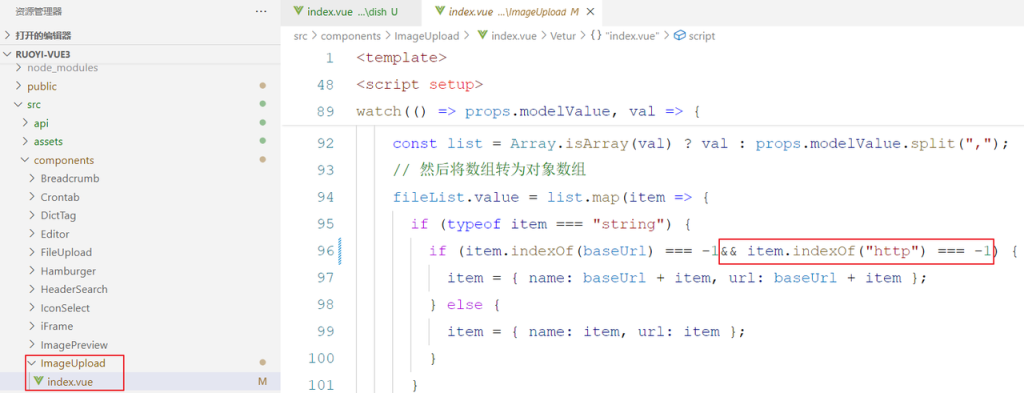
图片上传组件
由于之前的图片访问是本地的路径和服务,需要发起请求才能获取图片,现在我们使用了OSS,图片可直接访问,无需再次访问后端服务,所以前端的图片访问逻辑我们需要修改
- 修改文件位置:src/components/imageUpload/index.vue
- 如果图片路径是以http开头的,则不走后台服务访问,直接访问OSS,之前的不变,如下图
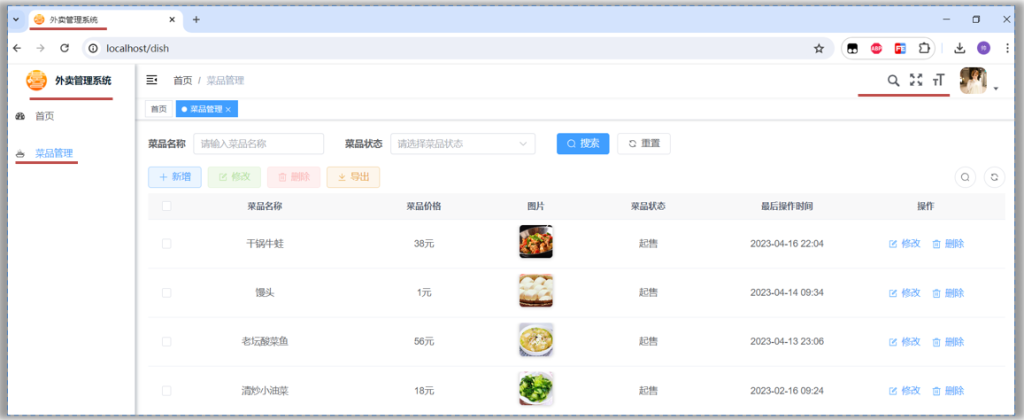
6.3 页面调整
如果使用若依框架项目做为脚手架,那么我们肯定需要在页面显示中,符合自己公司或者项目的标识才行,需要更换的地方很多,我们依次来解决它
- 浏览器标签页logo标识、标题
- 系统页面中的logo标识、标题
- 去除源码地址 & 文档地址
- 主题风格和菜单图标
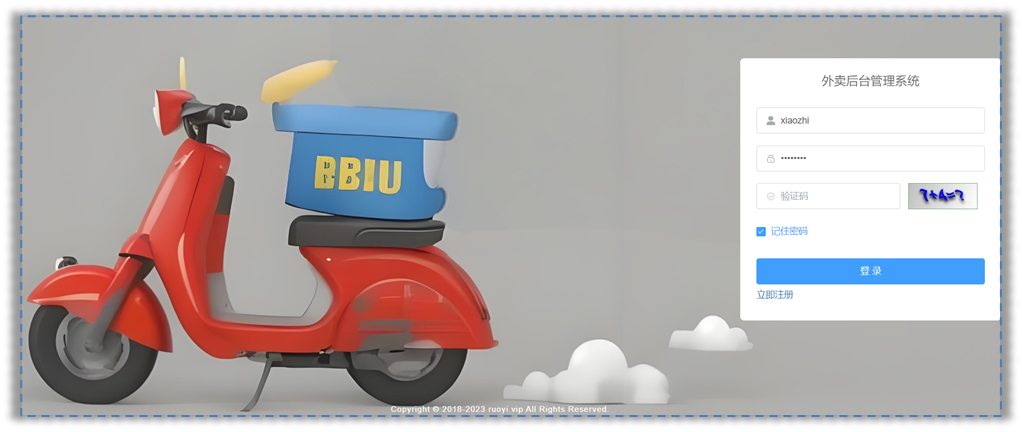
- 登录名称及背景图
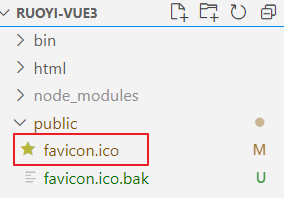
6.3.1 浏览器标签页icon、标题
找到资料中的logo图标,替换前端项目中的public文件夹,删除原有的favicon.ico,把新拷贝过来的logo更名为favicon.ico即可
找到根目录下的index.html文件,把title更换为自己想要的内容即可
6.3.2 系统页面中的logo、标题
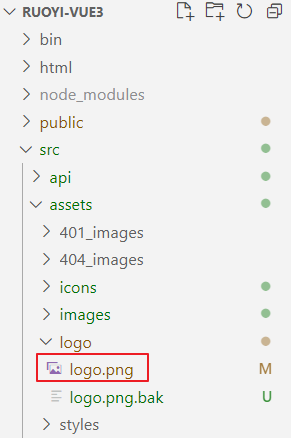
找到资料中的logo文件,替换 src/assets/logo/logo.png文件
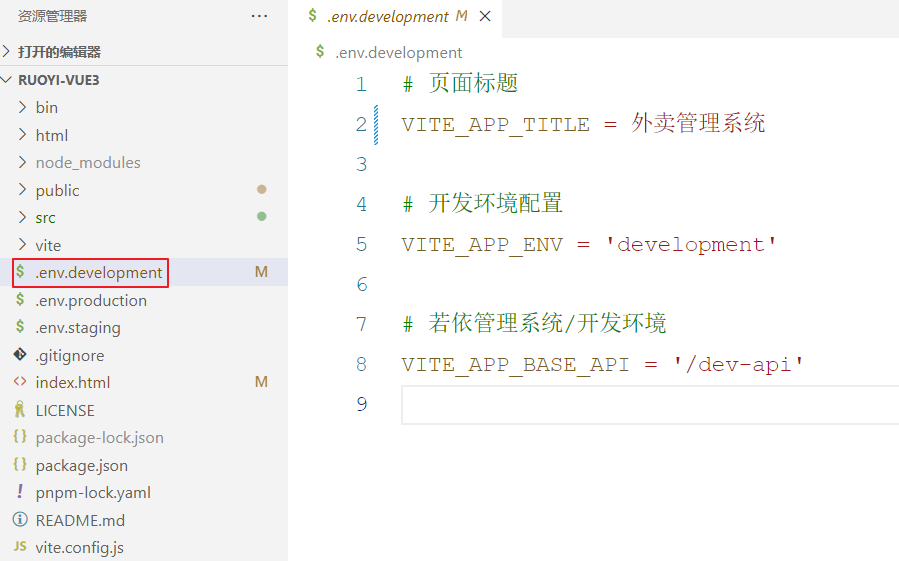
若依的系统页面标题引用的是开发环境的配置,我们只需要修改开发的环境的VITE_APP_TITLE属性即可
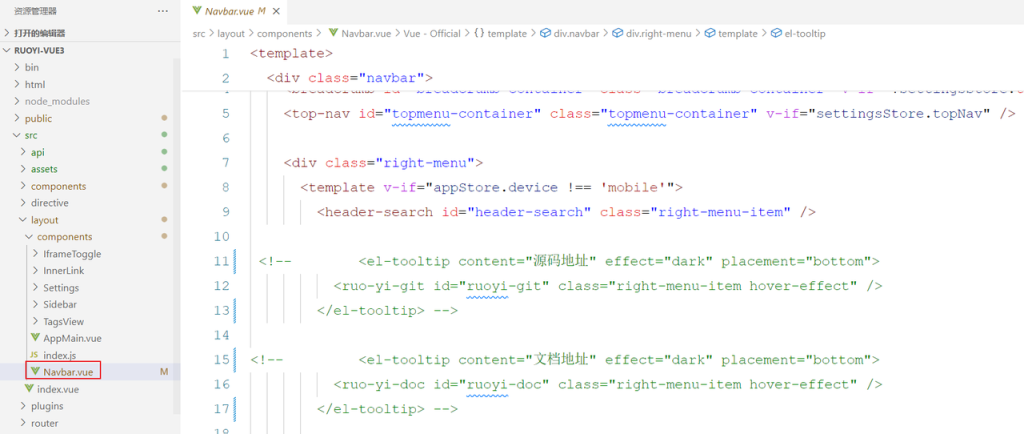
6.3.3 去除源码 & 文档
6.3.4 主题和自定义图标
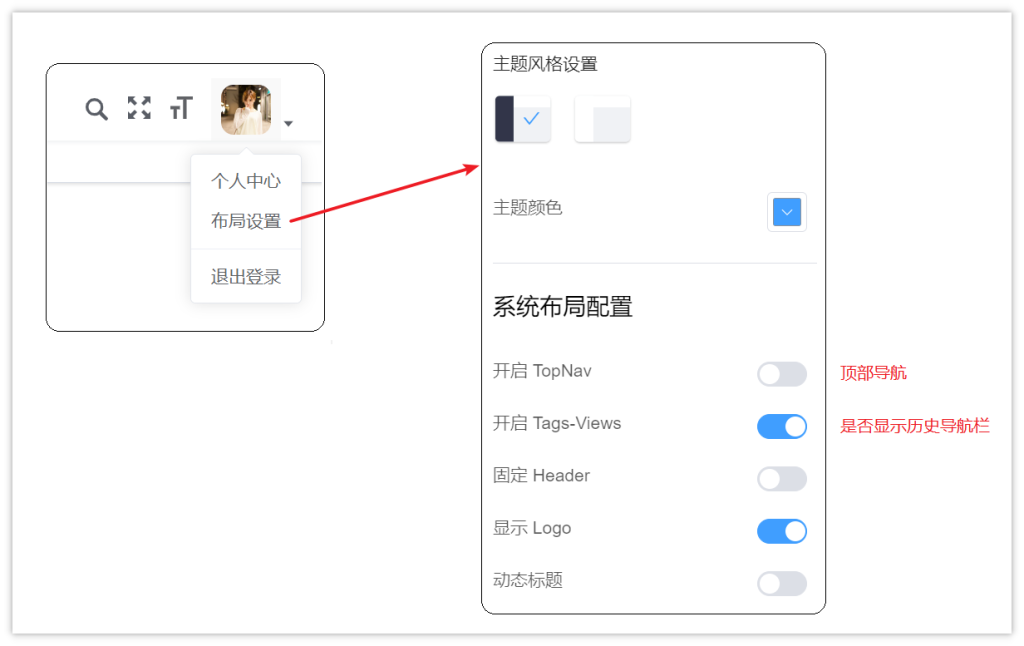
在目前的前端项目中,已经提供了非常便利的操作方式,可以切换主题的风格
操作:点击右上角的头像,可以找到**布局设置,**如下操作
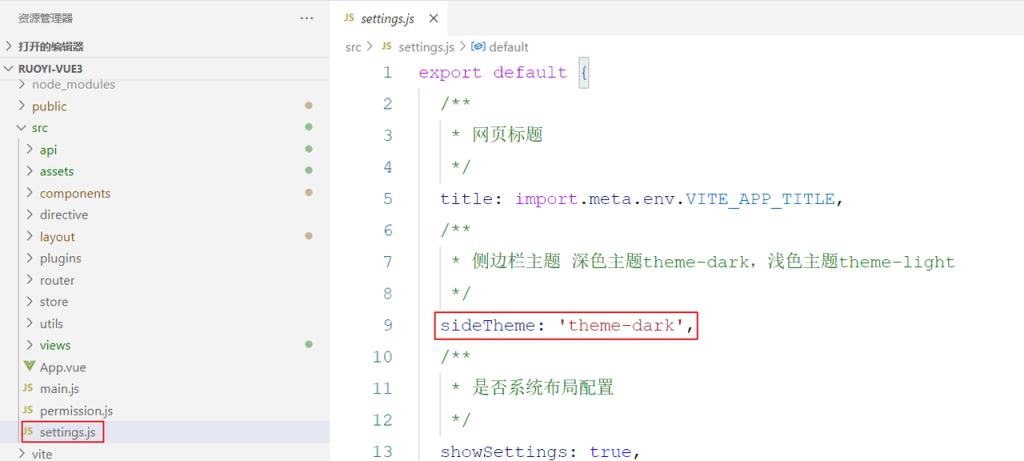
在前端代码中也有对应的操作,更好主题风格文件位置:src/setting.js
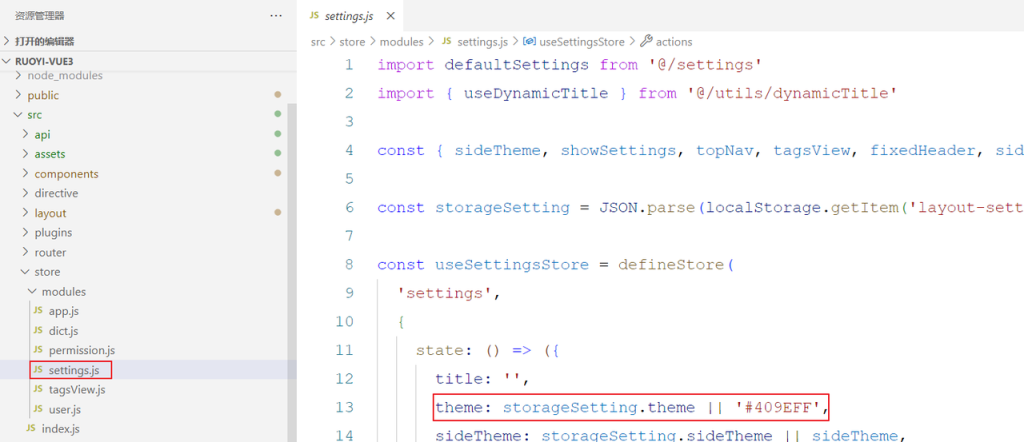
更换主题颜色文件位置:src/store/modules/settings.js
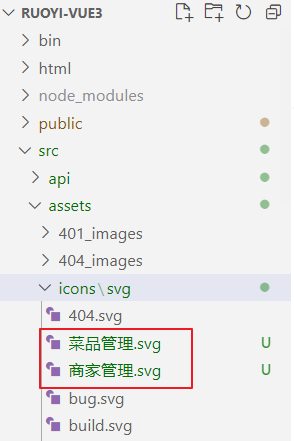
访问阿里巴巴矢量图库,搜索图标:https://www.iconfont.cn/search/index?searchType=icon&q=菜品管理
将下载好的图标复制到src/assets/icons/svg目录下,就可以给指定菜单设置图标了
6.3.5 登录页面中标题、背景图
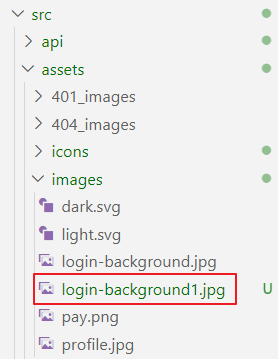
登录名称和背景图,我们可以直接找到登录的组件进行修改即可
组件位置:src/views/login.vue
基础篇完